Introduction
Welcome to the user manual for your new Lenovo IdeaPad Slim 3 15.3-inch laptop, model 83K100G6JP. This document provides essential information to help you set up, operate, maintain, and troubleshoot your device. Please read this manual thoroughly to ensure optimal performance and longevity of your laptop.

Image: Lenovo IdeaPad Slim 3 laptop highlighting its 13th Gen Intel Core i5 processor, 16GB memory, and 512GB storage.
Setup
Initial Power-On and Windows Setup
- Connect Power: Connect the AC adapter to the laptop's power connector and then to a power outlet. Ensure the power cord is for 100V AC in Japan.
- Power On: Press the power button to turn on the laptop.
- Windows 11 Home Setup: Follow the on-screen instructions to complete the initial setup of Windows 11 Home (Japanese version). This includes setting up your region, language, network, and user account.
Operating Your Laptop
Component Overview
Familiarize yourself with the various ports and features of your IdeaPad Slim 3 laptop.

Image: The Lenovo IdeaPad Slim 3 laptop showcasing its slim design and 15.3-inch WUXGA IPS display with a 16:10 aspect ratio for an expansive viewing area.
Ports and Connectors
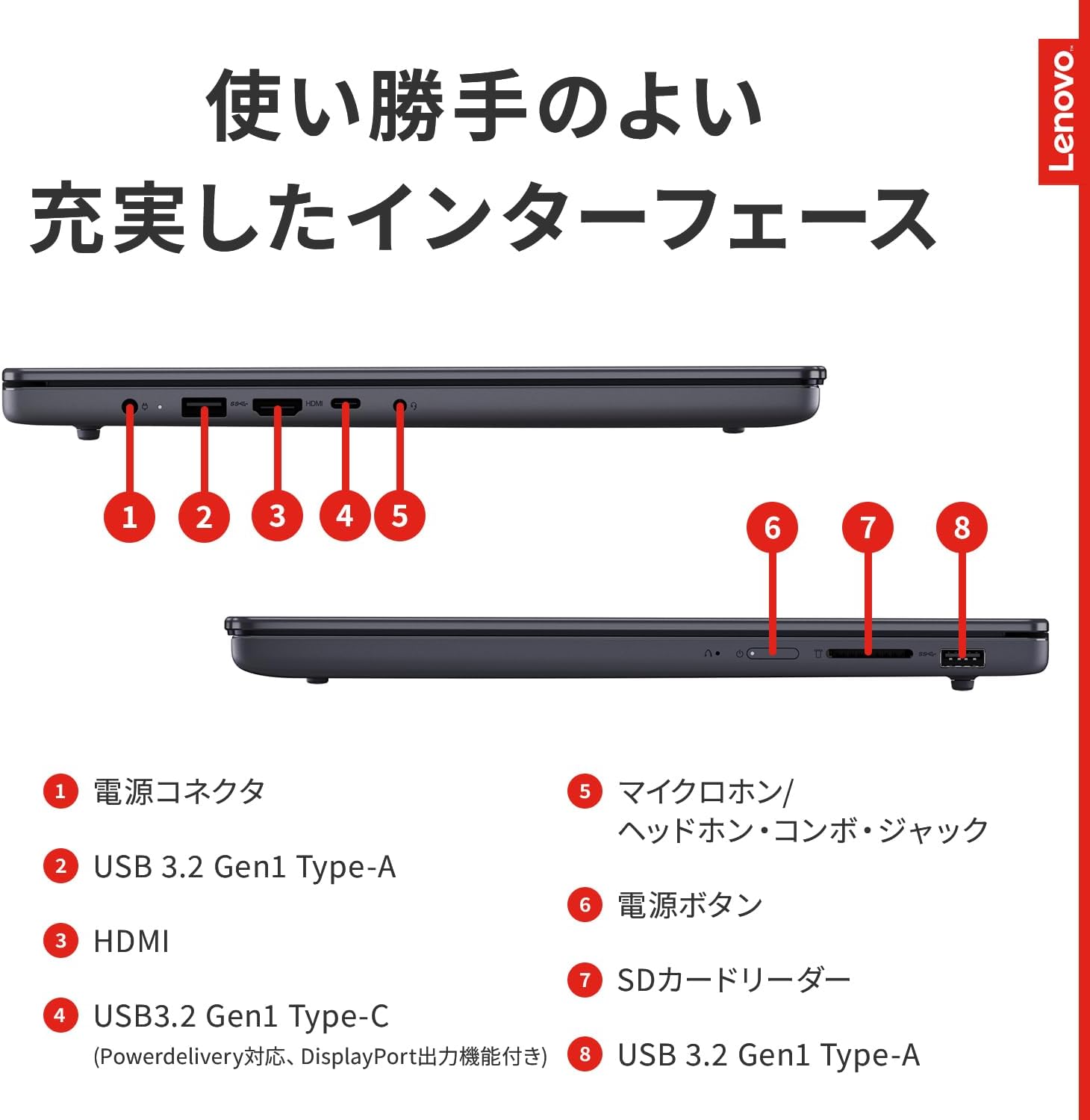
Image: Detailed diagram illustrating the location and type of ports on the Lenovo IdeaPad Slim 3 laptop.
- Power Connector: For connecting the AC adapter.
- USB 3.2 Gen1 Type-A Ports (x2): For connecting USB devices.
- HDMI Port: For connecting external displays.
- USB 3.2 Gen1 Type-C Port (x1): Supports Power Delivery and DisplayPort output.
- Microphone/Headphone Combo Jack: For audio input and output.
- Power Button: To turn the laptop on/off.
- SD Card Reader: Supports SD, SDHC, SDXC, and MMC memory cards.
Note on USB Ports: USB 3.2 Gen1 is equivalent to USB 3.1 Gen1 and USB 3.0. Operation of all connected devices is not guaranteed.
Display and Graphics
Your laptop features a 15.3-inch WUXGA (1920x1200) IPS LCD with LED backlight. The display is non-glossy to reduce reflections. Graphics are handled by integrated Intel® UHD Graphics, sharing memory with the main system RAM.
Note on Display: LCD displays are manufactured using high-precision technology, but some pixels may remain constantly lit or unlit. This is a characteristic of LCD technology and not a defect. When displaying lower resolutions, images may appear smaller or blurry due to scaling. The maximum available video RAM may vary based on system configuration and updates.
Audio and Communication
- Audio: Intel® High Definition Audio with Dolby Audio™ support. Features stereo speakers (2.0W x 2) and a digital array microphone.
- Wireless Connectivity: Supports Wi-Fi 7 (IEEE802.11be/ax/ac/a/b/g/n) and Bluetooth v5.4.
Note on Wireless: An optional access point is required for wireless LAN internet connection. Actual transfer speeds may vary from theoretical maximums. Wi-Fi and Bluetooth performance can be affected by environmental factors and device settings.
Camera and Security
The laptop includes a front-facing HD 720p camera with a privacy shutter for enhanced security.
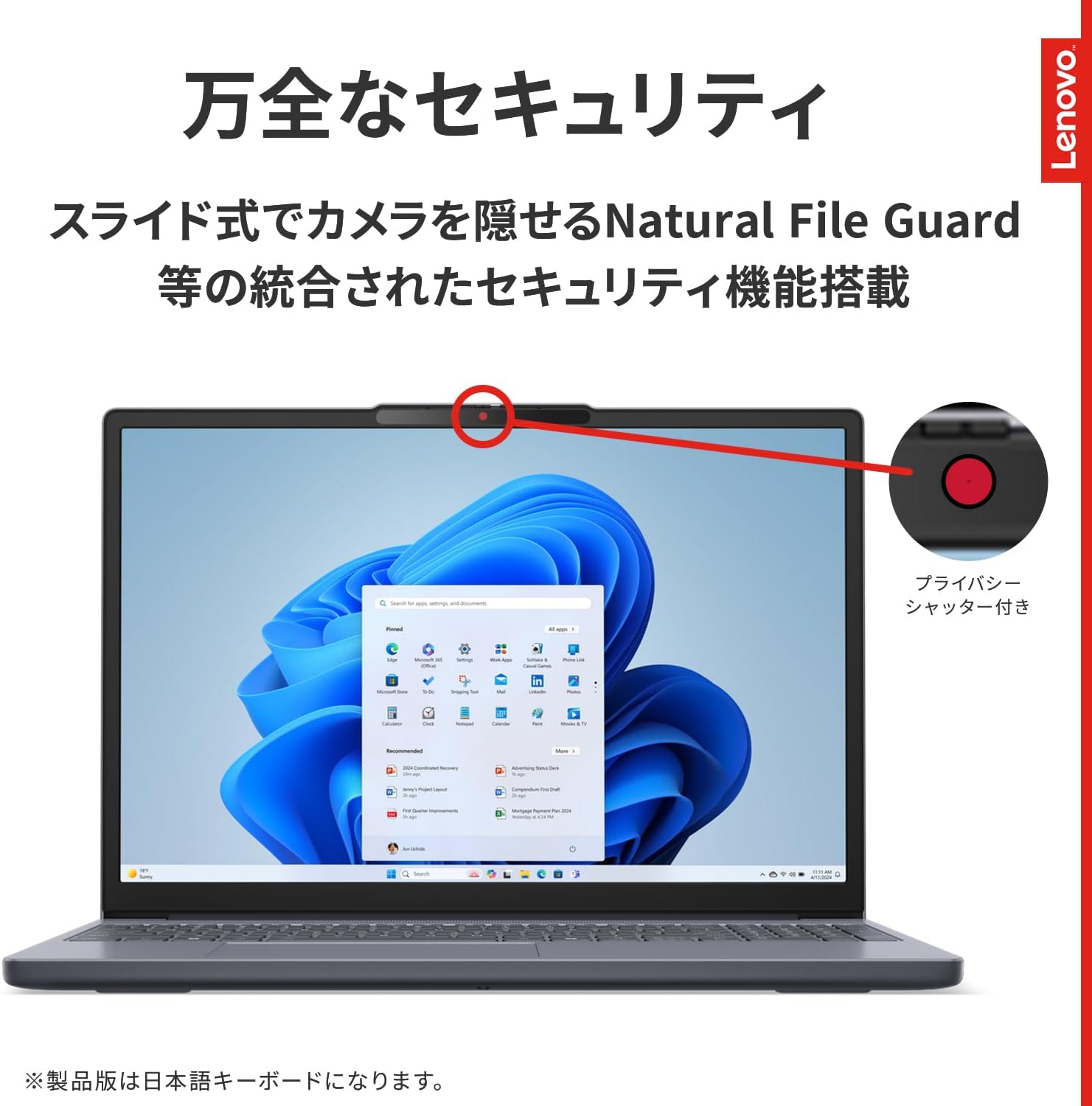
Image: The Lenovo IdeaPad Slim 3 laptop highlighting its integrated camera with a physical privacy shutter for enhanced security.
Keyboard and Touchpad
The laptop features an 84-key JIS layout keyboard, including Fn, Windows, and Copilot keys, along with a multi-touchpad and a numeric keypad.
Maintenance
Battery Care
The laptop is equipped with a fixed 3-cell Lithium-ion Polymer battery. This battery is not user-replaceable. To maximize battery life, avoid extreme temperatures and fully discharging the battery frequently. The battery provides approximately 9.9 hours for video playback and 16.9 hours for idle use, with a charging time of about 3.5 hours when powered off.

Image: The Lenovo IdeaPad Slim 3 laptop emphasizing its 50Whr large capacity battery and Wi-Fi 7 compatibility for high-speed communication.
Cleaning Your Laptop
- Screen: Use a soft, lint-free cloth lightly dampened with water or a screen cleaner. Do not spray liquid directly onto the screen.
- Chassis and Keyboard: Use a soft, dry cloth. For stubborn dirt, a slightly damp cloth can be used, followed by a dry cloth. Avoid harsh chemicals or abrasive materials.
Troubleshooting
Common Issues and Solutions
- Laptop does not power on: Ensure the AC adapter is securely connected to both the laptop and a working power outlet. Check if the power button is functioning correctly.
- No display or blank screen: Connect an external monitor to the HDMI port to check if the issue is with the laptop's display. Try restarting the laptop.
- Slow performance: Close unnecessary applications. Check for sufficient free storage space on the SSD. Ensure Windows is up to date.
- Wi-Fi or Bluetooth connectivity issues: Ensure Wi-Fi/Bluetooth is enabled in Windows settings. Restart your router/access point. Check for updated drivers.
- Pixel defects on screen: As noted in the specifications, LCD displays may have a small number of constantly lit or unlit pixels. This is a manufacturing characteristic and not typically considered a defect unless it exceeds specific criteria.
- External USB devices not recognized: Ensure the device is properly connected. Try a different USB port. Update USB drivers if necessary.
If you encounter persistent issues not covered here, please refer to the support section for further assistance.
Specifications
| Feature | Detail |
|---|---|
| Product Series | Lenovo IdeaPad Slim 3 |
| Model Number | 83K100G6JP |
| Operating System | Windows 11 Home 64bit (Japanese) |
| Processor | Intel® Core™ i5-13420H (2.10GHz, up to 4.60GHz with Turbo Boost, 8 Cores) |
| Memory | 16GB DDR5-4800 SDRAM SODIMM (1 slot, non-upgradable) |
| Storage | 512GB PCIe NVMe/M.2 SSD |
| Optical Drive | None |
| Display | 15.3-inch WUXGA (1920x1200) IPS LCD, LED backlight, Non-glossy, 16:10 aspect ratio |
| Graphics | Intel® UHD Graphics (Integrated, shared with main memory) |
| USB Ports | 1x Type-C USB 3.2 Gen1 (Power Delivery, DisplayPort output), 2x Type-A USB 3.2 Gen1 |
| Video Output | 1x HDMI |
| Audio Ports | 1x Microphone/Headphone Combo Jack |
| Ethernet | None |
| Wireless | Wi-Fi 7 (IEEE802.11be/ax/ac/a/b/g/n) |
| Bluetooth | Bluetooth v5.4 |
| Audio Features | Intel® High Definition Audio (Dolby Audio™), Stereo speakers (2.0W x 2), Digital array microphone |
| Camera | HD 720p with privacy shutter |
| Memory Card Slot | 4-in-1 media card reader (SD, SDHC, SDXC, MMC) |
| Keyboard | 84 keys (JIS layout), Multi-touchpad, Numeric keypad |
| Color | Luna Gray |
| Dimensions (WxDxH) | Approx. 343.4 x 239.5 x 17.9 mm |
| Weight | Approx. 1.59 kg |
| Battery Type | Fixed 3-cell Lithium-ion Polymer battery |
| Battery Life (JEITA2.0) | Approx. 9.9 hours (video playback), Approx. 16.9 hours (idle) |
| Battery Charging Time | Approx. 3.5 hours (power off) |
| AC Adapter Input | AC 100-240V (50/60Hz) |
| AC Adapter Weight | Main unit: Approx. 209.57g, Cord: Approx. 100g |
| Max Power Consumption | 65W |
| Microsoft Office | None (Microsoft 365 Basic 1-year free offer available with activation) |
| Included Accessories | AC adapter, Power cord |
Warranty and Support
Warranty Information
- Warranty Period: 1 year for the main unit.
- Battery Pack Warranty: 1 year, regardless of the main unit's warranty period.
- Proof of Purchase: A warranty card is not included. Please retain your proof of purchase (receipt or delivery note) as it may be required for warranty service.
- Domestic Repair: Pickup repair service is available.
- International Repair: Not supported under the standard warranty. For International Warranty Service (IWS), please refer to www.lenovo.com/jp/iws/ for details on service provision countries.
Support Options
Lenovo offers comprehensive support for your product. Available support options may include:

High-quality phone support

Speedy repair support

Pickup and delivery repair system

Long-cultivated repair know-how
For specific contact information and service details, please visit the official Lenovo support website or refer to the documentation included with your product.


