
1. Introduction
Thank you for choosing the DEKOPRO 400W Electric Jigsaw. This manual provides essential information for the safe and efficient operation, setup, and maintenance of your tool. Please read it thoroughly before use and keep it for future reference.
1.1 Package Contents
- 1 x DEKOPRO 400W Electric Jigsaw
- 4 x Wood Cutting Blades
- 2 x Metal Cutting Blades
- 2 x Plastic Cutting Blades
- 1 x Hex Key
- 1 x User Manual

Image 1.1: The DEKOPRO 400W Electric Jigsaw and its accompanying blade set.

Image 1.2: Overview of the DEKOPRO Electric Corded Jigsaw, emphasizing its 400W motor, 0-3000 RPM speed range, and overload protection feature.
2. Safety Instructions
Always follow basic safety precautions when using electric tools to reduce the risk of fire, electric shock, and personal injury.
2.1 General Power Tool Safety
- Work Area Safety: Keep your work area clean and well-lit. Cluttered or dark areas invite accidents. Do not operate power tools in explosive atmospheres, such as in the presence of flammable liquids, gases, or dust.
- Electrical Safety: Power tool plugs must match the outlet. Never modify the plug in any way. Do not abuse the cord. Never use the cord for carrying, pulling, or unplugging the power tool. Keep cord away from heat, oil, sharp edges, or moving parts.
- Personal Safety: Always wear eye protection. Use hearing protection when operating for extended periods. Dress properly; avoid loose clothing or jewelry. Secure long hair.
- Tool Use and Care: Do not force the power tool. Use the correct power tool for your application. Disconnect the plug from the power source before making any adjustments, changing accessories, or storing power tools.
3. Components Overview
Familiarize yourself with the parts of your DEKOPRO 400W Jigsaw for safe and effective operation.

Image 3.1: Labeled components of the DEKOPRO 400W Jigsaw, including the Variable Speed Dial, Blade Change Lever, Lock-on Button, Variable Speed Trigger Switch, and Diecast Base.
- Variable Speed Dial: Adjusts the cutting speed.
- Blade Change Lever: Facilitates tool-free blade changes.
- Lock-on Button: Engages continuous operation, reducing user fatigue.
- Variable Speed Trigger Switch: Activates the tool and controls speed based on pressure.
- Diecast Base: Provides stability and support during cutting.
4. Setup
4.1 Blade Installation and Removal
The DEKOPRO Jigsaw features a tool-free blade change system for quick and easy blade replacement.
- Ensure the jigsaw is unplugged from the power source.
- Locate the blade change lever (refer to Image 3.1).
- Rotate the blade chuck counterclockwise to open it.
- Insert the desired blade into the chuck, ensuring it is fully seated.
- Release the chuck to its original position to secure the blade.
- To remove a blade, repeat steps 3 and 4 in reverse.

Image 4.1: The quick chuck system allows for rapid and secure blade changes without additional tools.

Image 4.2: Visual steps for installing and removing jigsaw blades using the quick chuck mechanism.

Image 4.3: The included set of jigsaw blades for various materials, designed for tool-free changes.
4.2 Base Plate Adjustment for Bevel Cutting
The robust metal base plate can be adjusted for precise bevel cuts up to ±45°.
- Ensure the jigsaw is unplugged.
- Loosen the screws that secure the base plate to the main body of the jigsaw using the included hex key.
- Adjust the base plate to the desired angle (0°, 15°, 30°, or 45°).
- Tighten the screws firmly to secure the base plate in position before operation.
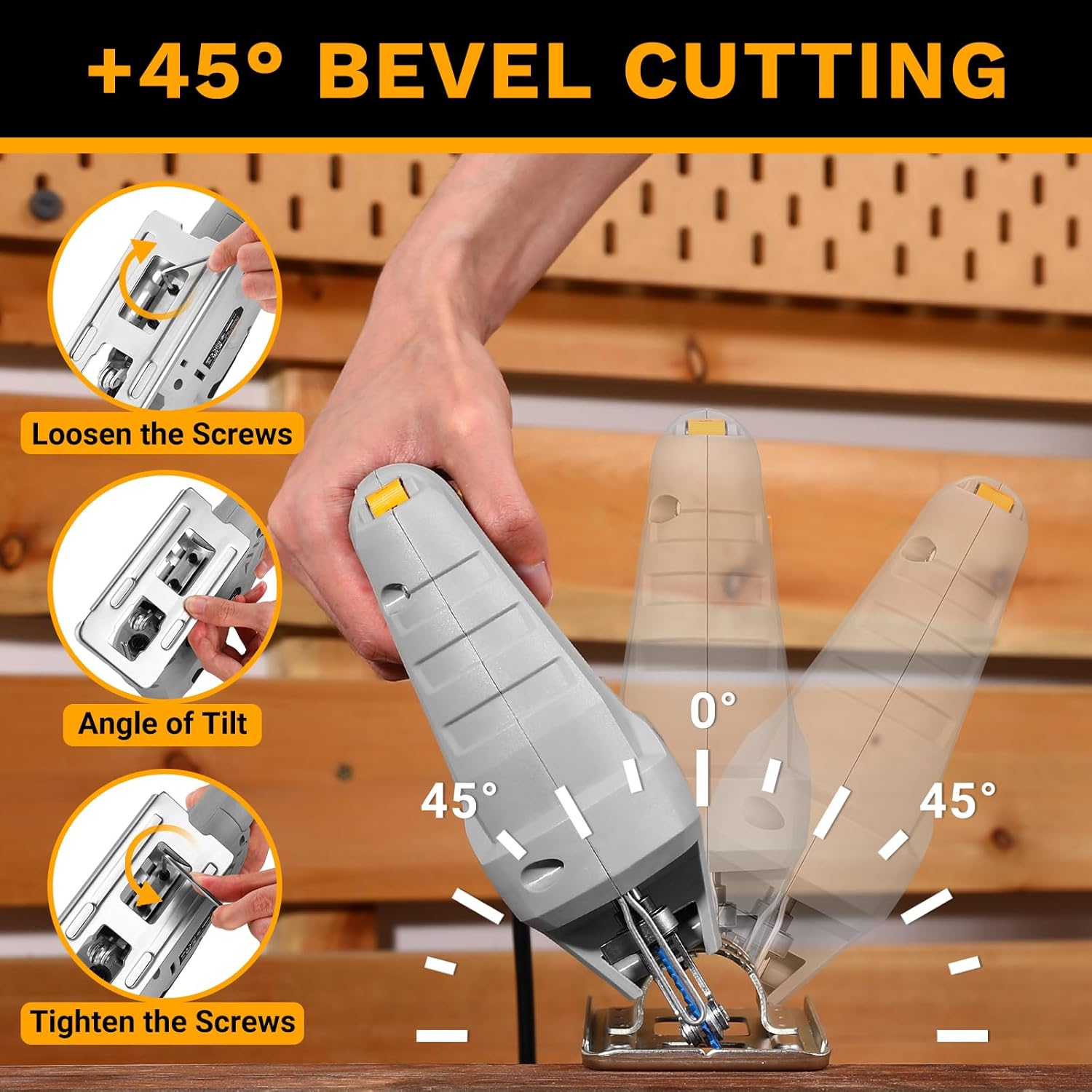
Image 4.4: Steps for adjusting the base plate to achieve bevel cuts, showing angles from 0° to 45°.

Image 4.5: The jigsaw demonstrating a 45° bevel cut, highlighting its versatility for angled cuts.
5. Operation
5.1 Powering On/Off and Lock-on Function
- To start the jigsaw, press the variable speed trigger switch.
- For continuous operation, press the lock-on button while the trigger is depressed. This reduces hand fatigue during prolonged use.
- To stop the tool from continuous operation, press the trigger switch again.

Image 5.1: The lock-on switch for continuous operation, located on the handle.
5.2 Variable Speed Control
The jigsaw features a variable speed dial (0-3000 SPM) to match the cutting speed to the material and blade type.
- Rotate the speed dial to select the appropriate speed setting.
- Lower speeds are generally suitable for harder materials like metal, while higher speeds are for softer materials like wood.
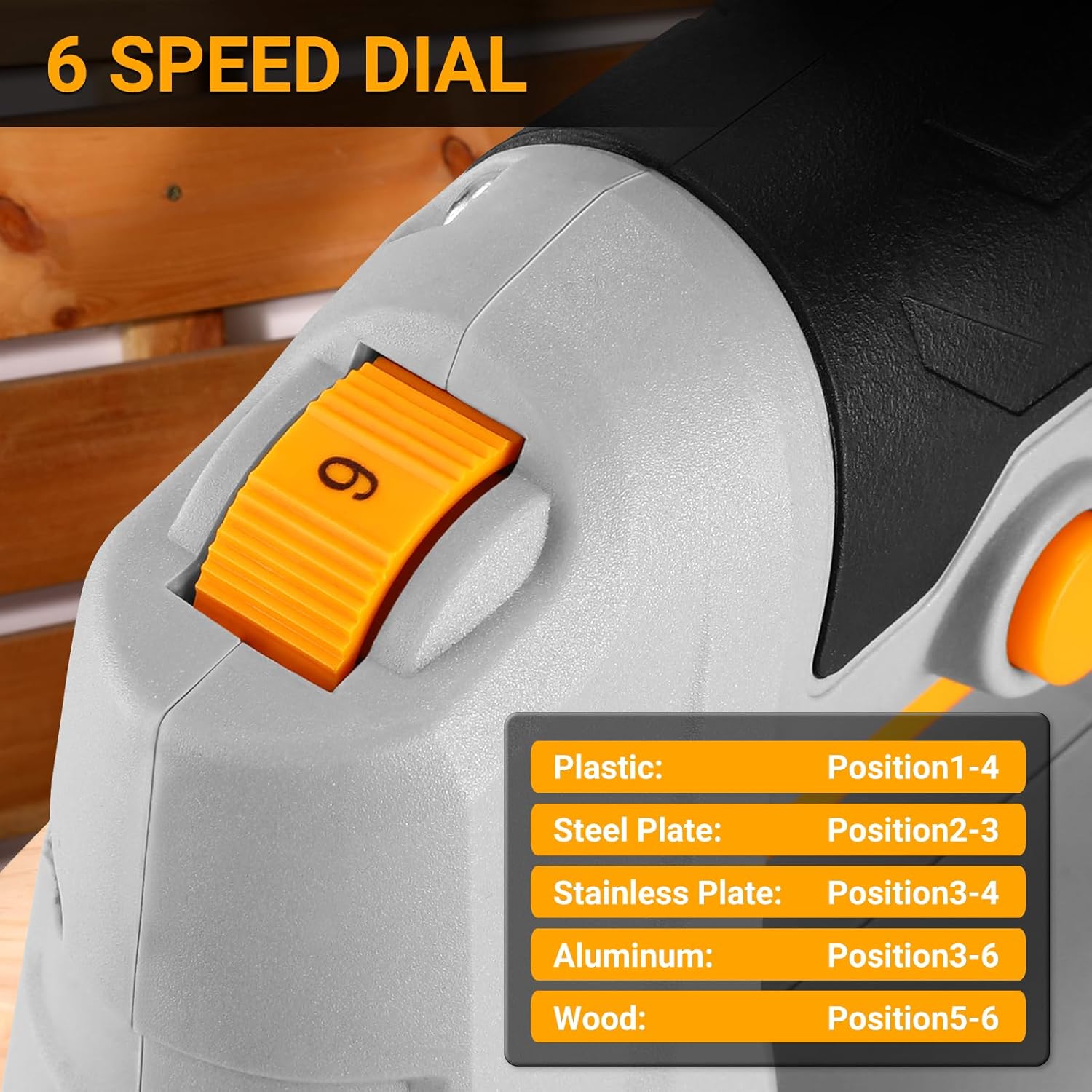
Image 5.2: The 6-speed dial with recommended settings for various materials, ensuring optimal cutting performance.

Image 5.3: Detail of the 6-speed dial for precise speed control.
5.3 Cutting Techniques and Material Compatibility
The DEKOPRO 400W Jigsaw is designed for versatile cutting across various materials, including wood, plastic, and metal. It offers a maximum cutting depth of 55 mm for wood and 6 mm for steel.
- Straight Cutting: Use a guide or ruler for precise straight lines.
- Curve Cutting: The narrow blade allows for intricate curve cuts.
- Bevel Cutting: Adjust the base plate as described in Section 4.2 for angled cuts.
- Plunge Cutting: For internal cuts, tilt the saw forward, start the cut, and slowly bring the base plate flat against the material.

Image 5.4: The jigsaw in action, demonstrating its capability to cut wood, PVC, and metal.

Image 5.5: The jigsaw equipped with a scale ruler for precise straight cuts, alongside a visual of the included blade types.

Image 5.6: Examples of different cutting techniques possible with the jigsaw: straight, circle, curve, and bevel cuts.

Image 5.7: The jigsaw performing a cut on a wooden plank.

Image 5.8: The jigsaw cutting a PVC pipe, demonstrating its capability with plastic materials.

Image 5.9: The jigsaw cutting an aluminum bar, showcasing its metal cutting ability.

Image 5.10: The jigsaw executing a precise circular cut on a wooden surface.
5.4 Operational Video Guide
Video 5.1: This video demonstrates various operational aspects of the DEKOPRO 400W Jigsaw, including blade installation, speed adjustment, and different cutting techniques such as straight, curved, and bevel cuts on various materials.
6. Maintenance
Regular maintenance ensures the longevity and optimal performance of your jigsaw.
- Cleaning: Keep the tool's ventilation openings clean to prevent overheating. Regularly remove sawdust and debris from the base plate and blade area.
- Blade Care: Always use sharp blades. Dull blades can cause kickback and strain the motor. Replace worn or damaged blades immediately.
- Cord Inspection: Periodically inspect the power cord for damage. Do not use the tool if the cord is frayed or cut.
- Storage: Store the jigsaw in a dry, secure place out of reach of children.
7. Troubleshooting
This section addresses common issues you might encounter with your jigsaw.
- Tool does not start:
- Check if the power cord is securely plugged into a working outlet.
- Ensure the trigger switch is fully depressed.
- Verify that the circuit breaker has not tripped.
- Blade not cutting efficiently or binding:
- The blade might be dull or damaged; replace it.
- Ensure the correct blade type is used for the material.
- Adjust the speed setting to match the material.
- Do not force the tool; allow the blade to do the work.
- Excessive vibration:
- Ensure the blade is correctly installed and secured.
- Check if the base plate is firmly tightened.
- The blade might be bent or damaged; replace it.
If issues persist, please contact DEKOPRO customer support.
8. Specifications
Technical specifications for the DEKOPRO 400W Electric Jigsaw.

Image 8.1: Technical specifications of the DEKOPRO Jigsaw, detailing electrical and performance characteristics.
| Feature | Specification |
|---|---|
| Manufacturer | DEKOPRO |
| Model Number | DKPJGSA040C1 |
| Product Dimensions | 25.5 x 8.5 x 21 cm |
| Item Weight | 1.85 kg |
| Power Source | Corded Electric |
| Rated Voltage | 220-240 Volts / 50Hz |
| Wattage | 400 Watts |
| No-Load Speed | 0-3000 SPM (Strokes Per Minute) |
| Stroke Length | 18 mm |
| Max. Cutting Depth (Wood) | 55 mm |
| Max. Cutting Depth (Steel) | 6 mm |
| Blade Material | High-speed steel |
| Recommended Surfaces | Plastic, Wood, Metal |
| Certification | CE |
| Batteries Included | No |
| Batteries Required | No |
9. Warranty and Support
DEKOPRO products are manufactured to high-quality standards. For warranty information, technical support, or service inquiries, please refer to the contact details provided with your purchase documentation or visit the official DEKOPRO website.