
1. Introduction
Thank you for choosing the YPMart FY8862 Sound Level Meter. This portable, A-weighted instrument is designed for accurate measurement of noise levels, ranging from 30dB to 130dB. It is suitable for various applications, including environmental noise assessment, industrial noise control, and personal noise exposure monitoring. This manual provides detailed instructions for the proper setup, operation, and maintenance of your device to ensure optimal performance and longevity.
2. Safety Information
Please read and understand all safety instructions before operating the device. Failure to follow these instructions may result in injury or damage to the instrument.
- Do not attempt to disassemble or modify the meter. This may cause damage and void the warranty.
- Keep the device away from water, high humidity, and extreme temperatures.
- Avoid dropping the meter or subjecting it to strong impacts.
- Remove batteries if the device will not be used for an extended period to prevent leakage.
- Dispose of used batteries according to local regulations.
- Do not use the device in environments with explosive gases or vapors.
3. Product Overview
Familiarize yourself with the components of your FY8862 Sound Level Meter:

Figure 3.1: Overview of the FY8862 Sound Level Meter with key components labeled.
- Sponge Sleeve: Protects the microphone from wind noise and dust.
- Sensor (Microphone): Detects sound waves for measurement.
- LCD Display: Shows measurement readings, mode indicators, and battery status.
- ON-OFF Button: Powers the device on or off.
- MAX Button: Toggles the maximum value hold function.
- FAST/SLOW Button: Switches between fast and slow response times.
- Red/Green Alarm Lights: Visual indicators for sound levels above or below 60dB.

Figure 3.2: Close-up view highlighting the windshield design, clear LCD display, and comfortable silicone buttons of the FY8862 Sound Level Meter.
- Windshield Design: Integrated design to block interference and ensure accurate measurement.
- LCD Display: Provides a clear and easy-to-read digital display of sound levels.
- Silicone Button: Durable and responsive buttons for comfortable operation.
4. Setup
4.1 Battery Installation
The FY8862 Sound Level Meter requires two 1.5V AAA batteries for operation.
- Locate the battery compartment cover on the back of the device.
- Slide or open the cover to access the battery compartment.
- Insert two AAA batteries, ensuring correct polarity (+ and - terminals).
- Close the battery compartment cover securely.
Note: Always use fresh batteries and replace them when the low battery indicator appears on the LCD.
5. Operating Instructions
5.1 Power On/Off
- To power on the device, press the ON-OFF button. The LCD display will illuminate.
- To power off the device, press and hold the ON-OFF button until the display turns off.
5.2 Taking Measurements
Once powered on, the meter will immediately begin displaying the current sound level in decibels (dB).
- Hold the meter with the microphone pointed towards the sound source.
- Ensure no obstructions are blocking the microphone.
- The measurement range is 30dB to 130dB. Readings outside this range may not be accurate.
5.3 Fast/Slow Mode Selection
The FY8862 offers two response modes for different measurement needs:
- Press the FAST/SLOW button to toggle between modes.
- FAST Mode: Displays sound levels in real-time (125ms response time). Suitable for capturing sudden noise peaks or rapidly changing sound levels.
- SLOW Mode: Displays the current average sound level over a longer period (1000ms response time). Ideal for measuring stable noise levels or when noise fluctuations are less frequent.

Figure 5.1: Examples of maximum, real-time (FAST), and average (SLOW) sound level readings on the FY8862 display.
5.4 MAX Function (Maximum Value Hold)
The MAX function allows you to capture and display the highest sound level recorded during a measurement session.
- Press the MAX button to activate this function. The "MAX" indicator will appear on the LCD.
- The display will now show the maximum sound level detected since the MAX function was activated.
- Press the MAX button again to exit the maximum value hold mode and return to real-time measurement.
5.5 Red/Green Alarm Lights
The FY8862 features visual alarm indicators for quick assessment of noise levels:
- If the sound level is below 60dB, the green alarm light will illuminate.
- If the sound level is above 60dB, the red alarm light will illuminate, indicating a potentially high noise level.
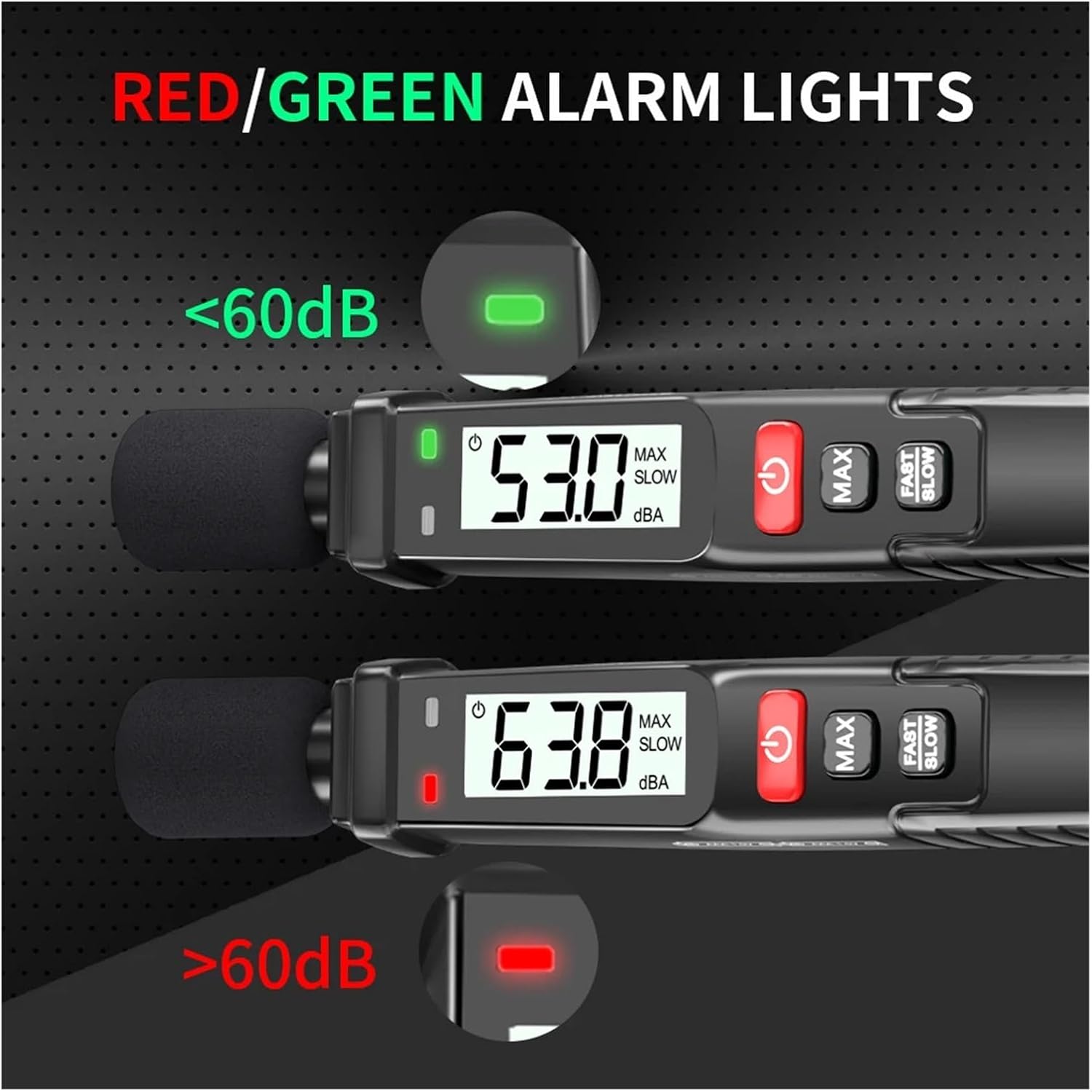
Figure 5.2: Illustration of the red and green alarm lights indicating sound levels relative to 60dB.
6. Maintenance
Proper maintenance ensures the accuracy and longevity of your sound level meter.
- Cleaning: Wipe the device with a soft, dry cloth. Do not use abrasive cleaners or solvents.
- Storage: Store the meter in a cool, dry place, away from direct sunlight and extreme temperatures. Remove batteries if storing for extended periods.
- Microphone Care: Keep the microphone clean and free from dust or debris. The sponge sleeve helps protect it; replace if damaged.
- Calibration: For professional applications requiring high accuracy, periodic calibration by a qualified laboratory is recommended.
7. Troubleshooting
If you encounter issues with your FY8862 Sound Level Meter, refer to the following common problems and solutions:
| Problem | Possible Cause | Solution |
|---|---|---|
| Device does not power on. | Dead or incorrectly installed batteries. | Replace batteries with new 1.5V AAA batteries, ensuring correct polarity. |
| Inaccurate or fluctuating readings. | Microphone obstructed, strong wind, or electromagnetic interference. | Ensure microphone is clear. Use the sponge sleeve in windy conditions. Move away from strong electrical fields. |
| Display shows "OL" (Overload). | Sound level exceeds the maximum measurement range (130dB). | Move further away from the sound source or reduce the sound level if possible. |
| Display shows "UN" (Underload). | Sound level is below the minimum measurement range (30dB). | The device cannot accurately measure sound levels below 30dB. |
If the problem persists after trying these solutions, please contact customer support.
8. Specifications
The following table outlines the technical specifications of the YPMart FY8862 Sound Level Meter:

Figure 8.1: Detailed technology parameters for the FY8862 Sound Level Meter.
| Parameter | Value |
|---|---|
| Frequency Weighting | A-Weighting |
| Frequency Response | 31.5Hz~8KHz |
| Measurement Range | 30dB~130dB |
| Sound Resolution | 0.1dB |
| Response Time | (FAST) 125ms, (SLOW) 1000ms |
| Overload Indication | >130dB (Displaying OL) |
| Accuracy | ±1.5dB |
| Sensor | 1/2 inch electret condenser microphone |
| Power Source | 1.5V AAA * 2 |
| Item Weight | 300 Grams |
| Number of Pieces | 1 |
9. Customer Support and Warranty
For technical assistance, warranty claims, or general inquiries, please contact YPMart customer support through your purchase platform or the official YPMart website.
Please retain your proof of purchase for warranty purposes.