Introduction
The Generic Compact 500 Lumen Hands-Free Work Light is a versatile lighting tool designed for various tasks. It features 500 lumens of bright LED light, a 180-degree rotating handle, and a strong magnetic base for hands-free operation. This manual provides instructions for its safe and effective use, ensuring optimal performance and longevity of your work light.
Package Contents
- Compact 500 Lumen Hands-Free Work Light (4 units)
- User Manual (this document)
Note: 4 AA batteries per light are required and are not included in the package.
Safety Information
Please read and understand all safety instructions before using this product. Failure to follow these instructions may result in electric shock, fire, or serious injury.
- Keep this product out of reach of children.
- Do not stare directly into the LED light beam. It can cause temporary vision impairment.
- Do not mix old and new batteries.
- Do not mix alkaline, standard (carbon-zinc), or rechargeable (nickel-cadmium) batteries.
- Remove batteries if the light will not be used for an extended period to prevent leakage.
- Dispose of used batteries properly according to local regulations.
- Do not attempt to disassemble or modify the work light. There are no user-serviceable parts inside.
- Do not expose the light to extreme temperatures or direct sunlight for prolonged periods.
Setup: Battery Installation
Your work light requires 4 AA batteries (not included) for operation.
- Locate the battery compartment on the back of the work light.
- Gently slide or unclip the battery compartment cover to open it.
- Insert 4 AA batteries, ensuring that the positive (+) and negative (-) terminals align correctly with the markings inside the compartment.
- Close the battery compartment cover securely until it clicks into place or is firmly seated.
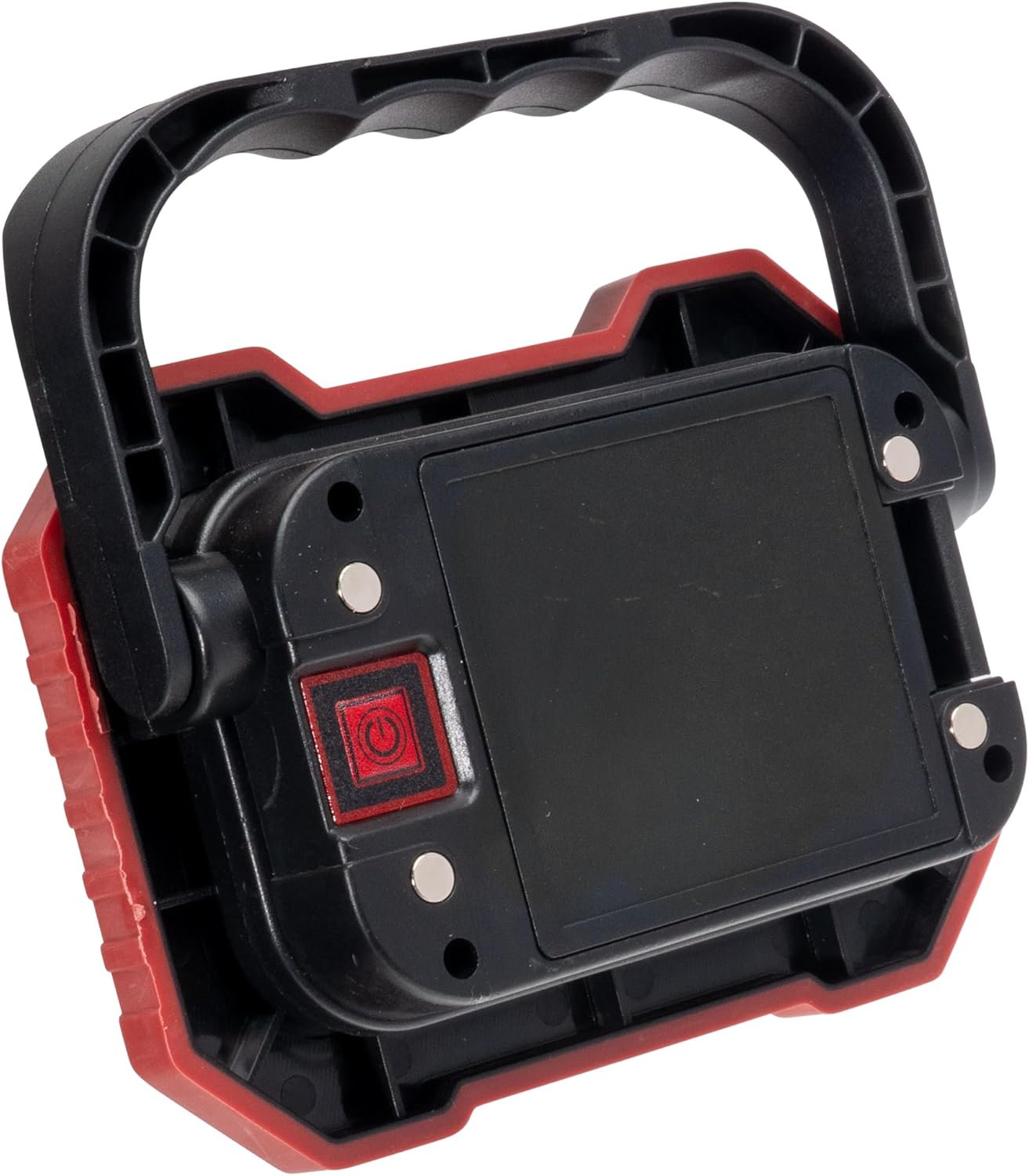
Image: Rear view of the work light, highlighting the battery compartment and power button for easy identification during battery installation.
Operating Instructions
Once batteries are installed, your work light is ready for use.
- Power On/Off and Light Modes: Press the power button, located on the back of the light, to cycle through the available lighting modes:
- First press: Activates Normal brightness mode.
- Second press: Activates High brightness mode (500 Lumens).
- Third press: Activates Low brightness mode.
- Fourth press: Turns the light OFF.
- Magnetic Mounting: Utilize the strong magnet located on the back of the light to attach it to any ferrous metal surface. This allows for convenient hands-free illumination in various work environments.
- Adjustable Handle: The integrated handle can rotate 180 degrees. Adjust the handle to direct the light beam precisely where it is needed, providing optimal visibility for your task.

Image: Front view of the work light, showcasing the LED panel and the adjustable handle in an upright position.
Maintenance
Proper maintenance ensures the longevity and optimal performance of your work light.
- Cleaning: Clean the exterior of the work light with a soft, dry cloth. Do not use abrasive cleaners, solvents, or harsh chemicals, as these may damage the finish or internal components.
- Battery Care: Always remove depleted batteries promptly. If the light will not be used for an extended period (e.g., more than one month), remove the batteries to prevent potential leakage and corrosion.
- Storage: Store the work light in a cool, dry place, away from direct sunlight and extreme temperatures.
Troubleshooting
If you encounter issues with your work light, refer to the following common problems and solutions:
| Problem | Possible Cause | Solution |
|---|---|---|
| Light does not turn on. | Depleted or incorrectly inserted batteries. | Check battery polarity and replace with fresh AA batteries. Ensure battery compartment is closed securely. |
| Light is dim or flickers. | Low battery power. | Replace all 4 AA batteries with new ones. |
| Magnetic mount is not holding. | Surface is not ferrous metal or is too thin/uneven. | Ensure the mounting surface is clean, flat, and made of a magnetic material. |
Specifications
| Model Number | V42184012000 |
| Brand | Generic |
| Brightness | 500 Lumens (High Mode) |
| Light Source Type | LED |
| Power Source | 4x AA Batteries (not included) |
| Material | Aluminum |
| Mounting Type | Magnetic |
| Product Dimensions | 5.33"L x 3.87"W x 1.5"H |
| Special Features | Durable, 180° Rotating Handle |
| Manufacturer | BrightEase |
Warranty Information
This product comes with a standard manufacturer's warranty. Please retain your proof of purchase for any warranty claims. For specific warranty details, including duration and coverage, refer to the product packaging or contact the manufacturer directly. The warranty typically covers defects in materials and workmanship under normal use.
Customer Support
For technical assistance, product inquiries, or to report any issues not covered in the troubleshooting section, please refer to the contact information provided on the product packaging or the manufacturer's official website. When contacting support, please have your product model number (V42184012000) and proof of purchase readily available.