
1. Introduction
Thank you for choosing the QxzPower UF-C8 Ultra Smart Glasses. These innovative glasses combine advanced audio technology with adaptive photochromic lenses, offering a seamless and comfortable experience for daily use. Designed for both men and women, they feature open-ear speakers, blue light blocking, and a lightweight design.
This manual provides detailed instructions for setting up, operating, and maintaining your smart glasses. Please read it thoroughly before use to ensure optimal performance and longevity of your device.
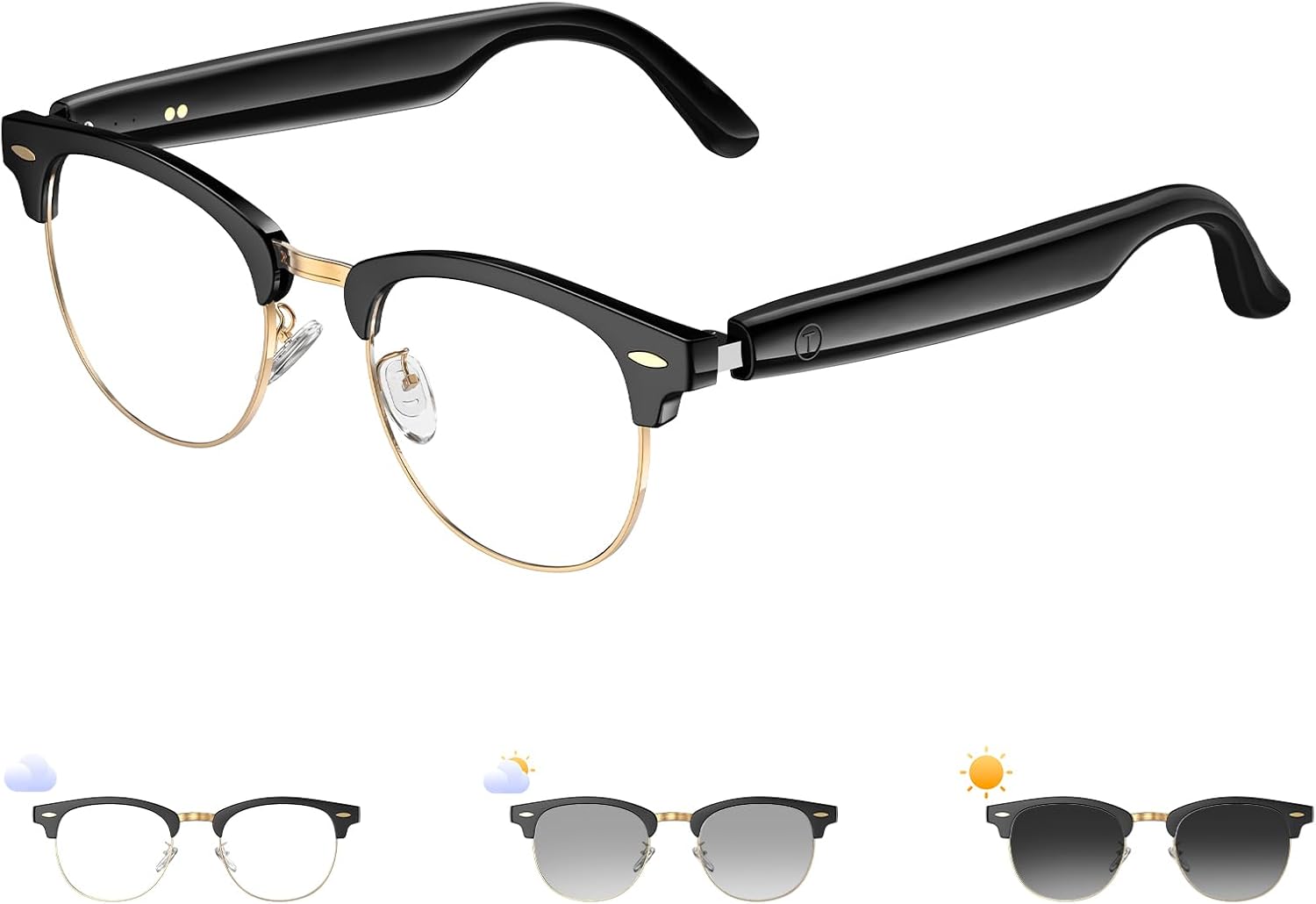
Image 1: Front view of the QxzPower UF-C8 Ultra Smart Glasses.
2. What's in the Box
Upon unpacking, please ensure all the following items are present:
- QxzPower UF-C8 Ultra Smart Glasses
- Magnetic Charging Cable
- Cleaning Cloth
- User Manual

Image 2: The smart glasses adapting from clear lenses indoors to darkened lenses outdoors, demonstrating the photochromic feature.
3. Setup
3.1 Charging the Glasses
The QxzPower UF-C8 Ultra Smart Glasses feature independent power switches and charging modules on both the left and right sides. To ensure proper charging:
- Connect the magnetic charging cable securely to both the left and right charging contacts on the glasses' temples.
- Ensure both power switches (located on each temple) are turned on during the charging process.
- A full charge typically provides 9 hours of immersive audio and 200 hours of standby time.
Note: If only one side appears to be charging or powered, verify that both power switches are activated and the charging contacts are correctly aligned. This is a normal operational characteristic, not a defect.
3.2 Powering On/Off
- To Power On: Press and hold the power button on either temple until you hear an audible confirmation or see an indicator light.
- To Power Off: Press and hold the power button on either temple until you hear an audible confirmation or see the indicator light turn off.
3.3 Bluetooth Pairing
To connect your smart glasses to a device (e.g., smartphone, tablet):
- Ensure the glasses are powered on and in pairing mode (usually indicated by a flashing LED light).
- On your device, navigate to the Bluetooth settings.
- Select "UF-C8 Ultra" (or similar name) from the list of available devices.
- Once connected, you will hear an audible confirmation, and the LED indicator will typically become solid.
The glasses utilize Bluetooth 5.4 for stable and instant connectivity with iOS and Android devices.

Image 3: Visual representation of the immersive audio and Bluetooth 5.4 features.
4. Operating Instructions
4.1 Photochromic Lenses
The lenses automatically adapt to your environment:
- Indoors: The clear lenses block harmful blue light, reducing eye strain.
- Outdoors: The lenses instantly transform into polarized sunglasses, reducing glare and providing UV400 protection.

Image 4: The photochromic lenses changing from clear to dark based on light exposure.
4.2 Audio Playback and Calls
The open-ear speakers allow you to listen to music, podcasts, and take calls while remaining aware of your surroundings. Controls are typically located on the temples:
- Play/Pause: Single press the multi-function button.
- Next Track: Double press the multi-function button.
- Previous Track: Triple press the multi-function button.
- Answer/End Call: Single press the multi-function button during an incoming call or active call.
- Reject Call: Press and hold the multi-function button during an incoming call.
- Volume Control: Use your connected device's volume controls.
4.3 Voice Assistant & Remote Photo Control
- Activate Voice Assistant (Siri/Google Assistant): Press and hold the multi-function button for approximately 2 seconds.
- Remote Photo Control: When your phone's camera app is open, a single press of the multi-function button can act as a remote shutter button.
Video 1: Demonstration of the QxzPower UF-C8 Ultra Smart Glasses features, including call handling, music playback, and remote photo control.
5. Maintenance
- Cleaning Lenses: Use the provided cleaning cloth to gently wipe the lenses. For stubborn smudges, use a lens cleaning spray designed for eyewear. Avoid abrasive materials.
- Cleaning Frame: Wipe the frame with a soft, damp cloth. Do not use harsh chemicals.
- Storage: When not in use, store the glasses in their protective bag or case to prevent scratches and damage.
- Water Resistance: The glasses are IPX5 water-resistant, meaning they can withstand splashes and light rain. Do not submerge them in water.

Image 5: Illustration of the Q-Power lens technology, highlighting its multi-coated layers for enhanced visual clarity and protection.
6. Troubleshooting
- One side not charging/powering on: Ensure both magnetic charging cables are securely connected and both independent power switches on the temples are turned on.
- Cannot pair via Bluetooth: Ensure the glasses are in pairing mode (flashing LED). Turn off and on your device's Bluetooth, then try pairing again. Ensure the glasses are sufficiently charged.
- No sound or low volume: Check the volume levels on both the glasses (if applicable) and your connected device. Ensure the glasses are properly connected via Bluetooth.
- Lenses not changing color: Ensure the glasses are exposed to sufficient UV light. Photochromic lenses react to UV, not just visible light. Performance may vary with temperature.
7. Specifications
| Feature | Detail |
|---|---|
| Model Number | UF-C8 Ultra |
| Item Weight | 5 ounces |
| Battery Capacity | 110 Milliamp Hours (dual 55mAh batteries) |
| Battery Life (Audio) | Up to 9 hours |
| Standby Time | Up to 200 hours |
| Connectivity Technology | Bluetooth 5.4 |
| Water Resistance | IPX5 |
| Special Features | Lightweight, Music Player, Phone Call, Photochromic Lenses, Blue Light Blocking, Open-Ear Speakers, Voice Assistant, Remote Photo Control |
| Frame Material | Titanium (feather-light) |

Image 6: Dimensions of the QxzPower UF-C8 Ultra Smart Glasses.
8. Safety Information
- Do not attempt to disassemble or modify the glasses. This may void the warranty and cause damage.
- Keep the glasses away from extreme temperatures, direct sunlight for prolonged periods, and corrosive substances.
- Avoid exposing the charging contacts to water or moisture when not charging.
- Use only the provided charging cable.
- Always be aware of your surroundings when using open-ear speakers, especially in traffic or hazardous environments.
9. Warranty and Support
QxzPower stands behind the quality of its products. For warranty information, technical support, or any inquiries, please refer to the contact details provided on the product packaging or visit the official QxzPower website.