
1. Product Overview
The SKYCOMET HS012 Wireless Headset is designed to provide a high-quality audio experience for work, entertainment, and communication. It features Bluetooth connectivity, passive noise cancellation, and comes with a convenient USB dongle and charging dock. This manual provides detailed instructions for setup, operation, and maintenance to ensure optimal performance.
2. What's in the Box
- Wireless Headphones
- Transmitter Charging Base
- Type C Charging Cable
- User Manual
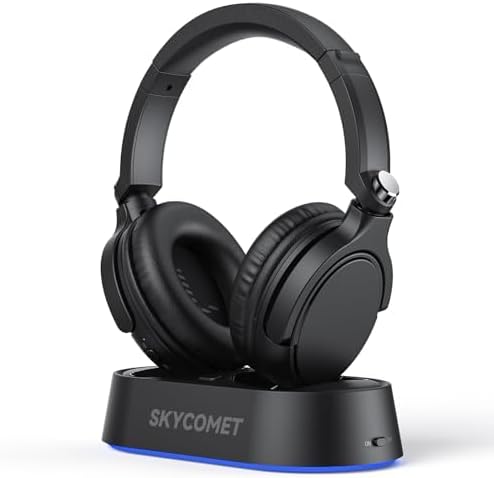
Image: The SKYCOMET HS012 Wireless Headset and its charging dock, as packaged.
3. Setup Instructions
3.1 Charging the Headset
Before initial use, fully charge the headset. Place the headphones on the transmitter charging base. The charging indicator will show the charging status.
Video: A short demonstration of placing the headset onto the charging dock. The dock illuminates with a blue light when charging.
The charging base indicates status:
- Connected: Warm White
- Charging: Breathing Warm White
- Fully Charged: Solid Blue
A full charge takes approximately 1.5 hours and provides up to 65 hours of use.
3.2 Connecting to Devices
The headset offers multiple connection options:
- Via Transmitter Charging Base (for TV/PC):
Connect the transmitter charging base to your TV or PC using one of the provided cables (optical fiber, 3.5mm AUX, or RCA). Power on the transmitter and the headphones. The headphones will automatically connect to the transmitter.

Image: The charging dock with various input ports (Optical, AUX 3.5mm, RCA Adapter) and a Bluetooth 5.2 icon, illustrating multiple connection methods.
- Via Bluetooth (for Computers/Mobile Phones):
Ensure the headset is powered on and in pairing mode. On your computer or mobile phone, navigate to Bluetooth settings and select "HS012" from the list of available devices to pair.
Please adjust the volume on both your TV/device and the headphones as needed for optimal sound.
4. Operating Instructions
4.1 Power On/Off
Locate the power switch on the headset. Slide it to the "ON" position to power on and to the "OFF" position to power off.
4.2 Volume Control
The headset features a dedicated volume control. Rotate the volume dial on one of the earcups to increase or decrease the audio level.
4.3 Noise Cancellation
The headset incorporates passive noise cancellation to reduce background distractions, providing a clearer and more immersive listening experience.

Image: A man wearing the SKYCOMET HS012 Wireless Headset, indicating an immersive listening experience with clear audio.

Image: A woman wearing the SKYCOMET HS012 Wireless Headset, highlighting the ultra-low latency and stable connection range.
5. Maintenance
- Clean the headset and charging dock with a soft, dry cloth. Avoid using abrasive cleaners or solvents.
- Store the headset in a cool, dry place when not in use.
- Avoid exposing the device to extreme temperatures, humidity, or direct sunlight.
- Do not attempt to disassemble or repair the headset yourself. Contact customer support for assistance.
6. Troubleshooting
6.1 No Sound
- Ensure the headset is powered on and fully charged.
- Verify that the headset is properly connected to the audio source (TV, PC, mobile phone) via the transmitter or Bluetooth.
- Check the volume levels on both the headset and the audio source.
- If using the transmitter, ensure the correct audio output is selected on your TV/PC.
6.2 Connection Issues
- For Bluetooth connections, ensure the headset is in pairing mode and within range of your device.
- Restart both the headset and the connected device.
- Clear previous Bluetooth pairings on your device and re-pair.
- Ensure no other strong wireless signals are interfering with the connection.
6.3 Poor Audio Quality
- Check for interference from other electronic devices.
- Ensure the headset is within the optimal operating range of the transmitter or Bluetooth device.
- Verify that the audio cables are securely connected if using a wired connection to the transmitter.
7. Specifications
| Feature | Detail |
|---|---|
| Model Name | HS012 |
| Connectivity Technology | Wireless (Bluetooth 5.2) |
| Wireless Communication Technology | Bluetooth |
| Noise Control | Passive Noise Cancellation |
| Battery Life | 65 Hours |
| Charging Time | 1.5 Hours |
| Bluetooth Range | 30 Meters (100 feet) |
| Audio Latency | 40 Milliseconds |
| Earpiece Shape | Over Ear |
| Material | Leather, Cotton |
| Compatible Devices | Televisions, Set-Top Boxes, Smart Speakers, Computers, Mobile Phones |
| Included Components | Wireless Headphones, Transmitter Charging Base, Type C Charging Cable, User Manual |
8. Warranty and Support
For any issues with your order or to inquire about warranty information, please contact SKYCOMET customer support via email:
Email: Business_NA@outlook.com
Please retain your proof of purchase for warranty claims.