
Introduction
This manual provides detailed instructions for the safe and efficient operation of your Sailnovo Automatic Egg Incubator. This device is designed to facilitate the incubation of various poultry eggs, including chicken, duck, quail, goose, and pigeon, by maintaining optimal temperature and humidity conditions with automatic egg turning.
Product Features
- 56 Egg Capacity: Accommodates various egg sizes for different poultry.
- Automatic Egg Turning: Eggs are automatically turned every 2 hours to promote even embryonic development. This function pauses 3 days before hatching.
- Automatic Humidification: Features an external water tank for humidity adjustment without opening the incubator, minimizing temperature fluctuations.
- Stable Temperature Control: Equipped with a heating system and fan-assisted induced airflow for consistent temperature distribution.
- Digital LED Display: Provides real-time monitoring and adjustment of temperature, humidity, and incubation time.
- Built-in LED Egg Candler: Allows observation of embryonic development without disturbing the eggs.
- Alarm System: Alerts users to abnormal temperature or humidity levels.
- Transparent Cover: Offers a clear view of the incubation process.
Package Contents
Before beginning, please verify that all components are present in the package:
- Sailnovo Automatic Egg Incubator Unit
- Power Cable
- Styrofoam Foam Packaging (for insulation)
- Water Bottle (for external water addition)
- Watering Can
- Water Feeder
- Record Card
- User Manual
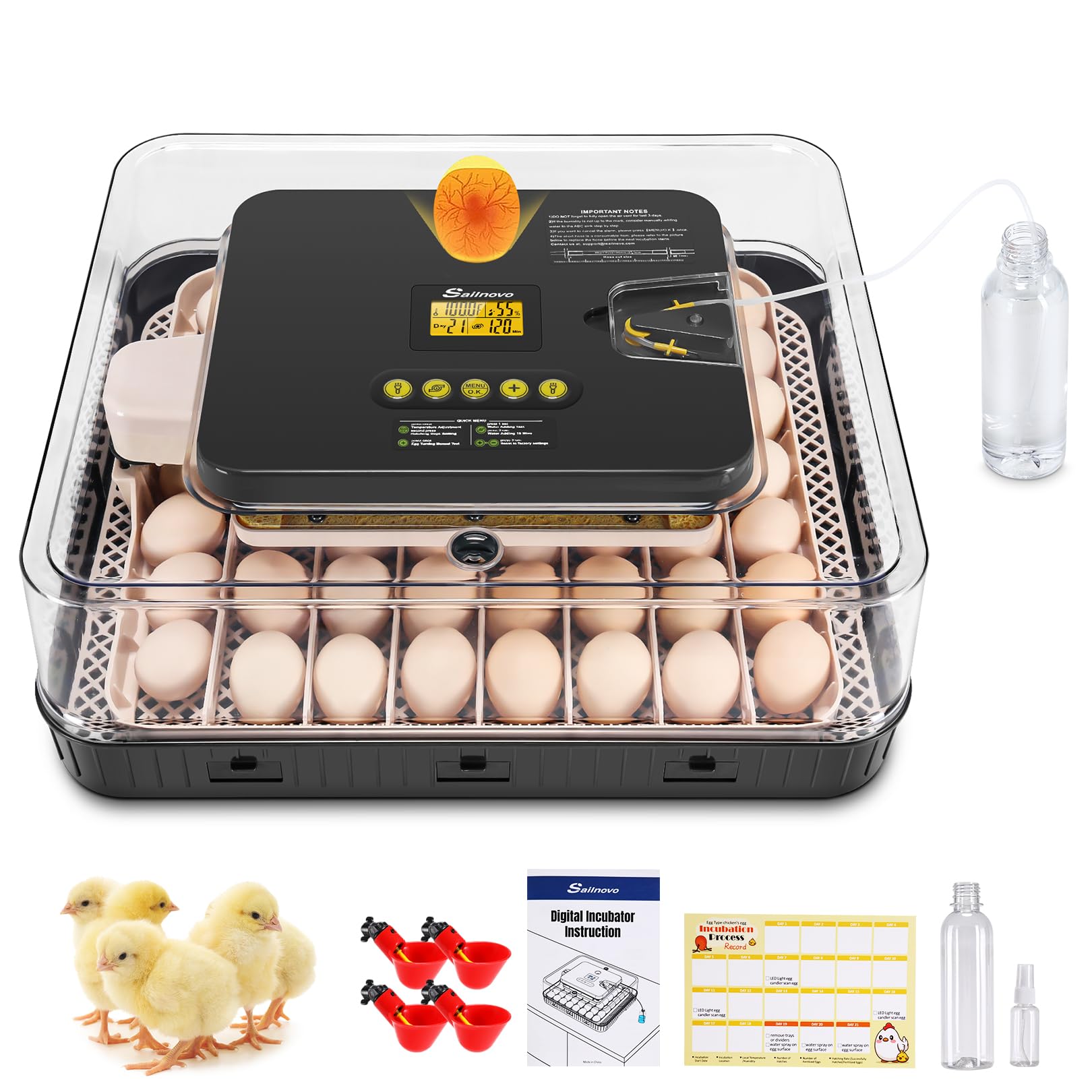
Image: The Sailnovo Automatic Egg Incubator with its various components, including the main unit, power cable, water bottle, watering can, water feeder, record card, and user manual.
Safety Instructions
- Always place the incubator on a stable, level surface away from direct sunlight, drafts, or extreme temperature fluctuations.
- Ensure the power supply matches the voltage requirements of the incubator.
- Do not immerse the incubator or its electrical components in water.
- Keep out of reach of children and pets.
- Unplug the incubator from the power outlet before cleaning or performing any maintenance.
- Avoid blocking the air vents to ensure proper airflow.
Setup Guide
- Placement: Select a room with a stable ambient temperature (ideally between 20-25°C / 68-77°F) and low humidity. Avoid areas with drafts or direct sunlight.
- Assembly: Place the egg tray inside the incubator base. Ensure the top cover fits securely.
- Power Connection: Connect the power cable to the incubator and then plug it into a suitable electrical outlet. The digital display will illuminate.
- Pre-heating: Allow the incubator to run for at least 2-3 hours to stabilize the internal temperature before placing eggs.
- Adding Water for Humidification: Fill the provided water bottle with distilled or clean water. Connect it to the external water inlet on the side of the incubator. The system will automatically draw water into the internal water tanks (A/B/C) as needed to maintain humidity.

Image: The external water addition system, showing the water bottle connected to the incubator, which fills the internal water tanks (A/B/C) without needing to open the lid.

Image: A diagram illustrating the fan-assisted induced airflow system, showing how warm and cold air circulate within the incubator to maintain stable temperature.
Operating Instructions
Control Panel Overview

Image: Detailed view of the digital control panel, highlighting the Heater Indicator, Humidity Indicator, Auto Turning Indicator, Egg Candler button, Water Adding button, Menu button, Decrease button, and Increase button.
- Heater Indicator: Blinks when the heating element is active.
- Humidity Indicator: Blinks when water is being added to increase humidity.
- Auto Turning Indicator: Displays 'ON' for automatic turning every two hours, 'BLINK' for turning, and 'OFF' when turning is stopped for the last 3 days of incubation.
- Egg Candler Button: Press once to activate the built-in LED candler to observe egg development.
- Water Adding Button: Press for 1 second to test the water adding function. Press and hold for 3 seconds to add water for 10 minutes.
- Menu Button (O.K.): Press once to set temperature. Press a second time to display the days remaining until hatch.
- Decrease Button (-): Press to set temperature range or cancel alarms.
- Increase Button (+): Press to set temperature range or press for 3 seconds to test the egg turner function.
Setting Temperature and Humidity
- Press the Menu (O.K.) button once. The temperature display will flash.
- Use the Increase (+) or Decrease (-) buttons to adjust the desired temperature.
- Press Menu (O.K.) again to confirm the setting.
- Humidity is automatically managed by the external water addition system. Monitor the humidity display and ensure the external water bottle is filled.
Automatic Egg Turning
The incubator is pre-programmed to turn eggs automatically every two hours. This process is crucial for preventing the embryo from sticking to the shell and ensuring even heat distribution. The automatic turning function will cease 3 days prior to the estimated hatch date to allow the chicks to position themselves for hatching.

Image: A visual representation of the automatic egg rotation, showing eggs turning 360 degrees from day 1 until 3 days before hatching (day 19 for a 21-day incubation period).
Egg Candling
The built-in LED egg candler allows you to observe the development of the embryo without opening the incubator. This helps in identifying infertile eggs or those with arrested development, which can then be removed to prevent contamination.
- Press the Egg Candler button on the control panel.
- Carefully place an egg over the candler light.
- Observe the internal structure and development.
- Press the Egg Candler button again to turn off the light.

Image: The built-in LED egg candler illuminating an egg, allowing observation of the embryo's development stages.
Incubation Process
Successful incubation requires careful management of temperature, humidity, and egg turning. The following are general guidelines; specific requirements may vary slightly by species.
Recommended Incubation Parameters
| Egg Type | Temperature (°C/°F) | Humidity (%) (Days 1-18) | Humidity (%) (Days 19-21) | Incubation Period (Days) |
|---|---|---|---|---|
| Chicken | 37.5-38.0°C / 99.5-100.4°F | 50-60% | 65-75% | 21 |
| Duck | 37.5-37.8°C / 99.5-100.0°F | 60-70% | 75-85% | 28 |
| Quail | 37.5-37.8°C / 99.5-100.0°F | 50-60% | 65-75% | 17-18 |
| Goose | 37.5-37.8°C / 99.5-100.0°F | 60-70% | 75-85% | 28-32 |
Note: Adjust humidity levels during the last 3 days (lockdown period) to the higher range to aid in hatching. The automatic egg turning will stop during this period.

Image: The incubator tray holding various types of eggs, including chicken, duck, and quail eggs, demonstrating its versatility.
Maintenance and Cleaning
Regular cleaning ensures optimal performance and hygiene for your incubator.
- Disconnect Power: Always unplug the incubator before cleaning.
- Disassemble: Remove the egg tray and any removable components.
- Cleaning Surfaces: Wipe down all internal and external surfaces with a damp cloth and a mild disinfectant solution. Avoid harsh chemicals that could damage the plastic or leave residues harmful to chicks.
- Egg Tray: Wash the egg tray with warm soapy water, rinse thoroughly, and allow to air dry completely.
- Water Tanks: Clean the internal water tanks to prevent mold or bacterial growth. Use a small brush if necessary.
- Drying: Ensure all parts are completely dry before reassembling and storing or reusing the incubator.
- Storage: Store the incubator in a clean, dry place away from direct sunlight when not in use.
Troubleshooting
| Problem | Possible Cause | Solution |
|---|---|---|
| Temperature too low/high | Incorrect setting, unstable room temperature, blocked air vents. | Verify temperature setting. Move incubator to a stable environment. Check and clear air vents. |
| Humidity too low | External water bottle empty, water inlet blocked, dry ambient air. | Refill water bottle. Check water inlet for blockages. Increase room humidity if possible. |
| Humidity too high | Too much water in tanks, high ambient humidity. | Reduce water in tanks (if manually added). Ensure proper ventilation in the room. |
| Eggs not turning | Automatic turning disabled, motor malfunction, eggs stuck. | Check Auto Turning Indicator. Press (+) button for 3 seconds to test turner. Ensure eggs are properly seated. |
| Alarm sounds | Temperature or humidity outside set range. | Check temperature/humidity readings. Adjust settings or environmental factors. Press (-) button to silence alarm. |
| Display not working | Power issue, loose connection. | Check power cable connection. Ensure power outlet is functional. |
Specifications
| Feature | Detail |
|---|---|
| Model Number | SL-5390-G-XINVER |
| Brand | Sailnovo |
| Capacity | 56 Eggs |
| Product Dimensions (L x W x H) | 18.7 x 16.14 x 6.3 inches (47.5 x 41 x 16 cm) |
| Item Weight | 12.63 pounds (5.73 kg) |
| Color | Grey |
| Automatic Egg Turning | Yes, every 2 hours |
| Automatic Humidification | Yes, with external water addition |
| Temperature Control | Digital, adjustable |
| Egg Candler | Built-in LED |
| Manufacturer | Sailnovo |
Warranty and Support
For warranty information, technical support, or service inquiries regarding your Sailnovo Automatic Egg Incubator, please refer to the contact information provided with your purchase documentation or visit the official Sailnovo website. Keep your purchase receipt as proof of purchase for warranty claims.


