
Introduction
Thank you for choosing the Douxlife Computer Gaming Chair with Footrest. This manual provides essential information for the safe assembly, operation, maintenance, and troubleshooting of your new gaming chair. Please read it thoroughly before use and retain it for future reference.
This ergonomic gaming chair is designed for comfort and support during long gaming or work sessions, featuring a 7-point massage system, adjustable recline, retractable footrest, and customizable armrests.

Image: The Douxlife Computer Gaming Chair in black and white, featuring a retractable footrest and a remote control for the massage function.
Safety Information
- Ensure all components are securely fastened before use.
- Do not stand on the chair or use it as a step stool.
- Avoid placing heavy objects on the chair that exceed its weight capacity.
- Keep children and pets away from the chair during assembly.
- Do not expose the chair to direct sunlight or extreme temperatures.
- Disconnect the massage unit from the power source when not in use or during cleaning.
Parts List
Please verify that all parts are present before beginning assembly. Refer to the assembly diagram for visual identification.
- Backrest
- Seat Cushion
- Armrests (2)
- Five-star Base
- Casters (5)
- Gas Lift Cylinder
- Gas Lift Cover
- Mechanism Plate
- Footrest Assembly
- Headrest Pillow
- Lumbar Support Pillow
- Massage Remote Control & Cables
- Hardware Pack (screws, washers, Allen wrench)
Setup and Assembly
Follow these steps for quick and proper assembly. It is recommended to assemble the chair on a soft, clean surface to prevent damage.
- Attach Casters to Base: Insert the five casters into the holes at the end of each leg of the five-star base. Push firmly until they click into place.
- Install Gas Lift: Place the gas lift cylinder into the center hole of the five-star base. Cover it with the gas lift cover.
- Attach Mechanism to Seat: Align the mechanism plate with the screw holes on the underside of the seat cushion. Ensure the front of the mechanism faces the front of the seat. Secure with screws and washers using the provided Allen wrench.
- Attach Armrests: Secure the armrests to the sides of the seat cushion using the designated screws.
- Connect Seat to Gas Lift: Carefully place the assembled seat onto the gas lift cylinder, ensuring it is centered.
- Attach Backrest to Seat: Align the backrest with the metal brackets on the seat cushion. Secure with screws.
- Install Footrest: Slide the footrest assembly into the designated slots under the seat.
- Connect Massage Cables: Locate the massage cables from the chair and the remote control. Connect them as shown in the diagram below. Ensure a secure connection for proper function.

Image: Diagram showing chair dimensions and recommended user height/weight for assembly reference.

Image: Visual guide demonstrating the connection of the massage unit cables to the chair and power source.
Operating Instructions
1. Massage System
The chair features a 7-point vibration massage system with a remote control.
- Power On/Off: Press the power button on the remote to activate or deactivate the massage function.
- Massage Modes: Select from 5 modes (Pulse, Press, Wave, Auto, Normal) using the mode button.
- Intensity Levels: Adjust between 2 intensity levels (High/Low) for desired vibration strength.
- Targeted Zones: Use the remote to select specific massage areas: neck, back, lumbar, or thighs.
- Timer Settings: Set the massage duration to 15, 30, or 60 minutes using the timer button.

Image: A user demonstrating the 7-zone vibration massage feature with the remote control, highlighting massage points in the neck, back, waist, and legs.

Image: Detailed view of the massage remote control, illustrating buttons for strength, timing, massage area switches, and modes.
2. Reclining Backrest & Rocking System
- Recline Adjustment: Pull the lever on the right side of the chair upwards to unlock the backrest. Lean back to your desired angle (90° to 175°) and release the lever to lock it in place.
- Rocking Function: In the 90°-165° range, pull the gas rod handle outwards (labeled 'FREE') to enable the rocking function. Apply force backward to make the backrest move above 105°, providing a 5° free swing range. Push the handle inwards (labeled 'LOCK') to disable rocking.
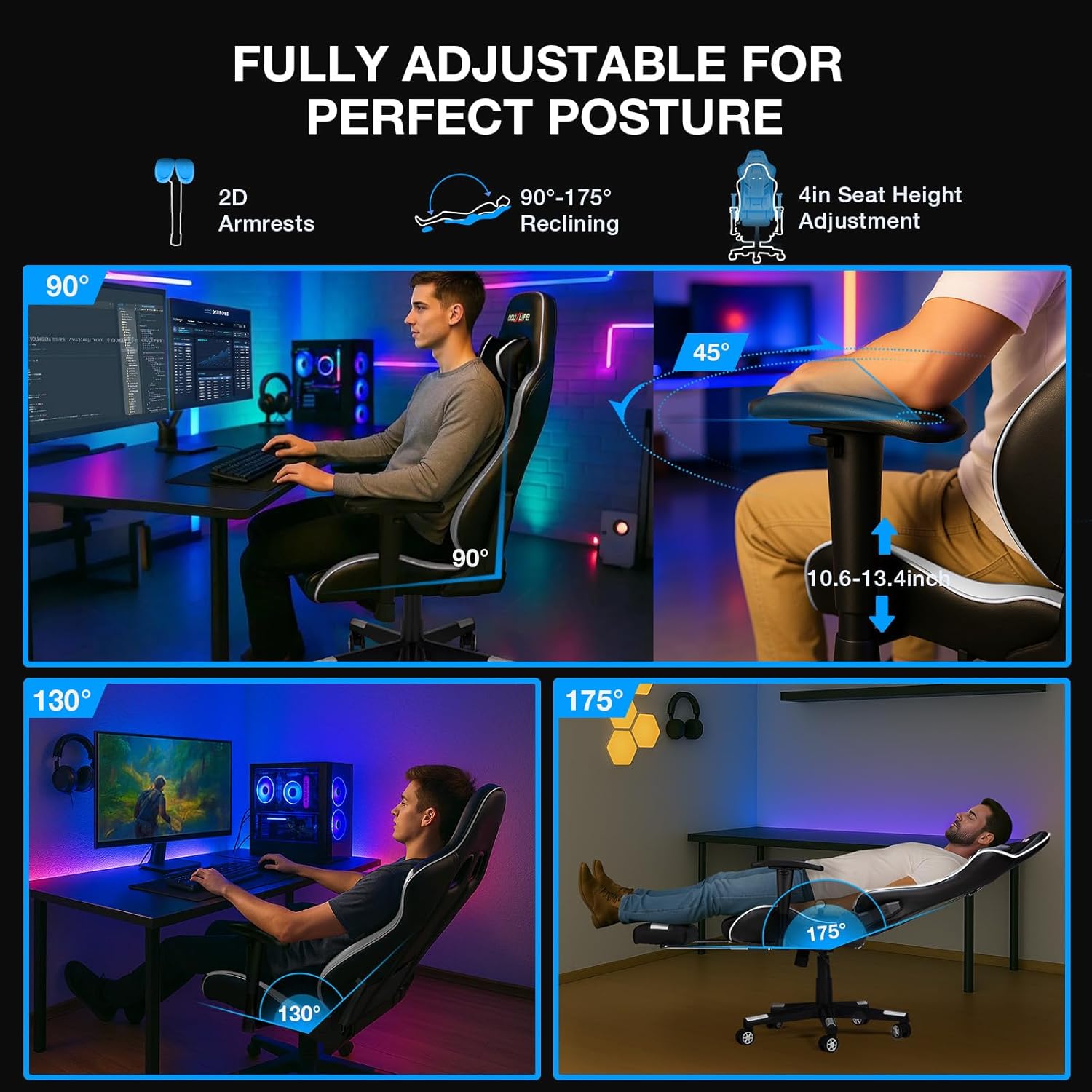
Image: Visual representation of the chair's full adjustability, including 90°-175° reclining, 2D armrests, and seat height adjustment.
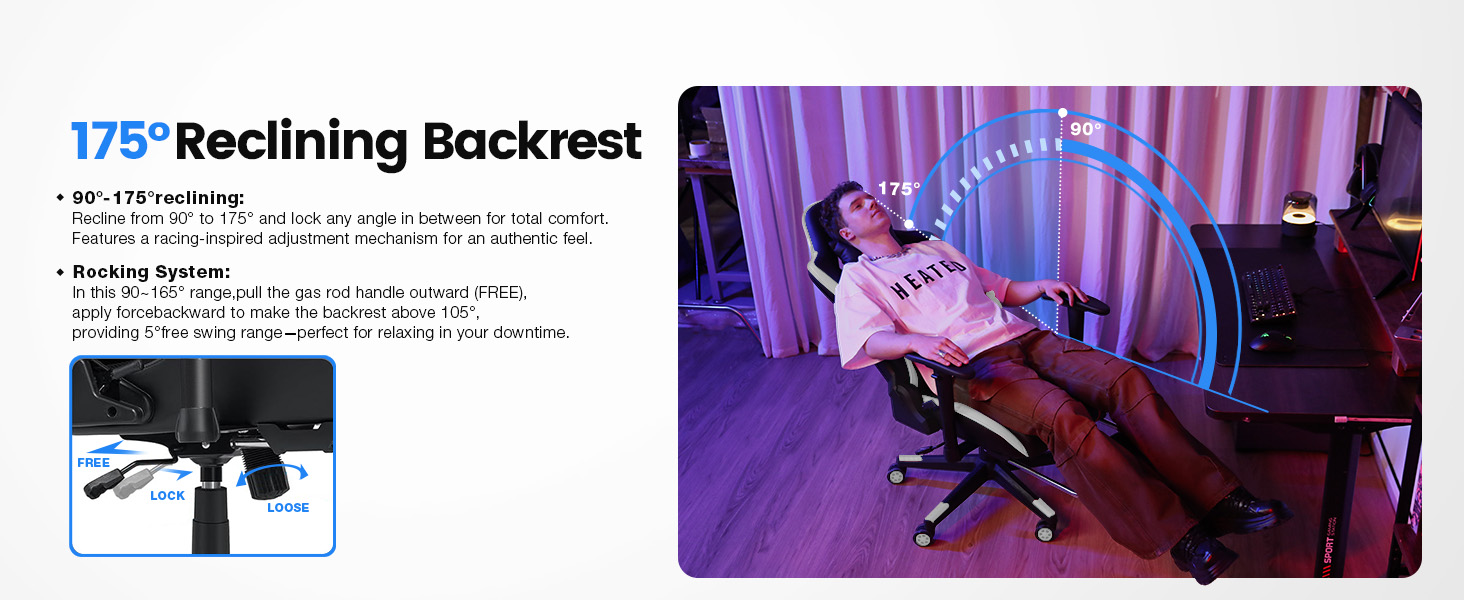
Image: Illustration detailing the 175° reclining backrest and the 'FREE' and 'LOCK' positions for the rocking system lever.
3. Height Adjustment
To adjust the seat height, pull the lever located under the seat upwards. While seated, lift your weight slightly to raise the chair. To lower the chair, remain seated and pull the lever upwards. Release the lever to lock the height.
4. Armrest Adjustment
The 2D armrests can be adjusted in two ways:
- Height Adjustment: Press the button on the side of the armrest and move it up or down to your preferred height. Release the button to lock.
- Rotation: The armrests can rotate 45° inwards or outwards to support various postures. Simply twist the armrest pad to adjust its angle.

Image: Illustration demonstrating the lifting (0-3 inches) and 45° rotating capabilities of the armrests, designed for anti-slip support.
5. Retractable Footrest
To use the footrest, pull it out from underneath the seat. Extend it to your desired length. To retract, push it back under the seat until it is fully stored.

Image: Close-up view of the retractable footrest extended from the chair, providing elevated relaxation.
Maintenance
- Cleaning: Wipe the chair's PU leather surfaces with a soft, damp cloth. For stubborn stains, use a mild soap solution and dry immediately. Avoid harsh chemicals or abrasive cleaners.
- Inspection: Periodically check all screws and bolts to ensure they are tight. Re-tighten if necessary.
- Caster Care: Clean casters regularly to remove dust and debris that may hinder smooth movement.
- Massage Unit: Keep the massage remote and cables dry. Do not immerse in water.
Troubleshooting
| Problem | Possible Cause | Solution |
|---|---|---|
| Chair wobbles or is unstable. | Loose screws or uneven floor. | Check and tighten all assembly screws. Ensure the chair is on a flat surface. |
| Gas lift does not adjust height. | Gas lift lever not engaged or faulty gas lift. | Ensure the lever is fully pulled. If the issue persists, contact customer support. |
| Massage function not working. | Cables disconnected or power issue. | Verify all massage cables are securely connected. Check power source. |
| Casters not rolling smoothly. | Debris in casters or casters not fully inserted. | Remove any hair or debris from the casters. Ensure casters are fully inserted into the base. |
Specifications
- Brand: Douxlife
- Model Name: GC-RC05
- Color: Black and White
- Product Dimensions (D x W x H): 22.05" x 32.09" x 11.22" (Note: H refers to package height, actual chair height is adjustable)
- Back Style: High Back
- Age Range (Description): Adult
- Included Components: Arm Pad, Headrest Pillow, Lumbar Support Pillow, Footrest
- Arm Style: Standard, 2D Adjustable
- Indoor/Outdoor Usage: Indoor
- Seat Depth: 11 inches
- Item Weight: 47.4 pounds
- Maximum Weight Capacity: 400 lbs
- Recline Angle: 90° to 175°
- Massage System: 7-Point Vibration, 5 Modes, 2 Intensity Levels, 3 Timer Settings
- Gas Lift: Class-4 Certified
- Base: 5-star Nylon Base
- Material: Premium PU Leather, High-Density Foam, Iron Frame
- UPC: 850073031186
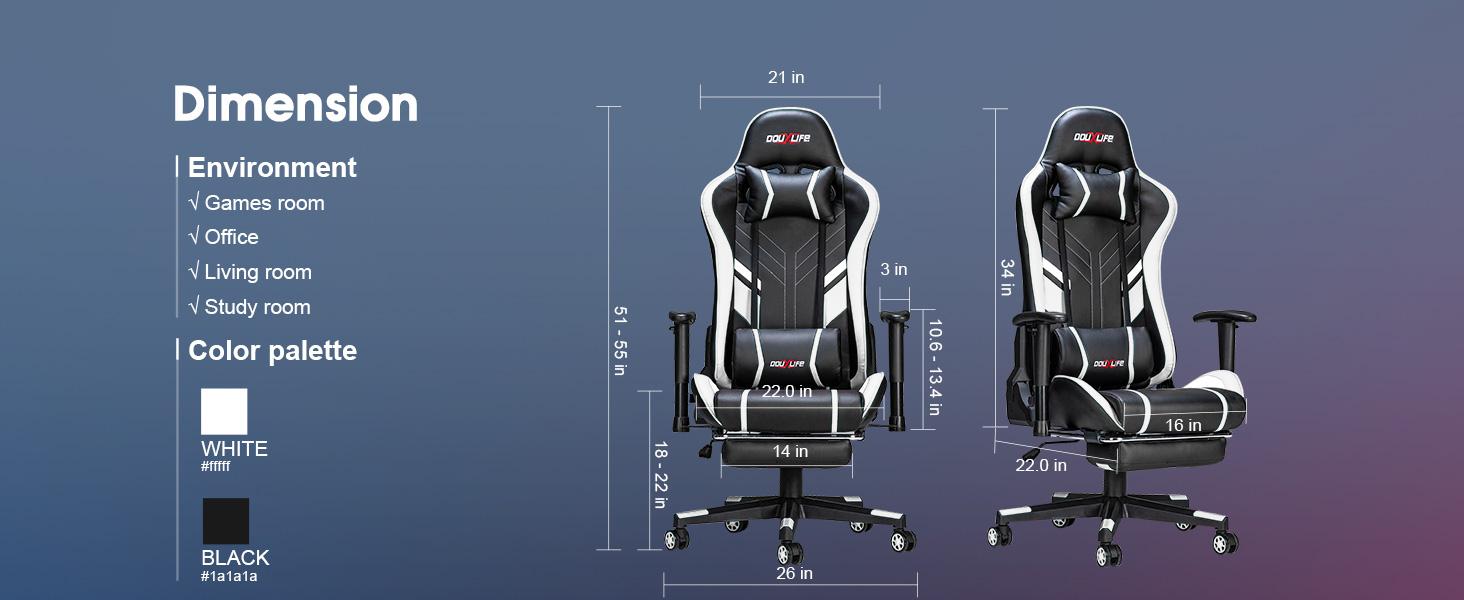
Image: Comprehensive diagram illustrating the chair's dimensions, suitable environments (games room, office, living room, study room), and color palette (white, black).

Image: A user lifting weights while seated in the chair, emphasizing its robust construction including racing-grade embroidery, full steel integrated frame, four-lever gas cylinder, explosion-proof base, silent universal wheels, and a maximum weight capacity of 400 lbs.
Warranty and Support
Douxlife is committed to providing high-quality products and excellent customer service. While specific warranty details are not provided in this manual, our customer service team is available to assist with installation guidance and promptly respond to any product-related issues.
For support, please refer to the contact information provided with your purchase or visit the official Douxlife website.