
Introduction
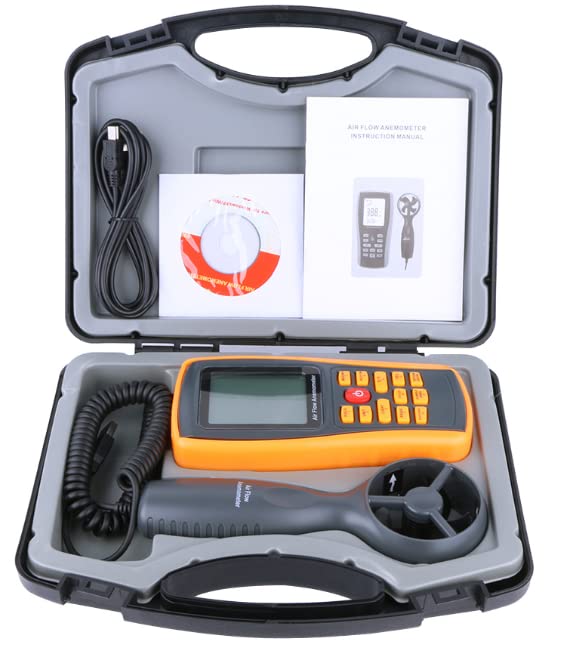
The GFAZXDS GM8902 Digital Anemometer is a precision instrument designed for measuring air velocity, air temperature, and air volume. This device is suitable for various applications requiring accurate airflow assessment. This manual provides detailed instructions for the proper setup, operation, and maintenance of your GM8902 anemometer.
Setup
1. Battery Installation
The GM8902 anemometer requires a 9V battery for operation (not included). Follow these steps to install the battery:
- Locate the battery compartment cover on the back of the main unit.
- Slide the cover downwards or unclip it to open.
- Insert a new 9V battery, ensuring correct polarity (+ and - terminals).
- Replace the battery compartment cover, ensuring it clicks securely into place.

2. Connecting the Vane Probe
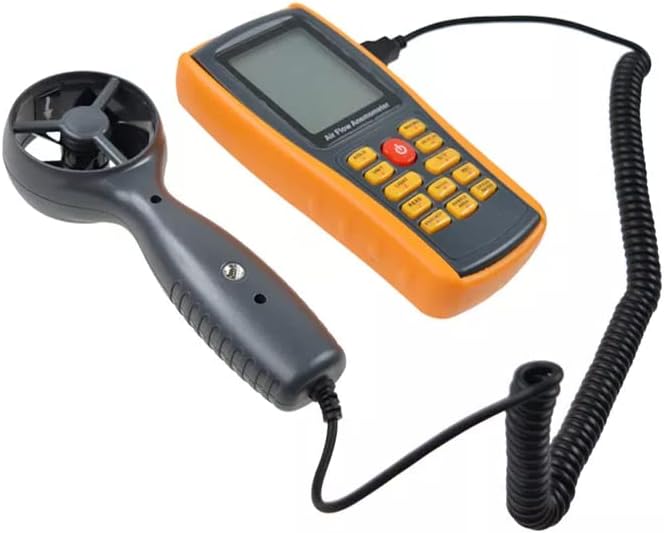
Connect the remote vane probe to the main unit:
- Locate the input port on the top or side of the main anemometer unit.
- Align the connector of the vane probe cable with the port.
- Gently push the connector into the port until it is firmly seated. Do not force the connection.
Operating Instructions
1. Power On/Off
Press the red power button (Ⓘ) located in the center of the keypad to turn the device on or off.
2. Keypad Functions
The GM8902 features a user-friendly keypad for various functions:
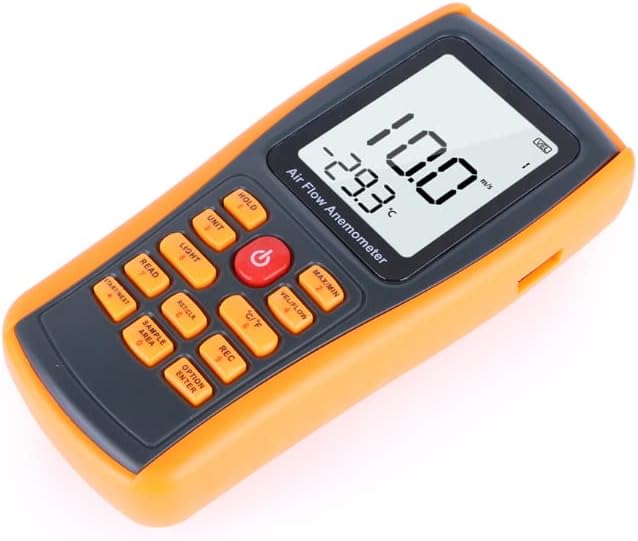
- HOLD: Freezes the current reading on the display. Press again to release.
- UNIT: Cycles through different units for air velocity (m/s, Km/h, Ft/min, Knots, mph).
- LIGHT: Activates or deactivates the LCD backlight for improved visibility in low-light conditions.
- READ: Used to read stored data.
- RST/CLR: Resets or clears data.
- START/NEXT: Initiates a function or navigates through options.
- SAMPLE AREA: Allows input or selection of the sample area for air volume calculations.
- MAX/MIN: Displays the maximum or minimum recorded air velocity/temperature.
- VEL/FLOW: Toggles between air velocity and air volume measurement modes.
- °C/°F: Switches the temperature unit between Celsius and Fahrenheit.
- REC: Initiates or stops data recording.
- OPTION ENTER: Confirms selections or enters options.
3. Measurement Functions
The GM8902 supports the following measurement capabilities:
- Air Velocity & Temperature Measurement
- Air Volume Measurement
- Max/Average/Current air velocity measurement
- C/F Temperature unit selection
- Five units of air velocity: M/s, Km/h, Ft/min, Knots, mph
- Data Hold function
- LCD backlight display
- Manual/Auto power shut off
- Beaufort Scale indication
- Wind chill indication
- Low battery indication
Maintenance
To ensure the longevity and accuracy of your GM8902 Digital Anemometer, follow these maintenance guidelines:
- Cleaning: Wipe the device and probe with a soft, dry cloth. Do not use abrasive cleaners or solvents.
- Storage: Store the anemometer in its carry box in a cool, dry place away from direct sunlight and extreme temperatures.
- Battery Replacement: Replace the 9V battery promptly when the low battery indicator appears on the display to ensure accurate readings and prevent data loss. Remove the battery if the device will not be used for an extended period to prevent leakage.
- Probe Care: Handle the vane probe carefully. Avoid dropping it or exposing it to excessive force, as this can damage the delicate impeller.
Troubleshooting
If you encounter issues with your GM8902 anemometer, refer to the following common problems and solutions:
- Device does not power on:
- Check if the 9V battery is installed correctly with the right polarity.
- Replace the battery with a new one.
- No reading or inaccurate readings:
- Ensure the vane probe is securely connected to the main unit.
- Verify that the impeller on the vane probe is spinning freely and is not obstructed.
- Check for low battery indication; replace the battery if necessary.
- Display is dim or unreadable:
- Activate the backlight using the LIGHT button.
- Replace the battery if the display remains dim.
Specifications
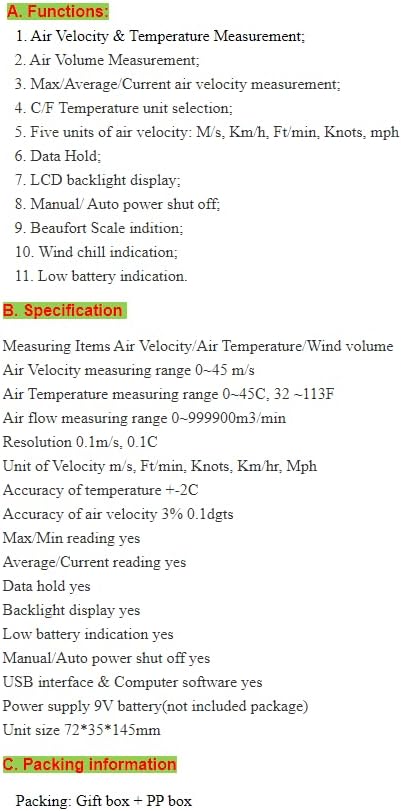
The following are the technical specifications for the GFAZXDS GM8902 Digital Anemometer:
| Feature | Specification |
|---|---|
| Measuring Items | Air Velocity, Air Temperature, Wind Volume |
| Air Velocity Measuring Range | 0 – 45 m/s |
| Air Temperature Measuring Range | 0 – 45°C (32 – 113°F) |
| Air Flow Measuring Range | 0 – 999900 m³/min |
| Resolution | 0.1 m/s, 0.1°C |
| Units of Velocity | m/s, Ft/min, Knots, Km/hr, Mph |
| Accuracy of Temperature | ±2°C |
| Accuracy of Air Velocity | 3% ±0.1 dgts |
| Max/Min Reading | Yes |
| Average/Current Reading | Yes |
| Data Hold | Yes |
| Backlight Display | Yes |
| Low Battery Indication | Yes |
| Manual/Auto Power Shut Off | Yes |
| USB Interface & Computer Software | Yes |
| Power Supply | 9V battery (not included) |
| Unit Size | 72 x 35 x 145 mm |
Warranty & Support
For warranty information or technical support, please refer to the product packaging or contact the retailer where the product was purchased. Keep your purchase receipt as proof of purchase.