
1. Introduction
This manual provides detailed instructions for the setup, operation, and maintenance of your GFAZXDS 8-Channel Wireless Outdoor Sensor. This sensor is designed to measure outdoor temperature and humidity, transmitting data wirelessly to a compatible weather station, such as models FT-0300 or FT-0810. Please read this manual thoroughly before using the device to ensure proper function and longevity.
2. Product Features
- 8-Channel Selectable: Allows for multiple sensors to be used with a single weather station, each on a distinct channel.
- Wireless Data Transmission: Sends temperature and humidity data wirelessly to a compatible weather station.
- Temperature Measurement: Provides accurate outdoor temperature readings.
- Humidity Measurement: Provides accurate outdoor humidity readings.
- Integrated Display: Features a small LCD screen to show current temperature, humidity, and selected channel directly on the sensor.
- Battery Powered: Operates on two AAA batteries (not included).
- Durable Design: Suitable for outdoor use.
3. Package Contents
Please check that all items are present and in good condition:
- GFAZXDS Wireless Outdoor Sensor (1 unit)
- Instruction Manual (this document)
Note: 2x AAA batteries are required for operation and are not included in the package.
4. Setup
4.1 Battery Installation
- Locate the battery compartment cover on the back of the sensor.
- Carefully remove the battery compartment cover.
- Insert two (2) AAA batteries, ensuring correct polarity (+ and -).
- Replace the battery compartment cover securely.
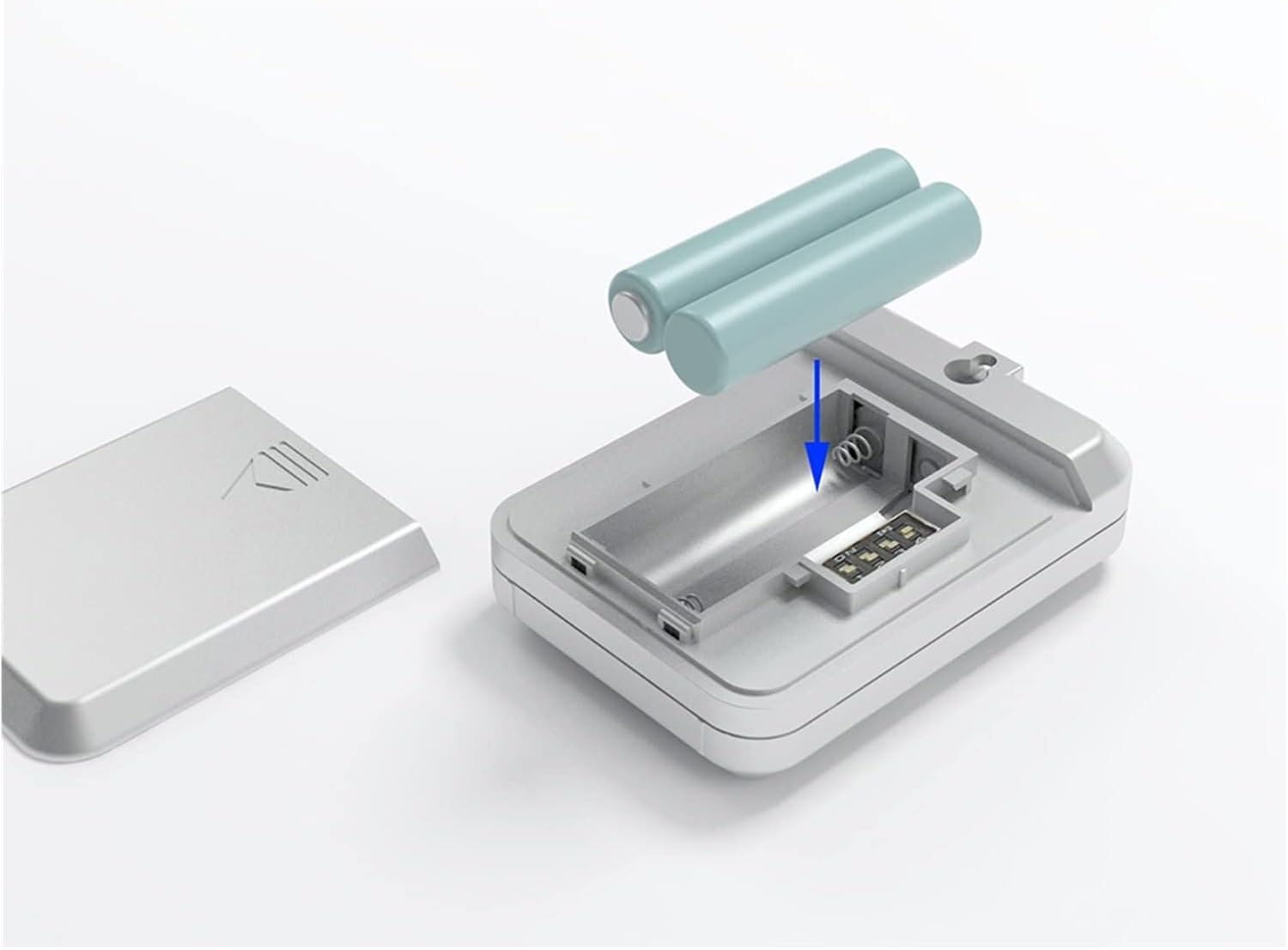
Figure 4.1: Battery installation in the outdoor sensor. The image shows the back of the sensor with the battery cover removed, and two AAA batteries being inserted into their slots, indicating correct polarity.
4.2 Channel and Temperature Unit Selection
The sensor features DIP switches on the back for selecting the transmission channel (1-8) and the temperature unit (°C or °F).
- After installing batteries, locate the DIP switches on the back of the sensor.
- Use a small pointed object (e.g., a pen tip) to adjust the switches.
- Channel Selection: Adjust switches labeled 'CH1' through 'CH8' to select the desired channel. Ensure this channel matches the channel selected on your main weather station unit for proper communication. The sensor supports up to 8 distinct channels.
- Temperature Unit: Adjust the switch labeled '°C / °F' to select your preferred temperature unit.

Figure 4.2: Rear view of the sensor, highlighting the DIP switches for channel selection (CH1-CH8) and temperature unit (°C/°F) settings.
4.3 Pairing with Weather Station
Once the batteries are installed and the channel/unit are set, the sensor will begin transmitting data. Refer to your main weather station's instruction manual for specific steps on how to pair it with an external sensor. Generally, this involves:
- Ensuring the weather station is powered on.
- Initiating a sensor search or pairing mode on the weather station.
- Confirming the selected channel on both the sensor and the weather station match.
The sensor's front display will show the current temperature, humidity, and the selected channel once powered on.

Figure 4.3: Front display of the sensor showing temperature (23.5°C), humidity (56%RH), and the active channel (CH).
5. Operating the Sensor
Once successfully paired with your weather station, the sensor will continuously monitor and transmit outdoor temperature and humidity data. The data will be displayed on both the sensor's integrated LCD and your main weather station unit.
- Placement: For accurate readings, place the sensor in a shaded area, away from direct sunlight and heat sources. Ensure it is protected from heavy rain and snow, but still has good air circulation.
- Range: The wireless transmission range can be affected by obstacles such as walls, trees, and electronic interference. Position the sensor within the recommended range of your weather station.
- Data Refresh: The sensor transmits data at regular intervals. Consult your weather station manual for the specific data refresh rate.
6. Maintenance
- Cleaning: Wipe the sensor's exterior with a soft, damp cloth. Do not use abrasive cleaners or solvents.
- Battery Replacement: Replace batteries when the low battery indicator appears on the sensor's display or the weather station. Always replace both batteries at the same time with new AAA alkaline batteries.
- Environmental Protection: While designed for outdoor use, extreme weather conditions (e.g., prolonged heavy rain, direct hail, extreme temperatures outside operating range) may affect performance or damage the unit. Consider relocating the sensor during severe weather.
7. Troubleshooting
| Problem | Possible Cause | Solution |
|---|---|---|
| No readings on weather station. |
|
|
| Inaccurate temperature/humidity readings. |
|
|
| Sensor display is blank. |
|
|
8. Specifications
| Feature | Detail |
|---|---|
| Product Type | Wireless Outdoor Temperature and Humidity Sensor |
| Compatibility | Compatible with FT-0300/0810 Weather Stations |
| Channels | 8 selectable channels |
| Power Supply | 2 x AAA 1.5V Batteries (not included) |
| Measurements | Temperature, Relative Humidity |
| Temperature Units | °C / °F selectable |
| Manufacturer | GFAZXDS |
| ASIN | B0F4CNP2Z8 |
9. Warranty and Support
Information regarding product warranty and customer support was not provided with this product. For any inquiries or support needs, please refer to the retailer or the manufacturer's official website if available.