
Introduction
This manual provides essential information for the safe and effective use of your Husky 500-Lumens Flip Light, Model K40517. Please read these instructions thoroughly before operating the device and retain them for future reference.
Product Overview
Key Features
- Versatile Lighting: Offers 500, 250, and 100 Lumens work light modes, a 100 Lumens torch light, and an SOS function.
- Adjustable Design: The light panel features 180° left and right adjustment and the entire light can swing 360° for optimal positioning.
- Multiple Mounting Options: Equipped with a strong magnetic base for attachment to metal surfaces and a built-in hook for hanging.
- Rechargeable Battery: Integrated 2000mAh capacity battery with a convenient Type-C charging port.
- Durable Construction: Made from aluminum with a painted finish.
Package Contents
- Husky 500-Lumens Flip Light (K40517)
- Charging Cable (Type-C)
- Clip
Component Identification
Familiarize yourself with the various parts of your Husky Flip Light:

Figure 1: The Husky Flip Light in its compact, folded position. This view shows the main body, the foldable light panel, and the power button.
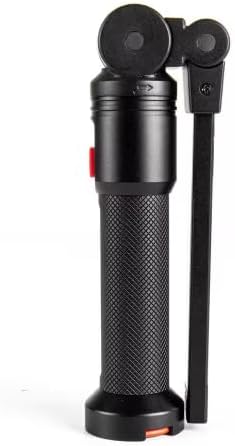
Figure 2: Side view of the light, highlighting the magnetic base at the bottom and the integrated hook for hanging.

Figure 3: The light panel extended horizontally, demonstrating its 180° adjustable range from the main body.

Figure 4: The light panel extended and angled, showcasing the flexibility for directing illumination and the top spotlight feature.
Setup
Charging the Device
- Locate the Type-C charging port on the device.
- Connect the provided Type-C charging cable to the light and plug the other end into a compatible USB power source (e.g., wall adapter, computer USB port).
- The charging indicator light will illuminate to show the charging status.
- Allow the device to charge fully before first use. A full charge ensures optimal battery performance.
Operating Instructions
Power On/Off
Press the power button once to turn the light on. Press and hold the power button for approximately 2 seconds to turn the light off from any mode.
Light Modes
With the light on, press the power button repeatedly to cycle through the available light modes:
- 500 Lumens: High brightness work light.
- 250 Lumens: Medium brightness work light.
- 100 Lumens: Low brightness work light.
- Torch Light (100 Lumens): Activates the top spotlight.
- SOS Mode: Flashing signal for emergencies.
The light will cycle back to 500 Lumens after SOS mode.
Adjusting the Light Panel
- Panel Rotation: The main light panel can be rotated 180° left or right relative to the handle. This allows for directional lighting.
- Body Swing: The entire light head, including the panel, can swing 360° around the base, providing comprehensive area illumination.
Mounting Options
- Magnetic Base: The strong magnet located at the base allows the light to be securely attached to any ferrous metal surface, such as car hoods, metal beams, or toolboxes.
- Integrated Hook: Extend the hook from the base of the light to hang it from ropes, tent poles, or other suitable fixtures for overhead lighting.
Maintenance
Cleaning
To clean the light, wipe it with a soft, damp cloth. Do not use abrasive cleaners or solvents, as these may damage the finish or internal components. Ensure the charging port cover is closed before cleaning to prevent moisture ingress.
Storage
Store the Husky Flip Light in a cool, dry place away from direct sunlight and extreme temperatures. If storing for extended periods, charge the battery periodically (e.g., every 3-6 months) to maintain battery health.
Troubleshooting
| Problem | Possible Cause | Solution |
|---|---|---|
| Light does not turn on. | Battery is depleted. | Charge the device using the provided Type-C cable. |
| Light output is dim. | Low battery charge. | Recharge the battery fully. |
| Light does not charge. | Charging cable or adapter is faulty; charging port is obstructed. | Try a different Type-C cable and USB adapter. Ensure the charging port is clean and free of debris. |
Specifications
| Feature | Detail |
|---|---|
| Model Number | K40517 |
| Brand | Husky |
| Brightness | Up to 500 Lumens |
| Light Modes | 500 Lumens, 250 Lumens, 100 Lumens, Torch (100 Lumens), SOS |
| Battery Capacity | 2000mAh (Built-in) |
| Charging Port | Type-C |
| Voltage | 5 Volts |
| Material | Aluminum |
| Color | Black |
| Product Dimensions | 3"L x 2.21"W x 3"H |
| Beam Angle (Torch) | 30 Degrees |
| Special Features | 360° swing, 180° foldable light panel, Magnetic base, Integrated hook |
| UPC | 820909914006 |
Warranty and Support
For warranty information or technical support, please refer to the documentation included with your purchase or contact Husky customer service directly. Keep your proof of purchase for warranty claims.


