
1. Introduction
Thank you for purchasing the Team Sports America NFL Dallas Cowboys Scoreboard Digital Wall Clock with Bluetooth Speaker. This manual provides essential instructions for the safe and efficient use of your new product. Please read it thoroughly before installation and operation, and retain it for future reference.
This digital wall clock is designed to resemble a classic football game day ticket stub, featuring official NFL Dallas Cowboys logos and colors. It displays time, date, and indoor temperature, and includes a built-in Bluetooth speaker for audio streaming.
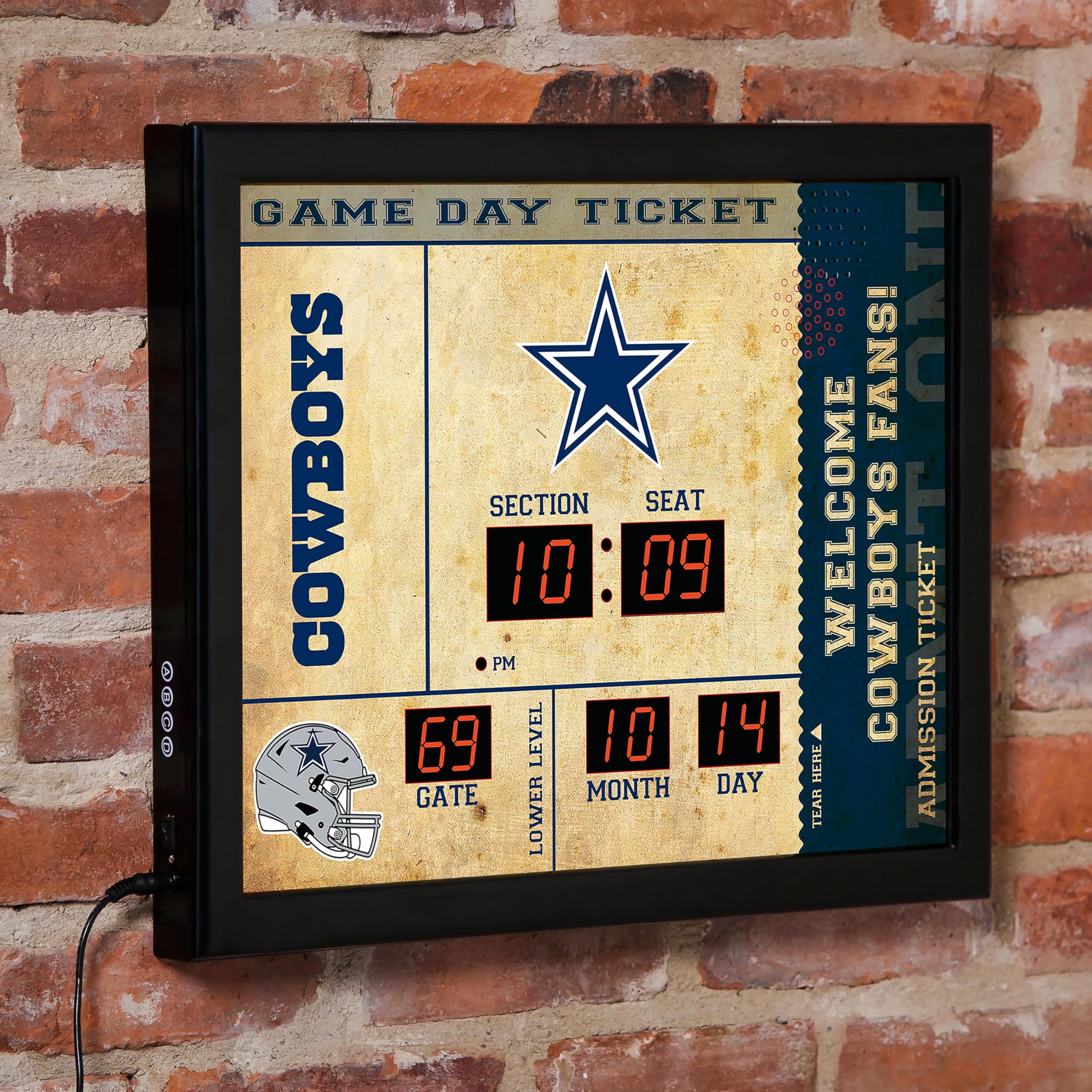
Image 1.1: Front view of the NFL Dallas Cowboys Scoreboard Digital Wall Clock.
2. Safety Information
- Power Source: Use only the provided 5-foot power cord and adapter. Ensure the power outlet matches the voltage requirements specified on the adapter.
- Indoor Use Only: This product is designed for indoor use. Do not expose it to water, moisture, or extreme temperatures.
- Placement: Mount the clock securely on a wall using the integrated keyholes or place it on a stable, flat surface. Avoid placing it near heat sources or in direct sunlight.
- Cleaning: Disconnect from power before cleaning. Use a soft, dry cloth. Do not use liquid cleaners or aerosol sprays.
- Children: Keep out of reach of children. The power cord can be a strangulation hazard.
- Servicing: Do not attempt to open or repair the unit yourself. Refer all servicing to qualified personnel.
3. Package Contents
Verify that all items are present in your package:
- 1 x NFL Dallas Cowboys Scoreboard Digital Wall Clock
- 1 x Power Adapter with 5-foot cord
- 1 x Instruction Manual (this document)
4. Setup
4.1 Power Connection
- Locate the DC power input port on the back of the clock.
- Connect the provided power adapter to the DC input port.
- Plug the power adapter into a standard electrical outlet.
- Flip the red power switch on the back of the clock to the "ON" position. The digital display will illuminate.
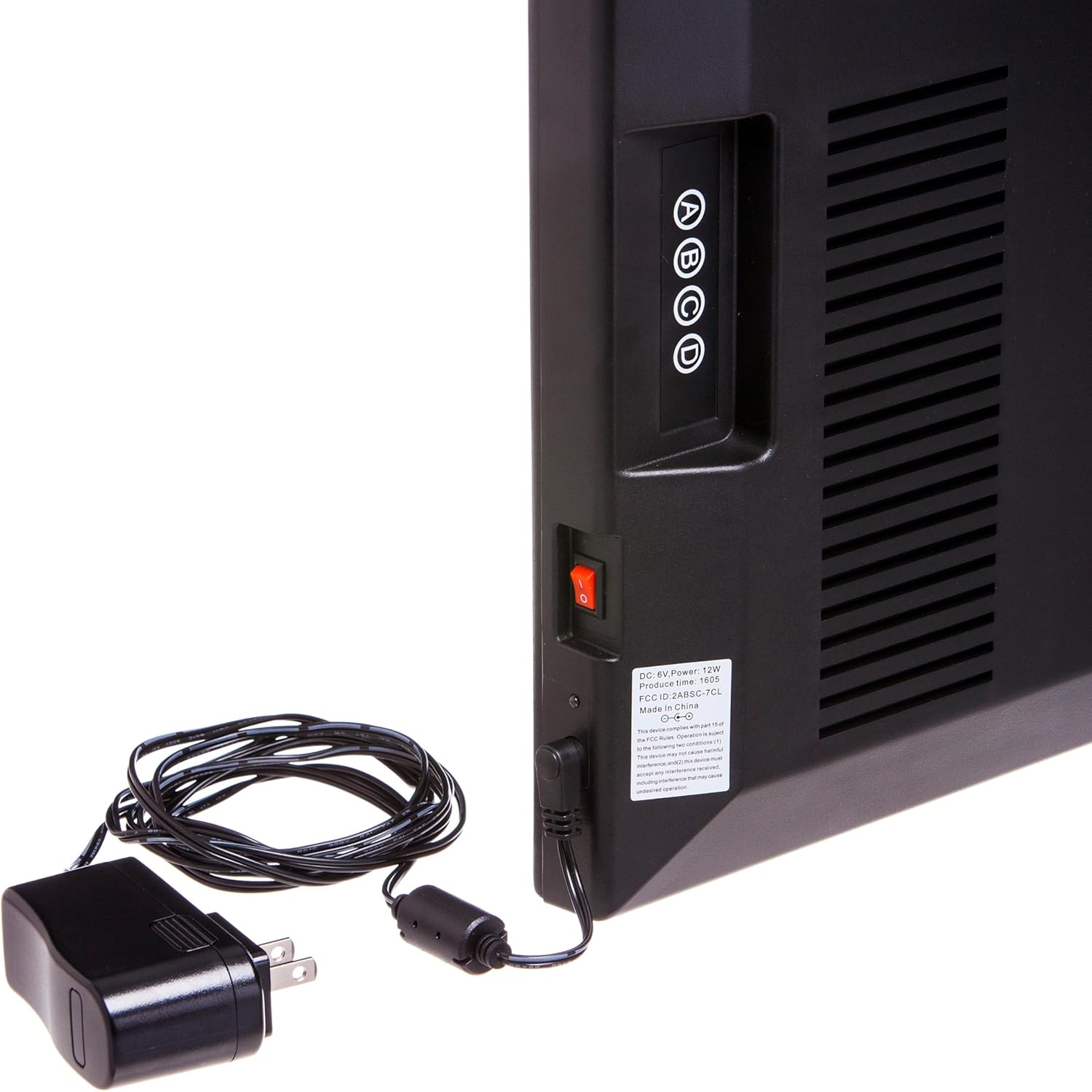
Image 4.1: Power input and control buttons on the back of the clock.
4.2 Mounting the Clock
The clock can be wall-mounted or placed on a flat surface.
- Wall Mounting: The clock features keyholes on the back for secure wall hanging. Use appropriate wall anchors and screws (not included) suitable for your wall type. Ensure the clock is level and securely fastened.
- Surface Placement: Place the clock on a stable, flat surface such as a desk or shelf. Ensure it is not prone to falling.

Image 4.2: Keyholes for wall mounting on the back of the clock.
5. Operating Instructions
5.1 Setting Time and Date
The clock features four control buttons (A, B, C, D) on the back for setting the time and date. Refer to Image 4.1 for button locations.
- Enter Setup Mode: Press and hold button 'A' for 3 seconds to enter time setting mode. The hour digits will flash.
- Set Hour: Use button 'B' to increase the hour and button 'C' to decrease the hour. Press 'A' to confirm and move to minute setting.
- Set Minute: Use button 'B' to increase the minute and button 'C' to decrease the minute. Press 'A' to confirm and move to year setting.
- Set Year: Use button 'B' to increase the year and button 'C' to decrease the year. Press 'A' to confirm and move to month setting.
- Set Month: Use button 'B' to increase the month and button 'C' to decrease the month. Press 'A' to confirm and move to day setting.
- Set Day: Use button 'B' to increase the day and button 'C' to decrease the day. Press 'A' to confirm and exit setup mode.
- 12/24 Hour Format: Briefly press button 'D' to toggle between 12-hour and 24-hour time formats.
The indoor temperature is displayed automatically and does not require manual setting.
5.2 Bluetooth Speaker Operation
The clock includes a built-in Bluetooth speaker. The speaker grille is located on the right side of the clock face (refer to Image 1.1).
- Activate Bluetooth: Ensure the clock is powered on. The Bluetooth function is automatically active.
- Pairing: On your mobile device (smartphone, tablet, computer), enable Bluetooth and search for available devices. The clock will appear as "Scoreboard Clock" or similar. Select it to pair.
- Audio Playback: Once paired, audio played on your device will stream through the clock's speaker.
- Volume Control: Adjust the volume directly from your paired mobile device.
- Disconnect: To disconnect, turn off Bluetooth on your mobile device or select "Forget Device" in your Bluetooth settings.
For a visual guide on the product's features, including the Bluetooth speaker, please watch the official product video below:
Video 5.1: Overview of the Scoreboard Digital Wall Clock features, including time display and Bluetooth speaker functionality.
6. Maintenance
- Cleaning: To clean the clock, first unplug it from the power outlet. Use a soft, dry, lint-free cloth to wipe the surface. Do not use abrasive cleaners, solvents, or chemical sprays, as these can damage the finish or electronic components.
- Dust Removal: Regularly dust the clock, especially around the speaker grilles and display, to prevent dust buildup that could affect performance.
- Storage: If storing the clock for an extended period, disconnect it from power and store it in a cool, dry place away from direct sunlight and extreme temperatures.
7. Troubleshooting
| Problem | Possible Cause | Solution |
|---|---|---|
| Clock does not power on. | No power, power switch off, faulty adapter. | Ensure power adapter is securely plugged into both the clock and a working outlet. Check if the red power switch on the back is in the "ON" position. Try a different outlet. |
| Digital display is dim or not visible. | Power issue, display malfunction. | Verify power connection. If the issue persists, contact customer support. |
| Bluetooth speaker not pairing. | Bluetooth not enabled on device, clock not in pairing mode, device too far. | Ensure Bluetooth is enabled on your mobile device. Make sure the clock is powered on. Move your device closer to the clock. Try restarting both the clock and your mobile device. |
| No sound from Bluetooth speaker. | Volume too low, device not paired, incorrect audio output. | Increase volume on your mobile device. Confirm the device is successfully paired with the clock. Check your device's audio output settings to ensure "Scoreboard Clock" is selected. |
| Incorrect time or date displayed. | Time/date not set correctly. | Follow the instructions in Section 5.1 to reset the time and date. |
8. Specifications
- Model: 7CL3808B
- Brand: Team Sports America
- Product Dimensions: 19.75" W x 1.75" D x 15.75" H (approximately)
- Display Type: LED
- Power Source: Electric (Corded)
- Connectivity: Bluetooth
- Material: Plastic, Medium Density Fiberboard (MDF)
- Indoor/Outdoor Usage: Indoor Only
- Manufacturer: Evergreen Enterprises
- UPC: 801946523604
9. Warranty and Support
Team Sports America stands behind the quality of its products. For any questions or concerns regarding your purchase, please contact our customer support directly. While specific warranty details are not provided in this manual, we are committed to ensuring your satisfaction.
Contact Information: Please refer to the packaging or the official Team Sports America website for the most current customer support contact details.
Return Policy: This product typically has a 30-day return/replacement policy. Please check with your retailer for specific return procedures.