
1. Product Overview
The Team Sports America NCAA Ohio State University Scoreboard Digital Wall Clock is designed to display time, date, and indoor temperature in a unique scoreboard style. This unit also features a built-in Bluetooth speaker for audio streaming. It is constructed with a durable engineered wood frame and is suitable for indoor use.
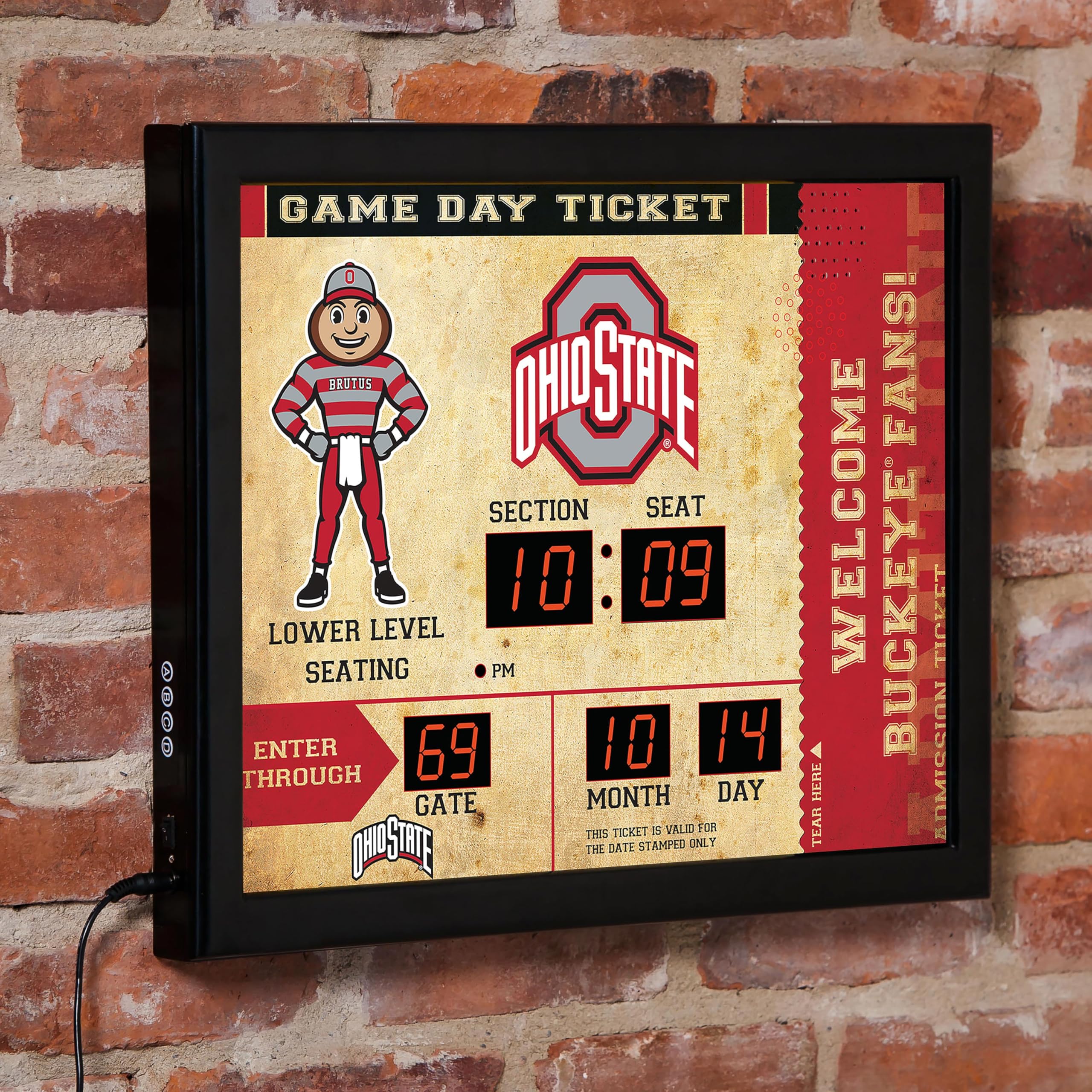
Image 1: Front view of the Ohio State University Scoreboard Digital Wall Clock, displaying time, date, and temperature.
2. Setup Instructions
2.1 Unpacking
Carefully remove the clock from its packaging. Inspect the unit for any signs of damage. Retain packaging for future transport or storage.
2.2 Power Connection
Connect the provided 5-foot power cord to the DC 5V power input port located on the back of the clock. Plug the other end of the power cord into a standard electrical outlet. The clock will power on automatically.
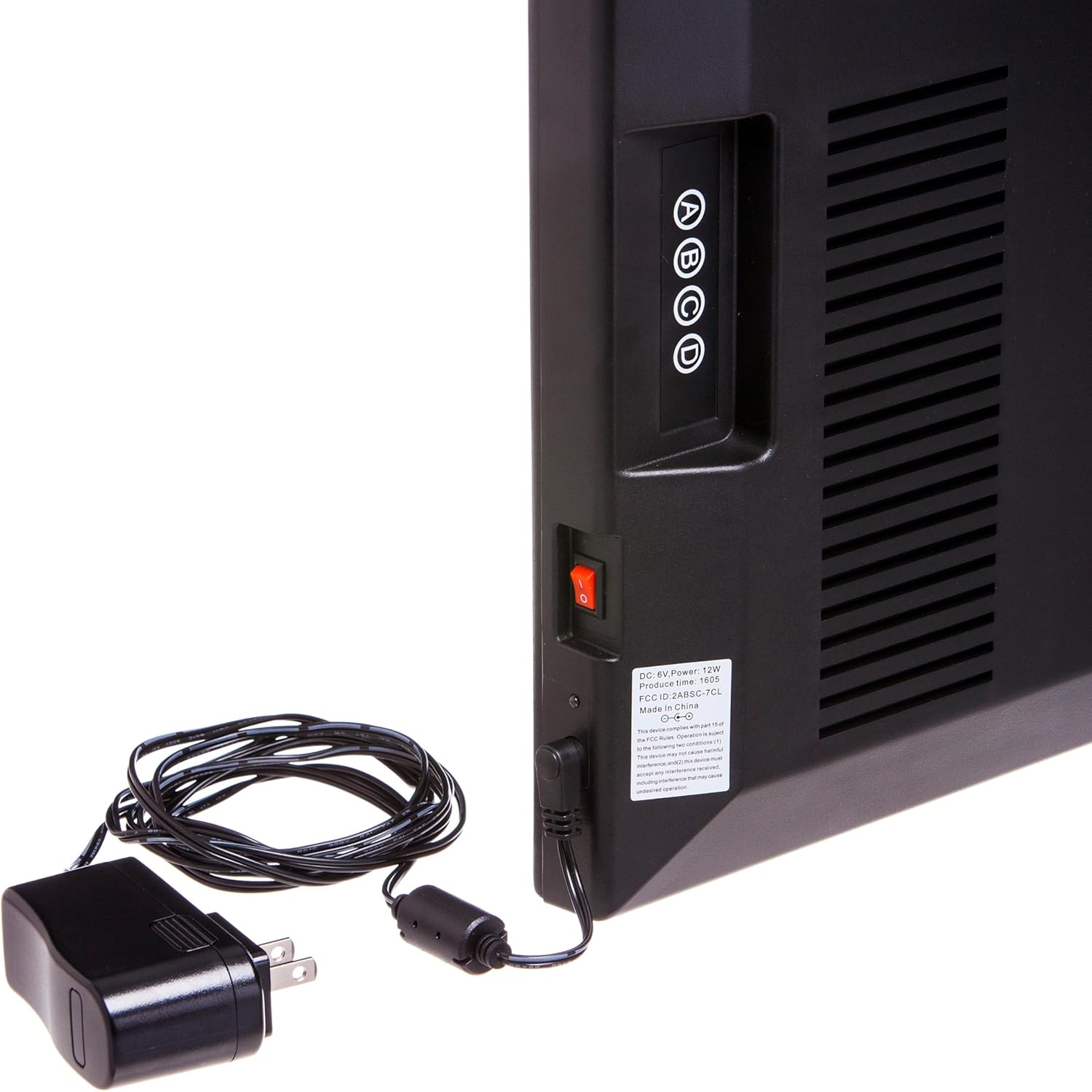
Image 2: Rear view of the clock, highlighting the power input and control buttons (A, B, C, D).
2.3 Wall Mounting
The clock features keyholes on the back for secure wall mounting. Use appropriate hardware (not included) for your wall type. Ensure the clock is level and securely fastened to prevent accidental falls.

Image 3: Rear view of the clock, showing the keyholes for wall mounting.
3. Operating Instructions
The clock's settings are adjusted using the four buttons (A, B, C, D) located on the side/back of the unit (refer to Image 2).
3.1 Setting Time and Date
- Press button A to enter setting mode.
- Use buttons B and C to adjust the values (e.g., hour, minute, month, day).
- Press button A again to confirm a setting and move to the next adjustable parameter.
- Button D may be used to switch between 12-hour and 24-hour time formats.

Image 4: Close-up of the digital display, illustrating the time, date, and ambient temperature readouts.
3.2 Temperature Display
The clock displays the indoor ambient temperature. This feature is automatic and does not require manual setting. The temperature is displayed in Fahrenheit.
4. Bluetooth Speaker Operation
The integrated Bluetooth speaker allows you to stream audio wirelessly from your compatible devices.
4.1 Pairing Your Device
- Ensure the clock is powered on.
- Activate Bluetooth on your mobile device (smartphone, tablet, computer).
- Search for available Bluetooth devices. The clock should appear as a discoverable device (e.g., "Scoreboard Clock").
- Select the clock from the list to initiate pairing. Once paired, the clock will emit an audible confirmation.
4.2 Audio Playback
After successful pairing, you can play audio from your device, and it will stream through the clock's speakers. Volume control is managed directly from your paired device.
Video 1: Official product video demonstrating the features and use of the digital wall clock with Bluetooth speaker.
5. Maintenance
To ensure the longevity and optimal performance of your digital wall clock, follow these maintenance guidelines:
- Cleaning: Use a soft, dry cloth to gently wipe the display and frame. Avoid abrasive cleaners, solvents, or excessive moisture, as these can damage the finish or electronic components.
- Placement: Position the clock in a stable indoor environment, away from direct sunlight, extreme temperatures, and high humidity.
- Power: Disconnect the power cord from the outlet before cleaning or if the unit will be unused for an extended period.
6. Troubleshooting
If you encounter issues with your digital wall clock, refer to the following common problems and solutions:
- Clock Not Powering On:
Ensure the power cord is securely connected to both the clock and a working electrical outlet. Test the outlet with another device to confirm it has power. - Incorrect Time/Date Display:
Refer to Section 3.1 for instructions on how to manually set the time and date using the control buttons on the back of the clock. - Bluetooth Speaker Not Connecting:
Ensure Bluetooth is enabled on your device and the clock is within range. Try restarting both the clock (by unplugging and replugging) and your device's Bluetooth function. Ensure no other device is currently paired with the clock. - Display Issues (e.g., missing segments):
Unplug the clock from the power source for a few minutes, then plug it back in. If the issue persists, contact customer support. - Frame Instability:
The clock features a durable engineered wood frame. Ensure the clock is mounted correctly using appropriate wall hardware and that all components are securely in place. Avoid excessive force or impact.
If these steps do not resolve the issue, please contact customer support for further assistance.
7. Product Specifications
| Brand | Team Sports America |
| Model Number | 7CL973B |
| Product Dimensions | 19.75"W x 15.75"H |
| Power Source | Electric (Corded) |
| Display Type | LED |
| Frame Material | Engineered Wood |
| Connectivity Technology | Bluetooth (for speaker) |
| Indoor/Outdoor Usage | Indoor |
| UPC | 801946524496 |
| GTIN | 801946524496 |
8. Warranty and Support
Team Sports America stands behind the quality of all its products. If you have any questions or concerns about your purchase, including warranty claims or technical support, please reach out to us directly. Our customer service team is available to assist you.
For contact information, please refer to the seller's details on the product purchase page or visit the official Team Sports America website.