
1. Introduction
This manual provides detailed instructions for the safe and effective use of your Generic Remote Control, designed specifically for GPS Fishing Bait Boats models D19 and D20. Please read this manual thoroughly before operating the device to ensure optimal performance and longevity.
2. Safety Information
- Keep the remote control away from water and moisture to prevent damage, unless specifically designed for water exposure (this remote is not).
- Do not attempt to disassemble or modify the remote control. This can void the warranty and cause malfunction.
- Ensure batteries are inserted correctly according to polarity markings.
- Remove batteries if the device will not be used for an extended period to prevent leakage.
- Keep out of reach of children to prevent accidental ingestion of small parts or batteries.
- Operate the bait boat and remote control responsibly, respecting local regulations and other water users.
3. Product Overview
The Generic Remote Control is designed for intuitive operation of your D19 or D20 GPS fishing bait boat. It features an LCD screen for real-time data display and various buttons and joysticks for precise control.

Figure 3.1: Remote Control Components. This diagram illustrates the various buttons, joysticks, and display elements of the remote control, including the power switch, motor controls, bait release buttons, and LCD screen indicators.
Key components include:
- Left Roller Wheel: Controls the left motor.
- Right Roller Wheel: Controls the right motor.
- Button A / Button B: Additional control functions (specific to boat model).
- Built-in Antenna: For signal transmission.
- LCD Screen: Displays critical information such as boat distance, direction, positioning points, battery life (remote and boat), signal strength, and light status.
- Buttons 1 & 2: Typically used for releasing bait from containers (Button 1 for 1/3 bait container, Button 2 for 2/4 bait container).
- Button 3 (Return button): Initiates the automatic return function.
- Button 4: Additional function button.
- Power Switch: Toggles the remote control on and off.
- Return Spot / Positioning Spot: Buttons related to GPS functions.
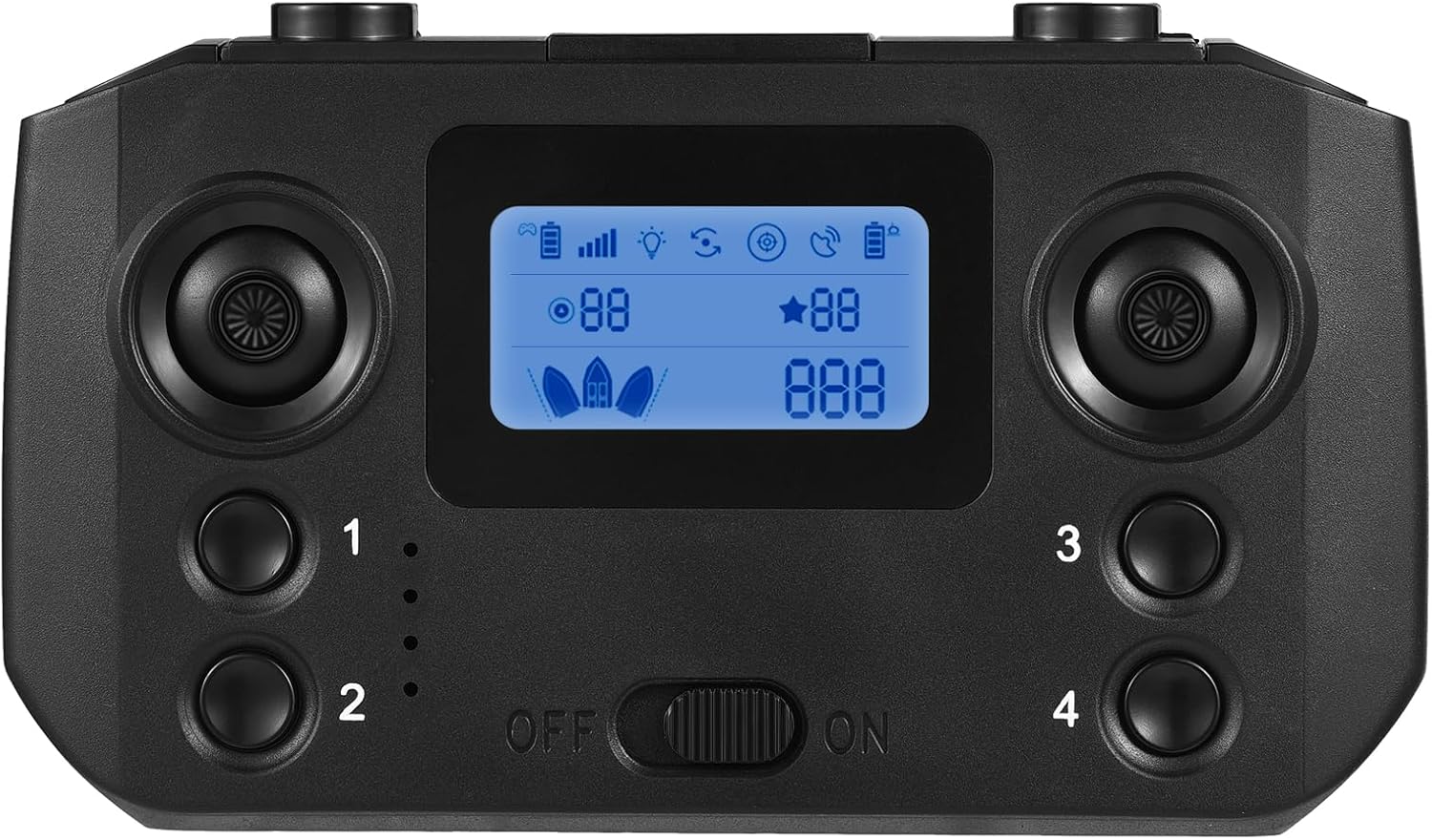
Figure 3.2: Remote Control Front View. This image shows the front of the remote control, highlighting the LCD screen and primary control buttons.
4. Setup
4.1. Battery Installation
The remote control requires three (3) AA batteries (not included) for operation.
- Locate the battery compartment cover on the back of the remote control.
- Slide or unclip the cover to open the compartment.
- Insert three AA batteries, ensuring correct polarity (+ and -) as indicated inside the compartment.
- Replace the battery compartment cover securely.
4.2. Initial Pairing (if applicable)
Typically, the remote control is pre-paired with compatible D19/D20 GPS fishing bait boats. If pairing is required or connection issues occur, refer to your specific bait boat's manual for detailed pairing instructions. Ensure both the remote control and the bait boat are powered on and within range during the pairing process.
5. Operating Instructions
5.1. Powering On/Off
- To power on: Slide the "ON/OFF" switch to the "ON" position. The LCD screen will illuminate.
- To power off: Slide the "ON/OFF" switch to the "OFF" position. The LCD screen will turn off.
5.2. Understanding the LCD Screen
The LCD screen provides real-time feedback on the bait boat's status and environment:
- Signal Strength: Indicates the strength of the connection between the remote and the boat.
- Remote Controller Battery Life: Shows the remaining battery power of the remote control.
- Boat Battery Life: Displays the remaining battery power of the connected bait boat.
- Boat Navigation Light: Indicates the status of the boat's navigation lights.
- GPS Signal: Shows the strength or status of the GPS signal for the boat.
- Distance: Displays the current distance of the boat from the remote control.
- Boat Direction: Indicates the boat's current heading.
- Positioning Points: Shows saved or active GPS positioning points.
- Original Point Reminder: Indicates the boat's starting point.
5.3. Controlling the Bait Boat
The remote control offers precise navigation and bait release functions:
- Forward/Backward: Use both Left and Right Roller Wheels simultaneously to move the boat forward or backward.
- Turning: Use the Left Roller Wheel to control the left motor and the Right Roller Wheel to control the right motor independently for steering.
- Fixed-speed Navigation: The remote supports fixed-speed navigation, allowing the boat to maintain a set speed. Refer to your bait boat's manual for activation details.
- Bait Release:
- Press Button 1 to release bait from the 1/3 bait container.
- Press Button 2 to release bait from the 2/4 bait container.
- Automatic Return: Press Button 3 to activate the automatic return function. The boat will navigate back to its original starting point.
- Signal Range: The remote control provides a strong signal with a range of up to 500 meters. Ensure you stay within this range for reliable operation.

Figure 5.1: Remote Control in Use. This image demonstrates the remote control being used to operate a bait boat on the water, illustrating its long-distance capabilities.

Figure 5.2: Remote Control and Bait Boat. This image shows the remote control alongside a GPS fishing bait boat, clarifying that the bait boat is not included with the remote control.
6. Maintenance
- Cleaning: Wipe the remote control with a soft, dry cloth. Do not use harsh chemicals or abrasive cleaners.
- Storage: Store the remote control in a cool, dry place away from direct sunlight and extreme temperatures.
- Battery Care: Remove batteries if the remote control will not be used for an extended period (e.g., more than a month) to prevent potential battery leakage and damage.
7. Troubleshooting
| Problem | Possible Cause | Solution |
|---|---|---|
| Remote control does not power on. | Dead or incorrectly inserted batteries. | Check battery polarity. Replace with fresh AA batteries. |
| Boat does not respond to remote. | Out of range, low boat battery, or pairing issue. | Move closer to the boat. Check boat's battery level. Re-pair the remote and boat if necessary (refer to boat manual). |
| LCD screen is dim or flickering. | Low remote control battery. | Replace remote control batteries. |
| Poor signal strength displayed. | Obstructions, distance, or interference. | Reduce distance to the boat. Avoid operating near large metal objects or strong electromagnetic fields. |
8. Specifications
- Material: Plastic
- Dimensions: 15cm * 8.7cm * 4.4cm (5.9in * 3.4in * 1.7in)
- Weight: 163g (5.8oz)
- Power Source: 3 x AA batteries (not included)
- Signal Range: Up to 500 meters
- Compatibility: D19/D20 GPS Fishing Bait Boats

Figure 8.1: Remote Control Dimensions. This image provides a visual representation of the remote control's physical dimensions.
9. Warranty and Support
Specific warranty information for this Generic product is not provided in the product details. For any support inquiries or warranty claims, please contact the seller or manufacturer directly through your purchase platform. Keep your proof of purchase for any potential claims.