
F2I3K0Z1 QM3G-70FH-24MT-485P
F2I3K0Z1 HMI PLC All-in-One Touch Screen User Manual
Model: QM3G-70FH-24MT-485P
Product Overview
The F2I3K0Z1 HMI PLC All-in-One Touch Screen is an integrated industrial control solution combining a Human Machine Interface (HMI) and a Programmable Logic Controller (PLC) into a single compact unit. This device is designed for various industrial automation applications, offering a user-friendly interface for monitoring and control, alongside robust PLC capabilities for process automation.
This manual provides essential information for the setup, operation, maintenance, and troubleshooting of your F2I3K0Z1 HMI PLC unit.
Setup and Installation
Proper installation is crucial for the reliable operation of the HMI PLC unit. Ensure all safety precautions are followed during installation.
Physical Dimensions and Mounting
The unit has a dimension of 200mm x 146mm x 36mm. For panel mounting, a cutout size of 192mm x 138mm is required. Ensure adequate ventilation around the unit.

Figure 1: Rear view of the HMI PLC unit, displaying the model number, various communication ports (LAN, USB, COM), and I/O terminals. This view is essential for understanding wiring and connectivity.
Power Connection
The device requires a 24VDC power input. Connect the power supply to the designated terminals on the rear of the unit. Observe correct polarity. The typical power consumption is 6-7W.
Communication Ports
The unit is equipped with multiple communication interfaces:
- Type-C HMI Download Port: Used for downloading HMI programs. This port also supports USB penetrating function for PLC program download.
- RS232 Port: A standard serial communication port.
- RS485 Port: An additional serial communication port, commonly used for multi-drop networks in industrial environments.
I/O Wiring (Model QM3G-70FH-24MT-485P)
This specific model includes 12 Digital Inputs (DI) and 12 Digital Outputs (DO) with transistor outputs.
- Input (DI): Passive NPN type. The public terminal is isolated.
- Transistor Output (DO): Low level NPN type. The COM terminal should be connected to the negative supply.
- Relay Output (MR models only): Normally open dry contact. (Note: This model is MT, so relay outputs are not applicable.)
For detailed wiring diagrams and safety guidelines, refer to the "Coolmay QM3G-FH All-in-One User Manual" and "Coolmay CX3G/FX3GC PLC Programming Manual".
Operating Instructions
The F2I3K0Z1 HMI PLC provides an intuitive touch screen interface for controlling and monitoring industrial processes.
HMI Operation
The 7.0" TFT resistive touch screen features a resolution of 800x480 pixels and supports 60K colors. It can also support portrait display mode.
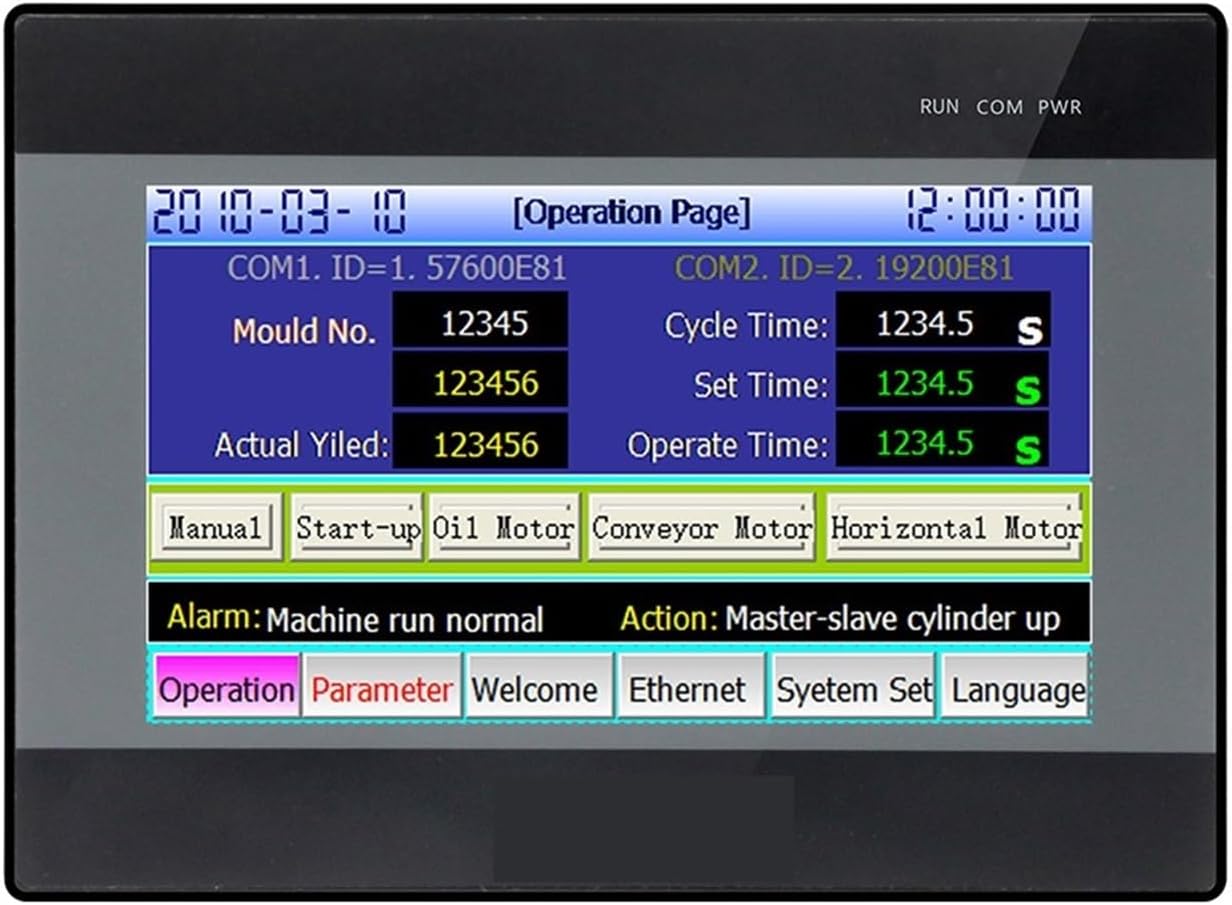
Figure 2: Front view of the HMI PLC unit showing an example "Operation Page" with English labels. This interface allows users to input data (e.g., Mould No., Cycle Time), view real-time status (e.g., Actual Yield, Alarm messages), and control operations via touch buttons (e.g., Manual, Start-up Oil Motor).
Navigate through the HMI screens by touching the corresponding buttons or input fields. The "Operation Page" typically provides access to manual controls, parameter settings, and system status. Refer to the "Coolmay TPHMI User Manual" for detailed HMI software operation and screen design.
PLC Functionality
The integrated PLC offers advanced control capabilities:
- High-Speed Counting: Supports single phase 6 channels at 60KHz, or 2 AB phases at 60KHz + 1 AB phase at 10KHz, or 2 ABZ phases at 60KHz + 1 AB phase at 10KHz.
- High-Speed Pulse Output: 8 channels available. Y0-Y3 support up to 100KHz, while Y4-Y7 support up to 10KHz. (Applicable only for MT models like QM3G-70FH-24MT-485P). The maximum frequency is 480KHz.
Programming the PLC requires specialized software. Consult the "Coolmay CX3G/FX3GC PLC Programming Manual" for detailed instructions on developing and downloading PLC programs.
Maintenance
Regular maintenance ensures the longevity and optimal performance of your HMI PLC unit.
- Cleaning: Periodically clean the touch screen and casing with a soft, dry cloth. Avoid using abrasive cleaners or solvents.
- Environmental Conditions: Ensure the operating environment remains within specified temperature and humidity ranges to prevent damage.
- Connections: Regularly check all wiring connections for tightness and signs of corrosion. Loose connections can lead to intermittent operation or failure.
- Internal Components: The unit contains no user-serviceable parts inside. Any internal servicing or repair should only be performed by qualified personnel. Unauthorized opening of the unit may void the warranty.
Troubleshooting
This section provides general guidance for common issues. For complex problems, refer to the detailed programming and user manuals or contact technical support.
| Problem | Possible Cause | Solution |
|---|---|---|
| Unit does not power on. | No power supply, incorrect voltage, or faulty wiring. | Verify 24VDC power supply connection and voltage. Check wiring for shorts or breaks. |
| HMI screen is unresponsive. | Screen calibration issue, software freeze, or hardware fault. | Restart the unit. If issue persists, check for screen calibration options in system settings or consult the HMI manual. |
| PLC I/O not responding. | Incorrect wiring, faulty sensor/actuator, or PLC program error. | Verify I/O wiring according to the manual. Test sensors/actuators independently. Check PLC program logic for errors. |
| Communication error with external devices. | Incorrect communication settings (baud rate, parity), wrong cable, or device address conflict. | Confirm communication parameters match between HMI/PLC and external device. Use correct cables. Check device addresses. |
Technical Specifications
| Feature | Specification |
|---|---|
| Model Number | QM3G-70FH-24MT-485P |
| Brand | F2I3K0Z1 |
| Dimensions (L*W*H) | 200mm * 146mm * 36mm |
| Cutout Size | 192mm * 138mm |
| Weight | 0.65 kg (650g) |
| Input Voltage | 24VDC |
| Power Consumption | 6-7W |
| HMI Specifications | |
| Screen Type | 7.0" TFT Resistive Touch Screen |
| Display Size | 154mm * 87mm |
| Resolution | 800 * 480 pixels |
| Colors | 60K colors |
| RAM | 64MB |
| ROM | NOR Flash 16MB |
| CPU | 32bit CPU 408MHz |
| HMI COM Ports | Type-C (download), RS232 |
| PLC Specifications | |
| I/O Configuration | 12 Digital Inputs (DI) / 12 Digital Outputs (DO) |
| Input Level | Passive NPN, public terminal isolated |
| DO Type | Transistor Output (Low level NPN) |
| DO Load (MT) | 2A/point, 4A/4 points COM; 0.5A/point, 0.8A/4 points COM, 1.6A/8 points COM |
| High-Speed Counting | Single phase 6ch 60KHz, or 2 AB 60KHz + 1 AB 10KHz, or 2 ABZ 60KHz + 1 AB 10KHz |
| High-Speed Pulse Output | 8 channels (Y0-Y3: 100KHz, Y4-Y7: 10KHz). Max 480KHz. |
| PLC COM Ports | 1x TYPE-C, 1x RS232, 1x RS485 |
| Certification | CE |
Warranty and Support
Warranty information for the F2I3K0Z1 HMI PLC All-in-One Touch Screen is typically provided by the manufacturer or the seller at the time of purchase. Please refer to your purchase documentation or contact the seller for specific warranty terms and conditions.
For technical support, programming assistance, or advanced troubleshooting, it is recommended to consult the official documentation provided by Coolmay (e.g., "Coolmay QM3G-FH All-in-One User Manual", "Coolmay CX3G/FX3GC PLC Programming Manual", "Coolmay TPHMI User Manual"). If further assistance is required, please contact your product vendor or the manufacturer's customer service department.