
1. Introduction and Overview
The RC ERA C032 UH-1 Huey RC Helicopter is a 1/48 scale, 6-channel remote-controlled aircraft designed for both adults and beginners. It features a 2.4G remote control system, a 6-axis gyroscope for stability, and functions like 3D rolling and altitude hold. This manual provides essential information for safe assembly, operation, and maintenance of your helicopter.
Key Features:
- Authentic Scale UH-1 Design: Mimics the real UH-1 helicopter with a 315mm rotor and 297mm fuselage.
- Precision Flight Technology: Incorporates TOF laser radar, optical flow positioning, a barometer, and a 6-axis gyro for stable altitude hold and smooth flight.
- Upgraded Controller System: Features an enhanced General Bearing Controller with interchangeable left/right main seat operation.
- 3D Inverted & Route Flight: Capable of advanced aerial tricks including inverted flight and programmable route flight.
- Stable Power & Long Battery Life: High-efficiency battery system and durable single-prop design for extended flight times and improved wind resistance.
2. Package Contents
Please check the package contents upon unboxing to ensure all items are present and undamaged.
- Helicopter x 1
- Transmitter x 1
- User Manual x 1
- USB Charger x 1
- Main Blades x 2 (spare)
- Tail Blade x 1 (spare)
- Lithium Battery x 1 (for helicopter)
- Screwdriver x 1
- Hex Wrench x 1
3. Specifications
| Feature | Detail |
|---|---|
| Rotor Diameter | 315mm |
| Body Length | 297mm |
| Height | 92mm |
| Flying Weight | 115g |
| Flight Time | Approximately 13 minutes |
| Charging Time | Approximately 50 minutes |
| Remote Control Mode | 2.4G remote controller |
| Remote Control Range | 120-150 meters |
| Helicopter Battery | 7.4V Lithium Battery (included) |
| Transmitter Battery | 4 x 1.5AA batteries (not included) |
| Recommended Age | 16 years and up |
4. Safety Precautions
- Always operate the helicopter in open areas, away from people, animals, and obstacles.
- Do not fly near power lines, buildings, or busy roads.
- Avoid flying in strong winds (above force 5) or adverse weather conditions.
- Ensure the helicopter battery is fully charged before each flight.
- Never touch the rotating blades during operation.
- Keep hands, face, and loose clothing away from the propellers.
- Adult supervision is recommended for users under 18 years of age.
- Store the helicopter and batteries in a cool, dry place, away from direct sunlight and heat sources.
- Do not attempt to modify or disassemble the helicopter or its components.
5. Setup
5.1 Battery Installation and Charging
- Helicopter Battery:
- Connect the helicopter's 7.4V Lithium Battery to the provided USB charger.
- Plug the USB charger into a compatible USB power source (e.g., computer USB port, USB wall adapter).
- The indicator light on the charger will show the charging status. Charging typically takes about 50 minutes.
- Once fully charged, disconnect the battery from the charger and carefully install it into the helicopter's battery compartment. Ensure it is securely fastened.
- Transmitter Batteries:
- Open the battery compartment on the back of the transmitter.
- Insert 4 x 1.5AA batteries (not included), ensuring correct polarity (+/-).
- Close the battery compartment cover securely.
5.2 Binding the Transmitter and Helicopter
- Ensure both the helicopter and transmitter are powered off.
- Place the helicopter on a flat, level surface.
- Turn on the helicopter. The indicator light will flash.
- Turn on the transmitter.
- Move the throttle stick (left stick) to the lowest position, then push it all the way up, and then back down to the lowest position.
- The indicator light on the helicopter will become solid, indicating successful binding.
- If binding fails, repeat the steps.
6. Operating Instructions
6.1 Basic Controls
Familiarize yourself with the transmitter controls before attempting flight.
- Left Stick (Throttle/Yaw): Controls altitude (up/down) and rotation (left/right).
- Right Stick (Pitch/Roll): Controls forward/backward movement (pitch) and left/right sideways movement (roll).
- Trim Buttons: Used to fine-tune the helicopter's stability if it drifts in any direction.
- One-Key Take-off/Landing Button: Initiates automatic take-off or landing.
- Speed Mode Button: Switches between different flight speeds (e.g., beginner, intermediate, advanced).
- 3D Rolling Button: Activates 3D stunt mode for advanced maneuvers.
6.2 First Flight
- Ensure the helicopter is bound to the transmitter and placed on a flat, open surface.
- Press the One-Key Take-off button. The helicopter will automatically ascend to a stable hovering altitude.
- Gently use the right stick to control forward, backward, left, and right movements.
- Use the left stick to adjust altitude and rotate the helicopter.
- If the helicopter drifts, use the corresponding trim buttons to correct its flight path.
- To land, press the One-Key Landing button. The helicopter will descend and land automatically. Alternatively, slowly lower the throttle stick.
6.3 Advanced Flight Modes
The C032 UH-1 Huey supports advanced flight features for experienced pilots.
- Altitude Hold: The 6-axis gyro and positioning systems maintain a stable altitude, allowing you to focus on directional control.
- 3D Rolling: Activate the 3D rolling function (refer to transmitter manual for specific button) to perform flips and rolls. Ensure sufficient altitude and clear space before attempting.
- Route Flight Programming: Some models may support programming custom flight paths. Refer to the transmitter's specific instructions for this feature.

Image: The RC ERA C032 UH-1 Huey helicopter demonstrating its easy one-key take-off and landing feature, ideal for beginners.
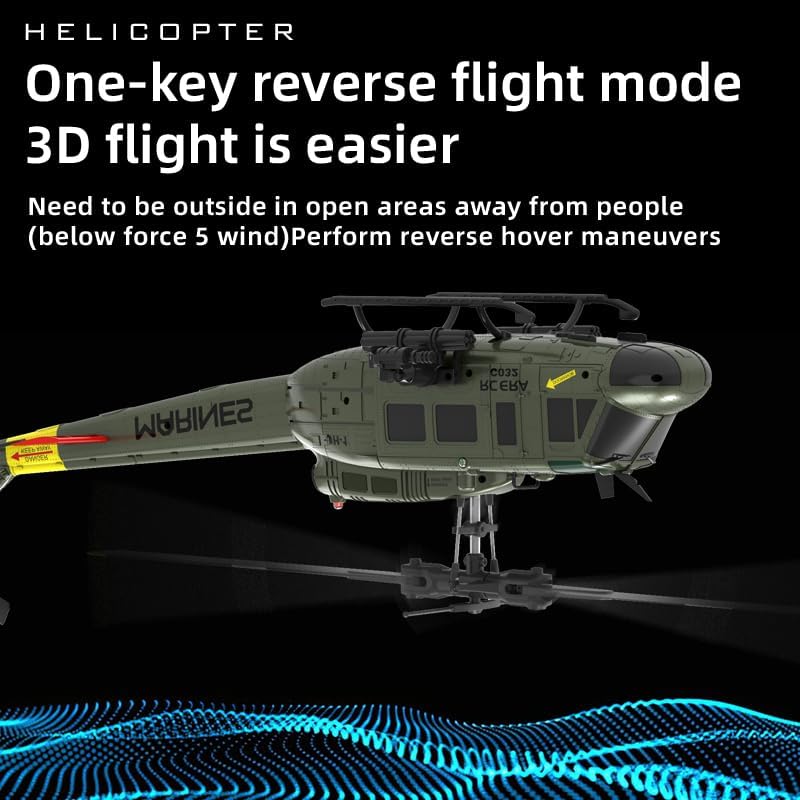
Image: The RC ERA C032 UH-1 Huey helicopter performing a reverse flight maneuver, showcasing its 3D flight capabilities.

Image: The RC ERA C032 UH-1 Huey helicopter showcasing its ability for flight in multiple directions, unrestricted by traditional controls.

Image: The RC ERA C032 UH-1 Huey helicopter featuring intelligent anti-stuck protection to prevent propeller damage during operation.

Image: The RC ERA C032 UH-1 Huey helicopter highlighting its TOF laser, air pressure, and optical flow positioning for intelligent and stable flight.

Image: The RC ERA C032 UH-1 Huey intelligent positioning version, depicted as an armed stunt helicopter, scaled at 1:48.
6.4 Official Product Videos
Video: This video demonstrates the RC ERA C032 UH-1 Huey RC Helicopter's 6-axis gyro and altitude hold capabilities during flight.
Video: An overview video showcasing the RC ERA C032 UH-1 Huey RC Helicopter, suitable for adults and beginners, highlighting its features and flight performance.
7. Maintenance
- Cleaning: Use a soft, dry cloth to clean the helicopter after each flight. Avoid using water or chemical cleaners.
- Propeller Inspection: Regularly check the main and tail blades for any damage, cracks, or deformities. Replace damaged blades immediately using the provided spares and screwdriver.
- Battery Care: Do not overcharge or over-discharge the battery. Disconnect the battery from the helicopter when not in use. If storing for an extended period, charge the battery to approximately 50% capacity.
- Motor Care: Keep the motors free from dust and debris. Avoid prolonged continuous operation to prevent overheating.
- Storage: Store the helicopter and transmitter in their original packaging or a protective case in a cool, dry environment.
8. Troubleshooting
| Problem | Possible Cause | Solution |
|---|---|---|
| Helicopter does not respond to transmitter. | Not bound, low battery in transmitter or helicopter, out of range. | Re-bind the helicopter and transmitter. Check and replace/charge batteries. Ensure within operating range. |
| Helicopter drifts during flight. | Improper trim settings, uneven surface during calibration, wind interference. | Adjust trim buttons. Ensure helicopter is on a flat surface when powered on. Avoid flying in windy conditions. |
| Short flight time. | Battery not fully charged, old battery, aggressive flying. | Ensure battery is fully charged. Consider replacing old batteries. Fly more conservatively. |
| Propellers not spinning or spinning slowly. | Obstruction, damaged motor, low battery. | Check for obstructions and clear them. Check battery level. If motor is damaged, contact support. |
| Helicopter crashes frequently. | Lack of experience, flying in unsuitable conditions, damaged parts. | Practice in open, calm areas. Ensure all parts are intact. Review operating instructions. |
9. Warranty and Support
For warranty information, technical support, or replacement parts, please refer to the contact information provided by your retailer or the manufacturer. Keep your purchase receipt as proof of purchase.


