
1. Product Overview
This document provides essential information for the YTGWLKCO TV Power Board, a replacement component designed for specific Samsung television models. The primary function of this power board is to convert household alternating current (AC) into direct current (DC) suitable for the internal circuits of the television, ensuring stable and reliable operation.

Image 1: Top view of the YTGWLKCO TV Power Board (BN44-00468 series), showing various components including transformers, capacitors, and connectors.
The power board is equipped with protection functions such as overload protection, short circuit protection, and overheat protection to safeguard the television and its internal components from potential damage. Its circuit design is optimized to influence TV performance, including start-up time, operational stability, and energy efficiency.
2. Compatible TV Models
This power board is compatible with various Samsung TV models. Please verify your TV's existing power board model number against the BN44-00468 series (BN44-00468A, BN44-00468B, BN44-00468C) for compatibility. Applicable TV models include, but are not limited to:
- Samsung LE32E420
- Samsung LE32D403E2W
- Samsung LA32D450G1
- Samsung LA32D400E1
- Samsung LN32D403E2DXZA
- Samsung LN32D403E2DXZP
- Samsung LN32D403E4DXZA
- Samsung LN32D405E3DXZA
- Samsung LN32D403E2D
- Samsung LN32D403E4D
- Samsung LN32D405E3D
3. Safety Information
Warning: Installation of this component should only be performed by qualified technicians. Improper installation can lead to electric shock, fire, or damage to the television. Always disconnect the TV from the main power supply before attempting any repair or installation.
- Ensure the TV is unplugged from the power outlet before starting.
- Discharge any residual power by pressing the power button for a few seconds after unplugging.
- Wear anti-static gloves or use an anti-static wrist strap to prevent electrostatic discharge (ESD) damage to sensitive electronic components.
- Handle the power board by its edges to avoid touching components directly.
- Do not force connectors; ensure proper alignment before applying pressure.
4. Installation Guide
This section outlines the general steps for replacing a TV power board. Specific steps may vary depending on your TV model. Refer to your TV's service manual for detailed instructions.
- Preparation: Place the TV face down on a soft, clean surface to protect the screen. Remove the back cover of the TV.
- Locate the Old Power Board: Identify the existing power board. It is typically a large circuit board connected directly to the AC power input.
- Disconnect Cables: Carefully disconnect all cables connected to the old power board. Pay attention to the orientation and type of each connector. Take photos for reference if necessary.

Image 2: Detailed view of a 14-pin connector (JP10) on the power board, showing pin assignments for P_DIM, BLU_ON, GND, A5V, PS_ON, B13V, and B5V. This connector typically interfaces with the main board or backlight driver.
- Remove Old Board: Unscrew the mounting screws securing the old power board to the TV chassis. Carefully lift and remove the old board.
- Install New Power Board: Position the new YTGWLKCO power board in the same location. Secure it with the screws removed earlier.
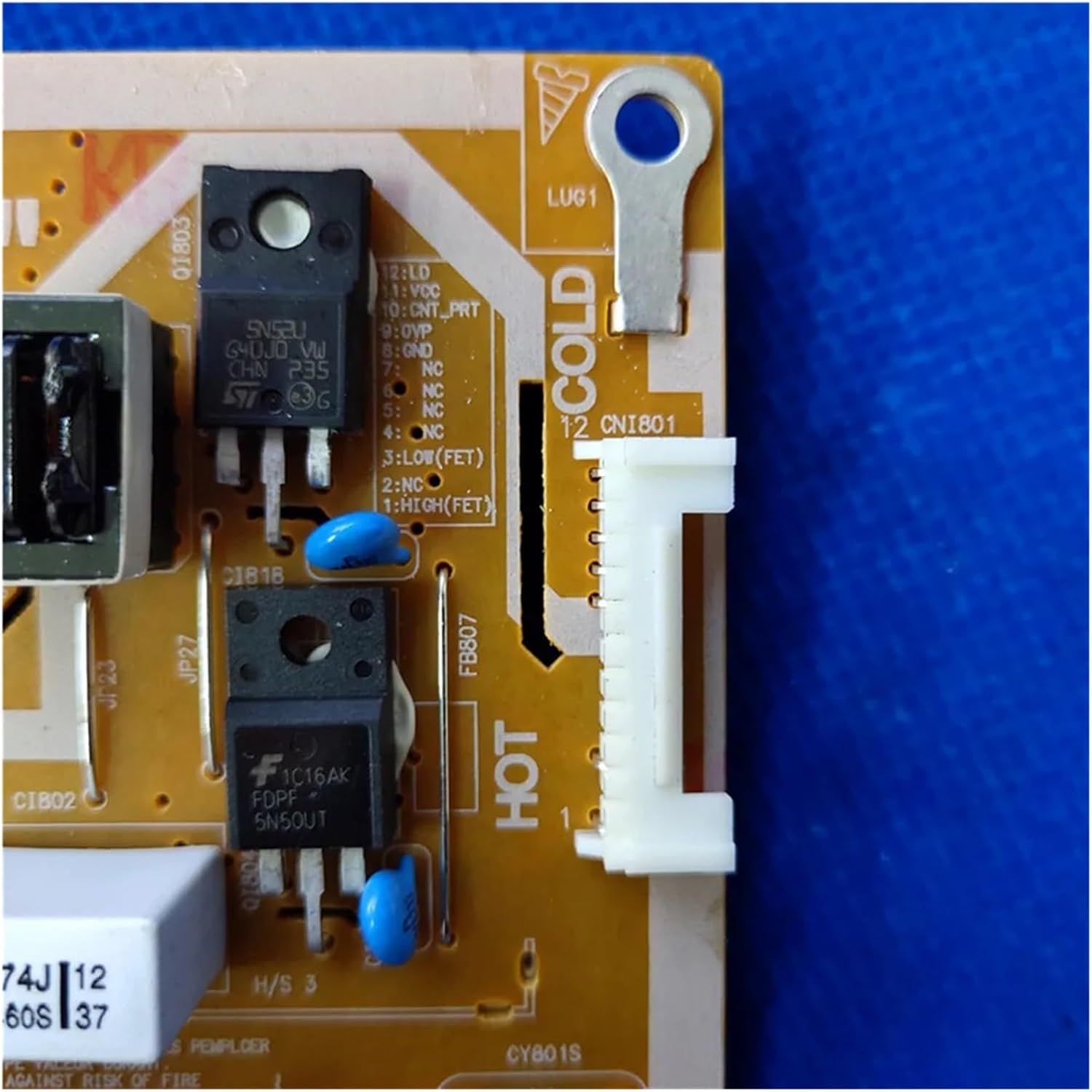
Image 3: Close-up of a 12-pin connector (CN1801) on the power board, indicating pin functions such as LO, VCC, CNT_PRT, GND, LOW(FET), and HIGH(FET). Note the 'HOT' and 'COLD' side separation for safety and circuit isolation.
- Reconnect Cables: Carefully reconnect all cables to the new power board, ensuring each connector is seated correctly and securely. Refer to your photos if needed.
- Test: Before reattaching the back cover, connect the TV to power and perform a brief test to ensure it powers on and functions correctly.
- Final Assembly: If the test is successful, disconnect power, reattach the TV's back cover, and secure all screws.
5. Troubleshooting
Common faults associated with TV power boards and potential causes:
- No Power: If the TV does not turn on at all, this could indicate a complete failure of the power board. This may be caused by a blown fuse, damaged rectifier, or faulty power IC.
- Flashing/Intermittent Power: The TV powers on but the screen flashes, or the power cycles on and off. This often points to unstable voltage output from the power board, possibly due to failing capacitors or voltage regulators.
- Turns Off After Starting: The TV powers on briefly and then shuts down. This can be a symptom of an overheating component on the power board, or a protection circuit being triggered due to an internal fault.
- No Backlight: If the TV has sound but no picture (a dark screen), the issue might be with the backlight inverter section of the power board or the backlight LEDs themselves.
If you encounter these issues after installation, double-check all cable connections. If problems persist, professional diagnosis and repair are recommended.
6. Specifications
| Attribute | Value |
|---|---|
| Brand | YTGWLKCO |
| Model Numbers | BN44-00468A, BN44-00468B, BN44-00468C |
| Item Weight | 1.76 ounces (50 Grams) |
| Package Dimensions | 1.18 x 0.79 x 0.39 inches |
| Assembly Required | No (Replacement part) |
| Number of Pieces | 1 |
Note: Specifications are subject to change without prior notice.
7. Customer Support
For further assistance, technical inquiries, or if you encounter issues not covered in this manual, please contact the seller or a certified electronics repair professional. Always provide your TV model number and the power board model number (BN44-00468A/B/C) when seeking support.