Introduction
This instruction manual provides guidance for the installation, operation, and maintenance of the PETSTIBLE Replacement Kit for the Laresar Mars 01 Robot Vacuum. This kit includes essential components designed to maintain your robot vacuum's cleaning efficiency and extend its service life. Please read these instructions carefully before replacing any parts.
Product Overview
The PETSTIBLE Replacement Kit for Laresar Mars 01 Robot Vacuum includes the following components:
- 3 x Filters
- 4 x Mop Cloths
- 6 x Side Brushes
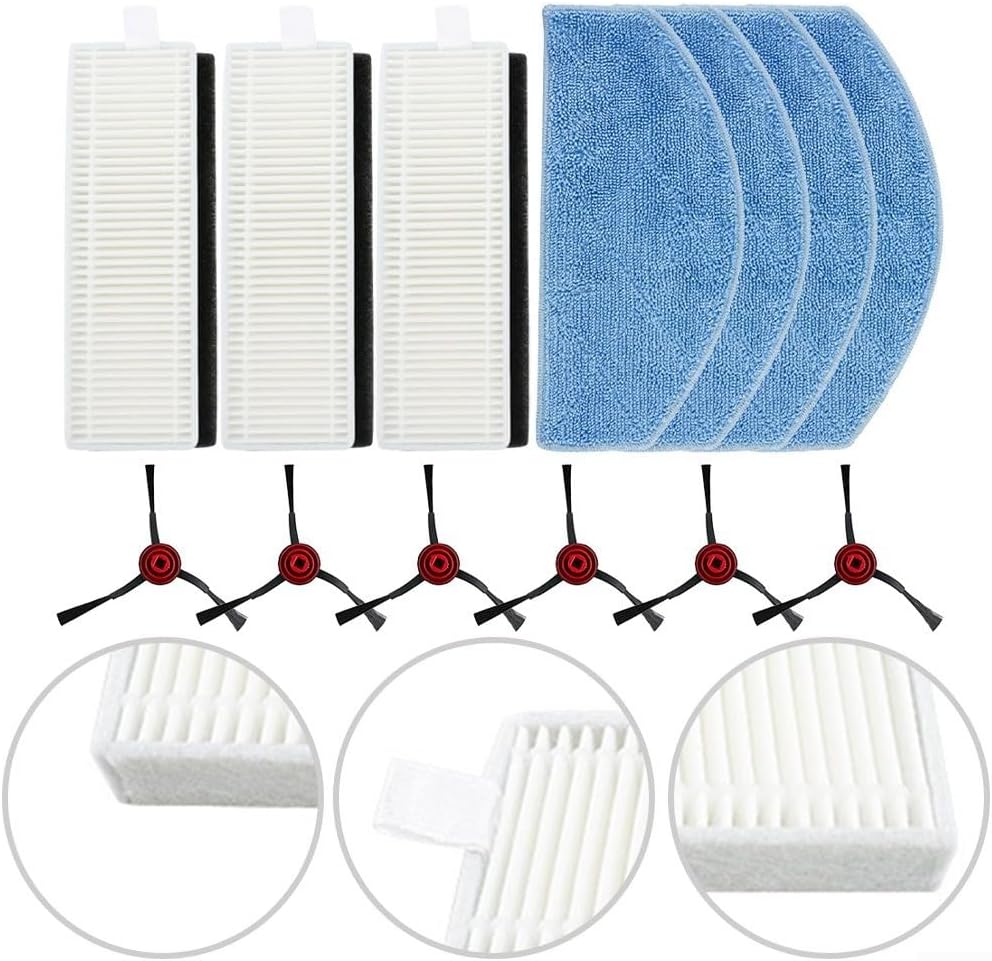
Image: Overview of the PETSTIBLE Replacement Kit, displaying all included filters, mop cloths, and side brushes.
Setup and Installation
Follow these steps to replace the components in your Laresar Mars 01 Robot Vacuum.
1. Replacing Side Brushes
- Turn the robot vacuum upside down on a flat surface.
- Locate the side brushes. Depending on your model, they may be secured by a screw.
- If applicable, use a screwdriver to remove the screw holding the old side brush.
- Gently pull the old side brush upwards to remove it.
- Align the new side brush with the post and press it down firmly until it clicks into place or re-secure it with the screw.

Image: A single side brush, showing its three-arm design and central attachment point.
2. Replacing Filters
- Open the dustbin cover on your robot vacuum.
- Remove the dustbin from the vacuum cleaner.
- Locate the filter compartment within the dustbin.
- Remove the old filter by pulling it out. Dispose of the old filter properly.
- Insert the new filter into the compartment, ensuring it is seated correctly.
- Close the dustbin cover and reinsert the dustbin into the robot vacuum.

Image: A filter with its dimensions indicated, measuring approximately 123mm in length and 39mm in width.
3. Attaching Mop Cloths
- Locate the mop cloth attachment area on the underside of your robot vacuum, typically on the water tank or a dedicated mopping module.
- Align the new mop cloth with the attachment points (e.g., Velcro strips or grooves).
- Press the mop cloth firmly onto the attachment area, ensuring it is securely fastened and lies flat.
- Fill the water tank if your model requires it for wet mopping.

Image: A blue microfiber mop cloth, showing its textured surface designed for cleaning floors.
Operating
After installing the replacement parts, ensure all components are securely in place before operating your Laresar Mars 01 Robot Vacuum. Refer to your robot vacuum's original user manual for specific operating instructions.
Maintenance
Regular maintenance of these replacement parts is crucial for optimal performance.
Filters
- Cleaning: Tap the filter gently over a trash can to remove dust and debris after each cleaning cycle. Do not wash filters with water unless explicitly stated by the robot vacuum manufacturer.
- Replacement: Replace filters every 2-3 months, or more frequently if you have pets or experience allergies.
Side Brushes
- Cleaning: Regularly check side brushes for tangled hair or debris. Use scissors to carefully cut away any tangled material.
- Replacement: Replace side brushes every 3-6 months, or when they appear worn, bent, or damaged.
Mop Cloths
- Cleaning: After each mopping session, remove the mop cloth and wash it thoroughly with water. It can be hand-washed or machine-washed on a gentle cycle. Air dry completely before reattaching.
- Replacement: Replace mop cloths every 1-2 months, or when they show signs of significant wear, reduced absorbency, or damage.
Troubleshooting
If you encounter issues after replacing parts, consider the following:
- Reduced Suction Power: Check if the filter is clogged. Clean or replace the filter as necessary. Ensure the dustbin is empty and properly installed.
- Ineffective Sweeping: Inspect side brushes for tangles or damage. Clean or replace them if they are not rotating correctly or are worn out.
- Poor Mopping Performance: Ensure the mop cloth is clean and properly attached. Check if the water tank (if applicable) is filled and dispensing water correctly. Replace the mop cloth if it is heavily soiled or worn.
- Unusual Noises: Verify that all replacement parts are correctly installed and not obstructing any moving components.
Specifications
Product specifications for the PETSTIBLE Replacement Kit:
| Feature | Detail |
|---|---|
| Product Name | Side Brush Filter Mop Cloth Kit |
| Material | Nylon+Plastic+Microfiber+Filter Paper |
| Fitment | For Laresar Mars 01 / For Lubluelu Robot Vacuums |
| Number of Pieces | 1 set (3 filters, 4 mop cloths, 6 side brushes) |
| Product Dimensions | 6.3 x 3.94 x 2.36 inches |
| Item Weight | 3.95 ounces |
| Manufacturer | PETSTIBLE |
| Item Model Number | R076L7NW64599B9C36GG3G |

Image: Detailed dimensions for both the mop cloth and the filter, showing their respective measurements.
Warranty and Support
This replacement kit is designed for compatibility and performance. For any questions regarding installation, maintenance, or product issues, please contact the seller directly through the platform where the purchase was made. Please refer to the original robot vacuum manufacturer's warranty for the main device.