
DISIROU S-918B Plus
DISIROU S-918B Plus Multifunctional UV Curing Vacuum Machine User Manual
Model: S-918B Plus
Introduction
This manual provides comprehensive instructions for the safe and efficient operation of your DISIROU S-918B Plus Multifunctional UV Curing Vacuum Machine. This device is designed for UV soft film lamination and curing on cell phones, as well as other UV glue curing applications. Please read this manual thoroughly before using the product to ensure proper function and longevity.
Important Safety Information
- Always ensure the device is connected to a grounded power outlet.
- Do not expose eyes or skin directly to UV light. Use appropriate protective eyewear and gloves.
- Keep the device away from water or other liquids to prevent electric shock.
- Do not attempt to open or repair the device yourself. Contact qualified service personnel.
- Ensure proper ventilation during operation.
- Keep out of reach of children.
Package Contents
Please verify that all items are present in the package:
- 1 x DISIROU S-918B Plus Host Unit
- 1 x Power Cord
- 1 x English and Chinese User Manual
Product Overview and Key Features
The DISIROU S-918B Plus is an advanced UV curing and vacuum lamination machine designed for precision work on mobile phone screens and other UV-sensitive materials. Its key features include:
- Dual Mode Operation: Offers both UV curing and vacuum UV curing with a single button selection.
- Adjustable Curing Time: Digital display allows precise timing adjustments for various material thicknesses.
- High-Efficiency UV Lamps: Equipped with 42 high-quality lamp beads for large irradiation area and strong light efficiency.
- Vacuum Negative Pressure Fit: Specifically designed for curved screens, ensuring a close fit and preventing warping.
- Cold Light Source: Minimizes heat generation on the product surface, reducing potential damage.
- Clamshell Design: Ensures closed curing, locking the light source for 100% utilization and safety.
- No Preheating Required: Instantaneous power-on with peak energy output.

Figure 1: DISIROU S-918B Plus UV Curing Vacuum Machine (Closed and Open View)
This image displays the DISIROU S-918B Plus unit, showing both the main control unit and the open curing chamber with its internal UV lamp array. The device is designed for efficient and precise UV curing and vacuum lamination.

Figure 2: Vacuum Negative Pressure Fit for Various Models
The image highlights the vacuum negative pressure fitting capability of the S-918B Plus, which ensures a tight seal and prevents warping during the lamination process, especially beneficial for curved screens. This feature contributes to effective shaping and protective film application.
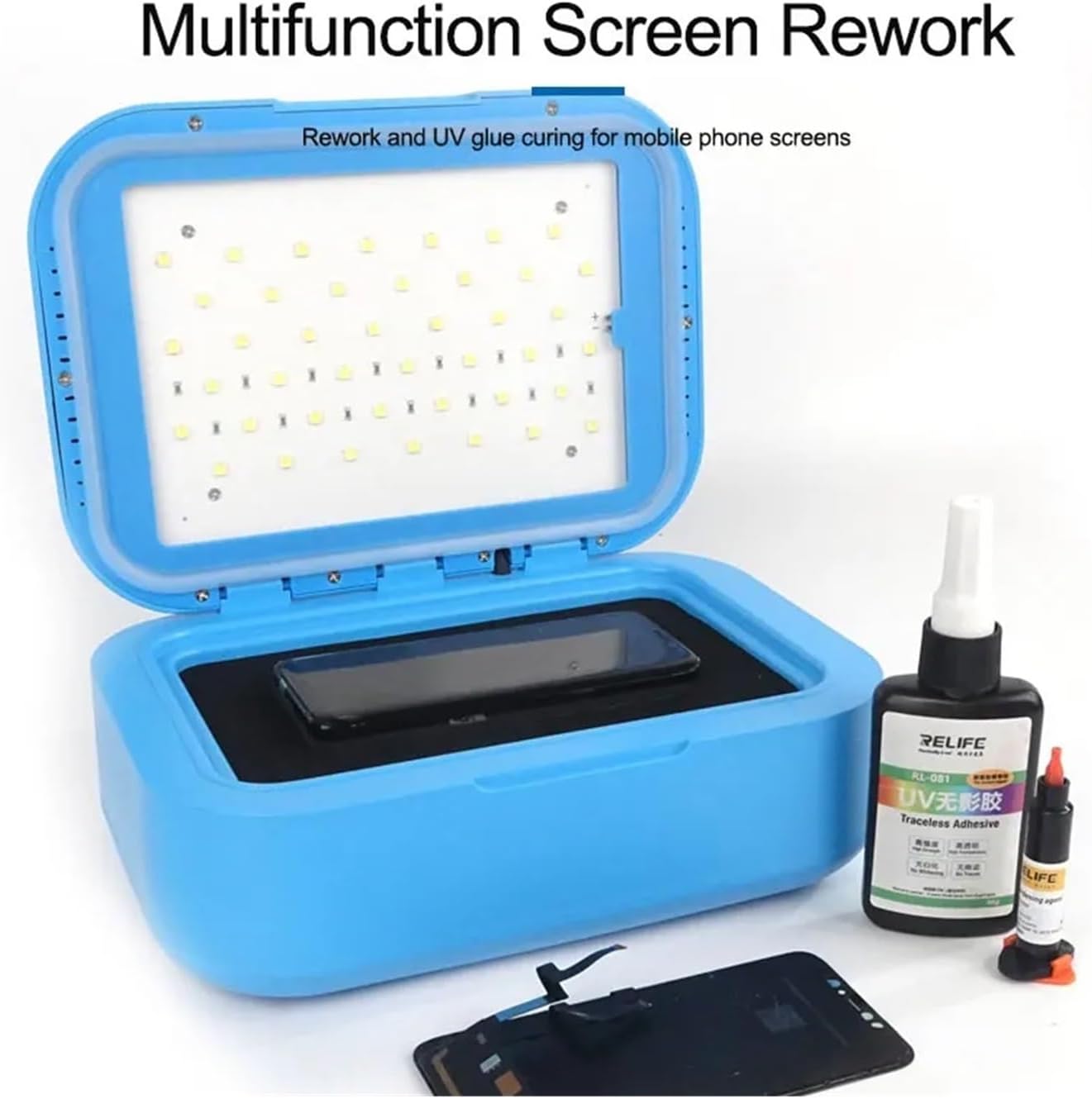
Figure 3: Multifunction Screen Rework
This illustration demonstrates the machine's versatility for mobile phone screen rework, including UV glue curing. It shows the curing chamber with a phone screen inside, alongside bottles of UV adhesive, indicating its use in repair processes.

Figure 4: Digital Display Timing Dual Mode Optional
The control panel of the S-918B Plus is shown, featuring a digital display for timing and buttons for setting up, UV curing, vacuum UV curing, and power. This interface allows for precise control over the curing process and selection of operating modes.
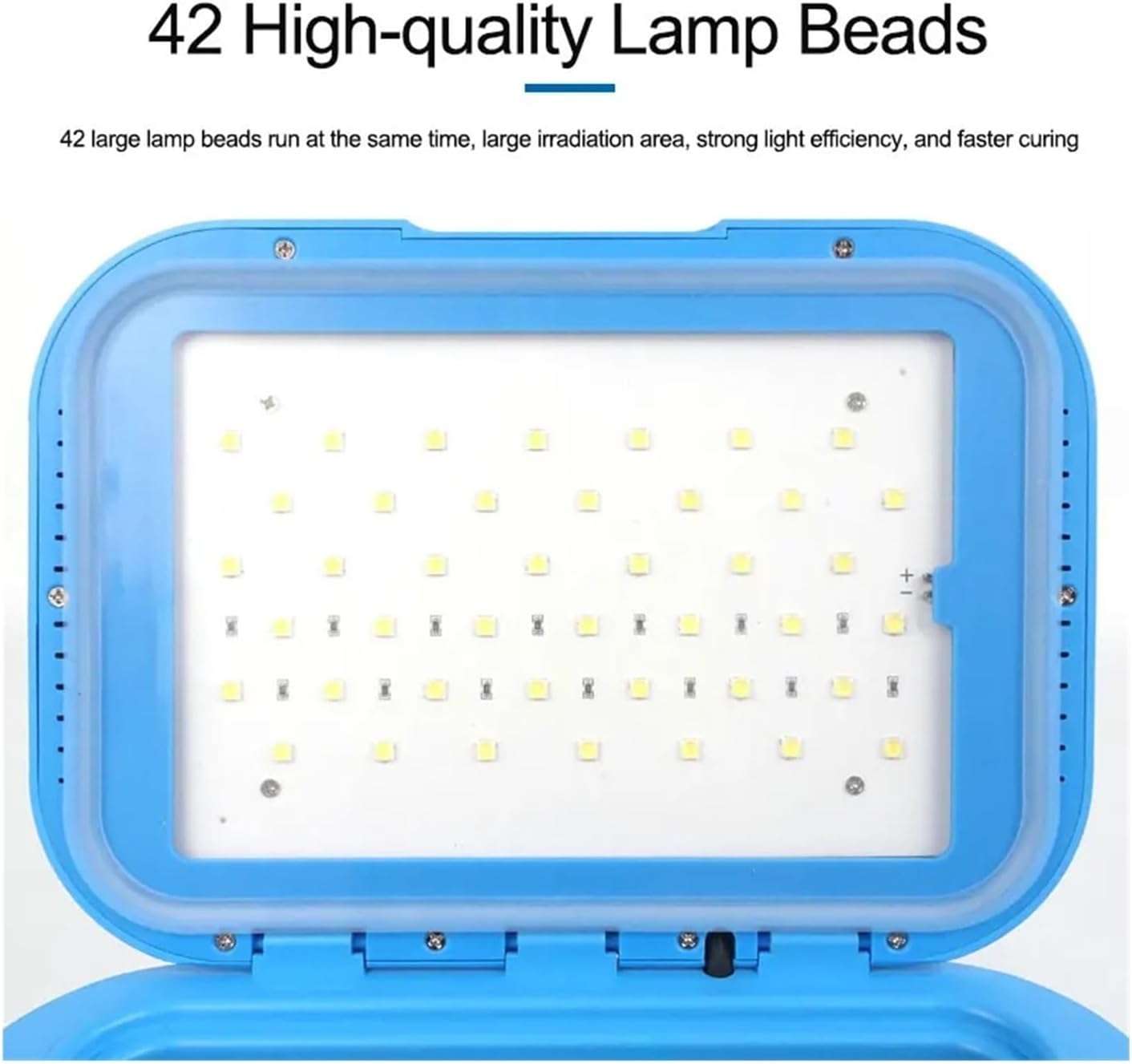
Figure 5: 42 High-Quality Lamp Beads
This image provides a close-up view of the curing chamber's interior, clearly showing the arrangement of 42 high-quality UV lamp beads. These lamps provide a large and uniform irradiation area for effective and fast curing.
Setup Instructions
- Unpacking: Carefully remove the S-918B Plus unit and all accessories from the packaging. Retain packaging for future storage or transport.
- Placement: Place the unit on a stable, level, and clean surface in a well-ventilated area. Ensure there is sufficient space around the device for air circulation.
- Power Connection: Connect the provided power cord to the power input port on the back of the S-918B Plus. Plug the other end into a standard, grounded electrical outlet (AC 100-240V, 50/60Hz).
- Initial Inspection: Before first use, inspect the unit for any visible damage. Do not operate if damage is observed.
Operating Instructions
1. Power On/Off
- Press the "Switch" button (refer to Figure 4) to power on the device. The digital display will illuminate.
- To power off, press the "Switch" button again.
2. Setting Curing Time
- With the device powered on, press the "Set up" button (refer to Figure 4) to enter time setting mode.
- Use the "UV curing up key" and "Vacuum UV curing down key" buttons to adjust the desired curing time in seconds.
- Press "Set up" again to confirm the time, or wait a few seconds for it to automatically save.
3. UV Curing Mode
- Place the item to be cured inside the chamber, ensuring it is positioned correctly.
- Close the lid securely. The clamshell design ensures the light source is contained.
- Press the "UV curing up key" button to start the UV curing process. The timer will begin counting down.
- Once the set time expires, the device will automatically stop.
4. Vacuum UV Curing Mode (for Lamination)
- Prepare the mobile phone screen or other item for lamination with UV soft film or glue.
- Carefully place the item inside the chamber. Ensure proper alignment, especially for curved screens, to utilize the vacuum negative pressure effectively.
- Close the lid securely.
- Press the "Vacuum UV curing down key" button to initiate the vacuum UV curing process. The device will first create a vacuum, then activate the UV lamps for the set duration.
- The timer will count down, and the process will stop automatically upon completion.
- Open the lid and carefully remove the laminated item.
Maintenance
- Cleaning: Disconnect the power cord before cleaning. Use a soft, dry cloth to wipe the exterior of the unit. For the interior, use a slightly damp cloth with mild detergent, ensuring no liquid enters the electrical components. Do not use abrasive cleaners or solvents.
- Storage: When not in use for extended periods, store the device in a cool, dry place, away from direct sunlight and extreme temperatures.
- UV Lamp Replacement: UV lamps have a finite lifespan. If you notice a decrease in curing efficiency, contact customer support for information on replacement lamps and service.
Troubleshooting
| Problem | Possible Cause | Solution |
|---|---|---|
| Device does not power on. | Power cord not connected; Power outlet malfunction; Device fault. | Check power cord connection; Try a different outlet; Contact customer support. |
| UV lamps not activating. | Lid not closed properly; Lamp malfunction; Incorrect mode selected. | Ensure lid is fully closed; Verify correct operating mode; Contact customer support. |
| Curing is incomplete or slow. | Insufficient curing time; Material too thick; Aged UV lamps. | Increase curing time; Ensure material is suitable; Contact customer support for lamp replacement. |
| Vacuum function not working. | Lid not sealed; Vacuum pump issue. | Ensure lid is closed tightly and seal is intact; Contact customer support. |
Specifications
| Model | S-918B Plus |
| Manufacturer | DISIROU |
| Item Model Number | 1005005752787459 |
| Item Weight | 2.87 pounds (approx. 1.3 kg) |
| Dimensions (L x W x H) | 270 x 198 x 100 mm (approx. 10.6 x 7.8 x 3.9 inches) |
| UV Lamp Beads | 42 |
| Power | 30W (Light efficiency power up to 1200 LMM) |
| Input Voltage | AC 100-240V, 50/60Hz |
Note: The package dimensions listed in some product descriptions (1.18 x 0.79 x 0.39 inches) appear to be incorrect. The operational dimensions of the unit are approximately 270 x 198 x 100 mm. Specifications are subject to change without prior notice.
Warranty and Support
The DISIROU S-918B Plus comes with a standard manufacturer's warranty. For specific warranty terms and conditions, please refer to the warranty card included with your product or contact DISIROU customer support.
For technical assistance, troubleshooting, or service inquiries, please contact your retailer or DISIROU customer service through their official website or contact channels. Please have your model number (S-918B Plus) and purchase information ready when contacting support.
Ask a question about this manual
Ask about setup, troubleshooting, compatibility, parts, safety, or missing instructions. Manuals+ will review the question and use this page’s manual context to help answer it.