
1. Product Overview
The IQMatePro Universal Garage Door Opener Remote (Model 953EV) is designed to provide convenient access to your garage. This compact remote features a three-button design, allowing control of up to three separate garage door openers or gate systems. It utilizes Security+2.0 technology, ensuring a new code with every use for enhanced security.
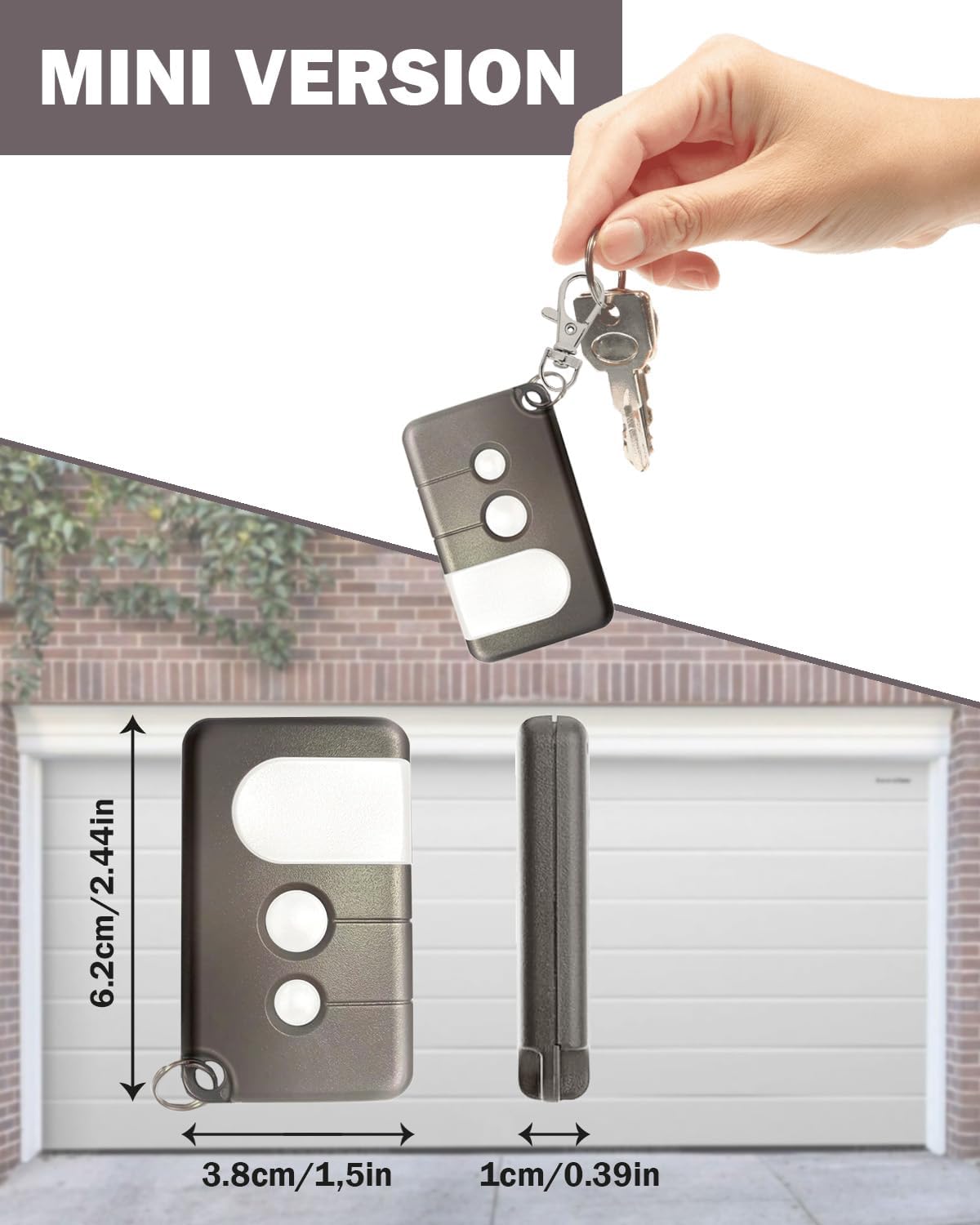
Image: The IQMatePro mini remote control with its dimensions: 6.2cm (2.44in) length, 3.8cm (1.5in) width, and 1cm (0.39in) thickness. A hand holding keys and the remote is shown in the background.
1.1 Package Contents
- 1 x IQMatePro Universal Remote Control
- 1 x Keychain
- 1 x Battery (pre-installed in the remote)
- 1 x User Manual

Image: Components included with the remote control: the remote itself, a keychain, a battery, and a small diagram illustrating programming instructions.
2. Compatibility
This remote control is compatible with various garage door openers from brands such as LiftMaster, Chamberlain, Sears, and Craftsman. Important: This remote is designed to work ONLY with garage door openers that feature a YELLOW Learn Button. Please verify the color of the learn button on your existing garage door opener before proceeding with setup.

Image: A diagram illustrating the location of the yellow learn button on a garage door opener unit. A close-up of the remote control is also shown. This image emphasizes the requirement for a yellow learn button for compatibility.
2.1 Compatible Models
The IQMatePro remote is compatible with the following models (among others) that feature a Yellow Learn Button:
- 139.3043, 139.30430, 139.30437, 139.54931, 139.54985
- 001D8214, 001D8234, 001D8363, 041D8169, 041DJ002
- 045ACT, 045DCT, 050ACTWF, 050ACTWFATS
- 050DCTB, 050DCTBF, 050DCTWF, 050DCTWFLK
- 1D7675, 1D8060, 1D8169, 41D7675, 45DCBR5
- 49DCTWF, 50DCBL5, HBW7356, HBW7675, HD220, K1D6597
Note: This remote does not support DIP Switch functions.
3. Setup and Programming
Follow these steps to program your IQMatePro remote control to your garage door opener. Ensure you have access to your garage door opener unit, as you will need to locate its learn button.
- Locate the Learn Button: Find the learn button on the back or side of your garage door opener motor unit. This button is typically yellow. You may need a ladder to reach it.
- Activate Learn Mode: Press and immediately release the learn button on the motor unit. The learn LED indicator light on the opener will glow steadily for 30 seconds. This indicates the opener is in programming mode.
- Program the Remote: Within 30 seconds of activating learn mode, press and hold the desired button on your IQMatePro remote control.
- Confirm Programming: Release the button on the remote when the garage door opener lights flash or two clicks are heard. This confirms successful programming.
- Test the Remote: Press the programmed button on your remote control. The garage door should activate.
To program additional garage door openers or gates, repeat these steps for each device using a different button on your remote.
4. Operation
The IQMatePro remote features three buttons, allowing you to control up to three different garage door openers or gate systems. Each button operates independently once programmed.

Image: The three-button design of the remote control, visually representing its capability to operate up to three separate garage doors. A garage with three doors is depicted in the background.
4.1 Opening/Closing Your Garage Door
To open or close your garage door, simply press the corresponding programmed button on your remote control. The remote is designed to work effectively from a distance, providing convenient "roll-in" access without waiting.
5. Maintenance
5.1 Battery Replacement
The remote control uses one unknown type battery (included). When the remote's range decreases significantly or it stops responding, it may be time to replace the battery. To replace the battery:
- Carefully open the remote control casing.
- Remove the old battery.
- Insert a new battery of the same type, ensuring correct polarity.
- Close the remote control casing securely.
Dispose of old batteries according to local regulations.
6. Specifications
| Brand | IQMatePro |
| Model Number | 953EV |
| Special Feature | Universal compatibility with Yellow Learn Button openers |
| Max Number of Supported Devices | 3 |
| Compatible Devices | Garage Door Openers (LiftMaster, Chamberlain, Sears, Craftsman with Yellow Learn Button) |
| Connectivity Technology | Radio Frequency (Security+2.0) |
| Button Quantity | 3 |
| Battery Type | 1 x Unknown battery (included) |
| Dimensions (Approx.) | 6.2cm (L) x 3.8cm (W) x 1cm (T) |
7. Troubleshooting
7.1 Remote Not Working After Programming
- Check Learn Button Color: Ensure your garage door opener has a YELLOW learn button. This remote is not compatible with other learn button colors.
- Reprogram: Repeat the programming steps carefully. Ensure you press and release the opener's learn button quickly, and then press and hold the remote button within 30 seconds.
- Battery Check: Verify the battery is correctly installed and has sufficient charge. Replace if necessary.
- Range: Test the remote closer to the garage door opener unit. Obstructions or interference can affect range.
7.2 Limited Range
- Battery: A weak battery is a common cause of reduced range. Replace the battery.
- Interference: Large metal objects, radio interference, or other electronic devices near the garage door opener or remote can affect signal strength.
8. Customer Support and Warranty
8.1 Technical Support
For technical assistance or further inquiries, please contact IQMatePro customer support. Refer to the product packaging or the seller's information for contact details.
8.2 Warranty Information
This product comes with a standard manufacturer's warranty. Please retain your proof of purchase for warranty claims. For specific warranty terms and conditions, refer to the product packaging or contact IQMatePro customer service.