
Zmuhyrd Maggrip Pro 360 2.0
Zmuhyrd Maggrip Pro 360 2.0 Phone Holder User Manual
Model: Maggrip Pro 360 2.0
Brand: Zmuhyrd
Introduction
This manual provides detailed instructions for the safe and effective use of your Zmuhyrd Maggrip Pro 360 2.0 Phone Holder. Please read this manual thoroughly before installation and operation to ensure proper functionality and longevity of the product.
Safety Information
- Ensure the mounting surface is clean and dry before installation to achieve optimal suction.
- Do not obstruct your view of the road or vehicle controls when mounting the device in a car.
- Avoid placing the phone holder in direct sunlight for extended periods, especially when not in use, to prevent material degradation.
- Keep out of reach of children.
- Do not attempt to disassemble or modify the product.
Package Contents
The following items are included in your Maggrip Pro 360 2.0 package:
- 1 or 2 Pcs Maggrip Pro 360 2.0 Phone Holder (quantity may vary based on purchase)
- 1 Pcs Charging Cable (Note: This product does not require charging for its primary function. This cable may be for an accessory or a generic inclusion.)
- 2 Pcs Car Bracket (likely refers to additional sticky pads for non-smooth surfaces)
- 4 Pcs Cleaning Cloth
- 1 Pcs Magnetic Ring (for non-magnetic phones/cases)
Product Overview
The Zmuhyrd Maggrip Pro 360 2.0 is a versatile phone holder designed for strong, hands-free phone mounting in various environments. It features an electric vacuum adsorption suction cup and a super strong magnetic fixation system.
Key Features:
- Electric vacuum adsorption for strong, stable suction on smooth surfaces.
- Free angle adjustment for optimal viewing.
- Super strong magnetic fixation (N55 magnetic core) for secure phone attachment.
- Wide compatibility with various phone sizes.
- Easy, tool-free installation.
- Foldable and portable design.
- Dual-mode application (suction/magnetic hybrid).
- 360° rotating aluminum alloy arm.
Components:
The Maggrip Pro 360 2.0 consists of a base with a vacuum suction cup, an adjustable arm, and a magnetic phone attachment ring.

This image displays the main components of the Maggrip Pro 360 2.0 phone holder, including its base with the vacuum suction mechanism, the adjustable arm, and the magnetic phone attachment. Also shown are a gift bag and a white variant of the holder.
Setup and Installation
Follow these steps to properly install your Maggrip Pro 360 2.0 Phone Holder.
- Prepare the Surface: Wipe both the suction cup of the holder and the intended installation surface (e.g., car dashboard, windshield, smooth table) with a cleaning cloth to ensure they are free of dust and debris. A clean, smooth surface is crucial for strong suction.

Figure 2: Examples of suitable mounting locations and usage scenarios. This image illustrates various suitable mounting locations within a car, such as the window, dashboard, and center console. It also shows the holder being used in different scenarios like at home (bathroom), during exercise (on a treadmill), and while traveling.
- Reset the Mount: Rotate the switch ring on the base counterclockwise to its maximum open position before attempting to secure it. This prepares the vacuum suction mechanism.
- Apply to Surface: Place the suction cup firmly onto the desired smooth surface. For non-smooth surfaces, use the provided sticky pad first, then attach the suction cup to the pad.
- Secure the Suction: Turn the switch ring clockwise to lock the suction cup in place. This creates a strong vacuum seal. The image below demonstrates the twist-lock mechanism.
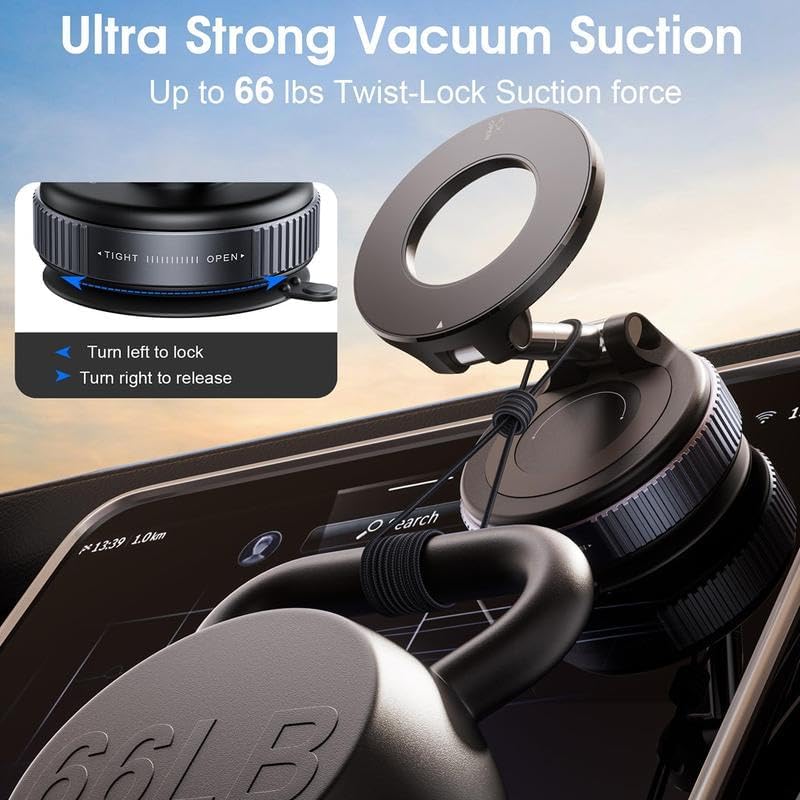
Figure 3: Twist-lock mechanism for ultra-strong vacuum suction. This image highlights the twist-lock mechanism on the base of the phone holder, showing how to turn left to lock and turn right to release, ensuring an ultra-strong vacuum suction of up to 66 lbs.
- Attach Metal Ring (if needed): For non-magnetic phones or cases, attach the included metal ring to the back of your phone or phone case. Press firmly to ensure it is securely attached. Wait for 30 minutes after pasting for optimal adhesion.

Figure 4: Using the metal ring for non-magnetic devices. This image demonstrates the compatibility of the phone holder with various phone models. It shows that iPhones 12-16 can be directly attached, while iPhone 11 and earlier models, Android devices, and non-magnetic cases require the use of the included metal ring for magnetic attachment.
Operating Instructions
Once installed, the Maggrip Pro 360 2.0 is ready for use.
- Attach Your Phone: Simply bring your phone (with or without a MagSafe case, or with the attached metal ring) close to the magnetic ring of the holder. The strong N55 magnetic core will securely hold your device.

Figure 5: Magnetic attachment of phone. This image illustrates the strong N52 magnetic force of the holder, showing how a phone with a MagSafe case or no case can be securely attached. It also indicates that finger rings and credit cards should not interfere with the magnetic connection.
- Adjust Viewing Angle: The holder features a 360° rotating aluminum alloy arm and flexible joints, allowing you to adjust the phone's position for optimal viewing. You can adjust it left, right, rotate it, or fold it for storage.
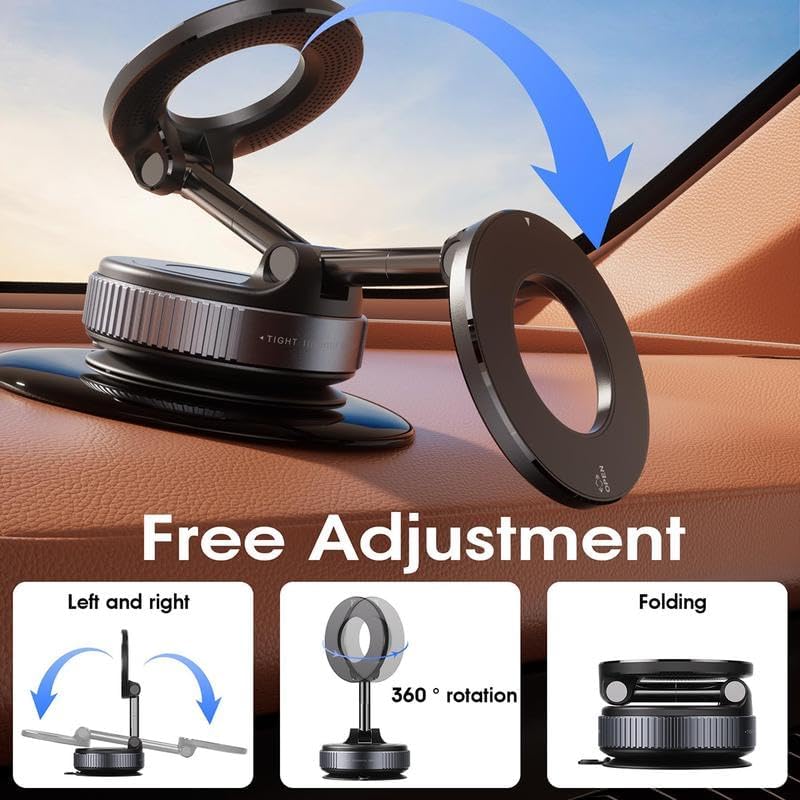
Figure 6: Adjustment capabilities of the holder. This image demonstrates the flexible adjustment capabilities of the phone holder, including left and right movement, 360-degree rotation, and folding for compact storage.
- Secure Hold: The strong suction and magnetic hold ensure your phone stays firmly in place even on bumpy roads, during high-speed driving, or off-road conditions.

Figure 7: Secure mounting in various driving conditions. This image illustrates the secure and stable mounting capability of the phone holder, showing that it remains firmly in place during high-speed driving, off-road travel, and on bumpy roads.
Versatile Applications:
Beyond car use, the Maggrip Pro 360 2.0 can be used in various scenarios:
- Home: Mount on smooth surfaces like bathroom tiles or kitchen counters for hands-free viewing while cooking or relaxing.
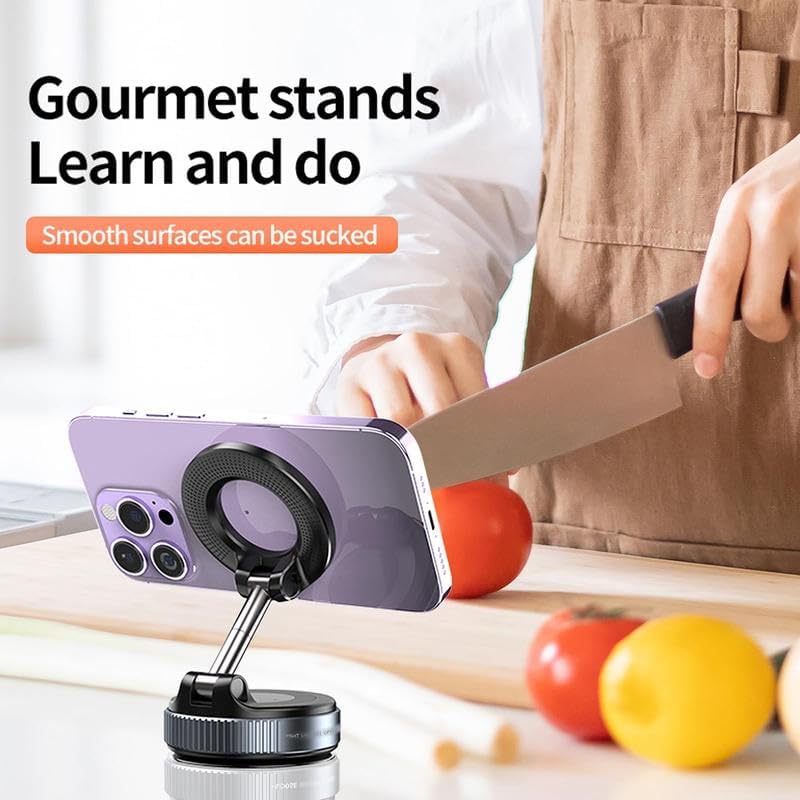
Figure 8: Using the phone holder in the kitchen. This image shows the phone holder being used in a kitchen setting, demonstrating its utility for hands-free viewing while cooking or following recipes.
- Exercise: Attach to treadmills or other smooth gym equipment.
- Office/Desk: Use on smooth tabletops for a convenient phone stand.

Figure 9: Vacuum adsorption on a smooth tabletop. This image illustrates the phone holder's ability to adhere to a smooth tabletop surface using its vacuum adsorption technology, making it suitable for use as a desk stand.
Maintenance
- Cleaning: Regularly wipe the suction cup and the holder's surface with a soft, damp cloth to remove dust and grime. Ensure the suction cup is clean before each use for optimal performance.
- Storage: When not in use, store the holder in a cool, dry place. Its foldable design allows for compact storage.
- Suction Cup Care: If the suction cup loses its stickiness over time, rinse it with warm water and let it air dry. Do not use harsh chemicals or abrasive materials.
Troubleshooting
Problem: The suction cup does not stick firmly.
- Solution: Ensure the mounting surface is clean, dry, and smooth. Wipe both the suction cup and the surface thoroughly. Make sure the switch ring is rotated fully clockwise to engage the vacuum lock. If the surface is not smooth, use the provided sticky pad.
Problem: The phone does not attach magnetically.
- Solution: Ensure your phone or case is MagSafe compatible. If not, attach the included metal ring to the back of your phone or case. Verify the metal ring is securely attached and positioned correctly. Avoid placing credit cards or other magnetic-sensitive items between the phone and the holder.
Problem: The holder feels loose or wobbly.
- Solution: Check that the suction cup is securely locked. Ensure all adjustable joints on the arm are tightened if they have a locking mechanism.
Specifications
| Attribute | Detail |
|---|---|
| Model Name | Maggrip Pro 360 2.0 |
| Brand | Zmuhyrd |
| Material | Zinc Alloy + ABS |
| Color | Black (also available in Silver, White) |
| Weight | 0.28lb / 128g |
| Dimensions (Folded) | Approx. 2.28 x 2.56 x 0.98 inches / 5.8 x 6.5 x 2.5 cm |
| Mounting Type | Vacuum Suction Cup (with optional sticky pad for non-smooth surfaces) |
| Magnetic Force | N55 Magnetic Core (1000GF) |
| Special Features | Foldable, Hands-Free, Rotatable, Electric Vacuum Adsorption, Magnetic Fixation |
| Compatible Devices | All smartphones (with metal ring for non-magnetic devices) |
Warranty and Support
For warranty information and customer support, please refer to the product packaging or contact Zmuhyrd customer service directly. Keep your purchase receipt for warranty claims.
For further assistance, please visit the official Zmuhyrd website or contact their support team.
Ask a question about this manual
Ask about setup, troubleshooting, compatibility, parts, safety, or missing instructions. Manuals+ will review the question and use this page’s manual context to help answer it.