
1. Product Overview
This manual provides essential information for the safe and effective use of your FYIOGXG replacement battery, designed for the JBL PartyBox Club 120 portable speaker. This battery is a high-quality replacement, certified with ISO9001, and engineered to meet original specifications.
- Compatibility: Specifically designed for JBL PartyBox Club 120, part number JBL FG2CELL21700P.
- High Quality: Manufactured to exact specifications, ensuring safe and durable use with protection against overcharge, over-discharge, over-voltage, and short circuits.
- Easy Installation: Features a fully decoded chip for seamless integration, similar to the original battery.
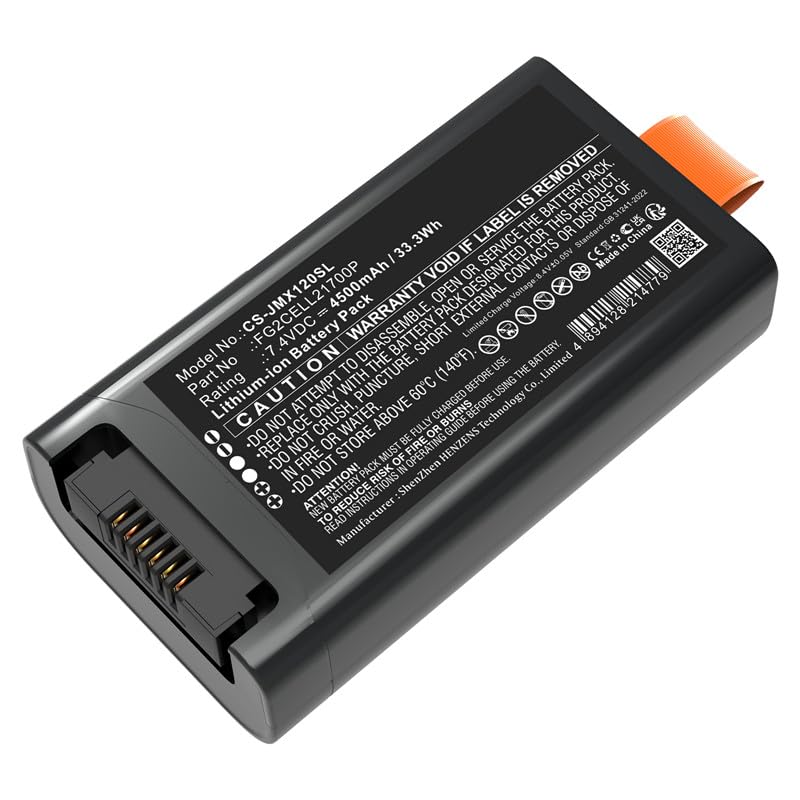
Image 1.1: Front view of the FYIOGXG replacement battery, displaying its specifications label.
2. Safety Information and Warnings
Please read and understand all safety instructions before using this battery. Failure to follow these instructions may result in fire, electric shock, explosion, or other hazards.
- Compatibility Check: Before purchase and installation, carefully verify that the model number of your device (JBL PartyBox Club 120) and the part number of your original battery match this replacement battery (PN: JBL FG2CELL21700P).
- Initial Use: A new battery will achieve its best performance after 2 or 3 complete charge and discharge cycles.
- Charger Quality: Do not use low-quality third-party adapter chargers. Using unapproved chargers can shorten the battery's life and pose safety risks.
- Installation: Ensure the battery connector is properly and securely connected to your device during installation.
- Disassembly: DO NOT attempt to disassemble, open, or service the battery pack.
- Replacement: Replace only with the battery pack designated for this product.
- Physical Damage: DO NOT crush, puncture, or short external contacts.
- Heat Exposure: DO NOT dispose of in fire or water. DO NOT store above 60°C (140°F).
- Label Integrity: Warranty is void if the label is removed.

Image 2.1: Detailed view of the battery's safety warnings and specifications.
3. Setup and Installation
Installing the replacement battery is a straightforward process. If you are unfamiliar with battery replacement procedures for your JBL PartyBox Club 120, it is recommended to consult online video tutorials or seek professional assistance.
- Power Off Device: Ensure your JBL PartyBox Club 120 is completely powered off and disconnected from any power source before beginning installation.
- Locate Battery Compartment: Refer to your JBL PartyBox Club 120's original manual or online resources to locate and open the battery compartment.
- Remove Old Battery: Carefully disconnect and remove the old battery. Note its orientation for correct installation of the new battery.
- Insert New Battery: Insert the FYIOGXG replacement battery into the compartment, ensuring it is correctly oriented.
- Connect Battery: Securely connect the battery's connector to the device's port. Ensure a firm connection.
- Close Compartment: Close the battery compartment securely.
- Initial Charge: After installation, fully charge the battery before its first use.

Image 3.1: Top view of the replacement battery, highlighting its form factor for installation.
4. Operating Instructions
4.1 Charging the Battery
For optimal performance and longevity, follow these charging guidelines:
- First Use: Fully charge the battery before its initial use.
- Conditioning Cycles: For the best performance, allow the new battery to complete 2 to 3 full charge and discharge cycles. This means using the device until the battery is low, then fully charging it.
- Approved Charger: Always use the original JBL charger or a high-quality, approved charger compatible with the JBL PartyBox Club 120. Avoid generic or low-quality chargers.
- Charging Indicators: Monitor your device's charging indicators to ensure the battery is charging correctly.
4.2 Using the Battery
Once installed and charged, the battery operates seamlessly with your JBL PartyBox Club 120, providing power for your audio experience.
- Normal Operation: Use your JBL PartyBox Club 120 as usual. The battery will provide power until it needs recharging.
- Battery Level Monitoring: Pay attention to your device's battery level indicators to know when recharging is necessary.
5. Maintenance and Storage
Proper care and storage will extend the life of your FYIOGXG replacement battery.
- Regular Charging: Avoid completely draining the battery frequently. Recharge it when the device indicates a low battery level.
- Temperature: Store the battery in a cool, dry place, away from direct sunlight and extreme temperatures. Do not expose to temperatures above 60°C (140°F).
- Long-Term Storage: If storing the battery for an extended period, charge it to approximately 50-60% capacity. Recharge it every 3-6 months to prevent deep discharge.
- Cleaning: Keep the battery contacts clean and free from dust or debris. Use a dry, soft cloth if cleaning is necessary.

Image 5.1: Bottom view of the replacement battery, illustrating its design.
6. Troubleshooting
If you encounter issues with your FYIOGXG replacement battery, consider the following:
- Battery Not Charging:
- Ensure the charger is properly connected to both the device and a power outlet.
- Verify that the charger is functional and an approved type.
- Check the battery connector for proper seating and any visible damage.
- Short Battery Life:
- Ensure the battery has completed 2-3 full charge/discharge cycles to reach optimal performance.
- Avoid extreme temperatures during use and storage.
- Confirm you are using an approved charger.
- Device Not Powering On:
- Ensure the battery is fully charged.
- Check that the battery is correctly installed and the connector is secure.
- If the issue persists, consult the JBL PartyBox Club 120's device manual for further troubleshooting.
If these steps do not resolve the issue, please contact customer support as detailed in the "Warranty and Support" section.
7. Specifications
| Feature | Specification |
|---|---|
| Model Number | CS-JMX120SL (as per battery label) |
| Part Number | FG2CELL21700P |
| Battery Type | Lithium Polymer |
| Capacity | 4700mAh / 34.78Wh |
| Voltage | 7.4V |
| Dimensions | 89.50 x 25.10 x 49.00mm |
| Weight | Approximately 10g (as per product specifications) |
| Reusability | Yes |
| Certifications | ISO9001 |

Image 7.1: Angled view of the replacement battery, showcasing its design and connector.
8. Warranty and Support
Your FYIOGXG replacement battery comes with dedicated support and warranty coverage.
- Warranty Period: A 12-month warranty is provided from the date of purchase.
- Customer Support: For any inquiries, technical assistance, or warranty claims, please contact our customer support. Email replies are typically provided within 24 hours.
- Seller Information: This product is sold by BatteryUniverse. For direct support, you may refer to your purchase platform for seller contact details.
Please retain your proof of purchase for warranty purposes.