
1. Introduction and Overview
This manual provides essential information for the safe and effective use of your FYIOGXG replacement battery, designed for Thuraya 9103, IP Modem, and ThurayaIP devices. This battery features a capacity of 10500mAh / 77.7Wh and operates at 7.4V. It is certified with ISO9001, RoHS, and CE standards, ensuring quality and safety. The new fully decoded chip ensures compatibility and performance similar to the original battery.
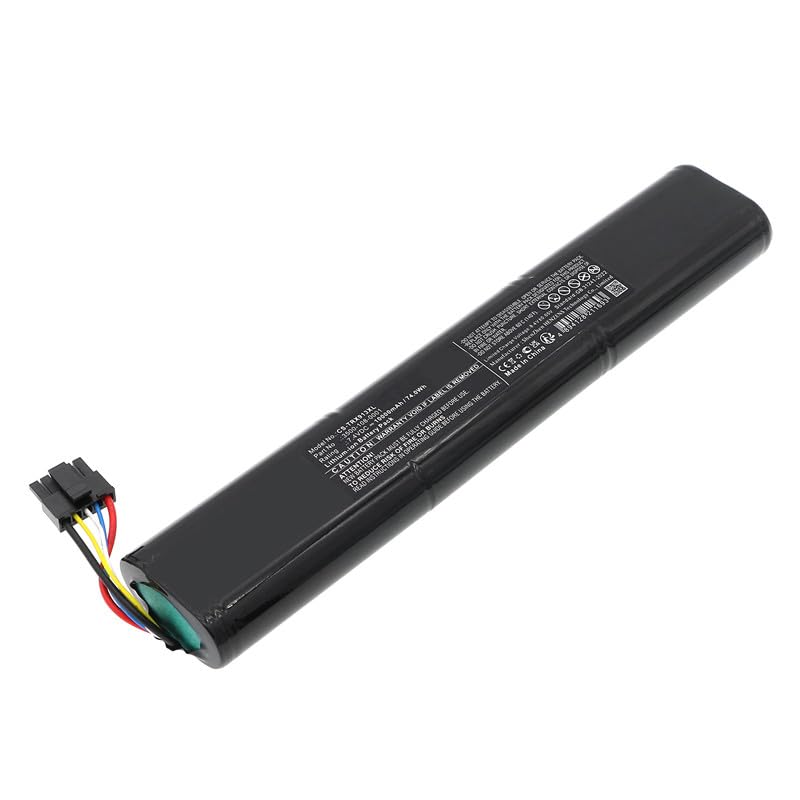
Image 1.1: The FYIOGXG replacement battery, showing its overall form factor and connector.
2. Safety Information
Please read all safety instructions carefully before using the battery.
- Compatibility Check: Before purchase and installation, carefully verify that the model number of your device and the part number of your original battery match the specifications of this replacement battery.
- Charging: Do not use low-quality third-party adapter chargers. Using unapproved chargers can shorten the battery's lifespan and pose safety risks.
- Protection Features: The battery is equipped with overcharge, over-discharge, over-voltage, and short-circuit protection for enhanced safety and longevity.
- Handling: Do not attempt to disassemble, open, or service the battery pack.
- Replacement: Replace only with the battery pack designated for the product.
- Physical Damage: Do not crush, puncture, short external contacts, or dispose of the battery in fire or water.
- Temperature: Do not store the battery above 60°C (140°F).
- Usage: Always refer to your device's operating guide for specific instructions on battery usage.
3. Setup and Installation
Installing the replacement battery is generally straightforward. Many instructional videos are available online to guide you through the process for your specific device model.
- Preparation: Ensure your device is powered off and disconnected from any power source before beginning the installation.
- Removal: Carefully remove the old battery from your device according to the device's manufacturer instructions.
- Installation: Insert the new FYIOGXG battery into the battery compartment.
- Connection: Ensure the battery connector is properly and securely connected to your device's port. A loose connection can prevent the device from powering on or charging correctly.
- Initial Charge: A new battery must be fully charged before its first use. For optimal performance, allow 2 to 3 complete charge and discharge cycles.

Image 3.1: Close-up view of the battery's multi-pin connector, which must be securely attached to the device.
4. Operating Instructions
Once installed, the battery operates similarly to your original battery. The new fully decoded chip ensures seamless integration with your Thuraya device.
- First Use: For best performance, fully charge the battery before its initial use. Allow the battery to undergo 2 to 3 full charge and discharge cycles to reach its maximum capacity.
- Charging: Charge the battery using the original or a certified compatible charger for your Thuraya device. Avoid using unapproved chargers.
- Usage: Use your device as normal. The battery's capacity of 10500mAh / 77.7Wh provides extended power for your Thuraya 9103, IP Modem, or ThurayaIP.
5. Maintenance and Care
Proper care and maintenance will help extend the life of your battery.
- Storage Temperature: Store the battery in a cool, dry place, away from direct sunlight and extreme temperatures. Do not store above 60°C (140°F).
- Long-Term Storage: If storing the battery for an extended period, ensure it is charged to approximately 50-70% capacity. Recharge it every few months to prevent deep discharge.
- Physical Protection: The battery is packaged with shock-absorbing foam to protect it during transport. Handle the battery with care to avoid physical damage.
- Cleaning: Keep the battery contacts clean and free from dust or debris. Use a dry, soft cloth for cleaning.
6. Troubleshooting
If you encounter issues with your FYIOGXG replacement battery, consider the following:
- Device Not Powering On: Ensure the battery is correctly installed and the connector is firmly seated. Verify the battery has sufficient charge.
- Battery Not Charging: Check that the charger is properly connected to both the device and a power source. Ensure the charger is compatible and functioning correctly. Try a different power outlet.
- Short Battery Life: Allow the battery to complete 2-3 full charge/discharge cycles to optimize its performance. Ensure you are using a compatible and high-quality charger.
If problems persist after following these steps, please refer to the Warranty and Support section for assistance.
7. Specifications
| Feature | Specification |
|---|---|
| Model Number | 3500-108-0001 |
| Compatible Devices | Thuraya 9103, IP Modem, ThurayaIP |
| Battery Type | Lithium Polymer |
| Capacity | 10500mAh / 77.7Wh |
| Voltage | 7.4 Volts |
| Dimensions (approx.) | 200.00 x 36.00 x 19.00mm |
| Weight (approx.) | 10 Grams |
| Certifications | ISO9001, RoHS, CE |
| Manufacturer | CS |
8. Warranty and Support
Your FYIOGXG replacement battery comes with a 1-Year Warranty from the date of purchase, covering manufacturing defects.
For technical support, warranty claims, or any questions regarding your battery, please contact our customer service team. We aim to provide an email reply within 24 hours.
Contact Information: Please refer to your purchase documentation or the seller's contact details for specific support channels.