
YITAHOME MAYIHa5S7L
YITAHOME Modern Vanity Desk with Stool User Manual
Model: MAYIHa5S7L | Brand: YITAHOME
Important Safety Information
Please read and understand all safety warnings before assembly and use of the vanity desk. Failure to follow these instructions may result in injury or damage to the product.
- Always unplug the power strip before assembly, disassembly, or cleaning.
- Keep electrical components away from water or damp environments to prevent electric shock.
- Do not place excessively heavy objects on the desk to prevent tipping or structural damage.
- Follow the assembly instructions carefully to avoid injury from sharp edges or pinch points during installation.
- Do not leave the desk unattended while the LED lights are on for extended periods.
- Ensure all connections are secure and stable after assembly.
Product Overview
The YITAHOME Modern Vanity Desk with Stool is designed to provide a functional and stylish space for makeup, study, or work. It features integrated RGB LED lighting, a built-in power outlet, and ample storage solutions.
Key Features
- Customizable RGB LED Light Strip: Create a vibrant ambiance with over 60,000 colors, music mode, timing function, and dynamic modes, controllable via remote or app.
- Integrated Power Strip: Equipped with 2 AC outlets, 1 USB port, and 1 Type-C port to keep your devices charged.
- Ample Storage: Two sleek white drawers with elegant gold handles for cosmetics and accessories.
- Interchangeable Side Hook & Fabric Side Pocket: Conveniently store headphones, bags, or snacks.
- Comfortable Stool: Includes a plush stool with a soft, comfortable white PU padded seat for extended use.
- Durable Construction: Crafted with a sturdy iron frame and P2 board for lasting beauty and function.
- Adjustable Legs: Ensures stability and protects floors from scratches.

Image: The YITAHOME Modern Vanity Desk with Stool, showcasing its pearl white finish, two drawers, side pocket, and integrated LED lighting, accompanied by the matching stool.
Package Contents
Please verify that all components are present before beginning assembly. If any parts are missing or damaged, please contact customer support.
- Vanity Desk Components (Tabletop, Legs, Support Bars)
- Stool Components (Seat, Legs, Support Bars)
- 2 x Drawers with Gold Handles
- RGB LED Light Strip with Remote Control
- Built-in Power Strip (2 AC outlets, 1 USB, 1 Type-C)
- Interchangeable Side Hook
- Fabric Side Pocket
- Assembly Hardware Kit (Screws, Allen Wrench, etc.)
- Anti-Tip Hardware Kit
- Instruction Manual
Assembly Instructions
Assembly is required for this product. It is recommended to have two people for easier and safer assembly. Please follow the steps carefully.
Before You Begin
- Clear a spacious area for assembly.
- Lay out all components and hardware, comparing them with the package contents list.
- Keep children and pets away from the assembly area.
- Use a soft cloth or cardboard to protect the desk surfaces during assembly.
Step-by-Step Assembly
- Assemble the Desk Frame: Attach the desk legs to the main tabletop structure using the provided screws and Allen wrench. Ensure all connections are tightened securely but do not overtighten.
- Install Drawers: Assemble the two drawers according to the instructions, then slide them into their designated slots in the desk. Ensure they glide smoothly.
- Attach Side Accessories: Secure the interchangeable side hook and fabric side pocket to the designated points on the desk frame.
- Install LED Light Strip: Adhere the RGB LED light strip to the underside of the desk's upper shelf or as indicated in the specific manual. Connect it to the power source.
- Connect Power Strip: Ensure the built-in power strip is securely integrated and its power cord is accessible.
- Assemble the Stool: Attach the stool legs to the stool seat using the provided hardware.
- Adjust Leveling Feet: Adjust the leveling feet at the bottom of the desk and stool legs to ensure stability on uneven surfaces.
- Install Anti-Tip Hardware: For safety, secure the desk to a wall using the included anti-tip hardware kit. This prevents accidental tipping.

Image: Detailed dimensions of the YITAHOME Vanity Desk (31.5"W x 15.7"D x 34.3"H) and Stool (14.5"W x 10.2"D x 16.5"H), useful for assembly and placement.
Operating Instructions
LED Lighting System
The vanity desk features an RGB LED light strip for customizable ambiance.
- Power On/Off: Use the provided remote control or the dedicated mobile app to turn the LED lights on or off.
- Color Selection: Choose from over 60,000 colors using the color wheel on the app or specific color buttons on the remote.
- Brightness Adjustment: Adjust the light intensity using the brightness controls on the remote or app.
- Modes: Explore various modes such as Music Mode (lights react to sound), Timing Function (set a timer for lights to turn off), and Dynamic Modes (pre-programmed light patterns).
- App Control: Download the specified mobile application (details in the separate LED light manual) to access advanced controls and customization options.

Image: Illustration of the smart RGB ambient lighting system, showing control via a mobile app and a physical remote, with icons for color selection, music mode, timing, dynamic modes, and adjustable brightness.
Power Outlet Usage
The built-in power strip provides convenient charging for your electronic devices.
- AC Outlets: Plug in standard electronic devices such as hair dryers, curling irons, or laptops into the 2 AC outlets (125V/12A).
- USB & Type-C Ports: Use the USB (5V/2.1A) and Type-C ports to charge smartphones, tablets, and other USB-powered devices.
- Safety: Always ensure devices are compatible with the power strip's specifications. Do not overload the power strip.
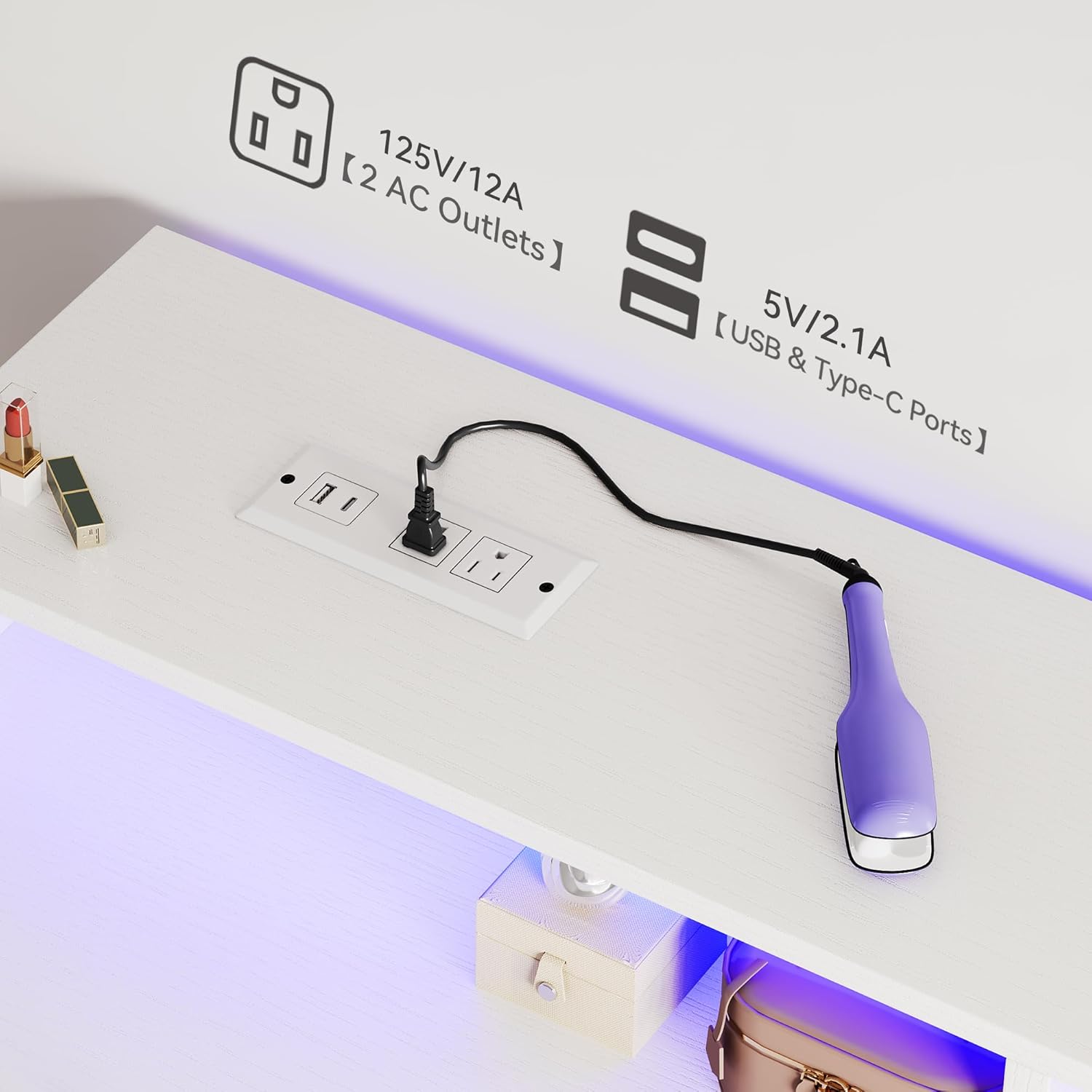
Image: A close-up view of the vanity desk's integrated power strip, featuring two standard AC outlets, one USB port, and one Type-C port, with a device plugged in.
Maintenance and Care
Proper care will extend the life and appearance of your vanity desk.
- Cleaning: Wipe surfaces with a soft, damp cloth. Avoid harsh chemicals or abrasive cleaners that may damage the finish.
- Spills: Clean up spills immediately to prevent staining, especially on the wood surfaces.
- Drawer Maintenance: Periodically check drawer slides for smooth operation. If they become stiff, a small amount of silicone lubricant can be applied.
- Electrical Components: Ensure the power strip and LED lights are kept dry. Do not attempt to repair electrical components yourself.
- Hardware: Periodically check and retighten any loose screws or connections to maintain stability.
- Stool Care: Wipe the PU padded seat with a damp cloth. Avoid sharp objects that could puncture the material.
Troubleshooting
If you encounter issues with your vanity desk, refer to the table below for common problems and solutions.
| Problem | Possible Cause | Solution |
|---|---|---|
| LED lights not turning on or flickering. | Loose connection, power issue, remote battery dead. | Check all power connections. Ensure the power strip is plugged in. Replace remote batteries. If using app, check Bluetooth connection. |
| Power outlets not working. | Desk not plugged in, circuit breaker tripped, device issue. | Ensure the desk's main power cord is securely plugged into a working wall outlet. Check your home's circuit breaker. Test with a different device. |
| Drawers are stiff or do not slide smoothly. | Misalignment, debris in tracks, overtightened screws. | Ensure drawers are correctly aligned on their tracks. Clean tracks of any debris. Loosen drawer slide screws slightly if overtightened. |
| Desk feels wobbly or unstable. | Loose hardware, uneven floor, leveling feet not adjusted. | Retighten all assembly screws. Adjust the leveling feet at the bottom of the desk legs to compensate for uneven flooring. |
| Side hook or pocket is loose. | Improper installation, loose attachment. | Ensure the hook and pocket are correctly inserted and secured according to assembly instructions. |
Product Specifications
| Attribute | Detail |
|---|---|
| Brand | YITAHOME |
| Model Number | MAYIHa5S7L |
| Product Dimensions (Desk) | 21.5"D x 31.5"W x 34.3"H (54.6cm D x 80cm W x 87.1cm H) |
| Item Weight | 26.9 pounds (12.2 kg) |
| Frame Material | Wood, Iron |
| Furniture Finish | Pearl White |
| Color | Pearl White |
| Assembly Required | Yes |
| Power Outlet | 2 AC Outlets (125V/12A), 1 USB Port (5V/2.1A), 1 Type-C Port (5V/2.1A) |
| LED Lighting | RGB, App/Remote Control, Music Mode, Timing Function, Dynamic Modes |
| UPC | 197839932326 |
| Country of Origin | China |
Warranty and Customer Support
YITAHOME products are manufactured to high-quality standards. For specific warranty information regarding your vanity desk, please refer to the warranty card included in your package or visit the official YITAHOME website.
If you have any questions, require assistance with assembly, or need to report missing/damaged parts, please contact YITAHOME customer support. Contact details can typically be found on the product packaging, the brand's official website, or through your purchase platform.
Please have your model number (MAYIHa5S7L) and purchase information ready when contacting support for faster service.