
1. Important Safety Information
Please read all instructions carefully before assembly and use. Retain this manual for future reference.
- Always follow the assembly instructions carefully to avoid injury.
- Do not exceed the maximum weight capacity of 300 pounds to ensure the stability and safety of the chair.
- Ensure all screws and bolts are securely tightened before use. Periodically check and re-tighten fasteners.
- Keep small parts away from children during assembly.
2. Product Overview
The HapGIFT Gaming Chair (Model Hap002-US) is designed for comfort and support during extended periods of sitting, whether for gaming or office work. It features an ergonomic design, durable materials, and adjustable functions to enhance your experience.
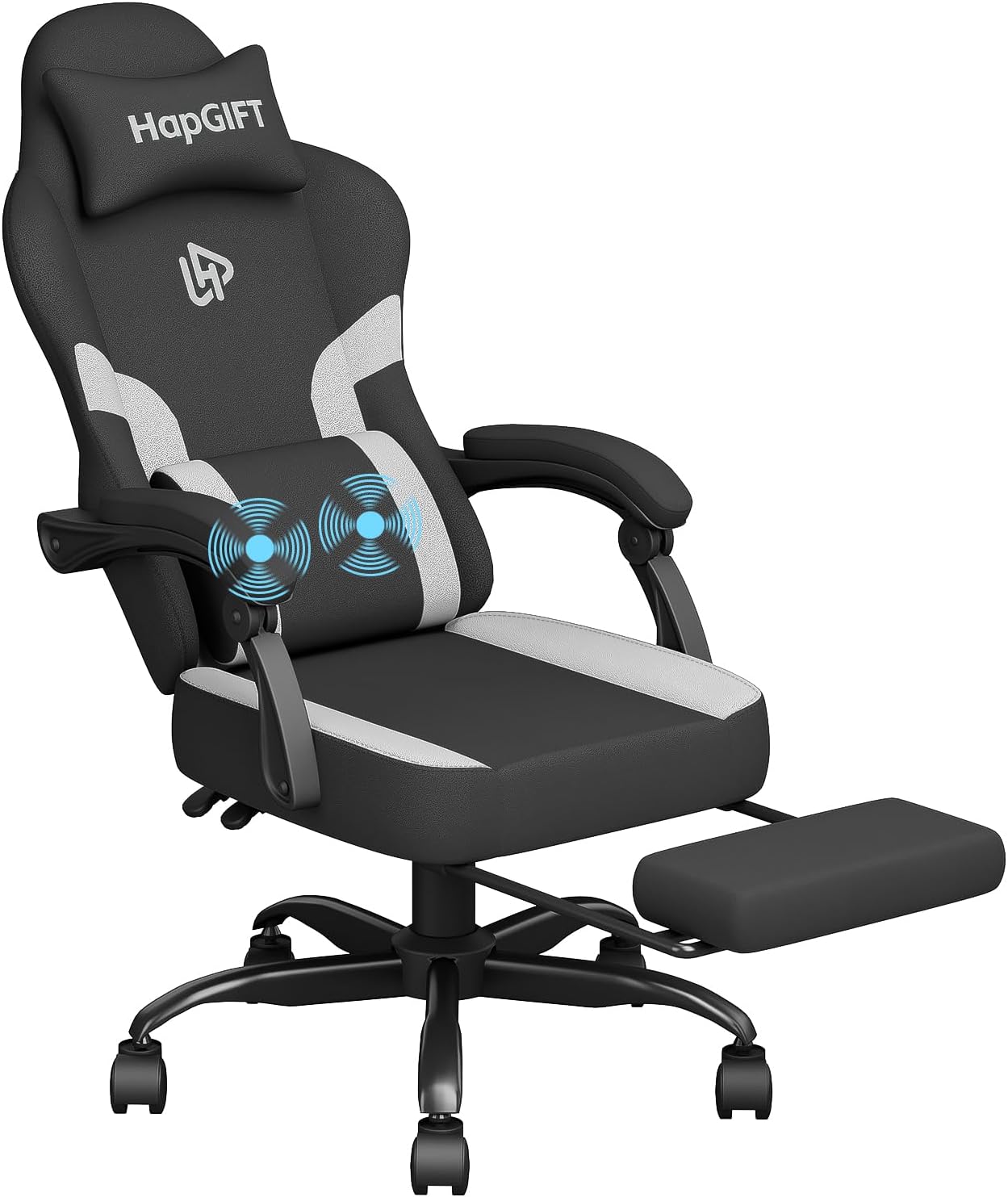
Figure 2.1: HapGIFT Gaming Chair, Black and Grey model, showcasing its ergonomic design and integrated footrest.
Key Features:
- Comfortable Fabric: Constructed with breathable PU leather, soft, comfortable, and easy to clean. The seat cushion features S-shaped springs and high-density foam for elasticity and support.
- Ergonomic Design: Conforms to the human body's curves, providing optimal comfort. Includes a headrest and a massage lumbar pillow to alleviate neck and back discomfort.
- Retractable Footrest: Located at the bottom of the seat, it can be extended to support your legs when reclining.
- Sturdy and Durable Material: Features a robust five-prong base and alloy steel air bars, certified to support up to 300 pounds.
- Adjustable Functions: 360° swivel, 360° caster wheels for free movement, adjustable height, and a reclining backrest (90° to 135°).
3. Assembly Instructions
A detailed instruction manual and all necessary accessories are included in the packaging for easy assembly. Please follow the step-by-step guide provided with your product. Ensure all components are present before beginning assembly.

Figure 3.1: All components and accessories for the HapGIFT Gaming Chair assembly.
4. Operating Instructions
4.1. Adjusting Chair Height
To adjust the chair's height, locate the "LIFT" lever on the right side, beneath the seat. Pull the lever upwards while standing to raise the chair. To lower the chair, pull the lever upwards while seated, allowing your weight to lower the seat to the desired position. Release the lever to lock the height.
4.2. Reclining the Backrest
To recline the backrest, locate the "RCL" lever on the left side, beneath the seat. Pull the lever upwards and lean back to the desired angle (between 90° and 135°). Release the lever to lock the backrest in place. To return to an upright position, pull the lever and lean forward.
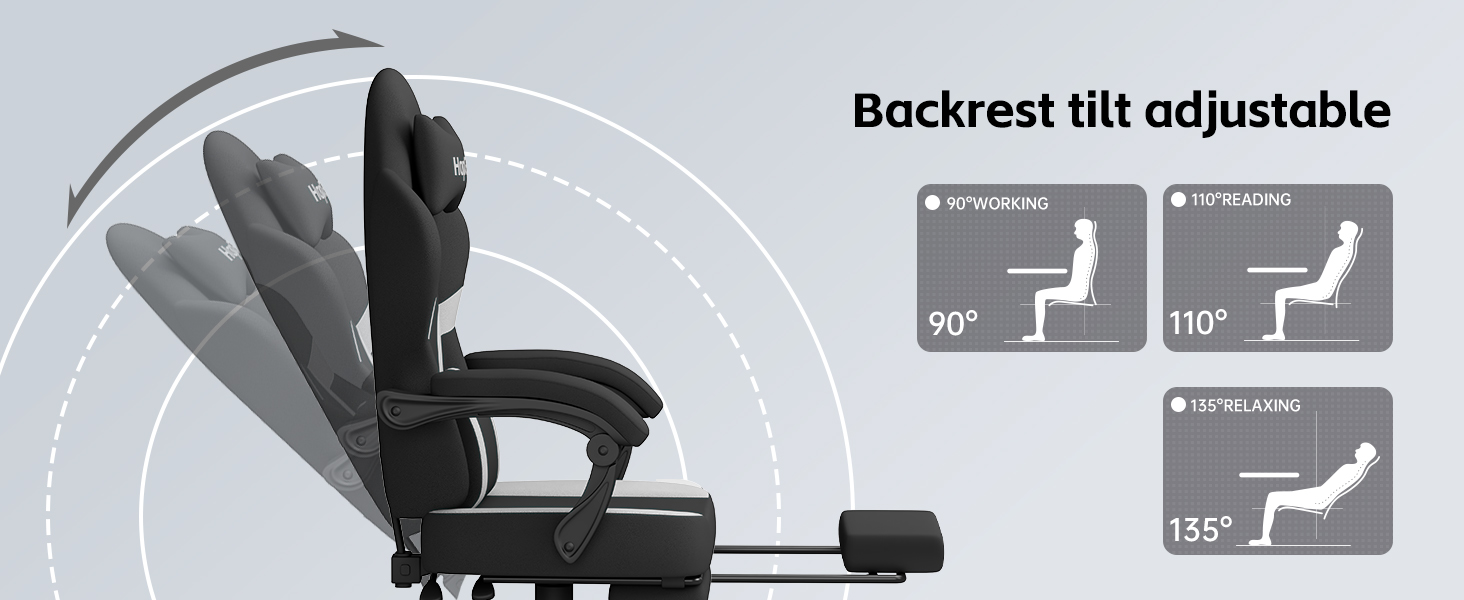
Figure 4.1: Illustration of the adjustable backrest positions for working, reading, and relaxing.
4.3. Using the Retractable Footrest
To deploy the footrest, pull it out from underneath the seat. It will extend forward. To retract, push it back underneath the seat until it is fully stored. This feature is designed to provide leg support when the chair is reclined.
4.4. Activating Massage Lumbar Support
The lumbar support pillow includes a vibrating massage function. Connect the USB cable from the pillow to a compatible USB power source (e.g., computer, USB wall adapter). Locate the inline switch on the cable to turn the vibration on or off.

Figure 4.2: Detail of the massage lumbar support, indicating its vibrating function for lower back relief.
5. Maintenance
- Cleaning: The PU leather fabric is easy to clean. Simply wipe it gently with a damp cloth. Avoid harsh chemicals or abrasive cleaners.
- Fasteners: Periodically check all screws and bolts to ensure they remain tight. Re-tighten as necessary to maintain stability and safety.
- Casters: Keep the caster wheels free of debris to ensure smooth movement.
6. Troubleshooting
If you encounter any issues with your HapGIFT Gaming Chair, please refer to the following general troubleshooting tips:
- Chair feels unstable: Ensure all assembly screws and bolts are fully tightened. Check that the five-prong base is correctly assembled and seated.
- Height adjustment not working: Verify that the "LIFT" lever is fully engaged and that the gas lift cylinder is properly installed. If the issue persists, contact customer support.
- Backrest recline not locking: Ensure the "RCL" lever is fully released after adjusting the angle. Check for any obstructions in the reclining mechanism.
- Massage function not working: Confirm the USB cable is securely connected to a powered USB port and the inline switch is in the "ON" position.
7. Specifications
| Feature | Detail |
|---|---|
| Brand | HapGIFT |
| Model Name | Hap002-US |
| Color | Black Grey-us |
| Product Dimensions | 10.63"D x 31.1"W x 23.23"H |
| Maximum Weight Recommendation | 300 Pounds |
| Material | Metal frame, PU leather, High-density foam |
| Special Features | Adjustable Height, Arm Rest, Ergonomic, Foot Rest, Massage Lumbar Support |
| Reclining Position Count | Adjustable from 90° to 135° |
| Item Weight | 39.5 pounds |

Figure 7.1: Detailed size specifications and recommended user parameters for the HapGIFT Gaming Chair.
8. Warranty and Support
HapGIFT is committed to customer satisfaction. If you encounter any problems such as missing parts, product damage, or other unsatisfactory issues, please do not hesitate to contact our professional after-sales service team.
- We offer free replacement or repair within one year of purchase.
- For assistance, please contact our customer support through the retailer's platform or the official HapGIFT website.