
Energizer UB2000
Energizer UB2000 True Wireless Bluetooth Earbuds User Manual
Model: UB2000
1. Introduction
Thank you for choosing the Energizer UB2000 True Wireless Bluetooth Earbuds. This manual provides essential information for setting up, operating, and maintaining your earbuds to ensure optimal performance and longevity. Please read this manual thoroughly before use.
2. Package Contents
Ensure all items are present in the package:
- Energizer UB2000 True Wireless Earbuds
- Charging Case
- USB-C Charging Cable
- Ear Cushions (various sizes)
- Gel Tips
- User Manual (this document)
3. Product Overview
The Energizer UB2000 earbuds offer a seamless audio experience with advanced features. Below is an illustration of the main components:

Image: Energizer UB2000 True Wireless Earbuds and their charging case. The earbuds are shown outside the case, which features LED indicators and a USB-C port.
The charging case also functions as an emergency power reserve for your smartphone, providing additional battery life on the go.
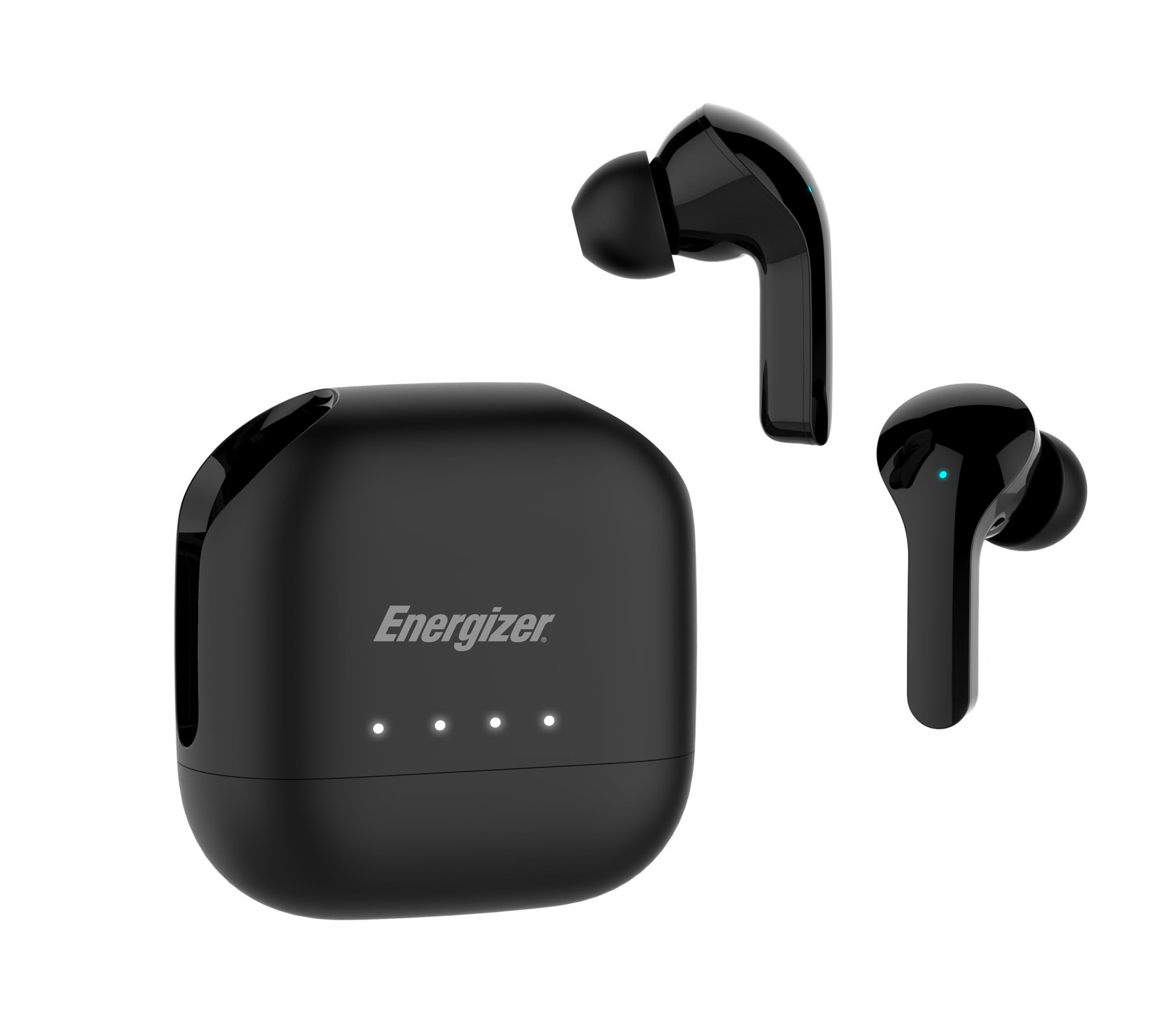
Image: The Energizer UB2000 charging case connected via USB-C to a smartphone, illustrating its emergency power reserve capability. The image highlights 1800mAh capacity and up to 40 hours of usage.
4. Setup
4.1 Charging the Earbuds and Case
- Initial Charge: Before first use, fully charge the earbuds and charging case. Place the earbuds into the charging case.
- Charge Case: Connect the provided USB-C cable to the charging port on the case and to a USB power source (e.g., wall adapter, computer USB port).
- LED Indicators: The LED indicators on the charging case will illuminate to show the charging status. A full charge is indicated when all LEDs are solid.
- Charging Time: A full charge typically takes approximately 2 hours.
4.2 Pairing with Your Device
- Power On: Open the charging case. The earbuds will automatically power on and enter pairing mode. The LED on one earbud will flash, indicating it's ready to pair.
- Activate Bluetooth: On your smartphone, tablet, or laptop, enable Bluetooth.
- Select Device: In your device's Bluetooth settings, search for "Energizer UB2000" and select it to connect.
- Confirmation: Once successfully paired, the earbud LED will stop flashing, and you may hear an audible confirmation.
- Reconnect: The earbuds will automatically reconnect to the last paired device when removed from the case, if Bluetooth is enabled on the device.

Image: Energizer UB2000 earbuds and charging case with a tablet in the background, illustrating stable Bluetooth 5.3 connectivity across iOS, Android, and Windows devices, and suitability for use on planes.
5. Operating Instructions
5.1 Power On/Off
- Power On: Open the charging case, or press and hold the touch control area on both earbuds for 3 seconds.
- Power Off: Place the earbuds back into the charging case and close the lid, or press and hold the touch control area on both earbuds for 5 seconds.
5.2 Touch Controls
The earbuds feature touch-sensitive controls for various functions:
- Play/Pause: Single tap on either earbud.
- Next Track: Double tap on the right earbud.
- Previous Track: Double tap on the left earbud.
- Answer/End Call: Single tap on either earbud during an incoming call or active call.
- Reject Call: Press and hold on either earbud for 2 seconds during an incoming call.
- Activate Voice Assistant: Triple tap on either earbud.
5.3 Emergency Power Reserve
The charging case can provide emergency power to other USB-C compatible devices:
- Connect your smartphone or other device to the USB-C output port on the charging case using a compatible USB-C to USB-C cable (not included, unless your device uses USB-C to USB-C).
- The charging case will begin to charge your connected device.
- This feature is designed for emergency situations and provides approximately 30-35% extra battery life for a typical smartphone.
6. Maintenance
6.1 Cleaning
- Regularly clean the earbuds and charging case with a soft, dry, lint-free cloth.
- Do not use harsh chemicals, cleaning solvents, or strong detergents.
- Remove ear tips and clean them separately with mild soap and water if necessary, ensuring they are completely dry before reattaching.
6.2 Storage
- When not in use, store the earbuds in their charging case to protect them and keep them charged.
- Store in a cool, dry place, away from extreme temperatures and direct sunlight.

Image: Three individuals engaged in different activities (yoga, walking in rain, running) while wearing Energizer UB2000 earbuds, highlighting their IPX4 water resistance for sweatproof and splashproof use.
7. Troubleshooting
If you encounter issues with your Energizer UB2000 earbuds, refer to the following common solutions:
- Earbuds not pairing:
- Ensure both earbuds are charged.
- Place earbuds back in the case, close the lid, then open it again to re-enter pairing mode.
- Turn off and on Bluetooth on your device.
- Forget "Energizer UB2000" from your device's Bluetooth list and try pairing again.
- No sound from one earbud:
- Ensure both earbuds are charged.
- Try placing both earbuds back in the case, closing the lid, and then taking them out again.
- Reconnect the earbuds to your device.
- Earbuds not charging:
- Ensure the charging cable is securely connected to both the case and the power source.
- Check if the power source is active.
- Clean the charging contacts on both the earbuds and inside the case with a dry cotton swab.
- Poor sound quality:
- Ensure the earbuds are properly seated in your ears. Try different sized ear tips for a better seal.
- Move closer to your connected device to avoid interference.
- Clean any debris from the earbud speakers.
8. Specifications
| Feature | Detail |
|---|---|
| Model Name | UB2000 |
| Connectivity Technology | Bluetooth, USB-C |
| Wireless Communication Technology | Bluetooth |
| Bluetooth Version | 5.3 |
| Bluetooth Range | 10 Meters |
| Audio Driver Type | Dynamic Driver |
| Audio Driver Size | 6 Millimeters |
| Frequency Response | 20 KHz |
| Sensitivity | 42 dB |
| Impedance | 32 Ohms |
| Battery Life | 40 Hours (with charging case) |
| Charging Time | 2 Hours |
| Control Type | Touch Control |
| Water Resistance Level | IPX4 (Water Resistant) |
| Material | Plastic |
| Item Weight | 0.16 Kilograms (5.6 ounces) |
| Product Dimensions | 2.07 x 2.07 x 1.02 inches (case) |
| Special Features | Bluetooth 5.3, Touch Control, Emergency Power Reserve |
For a visual overview of product specifications, please watch the video below:
Video: An official product video detailing the specifications and features of the Energizer UB2000 True Wireless Earbuds, including Bluetooth 5.3, IPX4 water resistance, and usage time.
9. Safety Information
- Do not disassemble, repair, or modify the product.
- Keep the product away from water, moisture, and extreme temperatures.
- Avoid prolonged exposure to high volume levels to prevent hearing damage.
- Keep out of reach of children and pets.
- Dispose of the product responsibly according to local regulations.
10. Warranty and Support
Energizer products are designed for reliability and performance. For warranty information, please refer to the warranty card included in your package or visit the official Energizer website.
For technical support, troubleshooting assistance, or any inquiries regarding your Energizer UB2000 earbuds, please contact Energizer customer service through their official channels.