1. Introduction
Thank you for choosing the GoldenEar Triton Reference Loudspeaker. This flagship, three-way floorstanding speaker is engineered to deliver unparalleled high-end audio performance. Featuring a powerful built-in subwoofer system and advanced driver technology, it provides deep, impactful bass, crystal-clear highs, and a wide dynamic range for an immersive listening experience. This manual provides essential information for setup, operation, maintenance, and troubleshooting to ensure optimal performance and longevity of your loudspeaker.
2. Safety Information
Please read all safety instructions carefully before operating your loudspeaker. Retain this manual for future reference.
- Power Source: Connect the loudspeaker only to the type of power source indicated on the marking label. Ensure the voltage is compatible with your region.
- Ventilation: Do not block any ventilation openings. Ensure adequate space around the speaker for proper airflow to prevent overheating.
- Water and Moisture: Do not expose the loudspeaker to rain, moisture, dripping, or splashing. Do not place objects filled with liquids, such as vases, on the apparatus.
- Heat: Do not place the loudspeaker near heat sources such as radiators, heat registers, stoves, or other apparatus (including amplifiers) that produce heat.
- Cleaning: Unplug the loudspeaker from the wall outlet before cleaning. Use only a dry cloth. Avoid liquid cleaners or aerosol sprays.
- Servicing: Do not attempt to service this product yourself. Refer all servicing to qualified service personnel. Opening or removing covers may expose you to dangerous voltage or other hazards.
- Placement: Place the loudspeaker on a stable, level surface to prevent it from falling. Keep out of reach of children and pets.
3. Package Contents
Carefully unpack your GoldenEar Triton Reference Loudspeaker and verify that all items are present and in good condition. The package should contain:
- GoldenEar Triton Reference Loudspeaker (1 unit)
- Power Cord
- Speaker Grille (pre-installed or separate)
- Owner's Manual (this document)
- Remote Control (for integrated amplifier functions)
If any items are missing or damaged, please contact your retailer immediately.
4. Setup
Proper setup is crucial for achieving the best sound quality from your Triton Reference Loudspeaker.
4.1 Speaker Placement
The Triton Reference Loudspeaker is designed to perform optimally in various room environments. Consider the following for ideal placement:
- Stereo Imaging: For a stereo pair, place the loudspeakers equidistant from your primary listening position, forming an equilateral triangle.
- Wall Distance: Experiment with placing the speakers a few feet away from the front and side walls to minimize boundary reflections and improve bass clarity.
- Toe-in: Slightly angle the speakers inward towards the listening position (toe-in) to fine-tune the soundstage and imaging.
- Room Acoustics: Room furnishings, carpets, and curtains can affect sound. Adjust placement to compensate for overly reflective or absorptive surfaces.

Figure 4.1: Front view of the GoldenEar Triton Reference Loudspeaker, highlighting its elegant, tall, and slender design with a piano-black lacquer finish.
4.2 Connections
The Triton Reference Loudspeaker requires both an audio signal connection from your amplifier/receiver and a power connection for its integrated subwoofer amplifier.
- Audio Input: Connect your amplifier's speaker outputs to the binding posts on the rear of the Triton Reference. Ensure correct polarity (+ to + and - to -).
- Power Connection: Plug the provided power cord into the AC inlet on the rear of the loudspeaker, then into a suitable wall outlet.
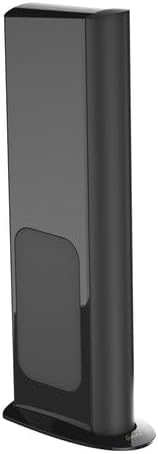
Figure 4.2: Side view of the GoldenEar Triton Reference Loudspeaker, illustrating the rear panel where audio and power connections are made.
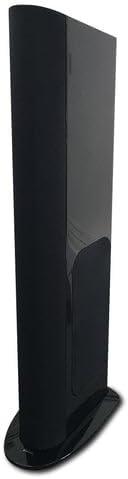
Figure 4.3: Angled view of the GoldenEar Triton Reference Loudspeaker, providing a comprehensive look at its form factor and stable base.
5. Operating Instructions
Once properly set up, operating your Triton Reference Loudspeaker is straightforward.
5.1 Powering On/Off
The integrated subwoofer amplifier will typically power on automatically when an audio signal is detected and enter standby mode when no signal is present for a period. Some models may feature a physical power switch on the rear panel.
5.2 Volume Control
The overall volume of the loudspeaker system is primarily controlled by your connected amplifier or receiver. The Triton Reference's internal subwoofer amplifier has its own level control, which can be adjusted to blend the bass output seamlessly with your room and main speakers. This adjustment is often done via a dedicated knob on the rear panel or through the provided remote control.
5.3 Remote Control (if applicable)
If your Triton Reference Loudspeaker includes a remote control, it is used to adjust specific settings of the integrated subwoofer amplifier, such as volume level, phase, and crossover frequency. Refer to the remote control's specific instructions for detailed functionality.
6. Maintenance
Regular maintenance will help preserve the appearance and performance of your loudspeaker.
- Cleaning the Cabinet: Use a soft, dry, lint-free cloth to wipe the cabinet. For the piano-black lacquer finish, avoid abrasive cleaners or polishes that could scratch the surface. A slightly damp cloth can be used for stubborn marks, followed by immediate drying.
- Cleaning the Grille: The speaker grille can be gently vacuumed with a soft brush attachment to remove dust. If removable, it can be hand-washed with mild soap and water, then air-dried completely before reattaching.
- Avoid Solvents: Never use harsh chemicals, solvents, or strong detergents, as they can damage the finish and components.
- Dusting: Regularly dust the speaker to prevent accumulation, especially around drivers and vents.
7. Troubleshooting
If you encounter issues with your Triton Reference Loudspeaker, refer to the following common problems and solutions:
- No Sound:
- Check all cable connections (audio and power) to ensure they are secure.
- Verify that your amplifier/receiver is powered on and the correct input is selected.
- Ensure the loudspeaker's power cord is firmly plugged into a working outlet.
- Check the volume level on both your amplifier and the loudspeaker's subwoofer control.
- Distorted Sound:
- Reduce the volume level on your amplifier and the loudspeaker's subwoofer.
- Check for loose speaker wire connections or frayed wires.
- Ensure the speaker wires are not short-circuited (strands touching each other or the other terminal).
- Verify that the audio source is not distorted.
- Weak or No Bass:
- Check the subwoofer level control on the loudspeaker or its remote.
- Ensure the power cord is connected and the subwoofer amplifier is powered on.
- Verify the phase setting of the subwoofer (if adjustable) to ensure it aligns with your main speakers.
- Review speaker placement; moving the speaker closer to a wall can sometimes enhance bass.
- Hum or Buzz:
- Ensure all components are properly grounded.
- Try plugging the loudspeaker into a different electrical outlet.
- Separate audio cables from power cables to reduce interference.
If the problem persists after trying these solutions, please contact customer support or a qualified service technician.
8. Specifications
Detailed technical specifications for the GoldenEar Triton Reference Loudspeaker:
| Feature | Detail |
|---|---|
| Manufacturer | Generic |
| ASIN | B0F45M556D |
| Date First Available | April 18, 2025 |
| Brand | Generic |
| Audio Output Mode | Stereo |
| Warranty Type | Limited |
| Control Method | Remote |
| UPC | 092592012967 |
| Frequency Response | 12 Hz to 35 kHz |
| Sensitivity | 93.25 dB |
| Subwoofer Amplifier | 1800-watt digital DSP amplifier |
| Sub-bass Drivers | Three 6" x 10" long-throw quadratic reference |
| Infrasonic Radiators | Four 9.5" x 10.5" planar |
| Mid/Bass Drivers | Two 6" high-definition cast-basket |
| Tweeter | High-gauss neodymium High-Velocity Folded Ribbon (HVFR) |
| Weight | 108 lbs (each) |
| Finish | Hand-rubbed piano-black lacquer |
9. Warranty and Support
9.1 Warranty Information
The GoldenEar Triton Reference Loudspeaker comes with a Limited Warranty. Please refer to the warranty card included with your product or contact the manufacturer/retailer for specific terms, conditions, and duration of the warranty coverage. This warranty typically covers defects in materials and workmanship under normal use.
9.2 Customer Support
For technical assistance, service inquiries, or to obtain replacement parts, please contact your authorized GoldenEar retailer or the manufacturer's customer support. Keep your purchase receipt and product serial number handy when contacting support.
For general inquiries, you may visit the manufacturer's official website or refer to the contact information provided at the point of purchase.