
ZOYI ZT-QS7
ZOYI ZT-QS7 Milliamp Clamp Meter User Manual
Model: ZT-QS7
1. Introduction
The ZOYI ZT-QS7 is a versatile auto-ranging digital clamp meter designed for accurate electrical measurements. It features a 1mA resolution for precise current detection, True RMS for accurate AC measurements, and a 6000-count display. This manual provides essential information for the safe and effective operation, maintenance, and troubleshooting of your ZT-QS7 clamp meter.

Image 1.1: ZOYI ZT-QS7 Clamp Meter with included accessories. This image displays the main unit, red and black test leads, a temperature probe, and a black carrying pouch.
2. Safety Information
Always adhere to basic safety precautions when using this instrument to prevent electric shock, injury, or damage to the meter or equipment under test. Read and understand all safety instructions before use.
- Do not exceed the maximum input values specified for each measurement range.
- Ensure the test leads are properly connected and in good condition before making any measurements.
- Do not use the meter if it appears damaged or if the insulation on the test leads is compromised.
- Exercise extreme caution when working with voltages above 60V DC or 30V AC RMS, as these pose a shock hazard.
- Always disconnect power to the circuit before measuring resistance, capacitance, or continuity.
- Replace batteries promptly when the low battery indicator appears to ensure accurate readings.
- The meter is rated CAT III 600V. Do not use it for measurements exceeding this category or voltage.
3. Product Overview
The ZT-QS7 clamp meter integrates multiple measurement functions into a compact design. Key features include:
- AC/DC Voltage and Current Measurement
- Resistance, Capacitance, and Frequency Measurement
- Temperature Measurement
- Continuity Test with Buzzer
- Non-Contact Voltage (NCV) Detection
- True RMS for accurate non-sinusoidal waveform measurements
- V.F.D. (Variable Frequency Drive) Measurement
- Inrush Current Measurement
- Data Hold and Peak Hold functions
- Automatic Power Off
- Backlight and Flashlight for improved visibility

Image 3.1: Visual representation of the ZT-QS7's measurement capabilities, including AC/DC voltage, high current, resistance, capacitance, True RMS, data hold, peak detection, NCV, temperature, VFD, frequency, and 6000-count display.
4. Setup
4.1 Battery Installation
The ZOYI ZT-QS7 requires two AAA batteries (included). To install or replace batteries:
- Ensure the meter is turned OFF.
- Locate the battery compartment cover on the back of the meter.
- Use a screwdriver to loosen the screw(s) and remove the cover.
- Insert the two AAA batteries, observing the correct polarity (+/-) as indicated inside the compartment.
- Replace the battery compartment cover and secure it with the screw(s).
5. Operating Instructions
Before making any measurement, ensure the meter is in the correct function mode and the test leads are properly connected to the input jacks (COM and VΩHz). For current measurements using the clamp, ensure the conductor is placed correctly within the clamp jaws.
5.1 AC/DC Current Measurement (Clamp)
The ZT-QS7 offers milliamp-level resolution for AC/DC current measurements, making it suitable for detecting parasitic draws.
- Turn the rotary dial to the 'A' (Ampere) range (e.g., 6A, 60A, 100A).
- Press the 'SELECT' button to switch between AC and DC current if necessary.
- Open the clamp jaws and enclose only one conductor of the circuit. Ensure the jaws are fully closed.
- Read the current value on the display.

Image 5.1: The clamp jaws of the ZT-QS7 can open up to 21mm, allowing for convenient measurement of various conductor sizes.
5.2 AC/DC Voltage Measurement
- Insert the red test lead into the VΩHz input jack and the black test lead into the COM input jack.
- Turn the rotary dial to the 'V' (Voltage) range.
- Press the 'SELECT' button to switch between AC and DC voltage.
- Connect the test probes in parallel to the circuit or component you wish to measure.
- Read the voltage value on the display.
5.3 Resistance Measurement (Ohm)
- Insert the red test lead into the VΩHz input jack and the black test lead into the COM input jack.
- Turn the rotary dial to the 'Ω' (Ohm) range.
- Ensure the circuit or component under test is de-energized.
- Connect the test probes across the component.
- Read the resistance value on the display.
5.4 Capacitance Measurement
- Insert the red test lead into the VΩHz input jack and the black test lead into the COM input jack.
- Turn the rotary dial to the 'Capacitance' range (often shared with resistance or frequency, use 'SELECT' to cycle).
- Ensure the capacitor is fully discharged before connecting the test probes.
- Connect the test probes across the capacitor terminals.
- Read the capacitance value on the display.

Image 5.2: The ZT-QS7 is capable of measuring large resistance and capacitance values, as shown with a capacitor connected to the test leads.
5.5 Temperature Measurement
- Insert the temperature probe into the VΩHz and COM input jacks, observing polarity if applicable.
- Turn the rotary dial to the '°C/°F' (Temperature) range.
- Place the tip of the temperature probe on or near the object whose temperature you wish to measure.
- Read the temperature value on the display. Press 'SELECT' to switch between Celsius and Fahrenheit.
5.6 Continuity Test
- Insert the red test lead into the VΩHz input jack and the black test lead into the COM input jack.
- Turn the rotary dial to the 'Continuity' range (often indicated by a speaker icon).
- Ensure the circuit or component under test is de-energized.
- Connect the test probes across the component.
- If continuity exists (resistance below a certain threshold), the meter will emit an audible beep.
5.7 Non-Contact Voltage (NCV) Detection
The NCV function allows for quick detection of AC voltage without direct contact with conductors.
- Turn the rotary dial to the 'NCV' position.
- Bring the front-end NCV sensor of the meter close to the object suspected of having AC voltage.
- If AC voltage is detected, the meter will indicate with an audible alarm and visual indicators.
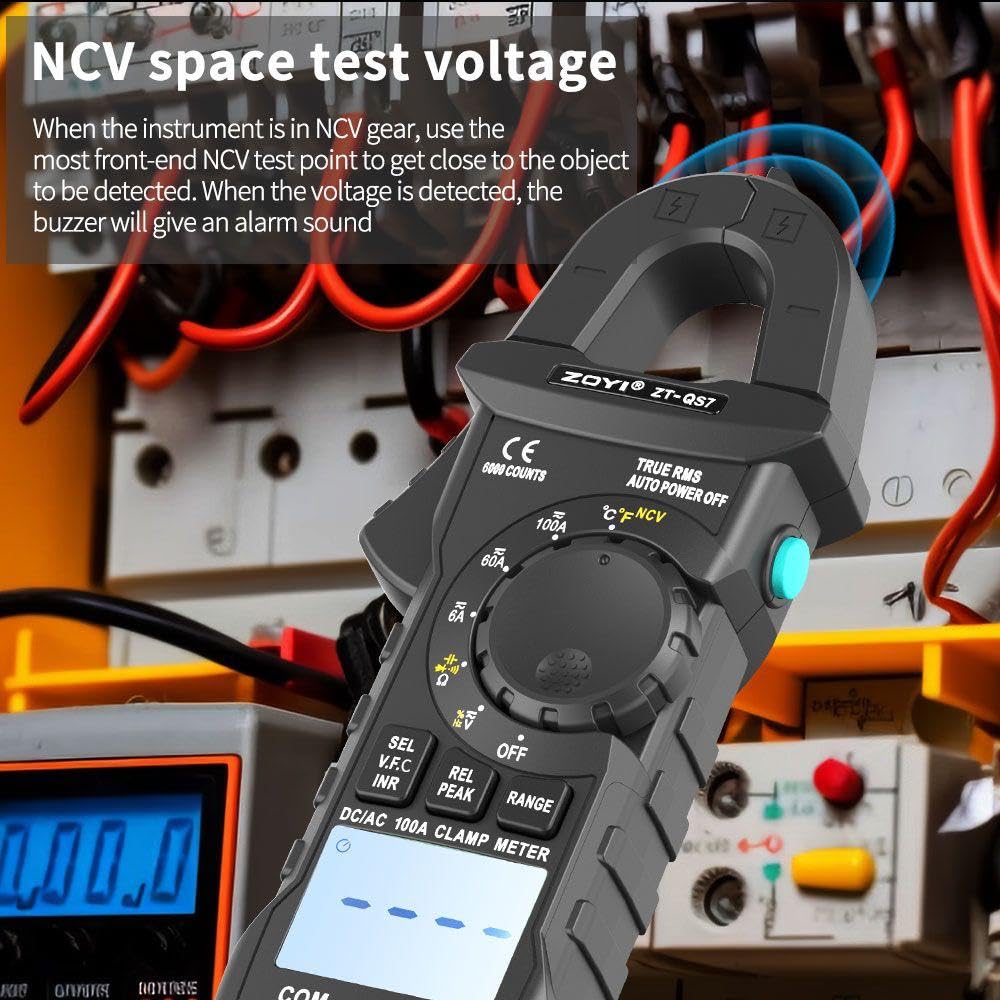
Image 5.3: The NCV function allows for safe detection of live AC voltage by bringing the meter's sensor close to the electrical source, triggering an alarm upon detection.
5.8 V.F.D. (Variable Frequency Drive) Measurement
The V.F.D. function is designed to measure the output voltage of inverters, reducing signal disturbance for precise results.
- Insert the red test lead into the VΩHz input jack and the black test lead into the COM input jack.
- Turn the rotary dial to the 'V' (Voltage) range.
- Long press the 'SELECT/V.F.D' button to enter V.F.D. mode.
- Connect the test probes to the output of the inverter.
- Read the V.F.D. voltage value on the display.

Image 5.4: The V.F.D. function enables accurate measurement of inverter output voltage, as demonstrated with the meter connected to an industrial inverter.
5.9 Other Functions
- Data Hold: Press the 'HOLD' button to freeze the current reading on the display. Press again to release.
- Peak Hold: For capturing transient peaks. Refer to the meter's specific button for this function (often labeled 'PEAK').
- Backlight/Flashlight: The meter features an LED HD backlight for the display and a flashlight for illuminating the work area. These can typically be activated by dedicated buttons or a long press of a function button.
- Auto Power Off: To conserve battery life, the meter will automatically power off after a period of inactivity.
- Smart Mode: The ZT-QS7 includes a smart mode for simplified operation, automatically identifying measurement types.

Image 5.5: The meter's LED HD backlight ensures clear readability of the large 6000-count screen, even in dimly lit conditions.
6. Maintenance
6.1 Cleaning
Wipe the meter's casing with a damp cloth and a mild detergent. Do not use abrasives or solvents. Ensure the meter is completely dry before use.
6.2 Battery Replacement
Refer to Section 4.1 for battery replacement instructions. Always replace both batteries simultaneously with new AAA batteries.
6.3 Overload Protection
The ZT-QS7 features intelligent anti-burn overload protection across all gears to prevent damage to the meter during accidental overloads.

Image 6.1: The ZT-QS7 is equipped with intelligent anti-burn overload protection, safeguarding the meter from damage across all measurement ranges.
7. Troubleshooting
If the meter does not function correctly, check the following:
- No Display/Faint Display: Check battery charge. Replace batteries if low.
- Incorrect Readings: Ensure the correct function and range are selected. Verify test lead connections. Check for external interference.
- No Continuity Beep: Ensure the circuit is de-energized. Check if the resistance is within the continuity threshold.
- NCV Not Detecting: Ensure the NCV sensor is close enough to the AC voltage source.
For persistent issues, contact customer support.
8. Specifications
| Feature | Specification |
|---|---|
| Brand | ZOYI |
| Model Number | ZT-QS7 |
| Display Counts | 6000 Counts |
| Current Resolution | 1mA |
| Measurement Type | True RMS |
| Power Source | Battery Powered (2 AAA batteries included) |
| Item Weight | 195 Grams |
| Product Dimensions (LxWxH) | 8 x 5 x 3 Centimeters |
| Safety Rating | CAT III 600V |
| Included Components | Meter, Test Leads, Temperature Probe, Battery, Manual |
9. What's in the Box
Upon opening your ZOYI ZT-QS7 package, you should find the following items:
- ZOYI ZT-QS7 Clamp Meter
- Test Leads (Red and Black)
- Temperature Probe
- AAA Batteries (2)
- User Manual
10. Warranty and Support
The ZOYI ZT-QS7 Clamp Meter comes with a standard manufacturer's warranty. For specific warranty terms, duration, and to register your product, please refer to the warranty card included in your package or visit the official ZOYI website. For technical support, troubleshooting assistance, or service inquiries, please contact ZOYI customer service through their official channels.
Ask a question about this manual
Ask about setup, troubleshooting, compatibility, parts, safety, or missing instructions. Manuals+ will review the question and use this page’s manual context to help answer it.