
1. Introduction
This manual provides comprehensive instructions for the operation and maintenance of your ZHIWHIS ZWS-206 Portable Shortwave Radio. Please read this manual thoroughly before using the device to ensure proper function and longevity. Keep this manual for future reference.
2. Product Overview
The ZHIWHIS ZWS-206 is a portable, multi-band radio designed for receiving AM, FM, and Shortwave (SW) broadcasts. It features a large speaker for clear audio, multiple power options, and an external antenna port for enhanced reception.
2.1 Key Features
- Multi-band reception: AM (520-1710KHZ), FM (87-108MHZ), SW1 (3.2-10.0MHZ), SW2 (10.0-22.0MHZ).
- Dual power supply: Operates on 4 AA batteries or AC power.
- High-quality 4-inch, 8W speaker for clear and powerful audio.
- 3.5mm headphone jack for private listening.
- External 3.5mm FM/SW antenna port for improved signal reception.
- Intuitive large tuning and volume knobs for easy operation.
- Compact and portable design with an integrated handle.
2.2 Components
Familiarize yourself with the radio's components:

Front view of the ZHIWHIS ZWS-206 radio, showing the speaker grille, tuning dial, and controls.
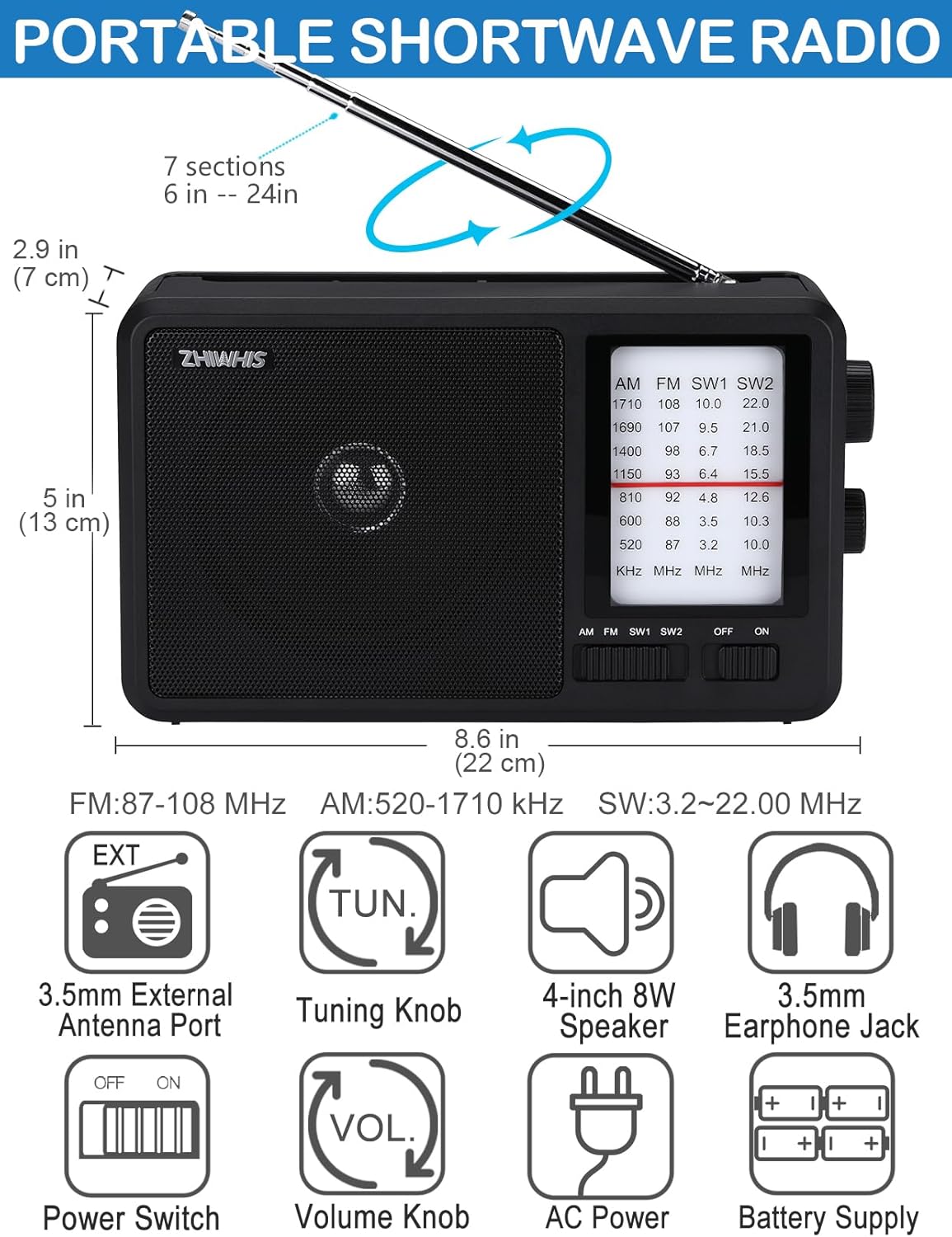
An illustration detailing the radio's dimensions (8.6x5x2.9 inches) and key components such as the external antenna port, tuning knob, speaker, earphone jack, power switch, volume knob, AC power input, and battery compartment.
- Telescopic Antenna: Extendable antenna for FM and SW reception.
- Speaker: 4-inch, 8W speaker for audio output.
- Tuning Dial: Displays frequency for selected band.
- Tuning Knob: Used to select radio stations.
- Volume Knob: Adjusts audio output level.
- Band Selector Switch: Toggles between AM, FM, SW1, and SW2 bands.
- Power Switch: Turns the radio on or off.
- AC-IN Port: For connecting the AC power cable.
- Battery Compartment: Holds 4 AA batteries.
- 3.5mm Earphone Jack: For connecting headphones.
- 3.5mm External Antenna Port: For connecting an external FM/SW antenna.
3. Setup
3.1 Power Supply
The ZWS-206 radio offers two power options:

This image illustrates the two power supply options: connecting the radio via the AC power cable to a wall outlet and installing four AA 1.5V batteries into the battery compartment.
3.1.1 AC Power
- Ensure the radio's power switch is in the 'OFF' position.
- Connect the provided AC power cable to the AC-IN port on the radio.
- Plug the other end of the AC power cable into a standard wall outlet.
3.1.2 Battery Power
- Ensure the radio's power switch is in the 'OFF' position.
- Open the battery compartment cover located on the back of the radio.
- Insert four (4) AA 1.5V batteries, ensuring correct polarity (+/-) as indicated inside the compartment.
- Close the battery compartment cover securely.
Note: When using AC power, batteries are not required. Remove batteries if the radio will not be used for an extended period to prevent leakage.
3.2 Antenna
The radio is equipped with a telescopic antenna and an internal AM magnetic antenna. For optimal FM and SW reception, extend the telescopic antenna fully. For enhanced FM/SW reception, an external antenna can be connected.

This image demonstrates the radio's reception capabilities, featuring its 24-inch (61 cm) telescopic antenna and the 3.5mm external antenna port for enhanced FM/SW sensitivity. A large satellite dish in the background symbolizes strong reception.
3.2.1 External Antenna Connection
- Locate the 3.5mm external antenna port on the back of the radio.
- Connect a compatible external FM/SW antenna (not included) to this port.
- Position the external antenna for best reception.
4. Operating Instructions
The ZWS-206 radio is designed for simple and intuitive operation.

A detailed view of the radio's user-friendly controls, including the large tuning and volume knobs, the band selection switch (AM, FM, SW1, SW2), and the 3.5mm earphone jack.
4.1 Power On/Off
Slide the 'OFF/ON' power switch located on the front panel to the 'ON' position to turn on the radio. Slide it to 'OFF' to power off.
4.2 Band Selection
Use the 'AM FM SW1 SW2' band selector switch on the front panel to choose your desired frequency band.
4.3 Tuning
- Select the desired band (AM, FM, SW1, or SW2).
- Rotate the large 'TUN' (Tuning) knob on the side of the radio to scan through frequencies.
- Observe the tuning dial on the front panel to identify the frequency.
- For Shortwave (SW) bands, tune slowly and carefully as stations can be close together and signals may fade.
4.4 Volume Adjustment
Rotate the 'VOL' (Volume) knob on the side of the radio to increase or decrease the audio output level.
4.5 Headphone Use
To listen privately, plug standard 3.5mm headphones into the earphone jack located on the side of the radio. The speaker will automatically mute when headphones are connected.
5. Maintenance
- Cleaning: Wipe the radio with a soft, dry cloth. Do not use abrasive cleaners or solvents.
- Battery Care: Remove batteries if the radio is not used for extended periods to prevent corrosion.
- Storage: Store the radio in a cool, dry place away from direct sunlight and extreme temperatures.
- Antenna: Retract the telescopic antenna when not in use to prevent damage.
6. Troubleshooting
| Problem | Possible Cause | Solution |
|---|---|---|
| No power | Power switch off, dead batteries, AC cable not connected. | Turn power switch on. Replace batteries. Check AC cable connection. |
| Poor reception / Static | Antenna not extended, weak signal, interference. | Extend telescopic antenna fully. Rotate radio for better signal. Try an external antenna. Move away from electronic devices. |
| No sound from speaker | Volume too low, headphones connected. | Increase volume. Disconnect headphones. |
| Difficulty tuning Shortwave (SW) | SW signals are sensitive and can fade. | Tune slowly and precisely. Try different times of day (SW signals vary). Use an external antenna. |
7. Specifications
| Feature | Specification |
|---|---|
| Frequency Range | AM: 520-1710KHZ, FM: 87-108MHZ, SW1: 3.2-10.0MHZ, SW2: 10.0-22.0MHZ |
| Reception Sensitivity | AM: <86 dB, FM: <18 dB, SW1: <30 dB, SW2: <30 dB |
| Loudspeaker | 4 inches, 4Ω, 8W |
| Power Source | DC6V (4 x AA 1.5V batteries) or AC Power |
| Product Dimensions | 8.58 × 5 × 2.87 inches (218 × 128 × 73 mm) |
| Net Weight | 1.75 lb (795 g) |
| Connectivity Technology | USB (for power cable) |
| Included Components | 1 x ZWS-206 Shortwave Radio, 1 x Power Cable, Owner's Manual |
8. Warranty and Support
ZHIWHIS offers a 12-month guarantee for this product. If you encounter any issues or have questions regarding your ZWS-206 radio, please contact ZHIWHIS customer service. 24/7 customer support is available to address your concerns.