
1. Introduction
This manual provides comprehensive instructions for the safe and effective use of your WACLA M40TR Action Camera. Designed for capturing high-quality video and photos in various environments, this camera features 5K 30fps video recording, 48MP photo capabilities, a dual-screen design, six-axis anti-shake technology, and 360° audio with wind reduction. Please read this manual thoroughly before operating the device.
2. Safety Information
- Do not expose the camera to extreme temperatures or direct sunlight for extended periods. The camera is designed to operate in temperatures as low as -20°C (-4°F).
- Keep the camera and accessories out of reach of children.
- Use only WACLA-approved batteries and charging cables. Improper use may result in fire, explosion, or other hazards.
- Ensure the waterproof case is properly sealed before using the camera in water.
- Avoid dropping or subjecting the camera to severe impacts.
- Do not attempt to disassemble or modify the camera. This will void the warranty.
3. Package Contents
Verify that all items listed below are included in your package. If any items are missing or damaged, please contact customer support.
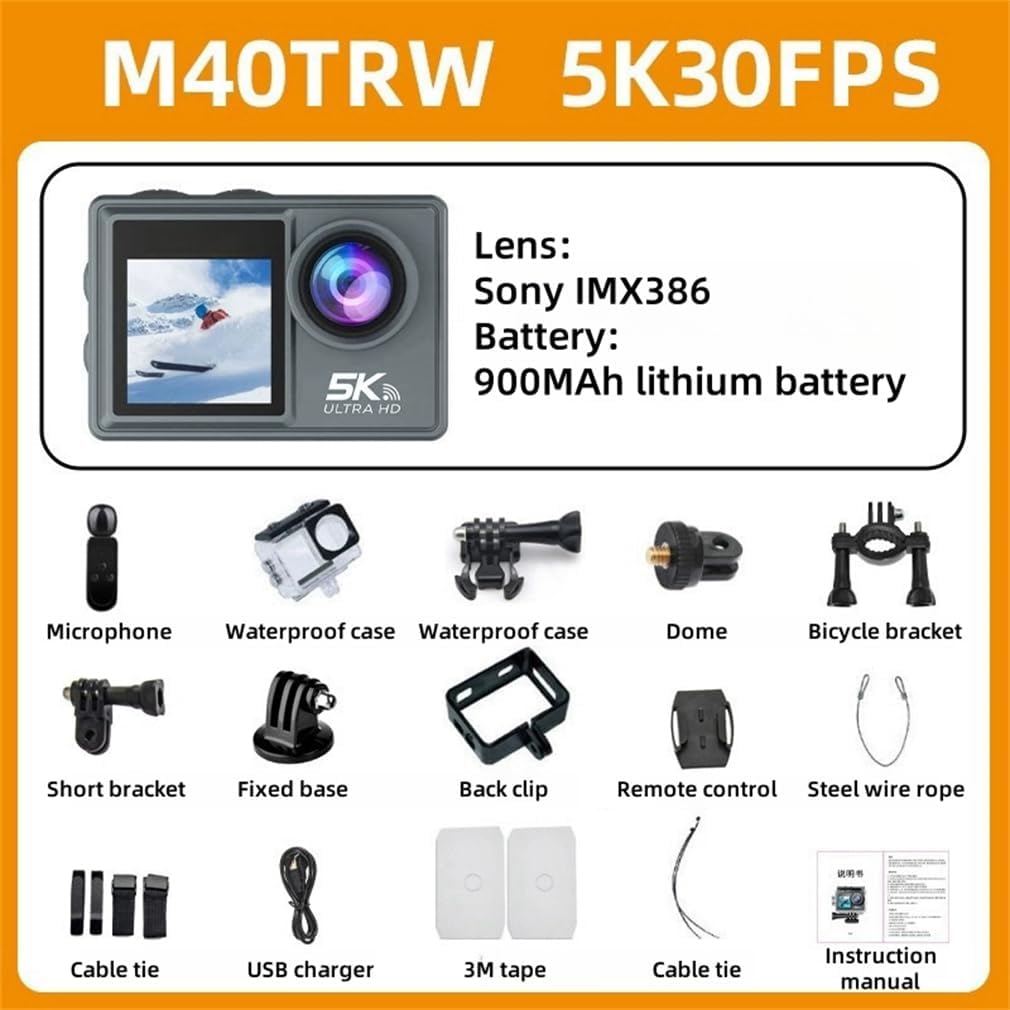
Image 3.1: Contents of the WACLA M40TR Action Camera package. This image displays the camera, a microphone, two waterproof cases, a dome, a bicycle bracket, a short bracket, a fixed base, a back clip, a remote control, a steel wire rope, cable ties, a USB charger, 3M tape, and an instruction manual. Note: The image shows model M40TRW, but the contents are generally indicative for the M40TR model.
- WACLA M40TR Action Camera
- Microphone
- Waterproof Case (x2)
- Dome
- Bicycle Bracket
- Short Bracket
- Fixed Base
- Back Clip
- Remote Control
- Steel Wire Rope
- Cable Ties
- USB Charger
- 3M Tape
- Instruction Manual
- 900mAh Li-ion Batteries (Quantity may vary, typically one or two)
4. Camera Overview
Familiarize yourself with the camera's physical components and controls.
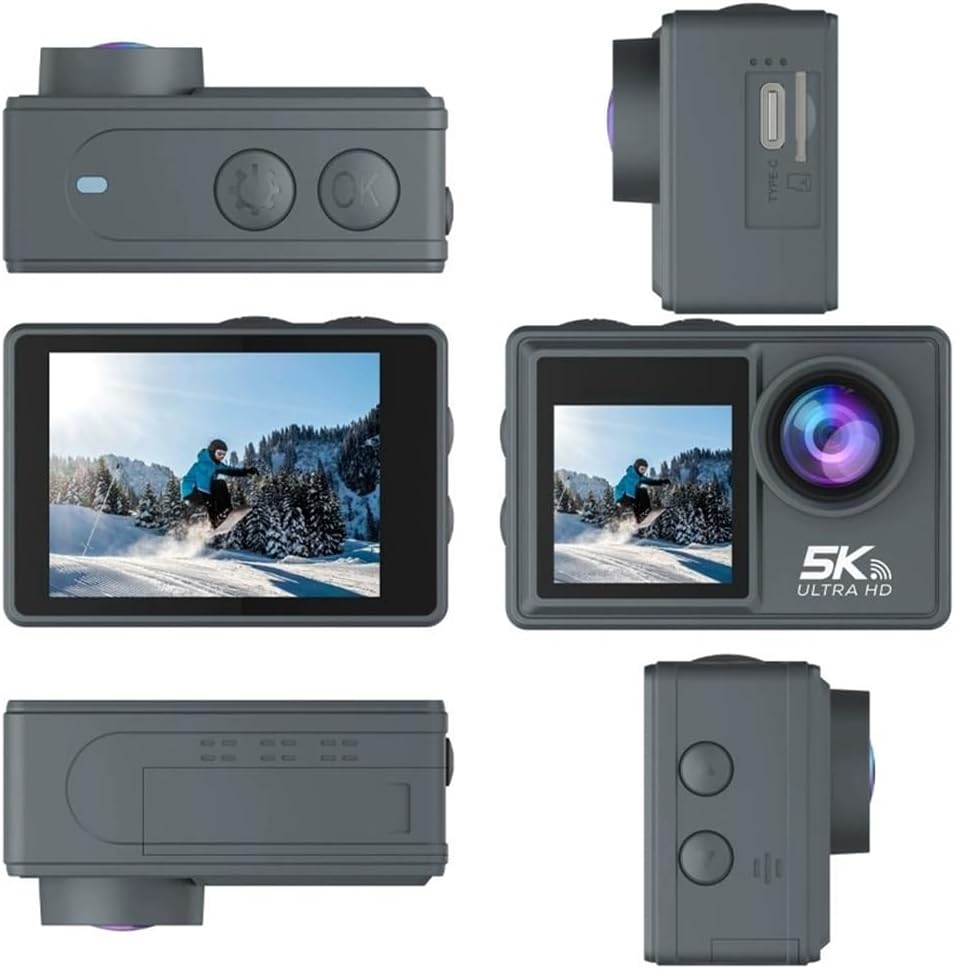
Image 4.1: Various angles of the WACLA M40TR Action Camera. This image displays the camera from the top, right side, front, back (with main screen), left side (with ports), and bottom, highlighting its compact design and button placement.
Key Components:
- Lens: Front-facing lens for capturing video and photos.
- Main Screen: 2.0-inch IPS touch screen on the rear for viewing, playback, and settings.
- Front Screen: 1.4-inch front screen for easy selfies and vlogging.
- Power/Mode Button: Typically located on the top or front, used to power on/off and switch modes.
- Shutter/OK Button: Used to start/stop recording or take photos, and confirm selections.
- Navigation Buttons: For menu navigation (if not using touch screen).
- TYPE-C Port: For charging and data transfer.
- MicroSD Card Slot: For memory card insertion.
- Battery Compartment: For battery insertion.
5. Setup
5.1. Battery Installation and Charging
- Open the battery compartment cover on the bottom of the camera.
- Insert the 900mAh Li-ion battery, ensuring the correct orientation of the contacts.
- Close the battery compartment cover securely.
- Connect the camera to a power source using the provided USB Type-C cable for charging. The indicator light will show charging status.
5.2. Memory Card Installation
A MicroSD card (not included) is required to store recordings. Use a high-speed card (Class 10 or UHS-I/UHS-3 recommended) up to 128GB.
- Locate the MicroSD card slot on the side of the camera.
- Insert the MicroSD card with the contacts facing the front of the camera until it clicks into place.
- To remove, gently push the card in until it springs out.
5.3. Powering On/Off
- Power On: Press and hold the Power/Mode button for a few seconds until the screen illuminates.
- Power Off: Press and hold the Power/Mode button for a few seconds until the screen turns off.
5.4. Initial Settings
Upon first use or after a reset, you may need to set the language, date, and time. Navigate through the settings menu using the touch screen or physical buttons.
6. Operating Instructions
6.1. Basic Operation (Photo & Video Modes)
- Switching Modes: Press the Power/Mode button repeatedly to cycle through video, photo, and playback modes.
- Recording Video: In video mode, press the Shutter/OK button to start recording. Press it again to stop.
- Taking Photos: In photo mode, press the Shutter/OK button to capture a still image.
6.2. Adjusting Settings
Access the camera settings via the touch screen interface. Common settings include:
- Video Resolution: Select from 5K 30fps, 2.7K 30fps, 1080P (120/60/30fps), or 720P (240/120/60/30fps).
- Photo Resolution: Choose from 24M, 20M, 16M, 13M, or 8M.
- View Angle: Adjust the field of view between 170°, 140°, 110°, and 70°.
- Electronic Image Stabilization (EIS): Enable for smoother footage, especially during active use.

Image 6.1: Demonstrates the 5K/30fps 170° ultra-wide angle capability of the camera, capturing a broad scene with high detail.

Image 6.2: Illustration of the 6-glass lens system, designed for clearer and more professional photographic results with a 48 million pixel field of view.
6.3. Special Features
Dual Screen Design
The WACLA M40TR features a 2.0-inch rear IPS touch screen and a 1.4-inch front screen. The front screen is ideal for framing selfies or vlogs, providing a live preview.
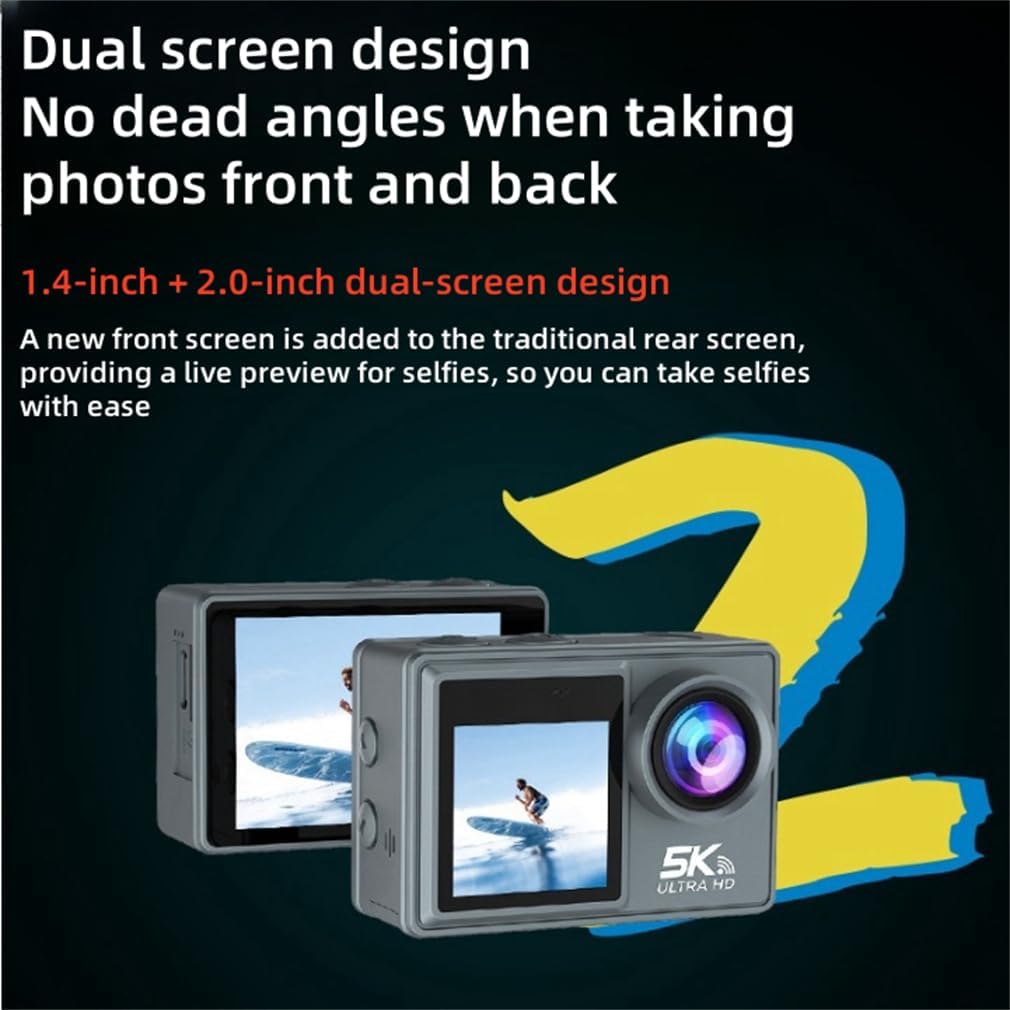
Image 6.3: Depicts the dual-screen design, showcasing both the main rear screen and the smaller front screen for versatile viewing and framing.
Wi-Fi Connectivity and Remote Control
Connect your camera to a smartphone via the dedicated app using Wi-Fi. This allows for remote control, live preview, and easy transfer of photos and videos.

Image 6.4: Illustrates the camera's Wi-Fi and remote control capabilities, compatible with both Android and iOS devices for seamless connectivity.
Shooting Modes
The camera offers a variety of shooting modes to enhance your creative possibilities:
- Normal Burst: Captures multiple photos in quick succession.
- 30-shot Burst: An enhanced burst mode for capturing fast action.
- Timer: Set a delay before taking a photo.
- Demo: (Specific pre-set mode for demonstration purposes)
- Long Exposure: For capturing detailed images in low light.
- Beauty: Enhances facial features in photos.
- Slow Motion: Records video at a higher frame rate for slow-motion playback.
- Fast Motion: Records video at a lower frame rate for fast-motion playback (time-lapse).
- Loop Recording: Records video continuously, overwriting older files when the memory card is full.
- Time-lapse Recording: Captures a series of photos at set intervals to create a time-lapse video.
- Self-timer: Delays photo capture.

Image 6.5: Overview of the six primary shooting modes available on the WACLA M40TR, encouraging creative photography and videography.
6.4. Using the Waterproof Case
The included waterproof case allows the camera to be used safely underwater up to a depth of 30 meters. Ensure the case is clean and properly sealed before each use. Test the case without the camera first to confirm its integrity.

Image 6.6: The WACLA M40TR Action Camera enclosed in its waterproof case, demonstrating its capability to withstand depths of up to 30 meters.
7. Maintenance
- Cleaning: Use a soft, lint-free cloth to clean the camera lens and screens. For stubborn dirt, a slightly damp cloth can be used. Do not use harsh chemicals.
- Lens Cover: The durable and scratch-resistant lens cover can be easily replaced if needed.
- Waterproof Case: After underwater use, rinse the waterproof case with fresh water and allow it to air dry. Check the O-ring seal for any debris or damage.
- Storage: Store the camera in a cool, dry place away from direct sunlight when not in use. Remove the battery if storing for extended periods.
- Battery Care: Fully charge the battery before first use. Avoid completely draining the battery regularly to prolong its lifespan.
8. Troubleshooting
If you encounter issues with your WACLA M40TR Action Camera, refer to the following common problems and solutions:
| Problem | Possible Solution |
|---|---|
| Camera does not power on. | Ensure the battery is fully charged and correctly inserted. Try charging the camera for at least 30 minutes. |
| Cannot record video/take photos. | Check if a MicroSD card is inserted and has sufficient free space. Ensure the card is formatted correctly (FAT32 or exFAT). |
| Poor image/video quality. | Clean the camera lens. Check selected resolution settings. Ensure adequate lighting. |
| Wi-Fi connection issues. | Ensure Wi-Fi is enabled on the camera and your smartphone. Restart both devices. Check the camera's app for updates. |
| Camera freezes or becomes unresponsive. | Remove and reinsert the battery to perform a hard reset. If the issue persists, try updating the firmware (if available). |
9. Specifications
| Feature | Detail |
|---|---|
| Model | M40TR |
| Material | Black Plastic |
| Camera Lens | 170° wide-angle 6-glass lens (Sony IMX386) |
| Touch Screen | 2.0 inch IPS (Rear) |
| Front Screen | 1.4 inch |
| Video Format | MOV |
| Image Format | JPG |
| Interface | TYPE-C, Wi-Fi |
| Battery | 900mAh Li-ion Batteries |
| Video Resolution | 5K 30fps, 2.7K 30fps, 1080P (120/60/30fps), 720P (240/120/60/30fps) |
| Photo Resolution | 24M / 20M / 16M / 13M / 8M |
| Battery Life | Approx. 60 Min (4K Video), 90 Min (1080P Video) |
| Audio | 360° Audio with smart wind-reduction algorithm |
| Waterproof Depth | 30m (with waterproof case) |
| Operating Temperature | As low as -20°C (-4°F) |
| Item Weight | 0.5 Kilograms |
| Manufacturer | WACLA |
10. Warranty and Support
WACLA products are designed for reliability and performance. For warranty information, please refer to the documentation included with your purchase or contact your retailer.
If you have any questions or require technical assistance, please do not hesitate to contact us. We aim to respond to all inquiries within 12 hours.
Contact Email: 96914@qq.com