
1. Introduction
Thank you for choosing the Protec Advance 650 Portable Power Station. This device is designed to provide a reliable and versatile power source for various applications, including camping, travel, and emergency home use. With a 600W output and a 634Wh battery capacity, it ensures stable performance for your electronic devices. This manual provides essential information for safe operation, setup, maintenance, and troubleshooting.
2. Safety Instructions
- Read all instructions before using the power station.
- Do not disassemble, repair, or modify the unit. Incorrect reassembly may cause fire or injury.
- Do not expose the unit to fire or high temperatures (above 60°C/140°F).
- Do not use or store the unit in direct sunlight, near heat sources, or in high humidity environments.
- Keep the unit away from water and other liquids.
- Do not drop, strike, or subject the unit to strong impacts.
- Keep out of reach of children.
- Ensure proper ventilation during use and charging.
- Use only recommended accessories and chargers.
- In case of leakage from the battery, avoid contact with skin and eyes. If contact occurs, rinse with water and seek medical attention.
3. Product Overview
3.1 Components and Features
The Protec Advance 650 is equipped with multiple ports and features for versatile power delivery and charging:
- Power Output: 600W continuous, 634Wh battery capacity.
- AC Outlets: Two 230V pure sine wave AC outlets for sensitive electronics.
- USB Ports: One USB-C PD 60W port and three USB-A QC 3.0 ports (54W total).
- DC Output: One 12V DC car charger port.
- Wireless Charging: Integrated 10W Qi wireless charging pad.
- Display: Real-time LCD screen showing charge level and remaining runtime.
- Lighting: Emergency lighting (side and handle).
- Durability: IP54 rating for dust and splash resistance.
- Charging Options: AC wall charger (100W included), compatible with Protec solar panels.

Front view of the Protec Advance 650 Portable Power Station, showing the main display, power button, AC outlets, DC car port, and USB ports.

Diagram illustrating the output capabilities of the Protec Advance 650, including two 500W AC outlets, a 1W torch, and three 18W USB-A ports.

Diagram highlighting the display features, a 60W USB-C Quick Charge port, and a 12V DC 10A car charger port on the Protec Advance 650.
4. Setup
4.1 Initial Charging
Before first use, fully charge the Protec Advance 650. This ensures optimal battery performance and extends its lifespan.
- Connect the included AC wall charger to the power station's input port.
- Plug the charger into a standard wall outlet.
- The display will indicate charging status. Charge until the battery indicator shows 100%.
4.2 Placement
Place the power station on a stable, flat surface in a well-ventilated area. Avoid placing it near heat sources or in direct sunlight.
5. Operating Instructions
5.1 Powering On/Off
Press and hold the main power button for a few seconds to turn the unit on or off. The LCD display will illuminate when the unit is on.
5.2 Charging the Power Station
The Advance 650 can be recharged using multiple methods:
- AC Wall Charger: Use the included 100W AC adapter. Connect it to the input port and a wall outlet.
- Solar Panels: Connect compatible Protec solar panels (sold separately) to the DC input port. Ensure the solar panels are placed in direct sunlight for efficient charging.
- Car Charger: Use a 12V car charger adapter (not specified if included, typically sold separately) to charge from your vehicle's cigarette lighter port.
5.3 Using AC Outputs
The power station features two 230V pure sine wave AC outlets, suitable for powering sensitive electronics up to 600W total.
- Press the AC power button to activate the AC outlets. The AC indicator on the display will light up.
- Plug your device into one of the AC outlets.
- Ensure the total power consumption of your devices does not exceed 600W.
- When finished, press the AC power button again to turn off the AC outlets and conserve battery.
5.4 Using DC Outputs (USB-A, USB-C, Car Port)
The DC outputs are ideal for charging smartphones, tablets, laptops, and other 12V devices.
- Press the DC power button to activate the DC outputs. The DC indicator on the display will light up.
- Connect your device to the appropriate USB-A, USB-C, or 12V car charger port.
- The USB-C port supports Power Delivery (PD) up to 60W, and USB-A ports support Quick Charge (QC 3.0) up to 54W total.
- When finished, press the DC power button again to turn off the DC outputs.
5.5 Using Wireless Charging
The top of the power station features a 10W Qi wireless charging pad.
- Ensure the power station is turned on.
- Place your Qi-compatible device directly onto the wireless charging pad.
- The device should begin charging automatically.
5.6 Using the Display
The LCD display provides real-time information:
- Battery Level: Shows the current charge percentage.
- Input/Output Power: Displays the current power input (charging) or output (discharging) in watts.
- Remaining Runtime: Estimates the remaining operating time based on current power consumption.
- Indicators: Icons for AC, DC, and fan status.
5.7 Using the Emergency Light
The power station includes integrated emergency lighting.
- Press the light button to turn on the emergency light.
- Press again to cycle through different brightness modes or turn off.

Examples of domestic use for the Protec Advance 650, showing estimated runtimes for a 60W TV (9h), a 50W PC (approx. 10 recharges), a 10W smartphone (53 recharges), and a 12W fan (45h).

Examples of professional use for the Protec Advance 650, showing estimated runtimes for a 500W lawnmower (1h), a 500W power tool (1h), and recharges for an 18V battery (4 recharges) and a double 18V battery (2 recharges).
6. Maintenance
6.1 Cleaning
Wipe the exterior of the power station with a soft, dry cloth. Do not use abrasive cleaners or solvents. Ensure all ports are free of dust and debris.
6.2 Storage
If storing the unit for an extended period, charge it to approximately 50-80% every 3-6 months to maintain battery health. Store in a cool, dry place, away from direct sunlight and extreme temperatures.
6.3 Battery Care
The Protec Advance 650 uses a Lithium-phosphate battery. To maximize its lifespan:
- Avoid fully discharging the battery frequently.
- Avoid prolonged exposure to high temperatures.
- Charge the unit fully before long periods of inactivity.
7. Troubleshooting
- Unit not turning on: Ensure the battery is charged. If not, connect to a power source.
- No output from ports: Check if the respective AC or DC output buttons are activated. Ensure the device is properly connected and within the power station's output limits.
- Slow charging: Verify that the charger is correctly connected and functioning. For solar charging, ensure panels are in direct sunlight and free of obstructions.
- Overload protection: If the unit shuts down, it may be due to an overload. Disconnect some devices and restart the power station.
- Overheating: If the unit feels excessively hot, disconnect all devices and allow it to cool down in a well-ventilated area.
8. Specifications
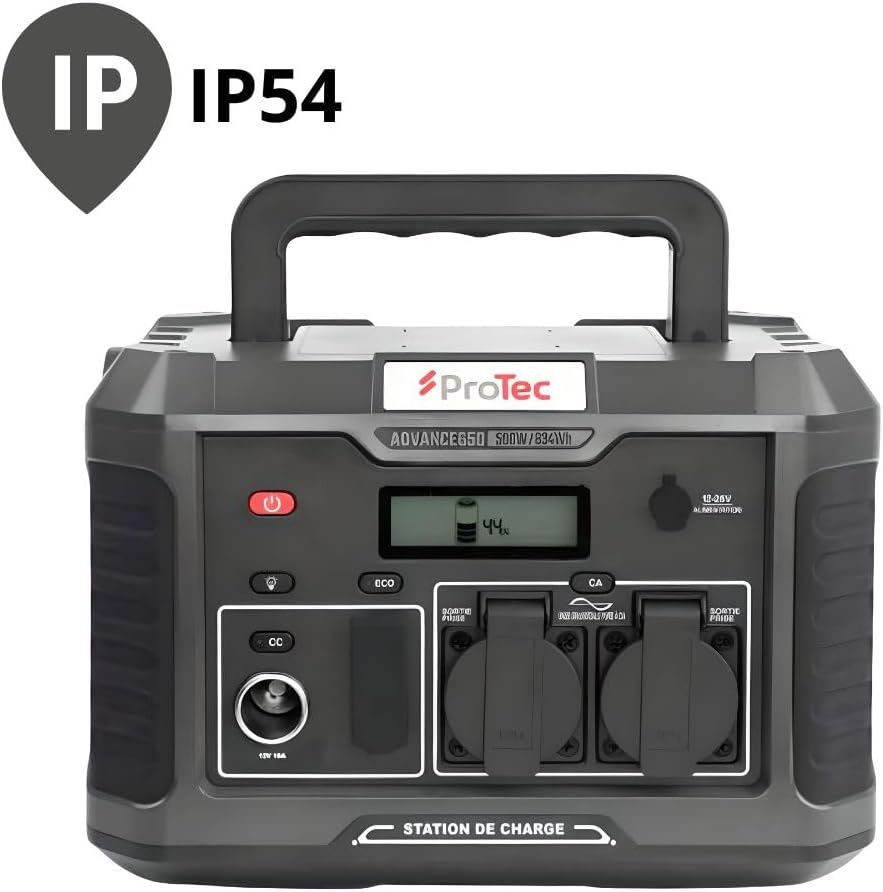
The Protec Advance 650 is rated IP54 for dust and splash resistance.
| Feature | Specification |
|---|---|
| Model Number | 798720 |
| Brand | Protec |
| Battery Type | Lithium-phosphate |
| Battery Capacity | 634Wh |
| AC Output Power | 600W (Pure Sine Wave) |
| AC Output Voltage | 230V |
| USB-C Output | 1 x PD 60W |
| USB-A Output | 3 x QC 3.0 (54W total) |
| DC Car Port Output | 1 x 12V 10A |
| Wireless Charging | 10W Qi |
| AC Input (Charger) | 100W |
| Dimensions (L x W x H) | 1 x 20 x 29 cm (approx. 10L x 200W x 290H mm) |
| Weight | 9.36 kg |
| Color | Black |
| IP Rating | IP54 (Dust and Splash Resistant) |
9. Warranty and Support
9.1 Warranty Information
The Protec Advance 650 Portable Power Station comes with a 2-year availability for spare parts within the EU. For specific warranty terms and conditions, please refer to the documentation provided at the time of purchase or contact Protec customer service.
9.2 Customer Support
For technical assistance, troubleshooting, or warranty claims, please contact Protec customer support through their official website or the retailer where the product was purchased.

The Protec Advance 650 Portable Power Station is suitable for various outdoor activities.