
1. Introduction
Thank you for choosing the CHIVALZ DH2088 Dehumidifier. This appliance is designed to efficiently remove excess moisture from the air, creating a more comfortable and healthier indoor environment. Please read this manual thoroughly before operating the unit to ensure proper use, optimal performance, and safety. Keep this manual for future reference.
Safety Information
- Always place the unit on a stable, level surface.
- Ensure the power supply matches the rating label on the unit.
- Do not block air inlets or outlets. Maintain at least 20 cm (8 inches) clearance around the unit.
- Do not operate the unit with a damaged power cord or plug.
- Unplug the unit before cleaning or maintenance.
- This appliance is not intended for use by persons (including children) with reduced physical, sensory or mental capabilities, or lack of experience and knowledge, unless they have been given supervision or instruction concerning use of the appliance by a person responsible for their safety.
- After unpacking, allow the unit to stand upright for at least 24 hours before plugging it in. This allows the refrigerant to settle.
2. Product Overview
Unit Components

The CHIVALZ DH2088 dehumidifier features a sleek, compact design with integrated controls and a visible water tank. Key components include:
- Control Panel: Located on the top, with LED display and touch buttons.
- Air Outlet: Top grille for dry air release.
- Air Inlet: Rear grille for moist air intake.
- Water Tank: Removable tank at the bottom for collected water.
- Drainage Port: Located at the rear for continuous drainage hose connection.
- Universal Wheels & Handle: For easy movement and portability.
- Removable Filter: Located behind the rear air inlet grille.
Control Panel Functions

- ON/STBY Button: Powers the unit on or off.
- INC / DEC Buttons: Adjusts the desired humidity level (30% - 80%) or sets the timer duration.
- CHILD LOCK Button: Activates or deactivates the child lock function to prevent accidental changes to settings. Press and hold for 3 seconds to engage/disengage.
- SPEED Button: Selects between high and low fan speeds.
- MODE Button: Cycles through operating modes: Smart Humidity (Auto), Dry Clothes, and Sleep.
- TIMER Button: Sets the auto-on or auto-off timer (1-24 hours).
- LED Display: Shows current humidity, set humidity, or timer settings.
3. Setup
- Unpacking: Carefully remove the dehumidifier from its packaging. Retain packaging materials for future storage or transport.
- Initial Placement: Place the unit upright on a flat, stable surface. It is crucial to allow the unit to stand upright for at least 24 hours before plugging it in. This allows the refrigerant to stabilize, preventing potential damage to the compressor.
- Positioning: For optimal performance, ensure there is at least 20 cm (8 inches) of clear space around the air inlet (rear) and air outlet (top) to allow for proper airflow. Avoid placing the unit directly against walls or furniture.
- Power Connection: Plug the power cord into a grounded electrical outlet that matches the voltage and frequency specified on the unit's rating label.
4. Operation
Power On/Off
- Press the ON/STBY button to turn the dehumidifier on. The LED display will show the current room humidity.
- Press the ON/STBY button again to turn the unit off.
Setting Desired Humidity
- When the unit is on, press the INC or DEC buttons to set your desired humidity level. The range is 30% to 80% relative humidity (RH).
- The unit will operate until the set humidity level is reached, then it will cycle off. It will restart automatically if the humidity rises above the set level.
Operating Modes

Press the MODE button to cycle through the following options:
- Smart Humidity (Auto) Mode: The unit automatically adjusts its operation to maintain the set humidity level. This is the standard operating mode for general use.
- Dry Clothes Mode: The unit operates continuously at high fan speed to quickly dry laundry. The humidity setting is ignored in this mode.
- Sleep Mode: The unit operates at a low fan speed with reduced noise. The display lights will dim after a few seconds to minimize disturbance during sleep.
Fan Speed Adjustment
- Press the SPEED button to switch between high and low fan speeds. Higher fan speed results in faster dehumidification.
Timer Function
- Auto-Off Timer: While the unit is running, press the TIMER button. Use INC or DEC to set the desired number of hours (1-24) after which the unit will automatically turn off.
- Auto-On Timer: While the unit is in standby mode, press the TIMER button. Use INC or DEC to set the desired number of hours (1-24) after which the unit will automatically turn on.
- To cancel the timer, press the TIMER button until '00' is displayed, or turn the unit off and on again.
Child Lock
- To activate the child lock, press and hold the CHILD LOCK button for 3 seconds. The child lock indicator light will illuminate. All other buttons will be disabled.
- To deactivate, press and hold the CHILD LOCK button for another 3 seconds. The indicator light will turn off.
Automatic Defrost

The dehumidifier is equipped with an automatic defrost function. If frost builds up on the evaporator coils, the unit will automatically pause dehumidification and run the fan to melt the frost. The defrost indicator light will illuminate during this process. Once defrosted, the unit will resume normal operation.
5. Drainage
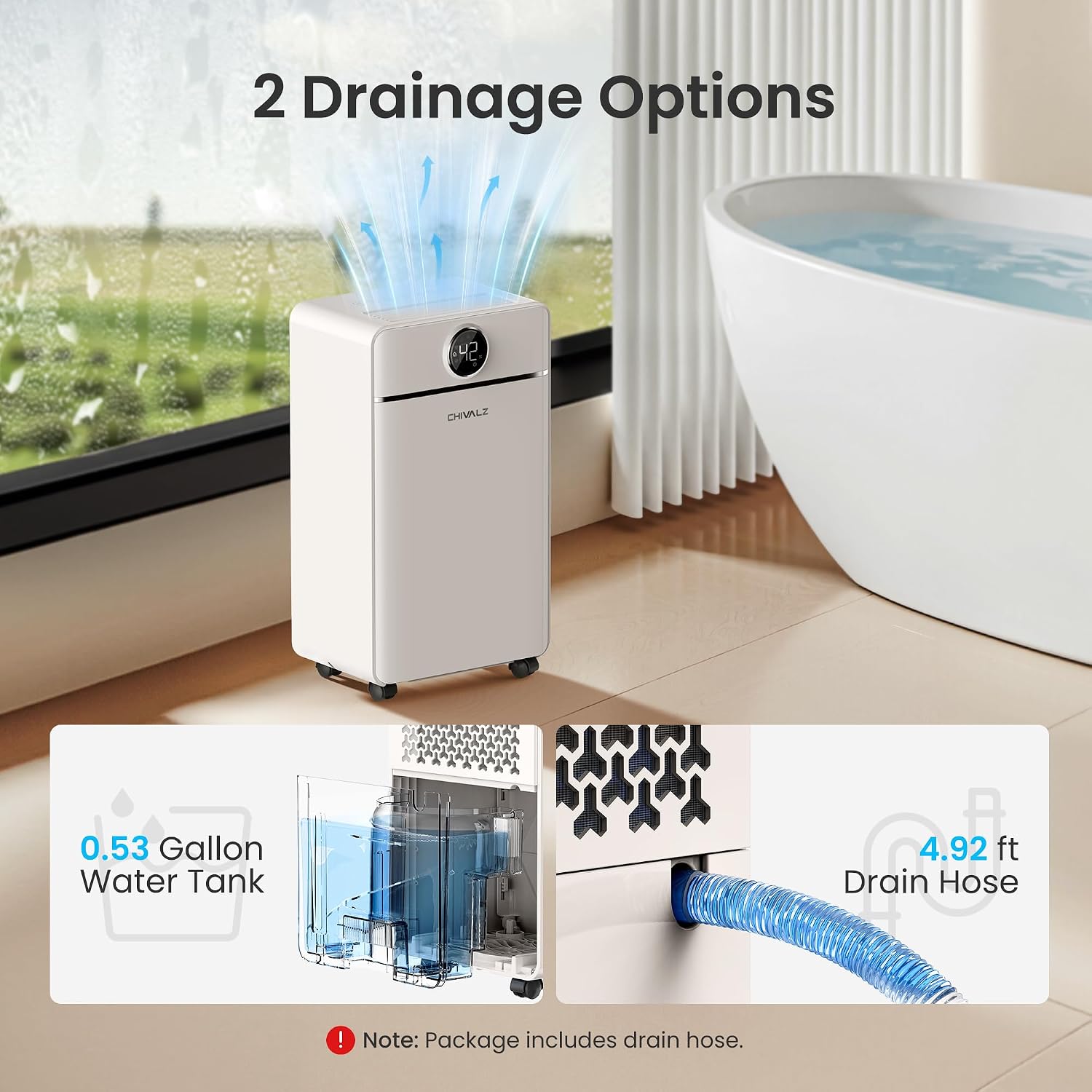
The CHIVALZ DH2088 offers two methods for water drainage:
Manual Drainage (Water Tank)

- When the water tank is full, the unit will automatically stop operating, and the 'Water Full' indicator light will illuminate. An audible alert may also sound.
- Carefully pull out the water tank from the front of the unit.
- Empty the collected water into a sink or drain.
- Slide the empty water tank back into the unit until it clicks into place. The unit will resume operation automatically.
Continuous Drainage
For continuous operation without needing to empty the water tank, you can use the included drain hose.
- Locate the continuous drainage port at the rear of the unit.
- Remove the rubber stopper from the drainage port.
- Connect one end of the provided drain hose to the drainage port. Ensure a secure connection to prevent leaks.
- Direct the other end of the hose to a suitable drain (e.g., floor drain, large bucket, sink). Ensure the hose is sloped downwards to allow gravity to drain the water. Do not allow the hose to be kinked or blocked.
- Once connected, the unit will continuously drain water, bypassing the internal water tank.
6. Maintenance
Regular maintenance ensures the longevity and efficient operation of your dehumidifier.
Cleaning the Air Filter

- Frequency: Clean the air filter every two weeks or more frequently if the unit is used in a dusty environment.
- Power Off: Always unplug the dehumidifier before cleaning.
- Remove Filter: Gently pull out the air filter from the rear air inlet grille.
- Clean: Use a vacuum cleaner to remove dust and debris from the filter. For heavier dirt, wash the filter with lukewarm water and a mild detergent. Rinse thoroughly.
- Dry: Allow the filter to air dry completely before reinstalling it. Do not expose it to direct sunlight or high heat.
- Reinstall: Carefully slide the dry filter back into its slot.
Cleaning the Water Tank
- Clean the water tank regularly to prevent mold and bacteria growth.
- Remove the water tank and wash it with mild soap and warm water.
- Rinse thoroughly and dry before placing it back into the unit.
Cleaning the Exterior
- Wipe the exterior of the unit with a soft, damp cloth.
- Do not use harsh chemicals, abrasive cleaners, or solvents, as these can damage the surface.
Storage
- If storing the unit for an extended period, ensure the water tank is empty and clean.
- Clean the air filter.
- Wrap the power cord neatly.
- Store the unit in an upright position in a cool, dry place, away from direct sunlight and extreme temperatures.
7. Troubleshooting
Before contacting customer support, please refer to the following troubleshooting guide for common issues.
| Problem | Possible Cause | Solution |
|---|---|---|
| Unit does not turn on. |
|
|
| No water collected or low dehumidification. |
|
|
| Unit is noisy. |
|
|
| Frost appears on coils. |
|
|
8. Specifications

| Feature | Specification |
|---|---|
| Brand | CHIVALZ |
| Model Number | DH2088 |
| Dehumidification Capacity | 12 Liters/Day (25 Pints/Day) |
| Water Tank Capacity | 2 Liters (0.53 Gallons) |
| Coverage Area | Up to 1500 Sq.Ft |
| Dimensions (L x W x H) | 19 x 27 x 47.8 cm (7.5 x 10.6 x 18.8 inches) |
| Weight | 9.8 kg (21.6 lbs) |
| Color | Ivory |
| Humidity Setting Range | 30% - 80% RH |
| Timer | 1-24 Hours (Auto-On/Off) |
| Operating Modes | Smart Humidity (Auto), Dry Clothes, Sleep |
| Defrost Function | Automatic |
| Drainage Options | Manual (Tank), Continuous (Hose) |
| Portability | 360° Universal Wheels, Integrated Handle |
9. Warranty and Support
For warranty information or technical support, please refer to the warranty card included with your product or contact CHIVALZ customer service. Please have your model number (DH2088) and purchase details ready when contacting support.
For further assistance, please visit the official CHIVALZ website or contact your retailer.