
Introduction
The VIVOSUN AeroDrain D12 Smart Environmental Dehumidifier is designed to efficiently control humidity levels in enclosed spaces, particularly grow tents. It features a high-efficiency compressor, precise temperature and humidity sensors, and smart control capabilities via the VIVOSUN app. This manual provides essential information for the safe and effective setup, operation, and maintenance of your dehumidifier.
Important Safety Information
Please read all safety warnings and instructions carefully before using this appliance to prevent injury or damage. Keep this manual for future reference.
- Always connect the dehumidifier to a grounded electrical outlet.
- Do not operate the unit with a damaged power cord or plug.
- Do not block air inlets or outlets. Ensure adequate clearance around the unit for proper airflow.
- Do not immerse the unit, power cord, or plug in water or other liquids.
- Unplug the unit before cleaning or performing any maintenance.
- This appliance is not intended for use by persons (including children) with reduced physical, sensory, or mental capabilities, or lack of experience and knowledge, unless they have been given supervision or instruction concerning use of the appliance by a person responsible for their safety.
- Children should be supervised to ensure that they do not play with the appliance.
- Use only as described in this manual.
- Do not use in areas where flammable liquids or gases are stored.
Package Contents
Carefully unpack your VIVOSUN AeroDrain D12 and check that all items are present and in good condition. If any items are missing or damaged, contact VIVOSUN customer support.

Image: The VIVOSUN AeroDrain D12 dehumidifier shown with all its components, including the main unit, exhaust ducts (Ø130mm and Ø150mm), air outlet hood, air inlet hood, temperature & humidity probe, filter, and drain pipe.
- VIVOSUN AeroDrain D12 Dehumidifier Unit
- Exhaust Duct (Ø130mm)
- Exhaust Duct (Ø150mm)
- Air Outlet Hood
- Air Inlet Hood
- Temperature & Humidity Probe
- Filter (pre-installed or separate)
- Drain Pipe
- User Manual (this document)
Product Features
- Superior Humidity Control: High-efficiency compressor removes up to 12L of moisture daily. Equipped with high-precision sensors for temperature and humidity monitoring.
- Smart Control: Connects to the VIVOSUN app for remote monitoring and control. Integrates with the VIVOSUN Smart Grow System for automated synchronization.
- Easy Setup & Mobility: Tool-free installation for quick connection to your grow space. Built-in handles and caster wheels for easy movement and positioning.
- User-Friendly Design: Offers two drainage options (2L tank or continuous drain). Automatic shut-off when the tank is full. Auto-restart function after power outages.
- Versatile Use: Suitable for both plant growth and drying stages, ensuring optimal environmental conditions.
- Recommended Compatibility: Ideal for grow tents up to 5x5 ft.
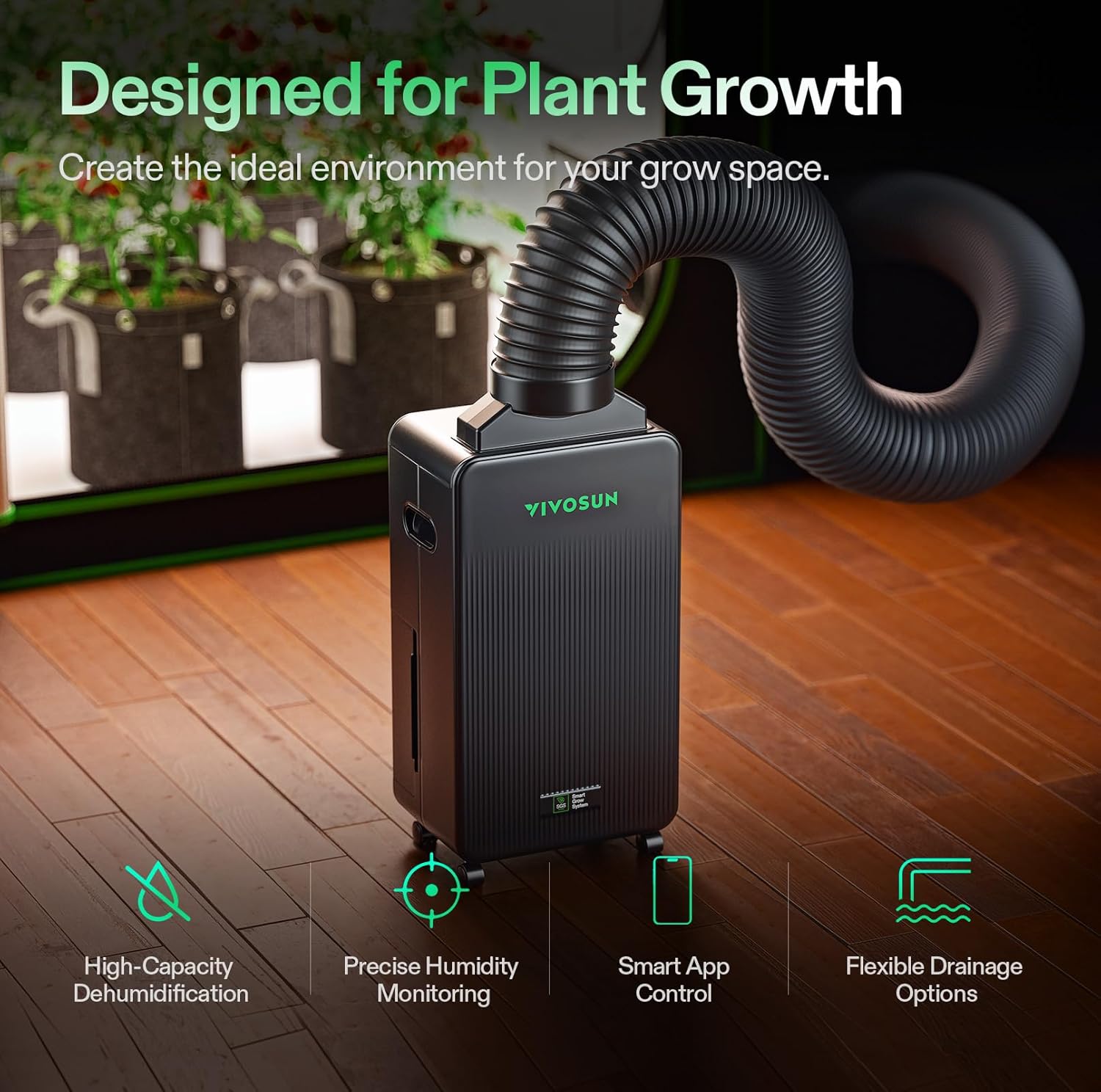
Image: The VIVOSUN AeroDrain D12 dehumidifier with icons representing its key features: High-Capacity Dehumidification, Precise Humidity Monitoring, Smart App Control, and Flexible Drainage Options.
Specifications
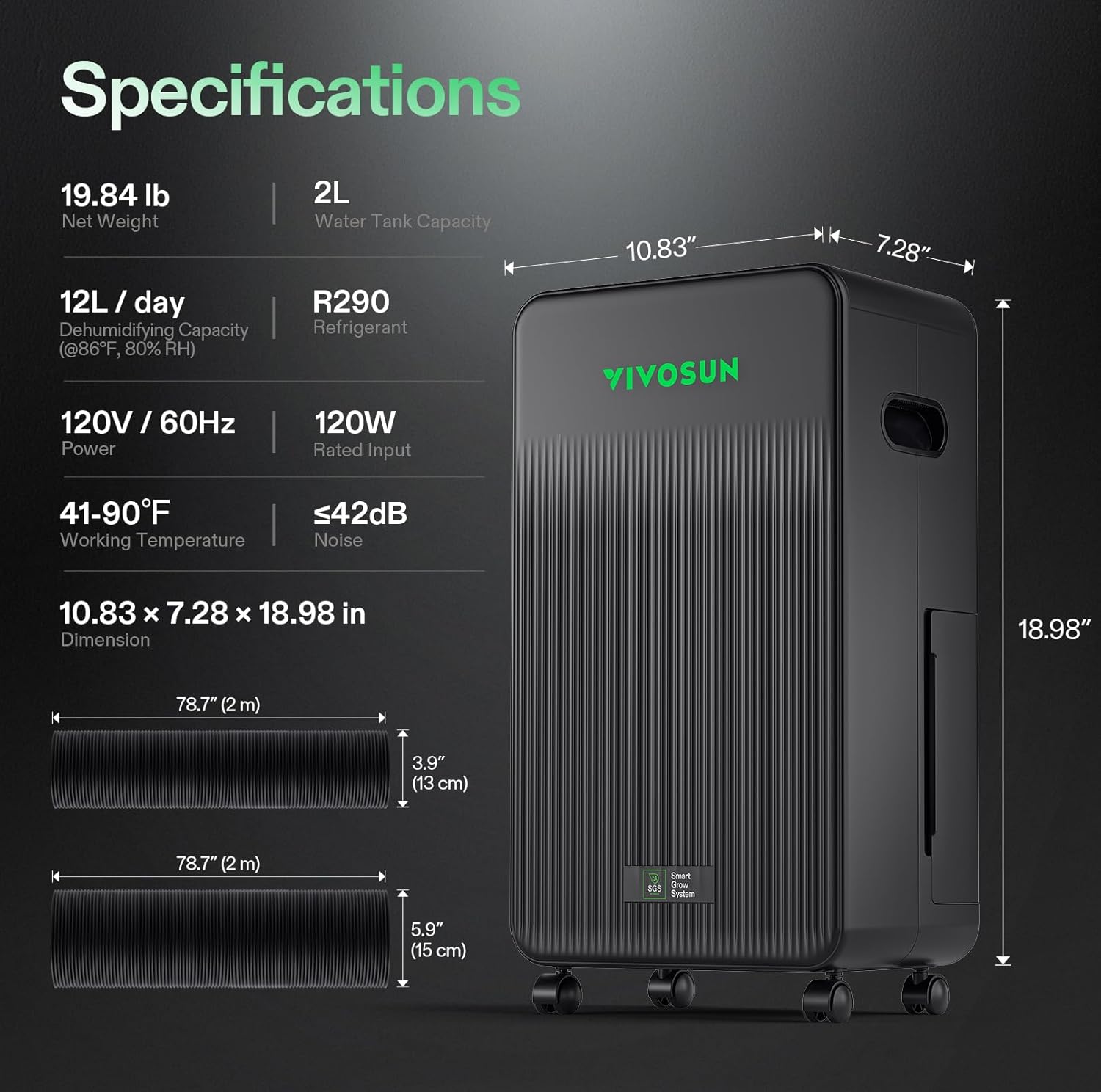
Image: A visual representation of the VIVOSUN AeroDrain D12 dehumidifier's dimensions and key technical specifications.
| Specification | Value |
|---|---|
| Model Name | VSE-ADD12 |
| Dehumidifying Capacity | 12L/day (@86°F, 80% RH) |
| Water Tank Capacity | 2 Liters (approx. 0.53 Gallons) |
| Power Input | 120V / 60Hz, 120W Rated Input |
| Working Temperature Range | 41-90°F (5-32°C) |
| Noise Level | ≤42dB |
| Refrigerant | R290 |
| Product Dimensions (D x W x H) | 10.83" x 7.28" x 18.98" (27.5cm x 18.5cm x 48.2cm) |
| Net Weight | 19.84 lbs (9 kg) |
| Duct Length | 78.7" (2 meters) |
| Duct Diameters | 3.9" (10 cm) and 5.9" (15 cm) |
| Color | Black |
| Special Feature | Timer |
| Recommended Use | Residential, Grow Tents up to 5x5 ft |
Setup
1. Placement
Place the dehumidifier on a flat, stable surface. Ensure there is sufficient space around the unit for proper air circulation. The built-in caster wheels allow for easy repositioning.
2. Ducting Installation
The AeroDrain D12 is designed for easy integration into grow tents using the provided ducting and hoods. Follow these steps for a hassle-free setup:
- Identify the Air Inlet Hood and Air Outlet Hood.
- Connect the appropriate exhaust duct (Ø130mm or Ø150mm) to the dehumidifier's air ports.
- Attach the air hoods to the ends of the ducts.
- Connect the ducted system to your grow tent's ventilation ports. Ensure a secure fit to prevent air leaks.
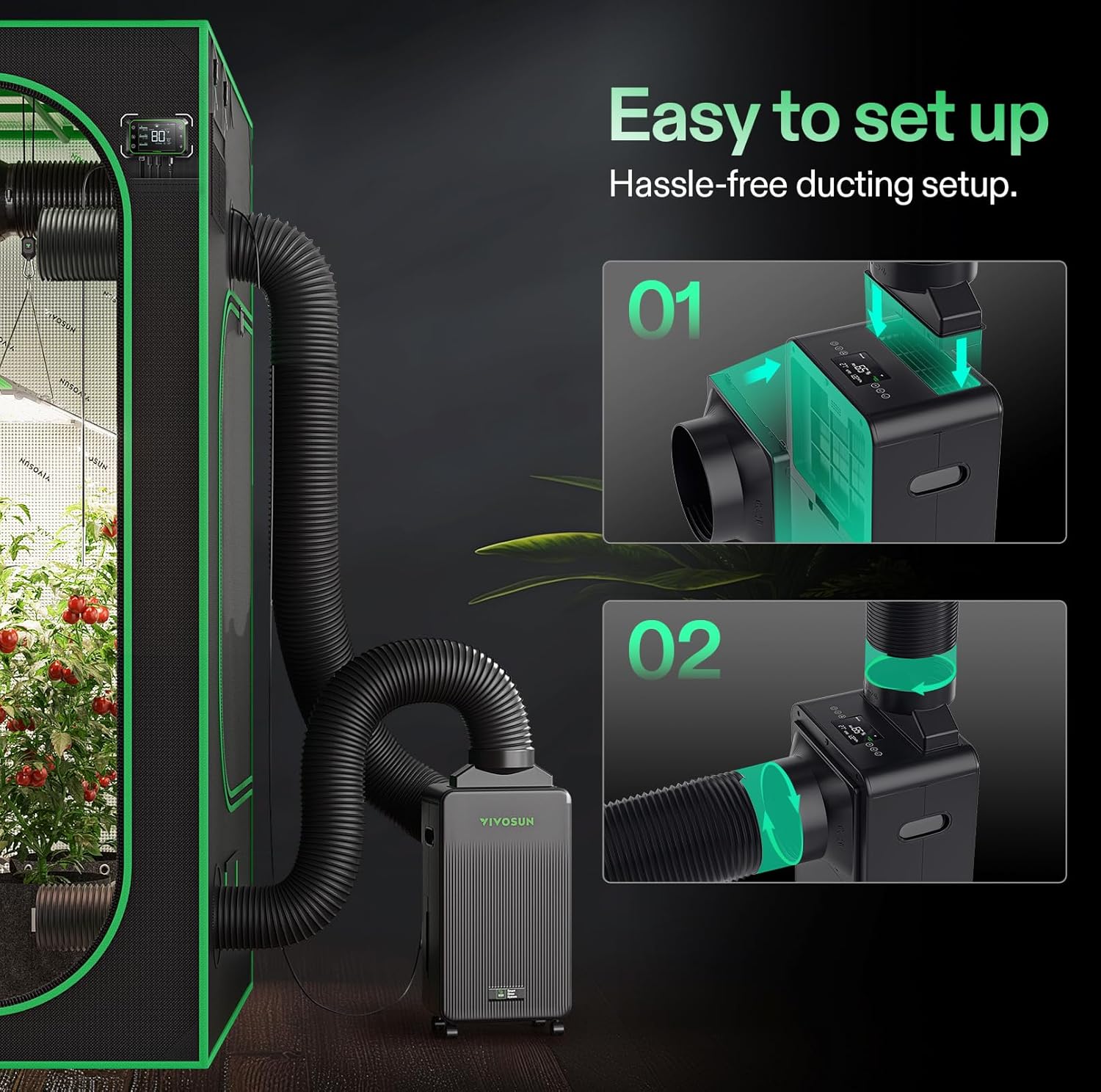
Image: Step-by-step diagram illustrating how to connect the ducting to the dehumidifier and the grow tent for optimal airflow.
3. Drainage Options
The dehumidifier offers two methods for water drainage:
- Internal Water Tank: The unit comes with a 2L water tank. When the tank is full, the dehumidifier will automatically shut off and send alerts via the screen or app. Empty the tank regularly.
- Continuous Drainage: For continuous operation without manual emptying, connect the provided drain pipe to the continuous drainage port on the unit. Route the pipe to a suitable drain or collection container.

Image: A visual comparison of the two drainage options: the internal 2L water tank with automatic shut-off, and the continuous drainage setup using an external drain pipe.
4. Temperature & Humidity Sensor Probe
Connect the external temperature and humidity sensor probe to the designated port on the dehumidifier. Position the probe within your grow space to accurately monitor environmental conditions.
5. Power Connection
Plug the power cord into a standard 120V/60Hz grounded electrical outlet.
Operation
1. Control Panel Overview
The dehumidifier features an intuitive control panel with a display for local control and monitoring of humidity, temperature, and VPD (Vapor Pressure Deficit).
2. VIVOSUN App Control
For advanced control and remote monitoring, download the VIVOSUN app from your mobile device's app store. Follow the in-app instructions to connect your AeroDrain D12 dehumidifier.
- Remote Monitoring: View real-time temperature, humidity, and VPD data from anywhere.
- Setting Adjustments: Adjust target humidity levels, switch between operating modes (Manual/Auto), and control fan speed.
- Automated Synchronization: Seamlessly integrate with other VIVOSUN Smart Grow System devices for a fully automated environment.
- Notifications: Receive alerts for full water tank, power outages, and other important status updates.
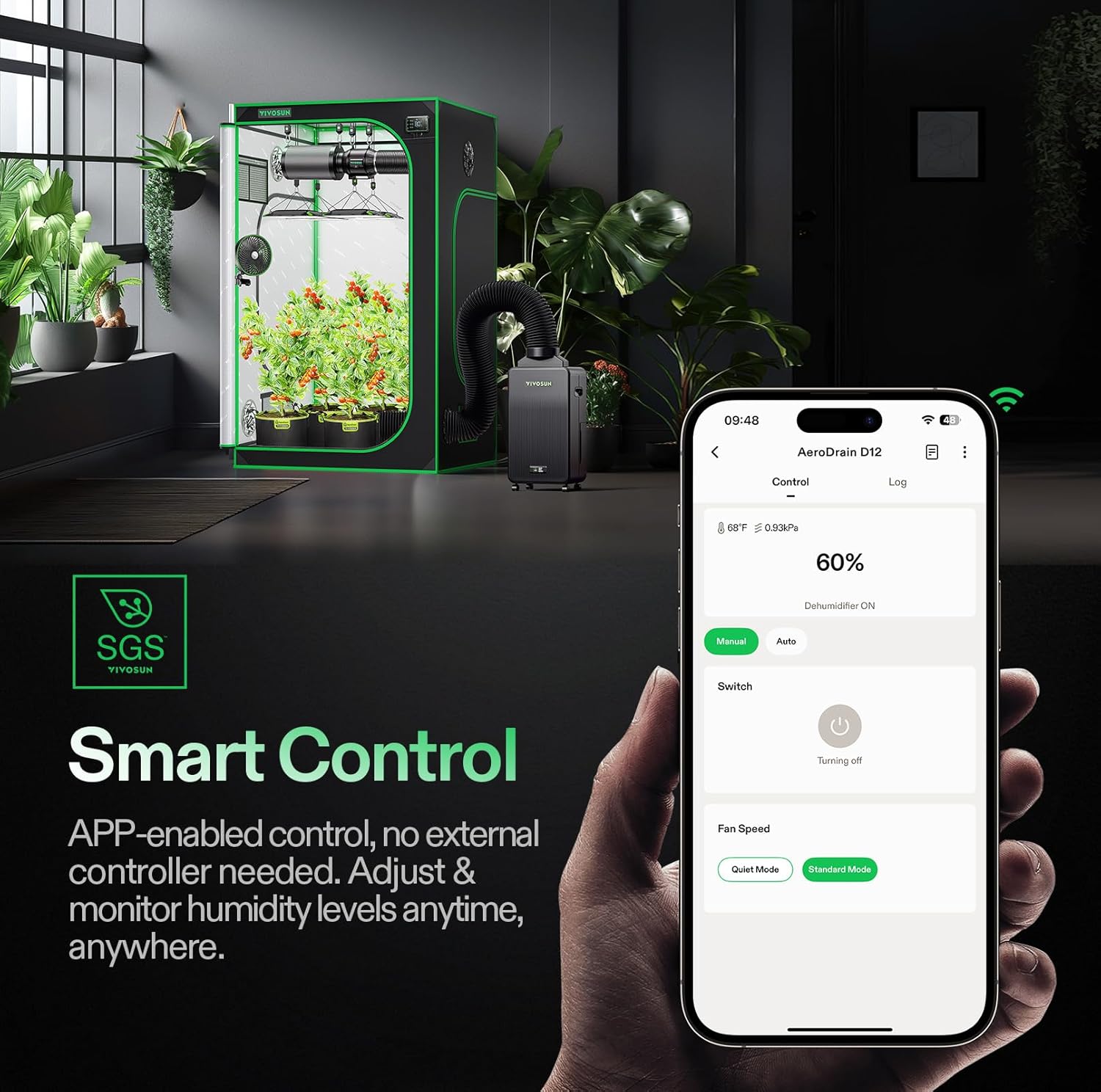
Image: The VIVOSUN AeroDrain D12 dehumidifier positioned near a grow tent, with a hand holding a smartphone displaying the VIVOSUN app interface for smart control.

Image: A split image showing the local control panel of the VIVOSUN AeroDrain D12 with button operations and screen display, alongside the Wi-Fi enabled VIVOSUN app interface for remote control and real-time notifications.
3. Operating Modes
- Manual Mode: Allows you to manually set the fan speed and turn the dehumidification on or off.
- Auto Mode: The dehumidifier automatically adjusts its operation based on the target humidity level you set and the current environmental conditions detected by the sensor probe.
- Quiet Mode: Reduces fan speed for quieter operation, suitable for times when noise is a concern.
- Standard Mode: Operates at normal fan speed for efficient dehumidification.
4. Timer Function
Use the timer function to schedule the dehumidifier to turn on or off at specific times, optimizing energy consumption and environmental control.
5. Auto-Restart After Power Outage
The unit is designed to automatically resume operation with its previous settings after a power interruption, ensuring continuous environmental control without manual intervention.
Maintenance
Regular maintenance ensures the longevity and optimal performance of your VIVOSUN AeroDrain D12 dehumidifier.
1. Emptying the Water Tank
When using the internal water tank, the unit will stop operating when the tank is full. Carefully remove the tank, empty the collected water, and reinsert it securely. Ensure the tank is properly seated for the unit to resume operation.
2. Cleaning the Air Filter
The dehumidifier is equipped with a high-density filter that should be cleaned regularly to maintain air quality and unit efficiency. A dirty filter can reduce dehumidification performance and increase energy consumption.
- Turn off and unplug the dehumidifier.
- Locate and remove the air filter. Refer to the product diagram for filter access.
- Rinse the filter under running water or use a vacuum cleaner to remove dust and debris.
- Allow the filter to air dry completely before reinserting it into the unit. Do not use a dryer or direct heat.
- Reinsert the dry filter securely.

Image: A composite image showing the auto-restart feature, smooth-rolling casters for easy movement, and the high-density filter which is easy to remove and rinse for maintenance.
3. General Cleaning
Wipe the exterior of the dehumidifier with a soft, damp cloth. Do not use harsh chemicals, abrasives, or solvents, as these may damage the surface.
Troubleshooting
If you encounter issues with your VIVOSUN AeroDrain D12, refer to the following common problems and solutions. If the problem persists, contact VIVOSUN customer support.
| Problem | Possible Cause | Solution |
|---|---|---|
| Dehumidifier does not turn on. | No power supply; Power cord not securely plugged in; Power outage. | Check power connection and outlet; Ensure power is restored. |
| Unit is running but not collecting water. | Humidity level is already low; Temperature is too low; Air filter is clogged; Unit is in fan-only mode. | Check ambient humidity; Ensure room temperature is within operating range (41-90°F); Clean the air filter; Select a dehumidification mode. |
| Water tank is full, but unit is still running. | Water tank not properly seated; Float switch malfunction. | Ensure water tank is correctly inserted; Contact support if issue persists. |
| Dehumidifier is noisy. | Unit not on a level surface; Air filter clogged; Obstruction in fan. | Place on a level surface; Clean air filter; Check for obstructions. |
| App connection issues. | Wi-Fi signal weak; Incorrect pairing steps; App outdated. | Ensure strong Wi-Fi signal; Re-attempt pairing process; Update VIVOSUN app. |
Warranty and Support
VIVOSUN products are manufactured to the highest quality standards. For information regarding warranty coverage, technical support, or replacement parts, please contact VIVOSUN customer service.
You can typically find contact information on the VIVOSUN official website or through the VIVOSUN app.
Please have your model number (VSE-ADD12) and purchase date ready when contacting support.


