
CHONCHOW G312
CHONCHOW G312 Wireless Gaming Keyboard and Mouse Combo User Manual
Model: G312
1. Product Overview
The CHONCHOW G312 Wireless Gaming Keyboard and Mouse Combo offers a seamless and responsive experience for both gaming and general computing. Featuring a 2.4GHz wireless connection, RGB backlighting, and a durable stainless steel panel, this combo is designed for performance and aesthetics. The keyboard includes a multi-function control knob for easy adjustments, and both devices are rechargeable for extended use.

Image 1.1: The CHONCHOW G312 Wireless Gaming Keyboard and Mouse Combo, showcasing its RGB backlighting and sleek design.
2. Package Contents
- CHONCHOW G312 Wireless Gaming Keyboard
- CHONCHOW Wireless Gaming Mouse
- USB 2.4GHz Wireless Dongle
- Type-C Charging Cable
- User Manual (this document)
3. Setup Guide
3.1 Initial Charging
Before first use, it is recommended to fully charge both the keyboard and mouse. Use the provided Type-C charging cable to connect the devices to a USB power source (e.g., computer USB port, USB wall adapter).
- Connect the Type-C end of the cable to the charging port on the keyboard and mouse.
- Connect the USB-A end to a power source.
- Charging indicators will typically show charging status (refer to device for specific indicator behavior).

Image 3.1: Location of the Type-C charging ports on the keyboard and mouse.
3.2 Wireless Connection
The keyboard and mouse connect wirelessly via a single 2.4GHz USB dongle.
- Locate the USB dongle, usually stored in a compartment on the underside of the mouse.
- Insert the USB dongle into an available USB-A port on your computer (PC, Laptop, Mac, Macbook, Raspberry Pi).
- Turn on the power switch for both the keyboard and mouse. The devices should automatically connect to your computer.
- No additional drivers are typically required for basic functionality.

Image 3.2: The USB 2.4GHz wireless dongle, typically stored within the mouse for convenience.
4. Operating Instructions
4.1 Keyboard Features
4.1.1 Multi-function Control Knob
The integrated knob on the keyboard serves dual purposes: controlling backlighting and multimedia functions. Press the FN key simultaneously with the knob to switch between modes.
- Backlight Mode:
- Rotate the knob to adjust the brightness of the RGB lighting.
- Click the knob to cycle through 5 different lighting effects.
- Multimedia Mode:
- Rotate the knob to adjust the system volume.
- Click the knob to play or pause media.

Image 4.1: The multi-function control knob, used for both backlight and multimedia adjustments.
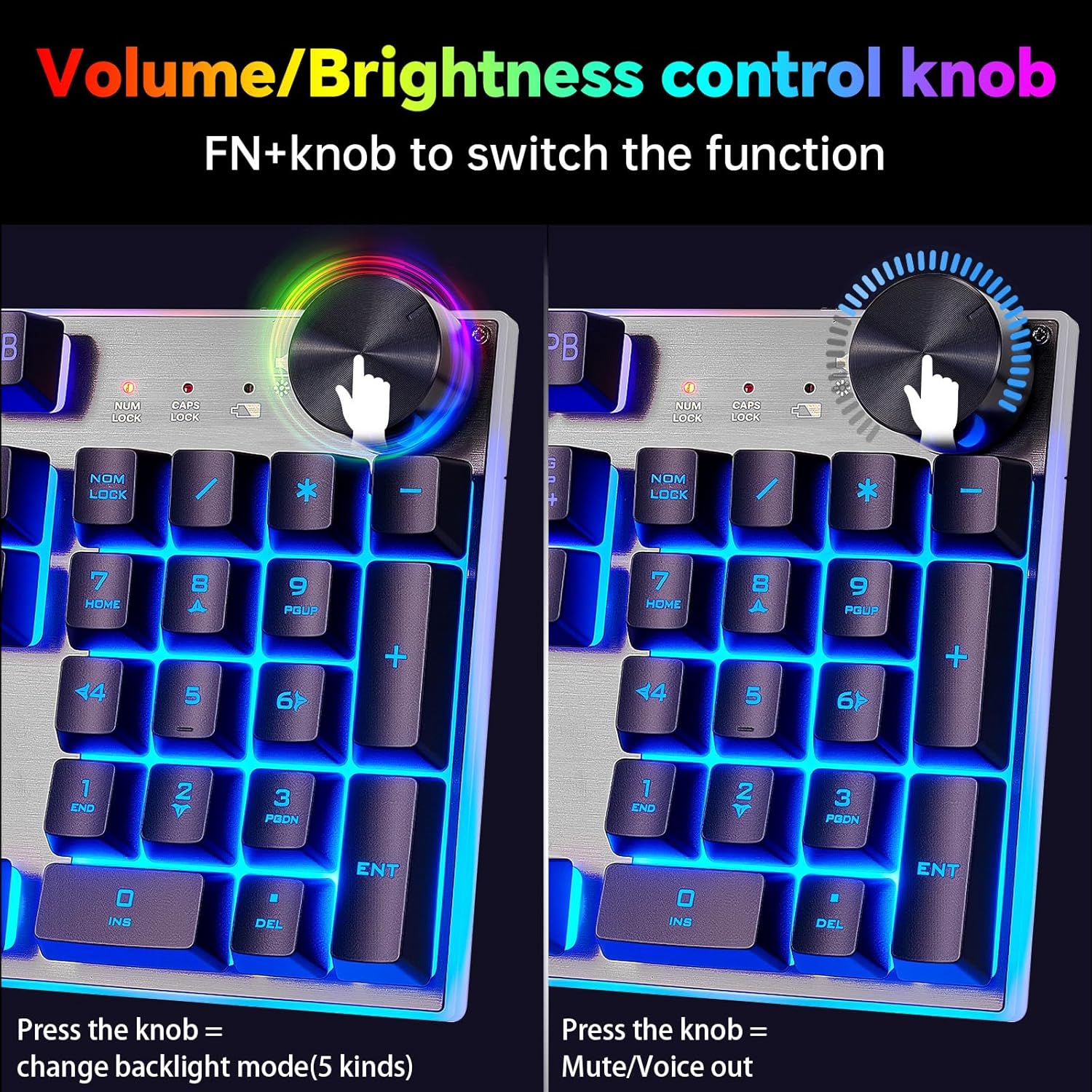
Image 4.2: Detailed view of the knob's functionality for volume and brightness control.

Image 4.3: Visual representation of the knob's dual function for backlight and volume control.
4.1.2 RGB Backlighting Control
The keyboard features vibrant RGB backlighting with various effects. In addition to the knob, specific key combinations control lighting:
- FN + SL: Change backlight color (3 kinds) and turn on/off backlight.
- FN + HOME: Switch breathing modes (4 kinds).
- FN + PU/PD: Adjust brightness.

Image 4.4: Examples of the keyboard's RGB lighting effects and key combinations for control.
4.1.3 Non-Conflict Keys
The keyboard supports 19 non-conflict keys, ensuring that multiple simultaneous key presses are registered accurately, which is crucial for gaming.
4.1.4 Stainless Steel Panel
The keyboard features a low-carbon brushed stainless steel panel, designed for durability and resistance to aging and oxidation. This non-mirror reflection surface enhances the unique lighting ambiance.

Image 4.5: Close-up of the non-mirror brushed stainless steel panel, highlighting its texture and durability.

Image 4.6: Illustration of the keyboard's wire drawing process and variable color lighting.
4.2 Mouse Features
The accompanying wireless mouse features a high DPI for precise tracking and side buttons for enhanced functionality in gaming or productivity tasks. It is also rechargeable and designed for comfortable use.
- DPI: Up to 4200DPI for adjustable sensitivity.
- Side Buttons: Programmable or pre-assigned functions for quick actions.
5. Power Management and Battery Life
Both the keyboard and mouse are equipped with high-capacity rechargeable batteries and smart energy-saving functions to maximize usage time.
- Keyboard Battery: 2500 mAh
- Mouse Battery: 500 mAh
- Continuous Use: More than 40 hours with lighting enabled.
- Smart Energy-Saving: If no operation is detected within 5 minutes, both devices will automatically enter sleep mode to conserve power. Press any key or button to wake them up.

Image 5.1: Visual representation of the keyboard's 2500mAh and mouse's 500mAh battery capacities.
6. Maintenance
To ensure the longevity and optimal performance of your CHONCHOW G312 combo, follow these maintenance guidelines:
- Cleaning: Use a soft, dry cloth to wipe down the keyboard and mouse. For the stainless steel panel, a slightly damp cloth can be used, followed by a dry cloth. Avoid abrasive cleaners or excessive moisture.
- Battery Care:
- Avoid completely draining the battery frequently.
- Store in a cool, dry place if not used for extended periods.
- Recharge regularly to maintain battery health.
- Storage: When not in use, store the USB dongle securely in its compartment within the mouse to prevent loss.
7. Troubleshooting
If you encounter issues with your CHONCHOW G312 combo, refer to the following common troubleshooting steps:
| Problem | Possible Cause | Solution |
|---|---|---|
| Keyboard/Mouse not responding | Low battery; Dongle not connected; Devices in sleep mode; Connection interference. | Charge devices fully. Ensure dongle is securely plugged in. Press any key/button to wake from sleep. Try a different USB port. Move closer to the dongle. |
| Mouse loses signal constantly | Interference; Low battery; Dongle issue. | Ensure no other 2.4GHz devices are causing interference. Recharge mouse. Try a different USB port for the dongle. |
| Specific key (e.g., 'A' button) not responding | Key switch issue; Software conflict. | Ensure the key is not physically stuck. Try cleaning around the key. Test on another computer to rule out software issues. If persistent, contact support. |
| Cannot set keyboard to a single RGB color | Feature limitation; Incorrect mode. | The keyboard may have pre-set lighting effects rather than full customizability for single colors. Refer to section 4.1.2 for available lighting controls. |
| Backlighting not working | Backlight turned off; Low battery; Incorrect mode. | Press FN + SL to cycle through backlight states. Ensure battery is charged. Check if the knob is in backlight mode. |
8. Specifications
| Feature | Detail |
|---|---|
| Model Number | G312 |
| Connectivity Technology | 2.4GHz RF Wireless |
| Keyboard Description | Gaming Keyboard with Multi-function Knob |
| Keyboard Backlighting | RGB (Multiple effects and brightness levels) |
| Keyboard Battery Capacity | 2500 mAh Lithium Polymer |
| Mouse Battery Capacity | 500 mAh Lithium Polymer |
| Mouse DPI | Up to 4200DPI |
| Panel Material | Stain-resistant Stainless Steel |
| Compatible Devices | Laptop, Mac, Macbook, PC, Raspberry Pi (Windows 8/9/10, MacOS) |
| Item Weight | 2.09 pounds (approx. 0.95 kg) |
| Package Dimensions | 17.63 x 9.02 x 1.97 inches (approx. 44.78 x 22.91 x 5.00 cm) |
| Manufacturer | CHONCHOW |
9. Warranty and Support
For warranty information, technical support, or any inquiries not covered in this manual, please contact CHONCHOW customer service through their official channels or the retailer from whom the product was purchased. Please have your model number (G312) and purchase details ready.
Visit the CHONCHOW Store on Amazon for more information and product updates.