
1. Introduction
Thank you for choosing the LotaTools Heavy-Duty Aquarium Stand. This stand is designed to provide a stable and functional base for 55-75 gallon aquariums, terrariums, or turtle habitats, supporting up to 1000 lbs. It features a built-in power outlet for convenience and ample storage with adjustable shelving. Please read this manual thoroughly before assembly and use to ensure proper setup and safe operation.
2. Safety Information
- Weight Capacity: Do not exceed the maximum weight capacity of 1000 lbs on the top surface.
- Level Surface: Always place the stand on a flat, level, and stable surface to prevent tipping or instability.
- Power Outlet: Ensure the power outlet is properly installed and connected to a grounded electrical source. Do not overload the outlets. Keep liquids away from the power strip.
- Assembly: Follow all assembly instructions carefully. Do not skip steps or use incorrect hardware.
- Children and Pets: Keep children and pets away from the stand during assembly. Ensure all small parts are kept out of reach.
- Water Damage: While the stand features moisture-resistant MDF, promptly wipe up any water spills to prevent long-term damage.
3. Parts List
Before beginning assembly, verify that all components listed in the included hardware pack and illustrated instructions are present and undamaged. Contact customer support immediately if any parts are missing or defective.
Refer to the detailed parts diagram in your physical instruction booklet for specific component identification.
4. Setup and Assembly
The LotaTools Aquarium Stand is designed for straightforward assembly with pre-drilled components, numbered connections, and tool-free cam locks. Illustrated multilingual instructions are included in the packaging.
4.1. Assembly Steps
- Unpack and Organize: Carefully unpack all components and lay them out on a clean, soft surface to prevent scratches. Group similar parts together.
- Follow Instructions: Refer to the step-by-step illustrated instructions provided in your product packaging. Each step is numbered for clarity.
- Secure Connections: Utilize the tool-free cam locks and pre-drilled holes to securely connect the panels. The modular panel design ensures proper alignment and stability.
- Install Power Outlet: Integrate the built-in power station into the designated slot on the side of the stand. Ensure the safety switch is accessible and the power cord is routed through the hidden wiring channels.
- Adjust Shelves: Install the adjustable shelf within the cabinet storage area to your desired height.
Assembly Tip: While a drill is not strictly necessary, it can expedite the process. However, all required tools for manual assembly are provided.

Image: The LotaTools Aquarium Stand supporting a large fish tank, highlighting its robust design.
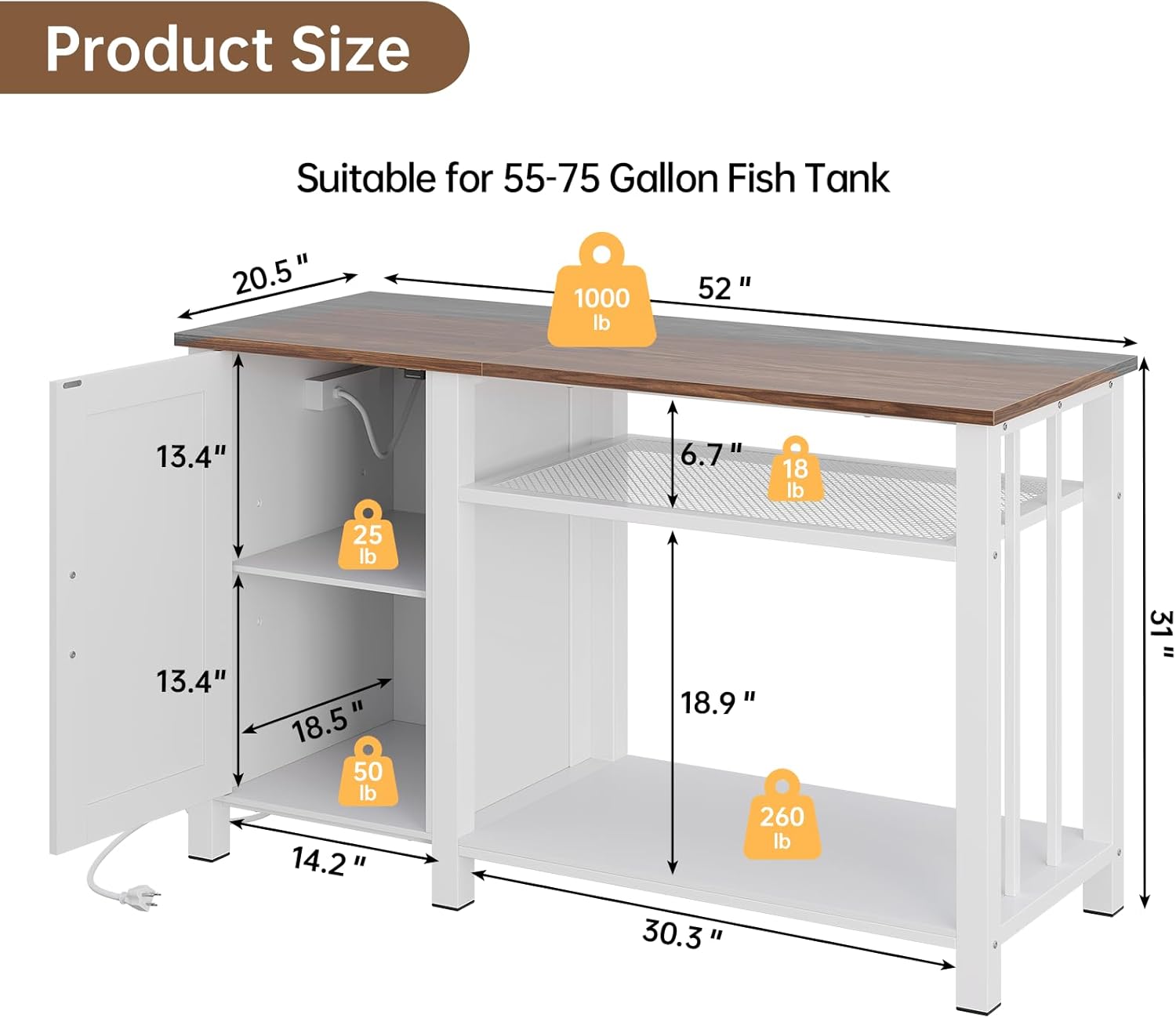
Image: Detailed product dimensions and weight distribution for the stand.
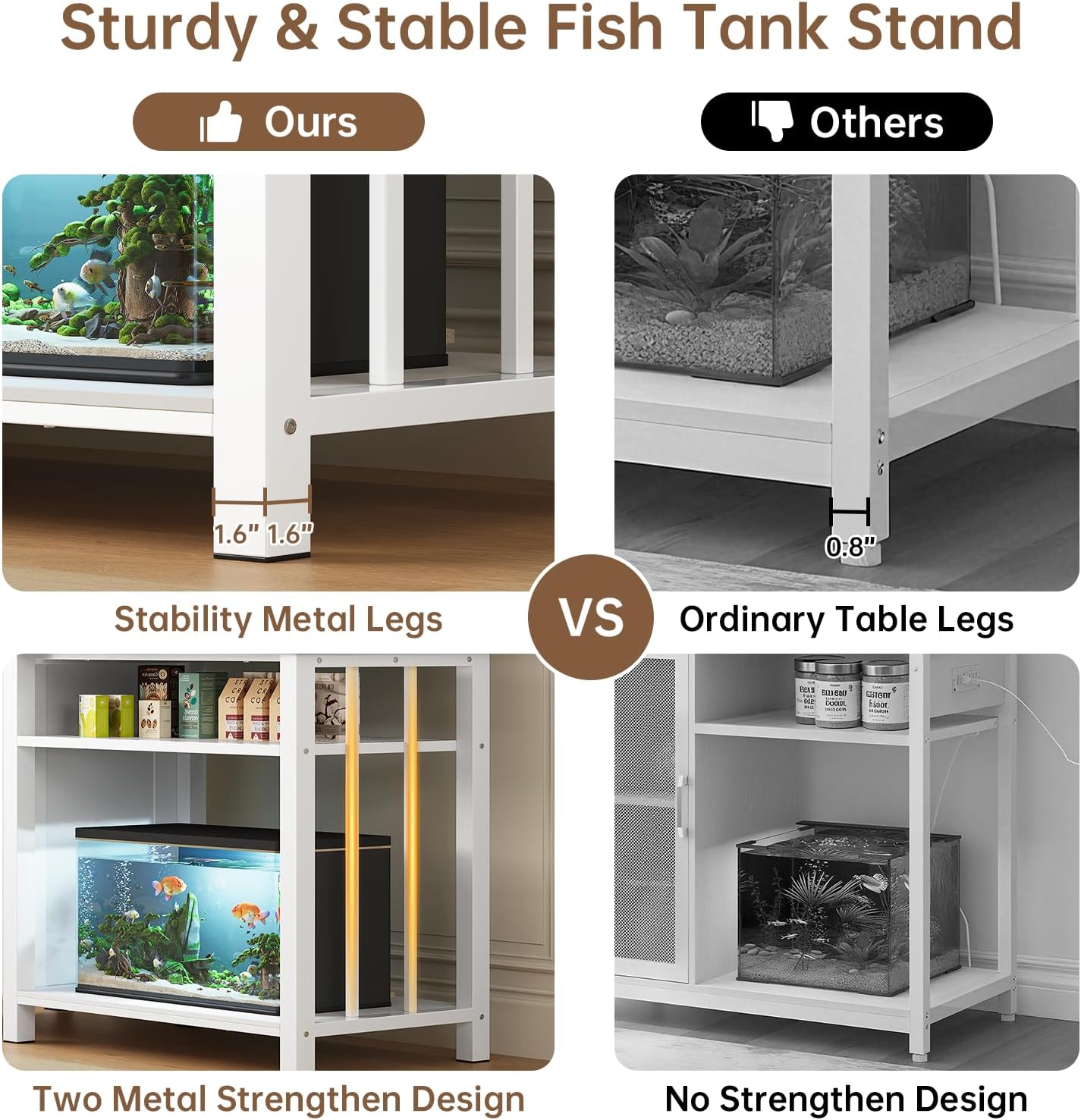
Image: Illustration of the stand's stability features, including reinforced metal legs.
4.2. Placement
Position the assembled stand in its desired location, ensuring it is on a stable, level floor. The stand is suitable for 55-75 gallon aquariums, terrariums, or turtle habitats on the top surface. The lower tier can accommodate 10-20 gallon fish tanks, making it versatile for multi-tank setups.

Image: The stand configured to display two fish tanks, demonstrating its dual-level capacity.
5. Operating Instructions
5.1. Using the Built-in Power Outlet
The stand is equipped with a convenient power station featuring 3 AC outlets and a safety switch. This allows for easy powering of your aquarium's essential equipment without visible clutter.
- Plug your aquarium lights, filters, heaters, and other accessories into the AC outlets.
- Use the integrated safety switch to easily turn power on or off to all connected devices.
- Route power cords through the hidden wiring channels to maintain a tidy appearance.
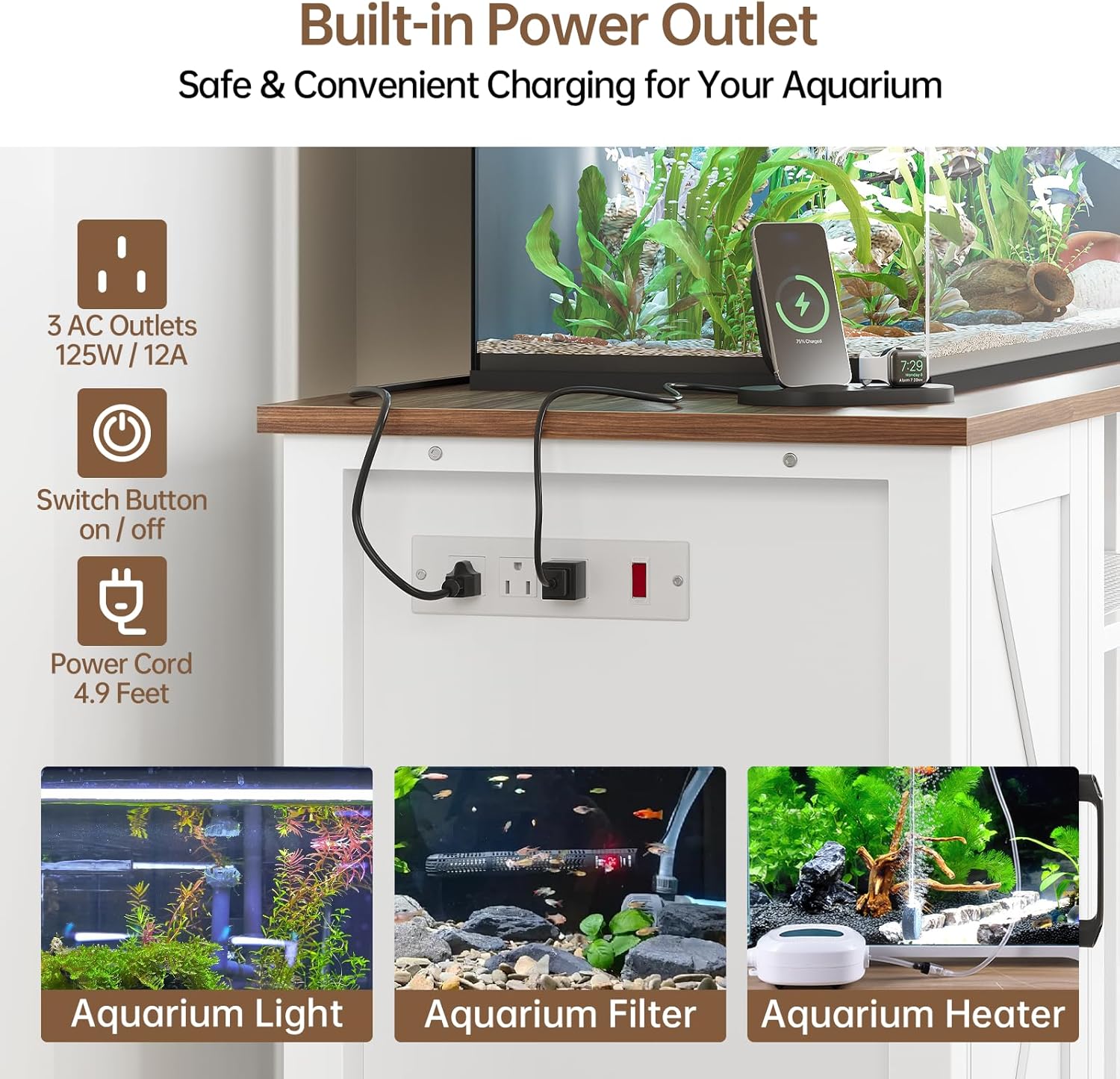
Image: The integrated power outlet with 3 AC outlets and a safety switch for aquarium equipment.
5.2. Utilizing Storage Spaces
The stand offers versatile storage options to keep your aquarium supplies organized.
- Cabinet Storage: The enclosed cabinet features an adjustable shelf. You can customize its height or remove it entirely to accommodate larger items like fish food, filters, or cleaning tools.
- Open Shelving: The open 2-tier shelving area provides additional space for decor, smaller tanks (10-20 gallons), or frequently accessed items.
- Barn Doors: The sliding barn doors allow you to conceal or display items in the central open shelving area as desired.

Image: The adjustable and removable shelf inside the cabinet, offering flexible storage.

Image: Overview of the stand's storage capabilities, including the cabinet and open shelves.
6. Maintenance
- Cleaning: Wipe the stand's surfaces with a soft, damp cloth. Avoid abrasive cleaners or harsh chemicals that could damage the matte finish.
- Spills: Promptly clean any water spills to protect the moisture-resistant MDF.
- Hardware Check: Periodically check all screws and connections to ensure they remain tight and secure.
- Power Outlet: Inspect the power outlet and cords regularly for any signs of wear or damage. Discontinue use and replace if damage is found.
7. Troubleshooting
- Stand Wobbles: Ensure the stand is placed on a completely level surface. Check all assembly connections to confirm they are tightened securely.
- Power Outlet Not Working: Verify that the main power cord is securely plugged into a functional wall outlet. Check the safety switch on the power strip to ensure it is in the 'ON' position. Test the wall outlet with another device.
- Sliding Doors Stick: Ensure the sliding track is clean and free of debris. Check that the doors are properly aligned on the track.
If you encounter issues not covered here, please contact LotaTools customer support for assistance.
8. Specifications
| Feature | Detail |
|---|---|
| Brand | LotaTools |
| Model Number | B0F43HSN77 |
| Material | Reinforced Steel Framing, Moisture-Resistant MDF |
| Color | White |
| Finish Type | Matte |
| Weight Capacity (Top) | Up to 1000 lbs |
| Recommended Aquarium Size (Top) | 55-75 Gallons |
| Lower Shelf Capacity | Accommodates 10-20 Gallon Tanks |
| Power Outlet | 3 AC Outlets, Safety Switch |
| Assembly Required | Yes |
9. Product Videos
Watch these official videos from LotaTools for additional product insights and demonstrations.
Farmhouse Fish Tank & TV Stand Overview
Video: An overview of the LotaTools stand, demonstrating its features and suitability as both a fish tank stand and a TV stand. This video is provided by the seller, LotaTools.
10. Warranty and Support
For warranty information, technical support, or assistance with missing/damaged parts, please contact LotaTools customer service through the retailer where you purchased the product or visit the official LotaTools website.
LotaTools Official Store: Visit LotaTools Store on Amazon