1. Introduction
This manual provides essential instructions for the safe and effective use of your Shark Lift-Away 5-in-1 Steam Mop, Model S3972BRN. Please read all instructions carefully before use and retain this manual for future reference.
The Shark Lift-Away 5-in-1 Steam Mop is designed for comprehensive home cleaning, offering both upright steam mopping for sealed hard floors and a detachable handheld steamer for various surfaces and tasks. It utilizes steam to sanitize and clean without harsh chemicals.
2. What's Included
Unpack your Shark Lift-Away 5-in-1 Steam Mop and identify the following components:

Image: Overview of the Shark Lift-Away 5-in-1 Steam Mop and its various components, including the main unit, mop head, and several attachments.
- Steam Mop with Detachable Handheld Steamer: The main unit for both floor and handheld cleaning.
- Double-Sided Dirt Grip Pad: For floor cleaning, designed for absorption and scrubbing.
- Fill Flask: For easy and precise water filling.
- Accessory Hose: Extends reach for handheld cleaning with attachments.
- Flat Pad Tool: Two-in-one tool with scrubbing and dusting sides for flat surfaces and upholstery.
- Scraper Tool: For loosening and lifting stuck-on messes and grease.
- Copper Brush Tool: For scrubbing built-up grease and grime from durable surfaces.
- Grout Brush Tool: Specifically designed for cleaning grout lines and tight crevices.

Image: A detailed diagram illustrating each component included in the box, such as the Dirt Grip pad, fill flask, accessory hose, flat pad tool, angled grout brush, scraper tool, and copper brush.
3. Important Safety Instructions
WARNING: To reduce the risk of fire, electric shock, or injury, read all instructions before using your steam mop.
General Safety Precautions:
- Always ensure the appliance is unplugged from the electrical outlet before assembling, disassembling, or filling the water tank.
- Do not leave the steam mop unattended when plugged in. Unplug from outlet when not in use and before servicing.
- Do not allow children to operate the steam mop. Close attention is necessary when used near children, pets, or invalids.
- Use only as described in this manual. Use only manufacturer's recommended accessories.
- Do not use on unsealed wood or unglazed ceramic floors.
- Do not use on leather, wax polished furniture or floors, synthetic fabrics, velvet, or other delicate, steam-sensitive materials.
- Do not add cleaning solutions, scented perfumes, oils, or any other chemicals to the water in the appliance, as this may damage the unit or cause injury.
Electrical Safety:
- Do not handle plug or steam mop with wet hands.
- Do not pull or carry by cord, use cord as a handle, close a door on cord, or pull cord around sharp edges or corners. Keep cord away from heated surfaces.
- Do not unplug by pulling on cord. To unplug, grasp the plug, not the cord.
- This appliance operates on 120V. Ensure your power outlet matches this voltage.
Steam Safety:
- Steam is very hot and can cause burns. Avoid direct contact with steam.
- Always direct steam away from yourself, other people, and pets.
- Do not use the steam mop without a Dirt Grip pad attached to the mop head.
- Allow the steam mop to cool completely before removing or changing pads or attachments.
4. Assembly
Follow these steps to assemble your Shark Lift-Away 5-in-1 Steam Mop:
- Attach the Mop Handle: Insert the upper handle into the main body of the steam mop until it clicks securely into place.
- Attach the Mop Head: Align the mop head with the bottom of the main unit and push until it locks.
- Attach a Dirt Grip Pad: Place the mop head onto a clean Double-Sided Dirt Grip Pad. The pad will adhere to the hook and loop fasteners on the bottom of the mop head.
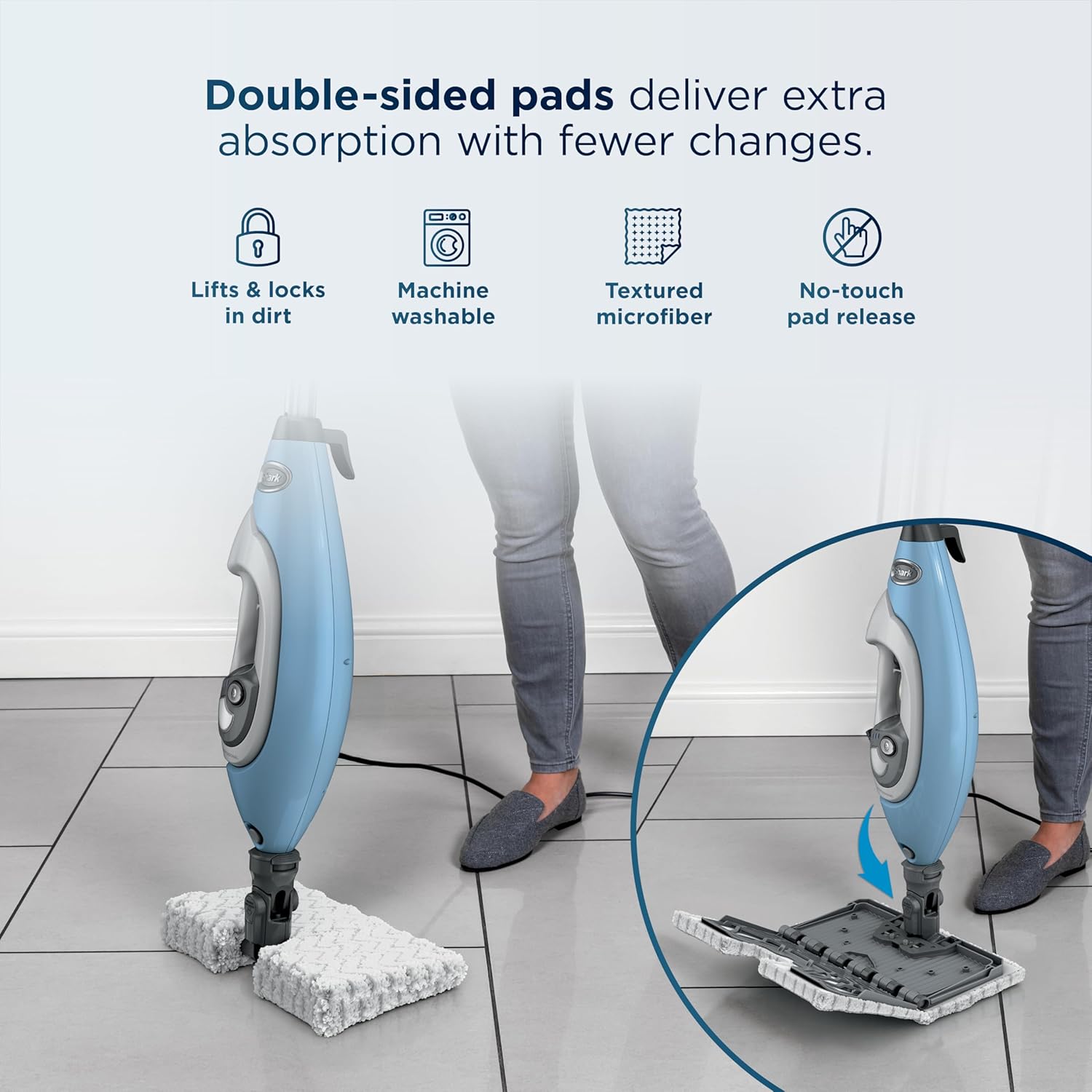
Image: The steam mop head with a double-sided Dirt Grip pad attached, demonstrating the easy attachment and release mechanism.
5. Operation
5.1 Filling the Water Tank
- Ensure the steam mop is unplugged.
- Open the water tank cap.
- Use the provided Fill Flask to pour distilled water into the tank. Do not overfill.
- Close the water tank cap securely.
Note: Always use distilled water to prevent mineral buildup and prolong the life of your steam mop. Do not add any cleaning solutions or chemicals to the water tank.

Image: The steam mop in action on a tiled floor, highlighting its ability to sanitize using only water.
5.2 Using as an Upright Steam Mop
- Ensure a clean Dirt Grip pad is attached to the mop head.
- Plug the power cord into a 120V electrical outlet.
- Select your desired steam mode (Light, Normal, or Deep) using the control dial on the main unit.
- Pump the handle a few times to initiate steam. Steam will begin to generate within approximately 30 seconds.
- Mop your sealed hard floors with a forward and backward motion.

Image: Demonstrates the 2-in-1 versatility, showing the steam mop cleaning a floor and the handheld steamer cleaning a countertop.
5.3 Detachable Handheld Steamer
- To detach the handheld steamer, press the release button located on the main unit and lift the handheld portion away.
- Attach the Accessory Hose to the handheld steamer.
- Select the appropriate cleaning tool for your task and attach it to the end of the accessory hose.
- Plug in the unit and allow it to heat up.
- Press the steam trigger on the handheld unit to release steam. Direct steam towards the surface you wish to clean.

Image: A collage showcasing the detachable handheld cleaner being used with various tools, including the flat pad, scraper tool, grout brush, and copper brush, for different cleaning tasks.
5.4 Steam Modes
Your steam mop features three distinct steam modes for customized cleaning:
- Light: Ideal for quick cleanups and delicate surfaces.
- Normal: Suitable for everyday use on most sealed hard floors.
- Deep: Provides maximum steam for tackling stuck-on messes and stubborn stains.

Image: Visual representation of the three steam modes (Light, Normal, Deep) and how to select them on the steam mop's control panel.
6. Using Specialized Attachments
The Shark Lift-Away 5-in-1 Steam Mop comes with several specialized tools to enhance your cleaning capabilities:
6.1 Flat Pad Tool
This versatile tool features two sides: stiff scrubbing loops for tough messes and soft microfiber loops for dusting and gentle cleaning. Ideal for:
- Glass and mirrors
- Countertops
- Range hoods
- Upholstery and car seats

Image: The flat pad tool attached to the handheld steamer, being used to clean a glass shower door, demonstrating its effectiveness on flat surfaces.
6.2 Scraper Tool
Designed to loosen and lift stubborn, stuck-on food and grease. Use on:
- Microwave and oven interiors
- Induction cooktops
- Kitchen countertops
- Sinks and areas with ice buildup

Image: The scraper tool attached to the handheld steamer, effectively removing baked-on food and grease from an oven interior.
6.3 Copper Brush Tool
Features durable copper loops for scrubbing away heavy grease and grime. Suitable for:
- Oven racks and grills
- Stovetops and appliance interiors
- Bathroom sinks and fixtures

Image: The copper brush tool attached to the handheld steamer, scrubbing a metal oven rack to remove tough grease and grime.
6.4 Grout Brush Tool
Specifically designed to clean and refresh grout lines and tight crevices. Use on:
- Kitchen and bathroom tiles
- Floor tiles
- Tight spaces in cars and other areas

Image: The grout brush tool attached to the handheld steamer, effectively cleaning grout lines on a tiled wall in a bathroom.
7. Care and Maintenance
7.1 Cleaning the Dirt Grip Pads
- The Double-Sided Dirt Grip Pads are machine washable. Wash separately with warm water using liquid detergent.
- Do not use bleach or fabric softeners, as these can damage the pads or leave a residue.
- Tumble dry on low setting or air dry.
- For best results, replace pads every 3-6 months, depending on usage.

Image: A Dirt Grip pad being placed into a washing machine, illustrating that the pads are machine-washable for easy maintenance.
7.2 Descaling the Water Tank
Over time, mineral deposits can build up in the water tank, especially if tap water is used. To descale:
- Mix a solution of 1/3 white vinegar and 2/3 distilled water.
- Pour the solution into the water tank.
- Plug in the unit and allow it to heat up.
- Run the unit until the tank is empty.
- Repeat with fresh distilled water to rinse.
Perform this process monthly or as needed, depending on water hardness and usage frequency.
7.3 Storage
- Unplug the power cord and allow the unit to cool completely before storing.
- Empty any remaining water from the tank.
- Wrap the power cord neatly around the cord hooks.
- Store the steam mop in a cool, dry place.
8. Troubleshooting
| Problem | Possible Cause | Solution |
|---|---|---|
| No steam or very little steam. |
|
|
| Mop leaves water on the floor. |
|
|
| Unit is not heating up. |
|
|
| Handheld steamer not detaching. |
|
|
9. Specifications
| Feature | Detail |
|---|---|
| Model Number | S3972BRN |
| Brand | Shark |
| Voltage | 120 Volts |
| Wattage | 1200 watts |
| Water Tank Capacity | 12.85 Fluid Ounces |
| Item Weight | 7 Pounds |
| Product Dimensions | 12"D x 12"W x 51.2"H |
| Power Source | AC/DC |
| Special Features | Detachable, Lightweight, Portable |
| Surface Recommendation | Sealed Hard Floors, Kitchens, Bathrooms, Upholstery, Cars, Grout |
10. Warranty and Support
For warranty information, please refer to the warranty card included with your product at the time of purchase. You can also visit the official Shark website for the most up-to-date warranty details and customer support resources.
If you encounter any issues or have questions not covered in this manual, please contact Shark Customer Service:
- Website: www.sharkclean.com
- Phone: Refer to your product registration or the Shark website for regional contact numbers.
Please have your model number (S3972BRN) and purchase date available when contacting support.