Introduction
Welcome to the Greevego DY8501 Electric Scooter user manual. This document provides essential information for the safe operation, assembly, maintenance, and troubleshooting of your new electric scooter. Please read this manual thoroughly before your first ride to ensure optimal performance and safety.
Safety Guidelines
Your safety is paramount. Adhere to all local laws and regulations regarding electric scooter usage. This product is UL2272 Certified, indicating compliance with electrical safety standards.
- Age and Weight Limit: Recommended for adults aged 18 and above. The maximum weight limit is 264 pounds.
- Protective Gear: Always wear a helmet and other protective gear, such as knee and elbow pads, when riding.
- Pre-Ride Check: Before each ride, inspect the brakes, tires, and all components to ensure they are in good working order.
- Riding Conditions: Be aware that speed and range can vary significantly based on rider weight, terrain, temperature, battery level, and riding style.
- Visibility: Utilize the bright front light and rear brake light, especially during low-light conditions or night riding.
- Braking: Familiarize yourself with the dual brake system, which includes EABS and a rear drum brake, for effective stopping.
Package Contents
Upon unpacking, ensure all items are present:
- Greevego DY8501 Electric Scooter
- Power Charger
- User Manual (this document)
- Tool Bag
- Handlebar Storage Bag
Product Overview
The Greevego DY8501 Electric Scooter is designed for adult commuting, featuring an efficient 350W motor, 8.5-inch solid tires, and a foldable design for portability.
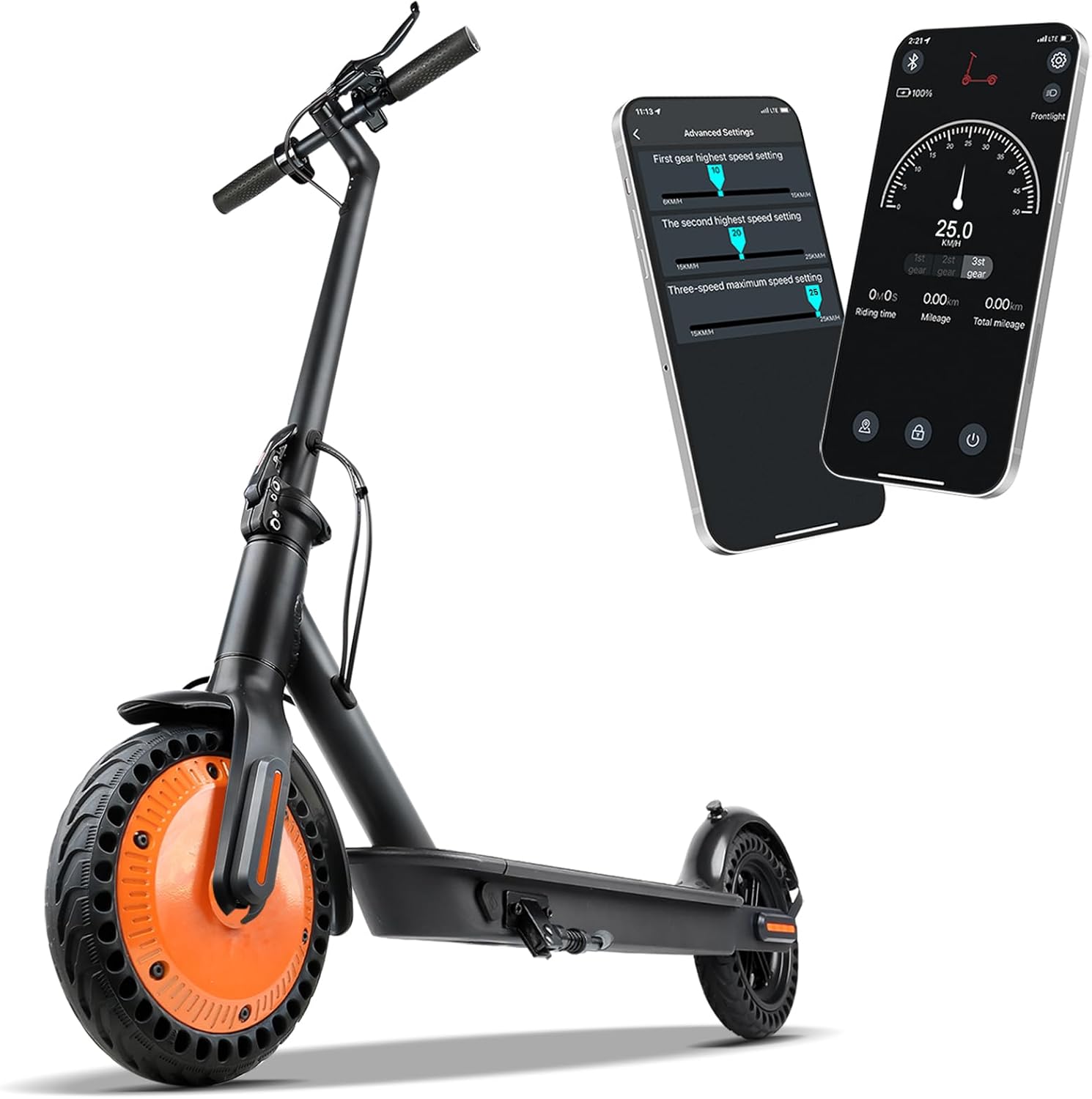
Image: The Greevego DY8501 Electric Scooter, showcasing its sleek design and integrated smartphone app connectivity.

Image: A user standing with the Greevego DY8501 Electric Scooter, highlighting its 12 MPH top speed, 15-mile range, 8.5-inch solid tires, and 350W motor.
Key Components:
- Handlebars: Fixed handlebar type with comfortable grips.
- LED Display: Integrated display showing speed, range, battery level, and cruise control status.
- Front Light: Bright LED headlight for visibility.
- Brake Lever: Controls the dual braking system.
- Throttle: For acceleration.
- Folding Mechanism: Quick-release lever for easy folding.
- Kickstand: For convenient parking.
- Motor: 350W motor integrated into the front wheel.
- Tires: 8.5-inch solid, anti-puncture rubber tires.
- Rear Brake: Drum brake with EABS (Electronic Anti-lock Braking System).
- Rear Light: Integrated tail light for rear visibility.
Assembly & Initial Setup
1. Unfolding the Scooter:
- Place the scooter on a flat surface.
- Locate the folding latch near the base of the handlebar stem.
- Lift the latch and carefully raise the handlebar stem until it locks into place with an audible click.
- Ensure the kickstand is deployed for stability.
Video: Demonstrates the quick and easy unfolding process of the Greevego electric scooter from its compact, folded state.
2. Initial Charging:
Before your first ride, fully charge the scooter's high-capacity battery. A full charge typically takes 4-5 hours. Connect the charger to the charging port on the scooter and then to a power outlet. The LED indicator on the charger will change when charging is complete.
3. App Connection:
Enhance your riding experience by connecting your scooter to the dedicated smartphone app via Bluetooth. Scan the QR code located on the scooter's display to download the 'KCQ Scooter APP' (available for Android/iOS).

Image: The smartphone app interface for the Greevego electric scooter, displaying options for speed settings, gear changes, and vehicle troubleshooting.
Operating Instructions
1. Power On/Off:
- To power on, press and hold the power button on the LED display.
- To power off, press and hold the power button again.
2. Speed Modes:
The scooter offers multiple speed modes for different riding preferences:
- ECO Mode: Energy-saving mode for extended range.
- D Mode: Standard drive mode for balanced performance.
- S Mode: Sport mode for maximum speed (up to 15mph).
Cycle through modes by pressing the power button once while the scooter is on. The current mode will be displayed on the LED screen.
3. Controls:
- Throttle: Press the thumb throttle on the right handlebar to accelerate.
- Brake: Squeeze the brake lever on the left handlebar to engage the dual braking system.
- Front Light: Double-click the power button to turn the front light on or off.
- Bell: Use the integrated bell to alert pedestrians or other riders.

Image: The LED smart display of the Greevego electric scooter, showing speed, gear shift, battery display, and the power/set button.
4. App Usage:
The companion app provides additional functionalities:
- Speed Control: Adjust speed settings and switch between gears (ECO, D, S) directly from your phone.
- Ride Data: Monitor riding time, current mileage, and total mileage.
- Vehicle Status: Check battery health and detect potential scooter failures.
- Lock Function: Secure your scooter remotely to prevent unauthorized use.
Video: A detailed demonstration of the Greevego DY01 Electric Scooter's display and its connectivity with the smartphone app, showing various settings and controls.
Features Overview
Powerful Motor:
Equipped with a 350W motor, the DY8501 provides high torque for quick acceleration while maintaining low power consumption. It can reach a top speed of 15mph and supports riders up to 264lbs.
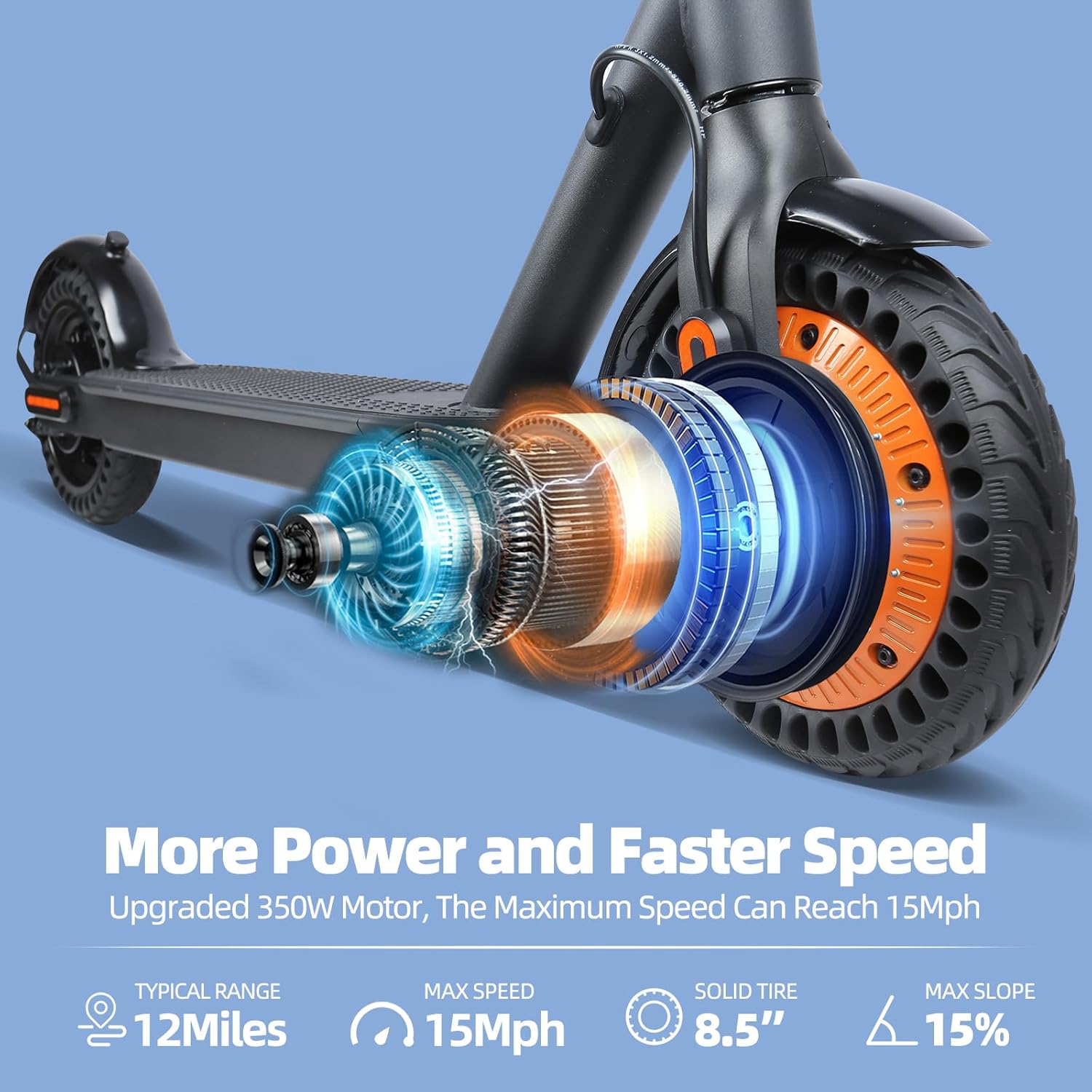
Image: An exploded view diagram illustrating the powerful 350W motor and its internal components, emphasizing its efficiency and speed capabilities.
Enhanced Battery:
The high-capacity battery offers an extended travel range of 12 miles on a single charge. The built-in cruise control feature provides a hands-free riding experience, optimizing battery usage.
Solid Tires:
The 8.5-inch solid tires are designed to be anti-puncture, eliminating the need for tire maintenance and providing a worry-free ride.

Image: A close-up view of the scooter's 8.5-inch solid tire, highlighting its durable, maintenance-free design.
Dual Brake System:
For maximum safety, the scooter is equipped with a dual brake system, including EABS (Electronic Anti-lock Braking System) and a rear drum brake, ensuring reliable stopping power.

Image: A visual representation of the scooter's dual brake system, featuring a disc braking system and EABS for enhanced safety.
Foldable Design:
The quick folding system allows the scooter to be easily folded in 1 second, making it convenient to store in a car trunk or carry with ease.

Image: The Greevego electric scooter neatly folded and placed inside a car trunk, demonstrating its compact storage capabilities.
Handlebar Storage Bag:
A convenient storage bag is included, attaching to the handlebar for carrying small items like your phone, wallet, or charger.
Maintenance
1. Cleaning:
Wipe the scooter with a damp cloth to remove dirt and dust. Avoid using high-pressure water jets or harsh chemicals that could damage electronic components.
2. Battery Care:
To prolong battery life, avoid completely draining the battery. Charge it regularly, even if not in frequent use. The app can help monitor battery health.
3. Tire Care:
The 8.5-inch solid tires are anti-puncture and require minimal maintenance. Regularly inspect them for any signs of wear or damage.
4. Storage:
Store the scooter in a cool, dry place away from direct sunlight and extreme temperatures. When storing for extended periods, ensure the battery is partially charged (around 50-70%) and recharge it every few months.
Troubleshooting
If you encounter issues with your Greevego DY8501 Electric Scooter, refer to the following common solutions:
- Scooter Not Powering On: Ensure the battery is charged. If the issue persists, check the power button for any obstruction.
- Error Code E1: If an E1 error appears, try resetting the scooter by powering it off and on again. If the error persists, consult the app for diagnostics or contact customer support.
- Brake Issues: If the brakes feel loose or ineffective, inspect the brake caliper and cable. If a brake caliper is not seated properly or a rotor is warped, professional adjustment or replacement may be required.
- App Connectivity Problems: Ensure Bluetooth is enabled on your smartphone and the scooter is powered on. Try restarting both the app and the scooter.
- Reduced Speed/Range: Remember that performance can be affected by rider weight, terrain, temperature, and battery level. Ensure the scooter is fully charged and consider riding in ECO mode for extended range.
For issues not covered here, utilize the smart app's diagnostic features or contact Greevego customer support.
Technical Specifications
| Feature | Specification |
|---|---|
| Brand | Greevego |
| Model Name | DY8501 |
| Motor Power | 350W |
| Top Speed | 15 mph |
| Maximum Distance Range | 12 Miles |
| Charging Time | 4-5 Hours |
| Weight Limit | 264 Pounds |
| Wheel Size | 8.5 Inches |
| Wheel Type | Solid (Anti-Puncture) |
| Brake Style | Front Braking, Rear Braking (EABS + Drum Brake) |
| Special Features | Anti-Puncture Tire, Cruise Control, Digital Display, Foldable |
| Frame Material | Carbon Steel |
| Age Range (Description) | Adult |
Warranty & Support
Greevego is committed to providing excellent performance and quality products. The DY8501 Electric Scooter comes with a 1-year limited warranty. Specific parts may have a 12-month or 180-day warranty period.
If you have any questions, require technical assistance, or need to claim warranty service, please contact Greevego customer support. Refer to the product packaging or the official Greevego website for contact information.