1. Product Overview
This Brush Roller & Filter Set is designed as a high-quality replacement for select Bissell CrossWave and OmniForce vacuum cleaner models. It ensures optimal cleaning performance by effectively capturing dirt, dust, and debris. The components are engineered for durability and ease of maintenance, providing a reliable solution for your vacuum's upkeep.
Key Features:
- High Compatibility: Specifically designed to fit and ensure optimal performance with compatible Bissell models.
- Easy Replacement: Components are designed for straightforward installation without the need for complex tools.
- Robust and Long-lasting: Constructed from durable materials to withstand regular use and maintain effectiveness over time.
- Washable & Reusable: The filter can be easily cleaned with water and reused, promoting sustainability and cost-effectiveness.
2. Compatibility
This replacement set is compatible with the following Bissell CrossWave and OmniForce vacuum cleaner models:
- Bissell CrossWave / OmniForce Models:
- 4076
- 3912
- 3999
- 4000
- 4006
- 4007
- 4008
- 4017
- 4087
Please verify your vacuum cleaner's model number before purchasing to ensure proper fit and function.
3. Installation Guide
Follow these steps to replace the brush roller and filter in your compatible Bissell vacuum cleaner. Always ensure the vacuum is unplugged before performing any maintenance.

Image 3.1: The complete Brush Roller and Filter Set.
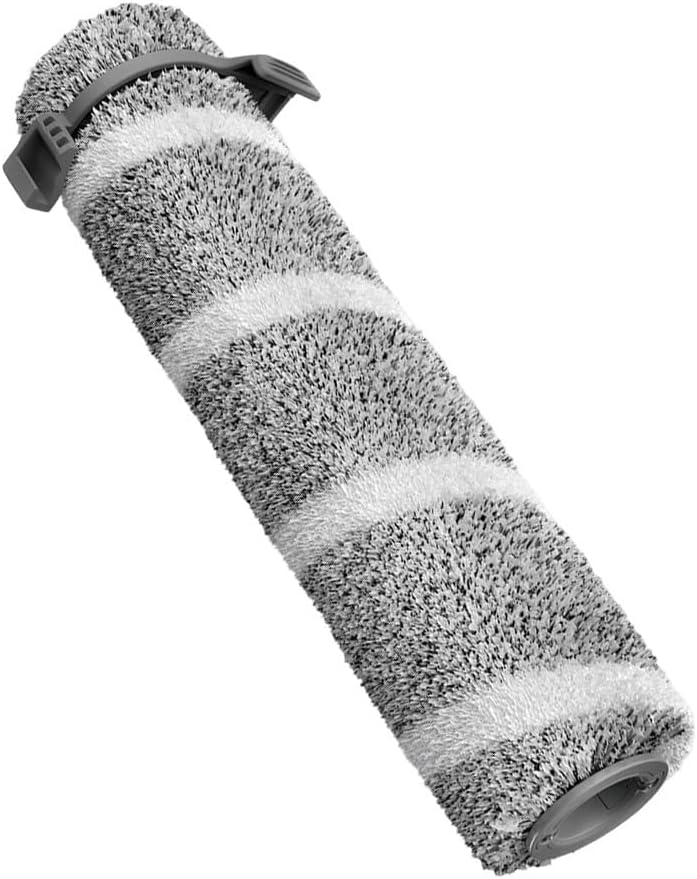
Image 3.2: Detailed view of the replacement brush roller.
- Power Off and Unplug: Before beginning, ensure your vacuum cleaner is turned off and unplugged from the power outlet to prevent accidental activation.
- Access the Brush Roll Area: Refer to your vacuum cleaner's original manual for specific instructions on how to open the brush roll cover. This usually involves releasing latches or screws.
- Remove Old Brush Roller: Carefully lift out the worn or damaged brush roller. Note its orientation for correct installation of the new one.
- Install New Brush Roller: Align the new brush roller with the designated slots or pins in the vacuum cleaner. Ensure it clicks securely into place.
- Access the Filter Compartment: Locate the filter compartment, typically near the dirty water tank or on the side of the vacuum.
- Remove Old Filter: Pull out the old filter. It may be dusty, so dispose of it properly.
- Install New Filter: Insert the new filter into the compartment, ensuring it sits flush and creates a tight seal.
- Close and Secure: Close all covers and compartments securely. Ensure all latches are fastened before plugging in and operating the vacuum.
4. Operation
Once installed, the new brush roller and filter will work seamlessly with your Bissell CrossWave or OmniForce vacuum cleaner to restore its cleaning efficiency.
- Brush Roller: The multi-surface brush roller effectively scrubs and cleans various floor types, including sealed hard floors and area rugs, picking up dry debris and wet messes.
- Filter: The filter captures fine dust, allergens, and debris from the air stream, preventing them from recirculating into your home and protecting the vacuum's motor.

Image 4.1: Detailed view of the replacement filter, showing its pleated design for effective filtration.
5. Maintenance and Cleaning
Regular cleaning of your brush roller and filter is crucial for maintaining optimal vacuum performance and extending the lifespan of the parts. The filter in this set is washable and reusable.
- Brush Roller Cleaning:
- Remove the brush roller from the vacuum as described in the installation steps.
- Use scissors or a brush to remove any hair, string, or debris tangled around the bristles.
- Rinse the brush roller under running water if necessary, ensuring all debris is removed.
- Allow the brush roller to air dry completely for at least 24 hours before reinstallation.
- Filter Cleaning:
- Remove the filter from its compartment.
- Tap the filter gently over a trash can to remove loose dirt and dust.
- Rinse the filter under cool running water until the water runs clear. Do not use detergent.
- Squeeze out excess water and allow the filter to air dry completely for at least 24 hours before reinstallation. Ensure it is completely dry to prevent mold or mildew growth and damage to the vacuum.
It is recommended to clean the filter after every few uses, or more frequently depending on usage, and replace it every 3-6 months for best performance.
6. Troubleshooting
If you encounter issues after installing your new brush roller and filter, consider the following common problems and solutions:
| Problem | Possible Cause | Solution |
|---|---|---|
| Reduced Suction Power | Clogged or dirty filter; improper filter installation. | Clean or replace the filter. Ensure the filter is correctly seated and sealed in its compartment. |
| Brush Roller Not Spinning | Hair or debris tangled around the brush roller; improper installation. | Remove the brush roller and clear any obstructions. Reinstall the brush roller, ensuring it is properly aligned and secured. |
| Unusual Noise from Vacuum | Brush roller not installed correctly; debris caught in brush roller mechanism. | Check brush roller installation. Remove and inspect for any foreign objects. |
If problems persist, consult your vacuum cleaner's original user manual or contact the manufacturer's support.
7. Product Specifications
| Attribute | Detail |
|---|---|
| Product Name | Brush Roller And Filter Replacement Parts |
| Material | Plastic |
| Number of Pieces | 1*Roller Brush + 1*Filter |
| Product Dimensions | 9.45 x 1.97 x 1.97 inches |
| Item Weight | 7.7 ounces |
| Manufacturer | ZWDZ |
| Country of Origin | China |
| Item Model Number (for this set) | E78XC8RK90YDDRDX6C2RS0A45E |
| Date First Available | February 13, 2025 |
8. Support and Warranty Information
For any questions regarding the installation, maintenance, or performance of your Brush Roller & Filter Set, please refer to the original manufacturer's support channels for your Bissell vacuum cleaner model.
This product is a replacement part. For information regarding returns or exchanges, please refer to the retailer's return policy where the product was purchased. Typically, a 30-day return/replacement policy is offered for new items.
For general inquiries about this replacement set, you may contact the manufacturer, ZWDZ, through their official support channels if available.