
1. Introduction
Thank you for choosing the Breloom SM5-T Rugged Handheld Terminal. This device is engineered for demanding industrial environments, combining robust durability with high-performance computing and advanced 2D barcode scanning capabilities. This manual provides essential information for setting up, operating, maintaining, and troubleshooting your SM5-T terminal to ensure optimal performance and longevity.

Figure 1: Breloom SM5-T Rugged Handheld Terminal, showcasing its front display and the textured, ruggedized back panel.
2. Product Overview
2.1 Package Contents
Please verify that all items are present in your package:
- 1 x Breloom SM5-T Handheld Terminal
- 1 x Box
- 1 x Charger (5V 2A)
- 1 x Ejection Pin
2.2 Device Components
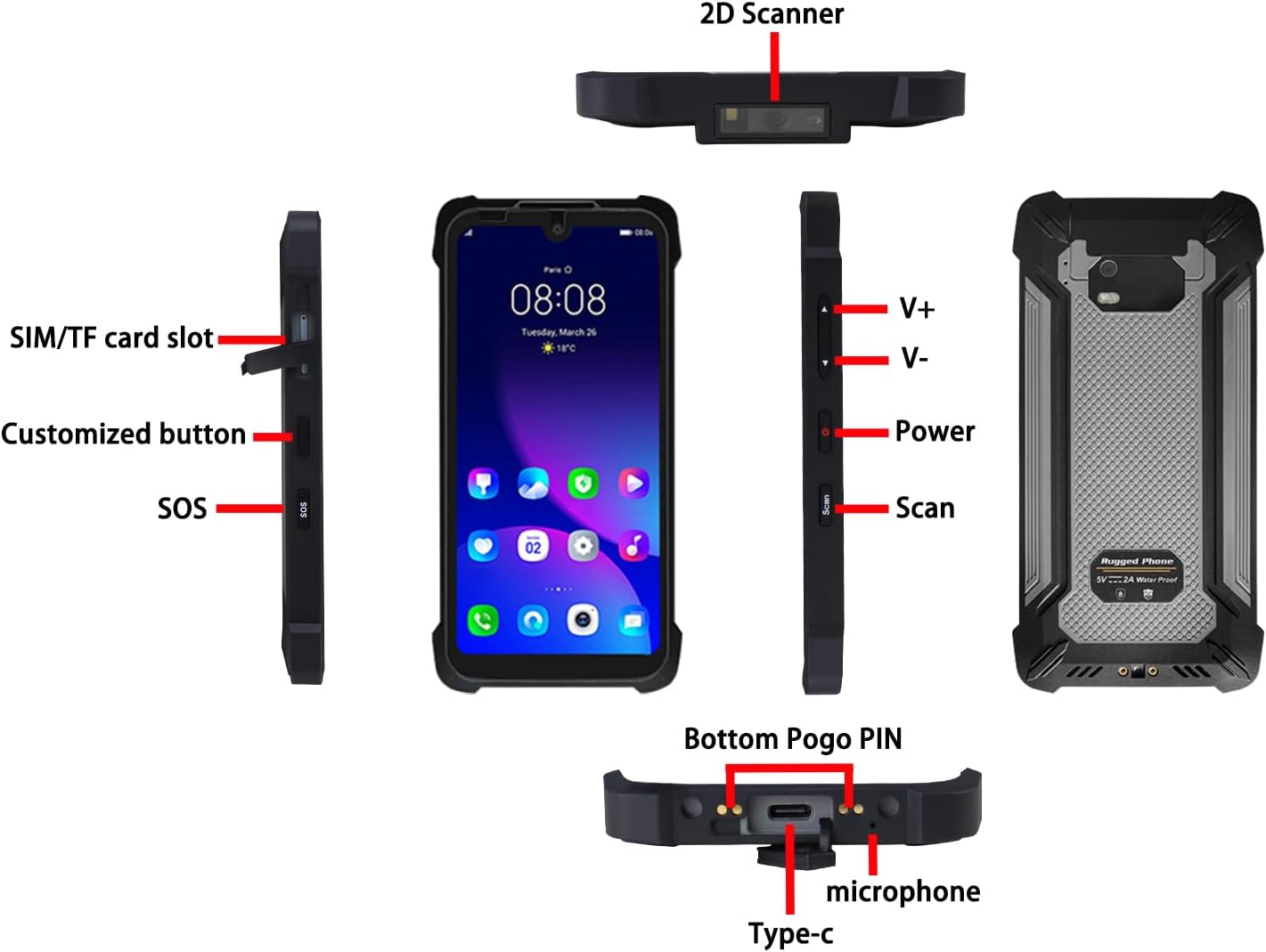
Figure 2: Detailed diagram illustrating the various components and ports of the SM5-T terminal, including the 2D scanner, SIM/TF card slot, customized button, SOS button, volume controls (V+/V-), power button, scan button, Type-C port, microphone, and Bottom Pogo PIN.
The SM5-T features a comprehensive layout designed for ease of use and industrial application:
- 2D Scanner: Integrated at the top for efficient barcode reading.
- SIM/TF Card Slot: Located on the left side for network connectivity and expandable storage.
- Customized Button: A programmable button for quick access to frequently used functions.
- SOS Button: For emergency situations.
- V+/V- Buttons: Volume control.
- Power Button: To turn the device on/off or put it to sleep.
- Scan Button: Dedicated button to activate the barcode scanner.
- Type-C Port: For charging and data transfer.
- Microphone: For voice input.
- Bottom Pogo PIN: For docking and specialized charging solutions.
3. Setup
3.1 Initial Charging
Before first use, fully charge the device using the provided 5V 2A charger. Connect the Type-C cable to the device and the charger to a power outlet. The charging indicator will show the charging status. A full charge typically takes less than 3 hours.

Figure 3: Visual representation of the SM5-T's 4000mAh battery, highlighting a charging time of less than 3 hours and a usage time of 12+ hours (based on 50% volume, 60% brightness playing local 1080p video).
3.2 SIM and TF Card Installation
To install a SIM card for cellular connectivity or a TF (microSD) card for expanded storage:
- Locate the SIM/TF card slot on the left side of the device.
- Use the provided ejection pin to open the tray.
- Carefully place the SIM card(s) and/or TF card into the designated slots on the tray, ensuring correct orientation.
- Gently push the tray back into the device until it clicks into place.
3.3 Powering On/Off
- To Power On: Press and hold the Power button on the right side of the device until the Breloom logo appears.
- To Power Off: Press and hold the Power button until the power options menu appears. Select "Power off" and confirm.
- To Restart: From the power options menu, select "Restart."
- To Sleep/Wake: Briefly press the Power button.
4. Operating the Device
4.1 Barcode Scanning
The SM5-T integrates a Newland NLS-N1 scanner for rapid and accurate decoding of 1D and 2D barcodes.
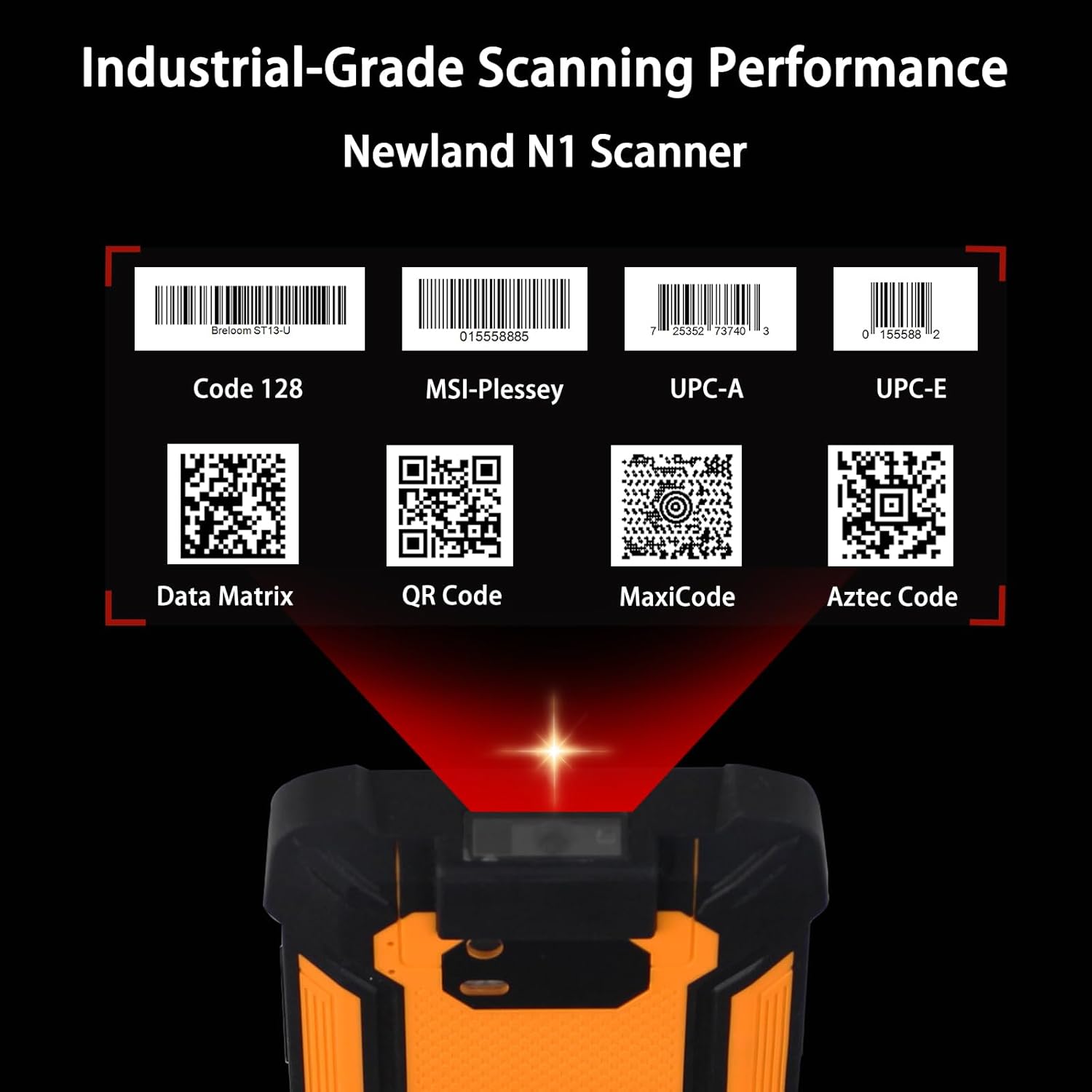
Figure 4: Illustration of the SM5-T's industrial-grade scanning performance, demonstrating its ability to decode various 1D (Code 128, MSI-Plessey, UPC-A, UPC-E) and 2D (Data Matrix, QR Code, MaxiCode, Aztec Code) barcode types.
To scan a barcode:
- Open an application that supports barcode scanning (e.g., inventory management app).
- Point the top of the device, where the scanner is located, towards the barcode.
- Press the dedicated Scan button on the right side of the device.
- Ensure the scanner's red aiming line covers the entire barcode for optimal reading. The device will typically provide an audible or haptic feedback upon successful scan.
4.2 Connectivity
The SM5-T offers robust global connectivity options:

Figure 5: Diagram illustrating the SM5-T's global connectivity and precision tracking features, including Wi-Fi 5, Bluetooth 5.0, 4G LTE, and tri-system GPS (BDS, GPS, GLONASS).
- 4G LTE: Supports 28 global bands for reliable cellular data and calls.
- Wi-Fi 802.11ac (Dual-band): For high-speed wireless internet access.
- Bluetooth 5.0: For connecting to wireless peripherals like headsets or printers.
- GPS (BDS/GPS/GLONASS): Tri-system navigation for accurate location tracking.
- NFC: For contactless payments and data exchange.
4.3 Display and Camera
The device features a 5.7-inch HD display and integrated cameras.

Figure 6: Visual details of the SM5-T's 5.7-inch display, showing its 720x1520 resolution, 9:19 aspect ratio, 400 nits brightness, and camera specifications (13MP Rear + 5MP Front).
- Display: 5.7-inch HD (720x1520 resolution) with 400 nits brightness for clear visibility even in direct sunlight.
- Cameras: 13MP rear camera and 5MP front camera for capturing images and video.
4.4 Operating System and Performance
The SM5-T runs on Android 13, powered by an Octa-Core processor.

Figure 7: Depiction of the MediaTek Helio T616 Octa-Core Processor, highlighting 4GB RAM, 64GB storage (expandable with 1TB TF card), Android 13, Octa-Core architecture, and 2.0GHz clock speed.
- Operating System: Android 13.0, providing a modern and secure platform.
- Processor: Unisoc T616 Octa-Core Processor (1.8GHz) for seamless multitasking and efficient app performance.
- Memory & Storage: 4GB RAM + 64GB internal storage, expandable via TF card for growing data demands.
5. Maintenance
5.1 Cleaning and Care
Despite its rugged design, proper care ensures the longevity of your device:
- Wipe the screen and body with a soft, damp cloth. Avoid abrasive cleaners or solvents.
- Ensure all port covers are securely closed to maintain IP68 water and dust resistance.
- Regularly clean the scanner window with a lint-free cloth to ensure optimal scanning performance.
5.2 Durability Features
The SM5-T is built to withstand harsh conditions:

Figure 8: Demonstrates the SM5-T's military-grade durability, showcasing its IP68 waterproof and dustproof capabilities (top image) and its ability to withstand 4.9FT drops (bottom image).
- IP68 Certified: Provides absolute dust resistance and robust waterproof protection (1.5m depth for 30 minutes).
- MIL-STD-810G: Withstands 1.5m (4.9ft) drops, violent downpours, and airborne debris.
- Temperature Range: Designed to operate in extreme temperatures from -25°C to 50°C.
6. Troubleshooting
This section addresses common issues you might encounter with your SM5-T terminal.
- Device not powering on: Ensure the device is fully charged. Connect it to the charger and wait a few minutes before attempting to power on again. If the issue persists, try a different charger or cable.
- Barcode scanner not working: Ensure the scanner window is clean and free of obstructions. Verify that the scanning application is open and active. Check if the barcode is damaged or poorly printed.
- Connectivity issues (Wi-Fi/4G/Bluetooth): Check if Wi-Fi, mobile data, or Bluetooth is enabled in the device settings. Ensure you are within range of a network or paired device. For cellular issues, verify SIM card installation and network coverage.
- Device freezing or slow performance: Close unnecessary background applications. Restart the device. If performance issues continue, consider clearing cache or performing a factory reset (back up data first).
- Battery draining quickly: Reduce screen brightness, disable unused connectivity features (Wi-Fi, Bluetooth, GPS) when not needed, and close background apps.
If you encounter issues not covered here or require further assistance, please refer to the Warranty and Support section.
7. Specifications
| Feature | Specification |
|---|---|
| Model Name | Breloom SM5-T |
| Item Model Number | 4GB+64GB w/2D Barcode |
| Operating System | Android 13.0 |
| Processor | Unisoc T616 Octa-Core (1.8GHz) |
| RAM Memory Installed Size | 4 GB |
| Memory Storage Capacity | 64 GB |
| Screen Size | 5.68 Inches |
| Display Type | LCD |
| Battery | 4000mAh (Nonstandard Battery, included) |
| Cellular Technology | 4G (28 global bands) |
| Wireless Connectivity | Wi-Fi 802.11ac, Bluetooth 5.0, NFC |
| Navigation | BDS/GPS/GLONASS |
| Barcode Scanner | Newland NLS-N1 (1D/2D) |
| Durability | IP68 Waterproof & Dustproof, MIL-STD-810G Drop Tested (1.5m) |
| Operating Temperature | -25°C to 50°C |
| Product Dimensions | 6.1 x 3 x 0.52 inches |
| Item Weight | 15.8 ounces |
| Manufacturer | Breloom |
| Country of Origin | China |
8. Warranty and Support
Breloom is committed to providing reliable products and excellent customer service.
- Warranty: The Breloom SM5-T Rugged Handheld Terminal comes with a 12-month warranty from the date of purchase. This warranty covers manufacturing defects and malfunctions under normal use.
- Technical Support: Breloom pledges lifetime technical support for the SM5-T. Our 24/7 enterprise-grade service team is available to assist you with any technical queries, software updates, or hardware-related concerns.
For support, please visit the official Breloom website or contact our customer service team through the contact information provided with your purchase documentation.