
URBZUE SR08-120W
URBZUE Full Spectrum LED Grow Light
Model: SR08-120W - User Manual
1. Introduction
Thank you for choosing the URBZUE Full Spectrum LED Grow Light, Model SR08-120W. This advanced grow light is designed to provide optimal lighting conditions for indoor plants across all growth stages, from seed starting to flowering and fruiting. Featuring a true full spectrum with UV395nm, high-efficiency LM218B+ diodes, an HD digital display, and multiple growth modes, this light offers precise control and superior performance for your horticultural needs. Please read this manual thoroughly before installation and operation to ensure safe and efficient use.
2. Safety Information
- Always disconnect power before installation, cleaning, or maintenance.
- Do not look directly at the operating LED lights. Prolonged exposure may cause eye damage.
- Ensure the grow light is installed in a well-ventilated area to prevent overheating.
- Keep the light away from water and high humidity environments to prevent electrical hazards.
- Do not attempt to disassemble or modify the light. This will void the warranty and may cause damage or injury.
- Use only the provided power cord and accessories.
- This product is for indoor use only.
3. Package Contents
Verify that all items are present in the package:
- 1x URBZUE LED Grow Light (Model: SR08-120W)
- 1x Metal Suspension Kit
- 1x Lifting Rope
- 1x Instruction Manual (this document)

Image: The URBZUE Full Spectrum LED Grow Light with its separate HD digital control panel.
4. Product Overview
The URBZUE SR08-120W grow light features a foldable design for easy storage and deployment. Key components include:
- LED Panels: Equipped with 544 Pcs SMD LM218B+ Diodes, providing a full spectrum including UV395nm and IR730nm.
- HD Digital Display Control Box: A separate unit with touch-sensitive buttons for adjusting settings and an HD screen displaying real-time status.
- Hanging System: Includes metal suspension cables and a lifting rope for adjustable height.
- Power Cord: For connecting the light to a power source.
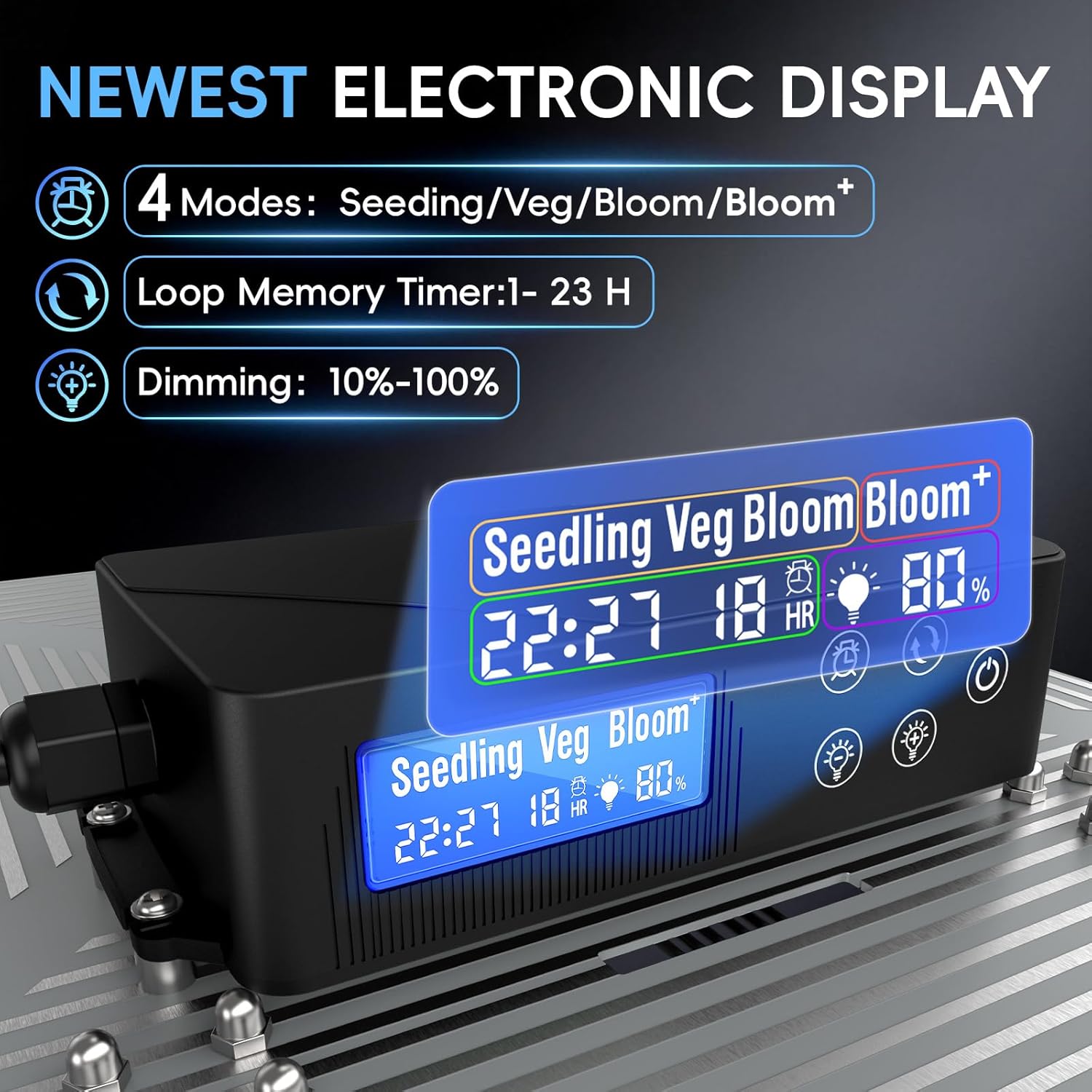
Image: Detailed view of the HD Digital Display, showing current mode, timer setting, and dimming level.

Image: Illustration of the full spectrum provided by the grow light, including UV395nm and 730nm, with spectral graphs for Seedling, Veg, Bloom, and Bloom+ modes.
5. Setup
- Unpack Components: Carefully remove all items from the packaging. Inspect for any damage.
- Assemble Hanging Kit:
- Attach the metal suspension cables to the four corners of the grow light panels.
- Connect the lifting rope to the central point of the suspension cables.
- Secure the other end of the lifting rope to a sturdy ceiling hook or grow tent frame. Ensure the light is level and securely suspended.
- Connect Control Box: Plug the cable from the LED panels into the designated port on the HD Digital Display Control Box.
- Positioning: Adjust the height of the grow light above your plants using the lifting rope. Recommended heights vary by growth stage (refer to Section 6.2 for details).
- Power Connection: Plug the power cord into the control box, then plug the power cord into a standard electrical outlet.

Image: PPFD (Photosynthetic Photon Flux Density) measurements at various hanging heights, illustrating light intensity distribution.
6. Operating Instructions
6.1 Control Panel Functions
The HD Digital Display Control Box allows for easy adjustment of the light's settings:
- Power Button: Turns the light ON/OFF.
- Mode Button: Cycles through the 4 growth modes: Seed Starting, Vegetative, Bloom, and Bloom+.
- Dimming Buttons (+/-): Adjusts brightness from 10% to 100% in stepless increments.
- Timer Button: Sets the operating duration from 1 to 23 hours, or a continuous 24-hour cycle. The timer has a loop memory function.
6.2 Growth Modes and Recommended Use
The URBZUE grow light offers four specialized modes to cater to different plant growth stages:
| Mode | Recommended Spectrum | Function | Recommended Height |
|---|---|---|---|
| Seed Starting | 460nm + 5000K | Promotes rooting and compact growth. | 18-24 inches |
| Vegetative (Veg) | 660nm + 5000K | Boosts leaf and stem development. | 14-18 inches |
| Bloom | 660nm + 5000K + 730nm | Stimulates flowering. | 12-14 inches |
| Bloom+ (Fruit) | 660nm + 5000K + 730nm + UV395nm | Enhances fruit flavor, aroma, color, and disease resistance. | 10-12 inches |
Note: Adjust dimming levels according to plant needs and specific species requirements. Observe your plants for signs of stress (e.g., leaf burn, stretching) and adjust light intensity or height accordingly.

Image: Visual representation of the four growth modes and their specific light spectrums for optimal plant development.
7. Maintenance
- Cleaning: Ensure the light is unplugged and cool before cleaning. Gently wipe the LED panels and control box with a soft, dry cloth. Do not use abrasive cleaners or immerse any part in water.
- Ventilation: Regularly check that the ventilation holes on the light are not obstructed to ensure proper heat dissipation.
- Cable Inspection: Periodically inspect the power cord and all connections for any signs of wear or damage. Replace if necessary.
8. Troubleshooting
| Problem | Possible Cause | Solution |
|---|---|---|
| Light does not turn on. | No power supply; loose connection; faulty power cord. | Check power outlet; ensure all cables are securely connected; try a different outlet. |
| Light flickers or dims unexpectedly. | Unstable power supply; loose connection; internal fault. | Ensure stable power; check connections; contact customer support if problem persists. |
| Control panel unresponsive. | Temporary software glitch; power cycle needed. | Unplug the light for 30 seconds, then plug it back in. |
| Plants show signs of stress (e.g., yellowing, burning). | Light too intense or too close; incorrect mode for plant stage. | Increase hanging height; reduce dimming level; switch to a more appropriate growth mode. |
9. Specifications
| Feature | Detail |
|---|---|
| Model Number | SR08-120W |
| Brand | URBZUE |
| Wattage | 120 watts |
| Light Source Type | LED (544 Pcs SMD LM218B+ Diodes) |
| Spectrum | Full Spectrum with UV395nm and IR730nm |
| Color Temperature | 5000 Kelvin |
| Dimming Range | 10% - 100% (Stepless) |
| Timing Function | 1-23 Hours, 24H Cycle (Loop Memory) |
| Growth Modes | Seed Starting, Vegetative, Bloom, Bloom+ |
| Material | Aluminum |
| Product Dimensions | 13"L x 3"W x 13"H (folded/compacted, actual usage dimensions are larger when unfolded) |
| Item Weight | 4.22 pounds |
| Certifications | CE, FCC, PSE, RoHS, UKCA |
10. Warranty and Support
URBZUE products are manufactured with high-quality materials and craftsmanship. For warranty information and customer support, please refer to the warranty card included with your product or visit the official URBZUE website. If you encounter any issues not covered in this manual, please contact our customer service team for assistance.
URBZUE Customer Service: Visit the URBZUE Store on Amazon
Ask a question about this manual
Ask about setup, troubleshooting, compatibility, parts, safety, or missing instructions. Manuals+ will review the question and use this page’s manual context to help answer it.