
ATOTOZONE X10G211E-R3
User Manual for ATOTOZONE 10" Android In-Dash Navigation Car Stereo
Model: X10G211E-R3
Brand: ATOTOZONE
1. Introduction
This manual provides detailed instructions for the installation, operation, and maintenance of your ATOTOZONE 10" Android In-Dash Navigation Car Stereo, Model X10G211E-R3. Please read this manual thoroughly before using the product to ensure proper functionality and safety. This device integrates advanced features such as 4G LTE connectivity, Wireless CarPlay & Android Auto, an AI Assistant, and a comprehensive 7.1.2 channel audio system with dual-camera DVR capabilities.
2. Safety Information
- Installation: Professional installation is recommended. Ensure all wiring is correctly connected to prevent damage to the unit or vehicle.
- Power Supply: Use only the specified power supply voltage. Incorrect voltage can cause fire or damage.
- Operation While Driving: Do not operate the unit or view videos that may distract you while driving. Always prioritize road safety.
- Temperature: Avoid exposing the unit to extreme temperatures or direct sunlight for prolonged periods.
- Moisture: Keep the unit dry. Do not expose it to rain or moisture to prevent electric shock or fire.
- Cleaning: Use a soft, dry cloth for cleaning. Do not use abrasive cleaners or solvents.
3. Package Contents
Verify that all items listed below are included in your package:
- 1 x ATOTOZONE 10" Android In-Dash Navigation Car Stereo (Main Unit)
- 1 x Car Dash Cam (Front Recording Camera)
- 1 x 32GB Micro SD Card
- 1 x Rear Recording Camera
- 1 x 20P Wire Harness
- 1 x USB1 Recording Storage Cable
- 1 x USB2 External Storage Cable
- Mounting Screws
- SIM Card Cable
- Movable Mounting Brackets
- 4-in-1 Antenna (for WiFi, GPS & Cellular Network)
- Tri-band Audio with Remote
- Extension Cable for Front Recording Camera (3.5m/11.48ft)
- Adapter Cable
- Extension Cable for Rear Recording Camera (8m/26ft)
- Double-DIN Brackets
- Product Care Online Support Card
- Online Resources Quick Guide

Image: Overview of all components included in the product package, including the main unit, cameras, cables, and mounting hardware.
4. Product Overview
4.1 Key Features
- Powerful Performance: QCM SD665 SoC with 8GB+128GB for snappy response, multi-tasking, and wireless CarPlay/Android Auto/MirrorLink. Features a refined, custom AICE 13 UI.
- 10.1" QLED Display: QLED panel at 550 nits with strong light suppression coating and 1280×800 resolution for clear visuals.
- Dual-Camera Recording: Connect two 1080P cameras for simultaneous front and rear or interior footage recording. Includes parking monitoring, emergency video lock, and GPS-linked playback.
- Evolved Audio Suite: DSP with 36-band EQ, time alignment, 3-way crossover & HD 24-bit DAC. Optical out & 10 assignable channels for custom 7.1.2 sound.
- Cellular Network & Dual-Band Wi-Fi: Stream music, get map updates, and install apps with reliable cellular network or Wi-Fi. Built-in hotspot support.
- Vehicle Data Integration Ready: Supports integration of steering wheel controls, factory amps, and vehicle info (gauges, climate data) for cars with complex data systems.
- Noise-Cancelling Mics: Dual built-in microphones for clearer Bluetooth calls and smoother voice control.
- Long-Term Value & Support: Frequent OTA firmware upgrades and 12 plus 6 months extended coverage options.
4.2 Components
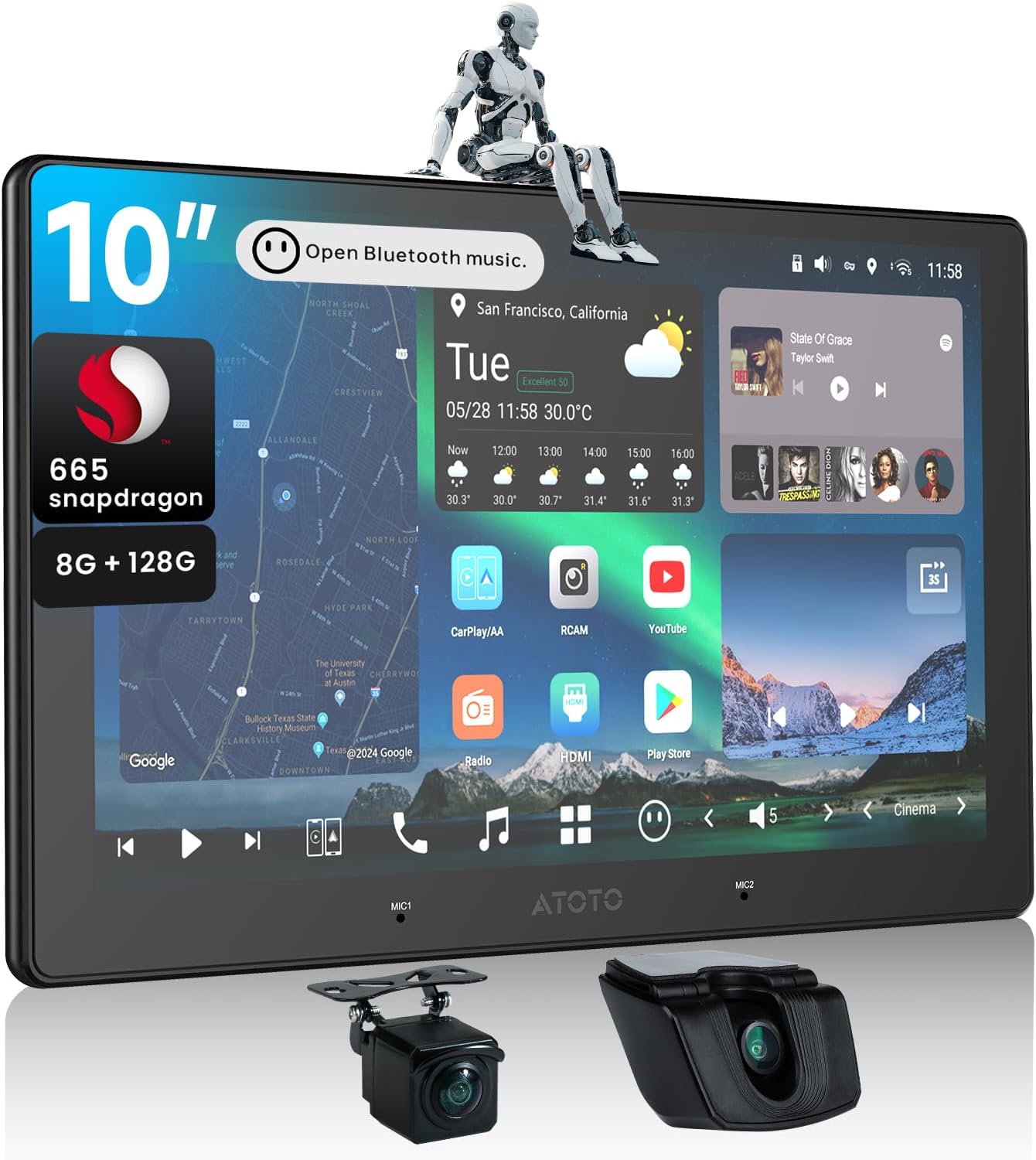
Image: The main ATOTOZONE 10-inch Android car stereo unit, showcasing its large display and the included front and rear cameras.
4.2.1 Display and User Interface
The unit features a 10.1-inch QLED display with a resolution of 1280x800, providing crisp visuals for navigation, video playback, and app usage. The custom AICE 13 UI is designed for intuitive interaction.

Image: The ATOTOZONE car stereo seamlessly integrated into a vehicle's dashboard, emphasizing its QLED display and comprehensive system features.
4.2.2 Audio System
Equipped with a Digital Signal Processor (DSP), the unit offers a 36-band equalizer, time alignment, and a 3-way crossover. It includes an HD 24-bit DAC, optical output, and 10 assignable channels for a customizable 7.1.2 surround sound experience without additional external gear.

Image: A visual representation of the car stereo's sophisticated audio capabilities, highlighting the 36-band EQ, time alignment, and high-resolution DAC for superior sound quality.
4.2.3 Dual-Camera DVR System
The system supports dual 1080P cameras for simultaneous front and rear recording. Features include parking monitoring, emergency video lock, and GPS-linked playback for enhanced driving confidence.

Image: This image demonstrates the dual-camera recording functionality, displaying how both front and rear views are captured simultaneously for comprehensive vehicle monitoring.
4.2.4 AI Assistant
The integrated AI Assistant allows for voice control and interaction, enhancing convenience and safety by minimizing manual input while driving.
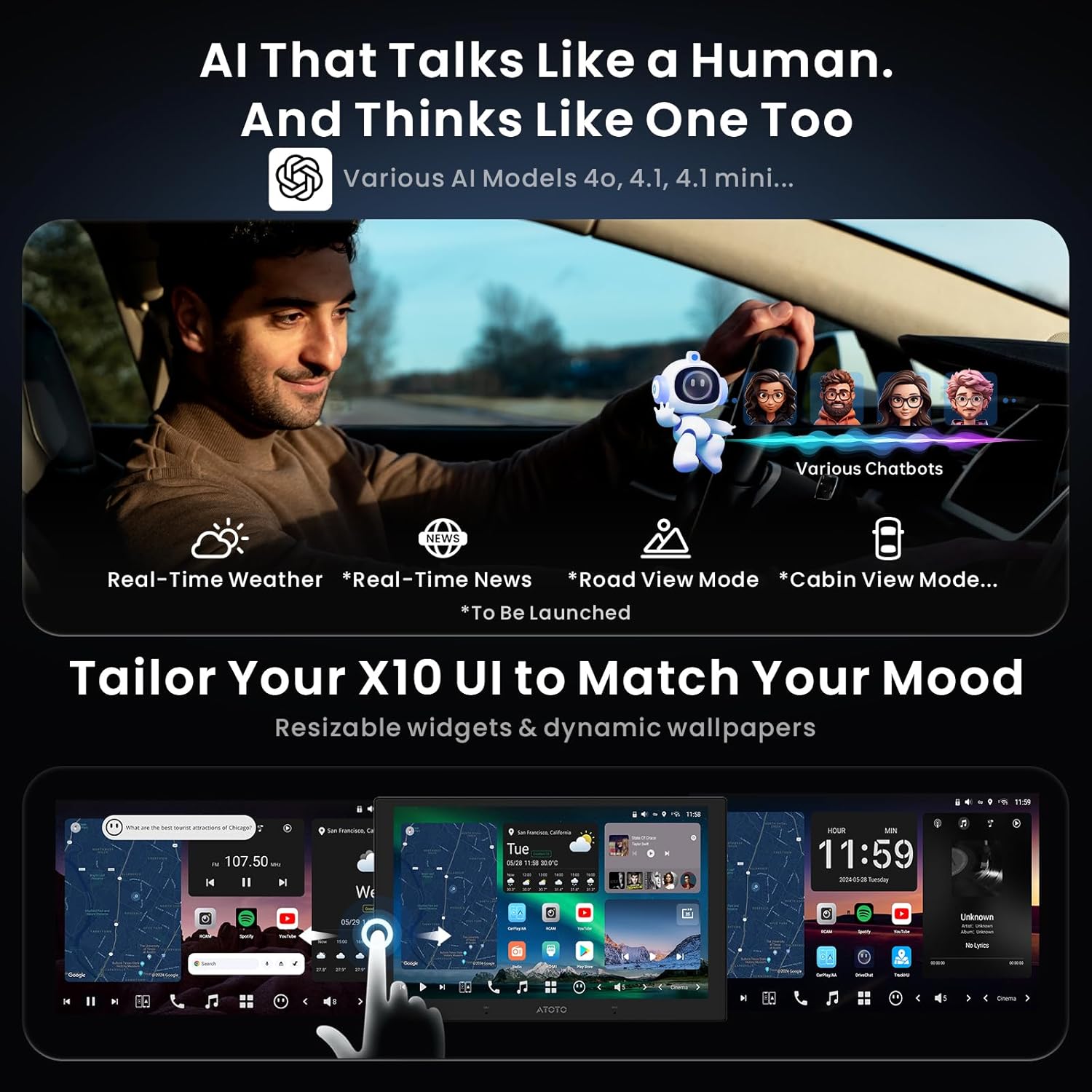
Image: A visual representation of the AI Assistant in action, illustrating how the driver can use voice commands to control the car stereo, promoting hands-free operation.
4.2.5 Connectivity
The unit supports 4G LTE, dual-band Wi-Fi, Bluetooth, and features an HDMI input for gaming and streaming. It also offers seamless integration with various accessories.

Image: This diagram highlights the extensive connectivity features of the car stereo, such as Bluetooth for accessories and HDMI input for external media devices.
5. Setup
5.1 Installation
The ATOTOZONE X10G211E-R3 is designed for standard double-DIN dashboard openings. Ensure you have the necessary dash kit and wiring harness for your specific vehicle model. Refer to the wiring diagram below for proper connections.
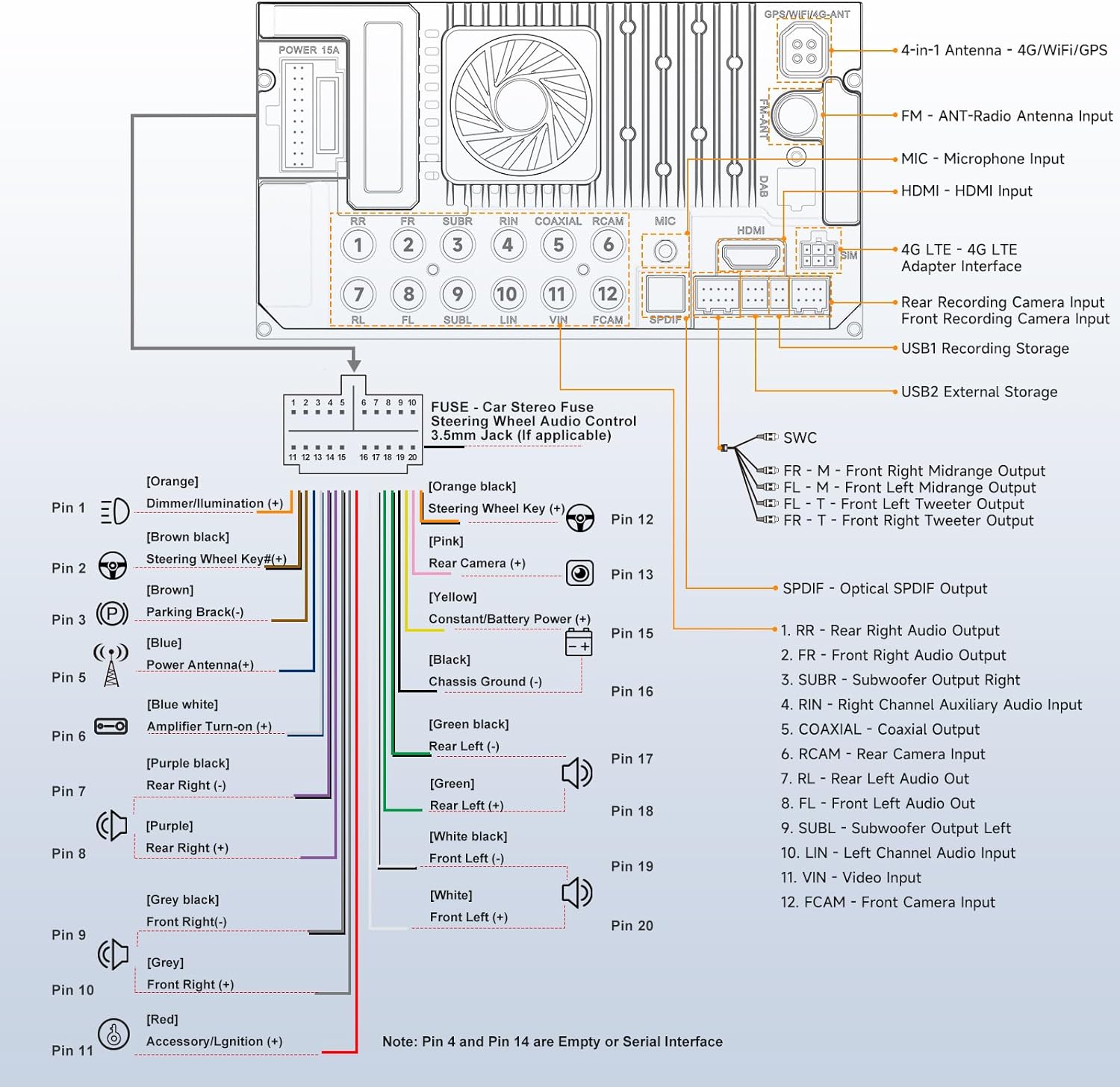
Image: A comprehensive wiring diagram illustrating all necessary connections for the car stereo, including power, audio outputs, and camera inputs.
Key Wiring Connections:
- Power: Connect the ACC (Accessory/Ignition), B+ (Constant/Battery Power), and GND (Chassis Ground) wires.
- Speakers: Connect Front Right (FR), Front Left (FL), Rear Right (RR), and Rear Left (RL) speaker outputs.
- RCA Outputs: Utilize the Hi-Volt RCA outputs for external amplifiers (FR, FL, RR, RL, SUBR, SUBL).
- Camera Inputs: Connect the Front Camera (FCAM) and Rear Camera (RCAM) inputs.
- Antenna: Connect the FM/AM antenna and the 4-in-1 antenna for GPS/WiFi/4G LTE.
- Steering Wheel Control (SWC): Connect SWC wires if your vehicle supports it.
- HDMI Input: For external video sources.
5.2 Initial Configuration
After installation, power on the unit. The system will boot into the AICE 13 UI. Follow the on-screen prompts for initial setup, including language selection, time zone, and network configuration. Connect to a Wi-Fi network to download any available firmware updates.

Image: The car stereo's interface displaying options for integrating with vehicle data, such as climate control, gauges, and OEM settings, simplifying initial setup.
6. Operating
6.1 Basic Functions
- Radio: Access the built-in FM/AM tuner for local radio stations.
- Media Playback: Play audio and video files from USB drives, Micro SD cards, or streaming services.
- Bluetooth: Pair your smartphone for hands-free calling and audio streaming. The dual Bluetooth allows for simultaneous connection of two devices.
6.2 Advanced Features
- Navigation: Utilize pre-installed navigation apps or download your preferred ones from the Google Play Store.
- Wireless CarPlay & Android Auto: Connect your compatible smartphone wirelessly for seamless integration of navigation, music, and communication apps.
- AI Assistant: Use voice commands to control various functions of the stereo, such as navigation, music playback, and calls.
- Dual-Camera DVR: Access the DVR app to view live feeds from connected cameras, review recorded footage, and manage settings for parking monitoring and emergency video lock.
- Audio Customization: Fine-tune your audio experience using the 36-band EQ, time alignment, and crossover settings in the DSP menu.
6.3 Connectivity
- 4G LTE: Insert a SIM card to enable cellular network connectivity for internet access, streaming, and map updates without relying on a phone hotspot.
- Wi-Fi: Connect to a Wi-Fi network for internet access and over-the-air (OTA) firmware updates.
- USB: Use the USB ports for media playback, connecting external storage, or charging devices.
- HDMI Input: Connect external devices like game consoles or TV boxes for video playback on the stereo's display.
7. Maintenance
- Screen Cleaning: Gently wipe the screen with a soft, lint-free cloth. For stubborn smudges, use a screen cleaner specifically designed for electronic displays.
- Software Updates: Regularly check for and install Over-The-Air (OTA) firmware updates to ensure optimal performance, new features, and bug fixes. These updates are typically found in the system settings menu.
- General Care: Keep the unit free from dust and debris. Avoid spilling liquids on the device.
8. Troubleshooting
If you encounter issues with your ATOTOZONE car stereo, refer to the following common problems and solutions:
| Problem | Possible Cause | Solution |
|---|---|---|
| Unit does not power on | Incorrect wiring, blown fuse, vehicle battery issue | Check power connections (ACC, B+, GND). Inspect vehicle fuses. Ensure vehicle battery is charged. |
| No sound output | Speaker wiring issue, volume too low, audio settings misconfigured | Verify speaker connections. Increase volume. Check DSP/EQ settings for muted channels or incorrect output. |
| Bluetooth not connecting | Bluetooth off, device not in pairing mode, interference | Ensure Bluetooth is enabled on both devices. Put stereo in pairing mode. Move closer to the unit. Restart both devices. |
| GPS signal lost/inaccurate | GPS antenna not properly installed, environmental interference | Ensure GPS antenna is securely connected and placed in an unobstructed location. Move to an open area. |
| Screen unresponsive/laggy | System overload, software glitch | Close unnecessary apps. Restart the unit. Check for and install any available firmware updates. |
For further assistance, please refer to the online support resources mentioned in the Warranty and Support section.
9. Specifications
| Feature | Specification |
|---|---|
| Model | X10G211E-R3 |
| Operating System | Android 13 (AICE 13 UI) |
| Processor | QCM SD665 SoC |
| RAM + ROM | 8GB + 128GB |
| Display Size | 10.1 Inches |
| Display Type | QLED Panel |
| Resolution | 1280x800 |
| Connectivity | 4G LTE, Wi-Fi (Dual-Band), Bluetooth, USB, HDMI |
| Audio Output Mode | Stereo (7.1.2 Ch Audio with DSP, 36-band EQ, Time Alignment, 3-way Crossover, 24-bit DAC, Optical Out, 10 assignable channels) |
| Camera Support | Dual 1080P (Front & Rear Recording) |
| Special Features | Wireless CarPlay & Android Auto, AI Assistant, Parking Monitoring, Emergency Video Lock |
| Item Weight | 5.4 pounds |
| Package Dimensions | 11.5 x 9.5 x 4 inches |
10. Warranty and Support
Your ATOTOZONE car stereo comes with a standard 12-month warranty from the date of purchase, with an option for an additional 6 months of extended coverage by communicating with us within 30 days of purchase. This product was first available on April 7, 2025.
For any inquiries, technical support, or warranty claims, please refer to the Product Care Online Support card included in your package. You can also scan the QR code on the product box to access the Eproductcare platform for comprehensive help and online manuals.
Benefit from frequent Over-The-Air (OTA) firmware upgrades that enhance stability and functionality over time, ensuring your unit remains up-to-date with the latest features and improvements.
Ask a question about this manual
Ask about setup, troubleshooting, compatibility, parts, safety, or missing instructions. Manuals+ will review the question and use this page’s manual context to help answer it.