
WILAWELS D22LT06-D11LT06
WILAWELS Low Voltage Landscape Transformer Bundle User Manual
Models: D22LT06 (300W) & D11LT06 (200W)
Introduction
This user manual provides comprehensive instructions for the safe and efficient operation of your WILAWELS Low Voltage Landscape Transformer Bundle, which includes a 300W transformer (Model D22LT06) and a 200W transformer (Model D11LT06). These transformers are designed to convert 120V AC household current to a safe 12V/14V AC for outdoor landscape lighting systems. Please read this manual thoroughly before installation and use, and retain it for future reference.
Safety Information
- Always disconnect power before installing, servicing, or cleaning the transformer.
- Do not immerse the transformer in water. It is designed for outdoor use but should be protected from direct water spray.
- Ensure all connections are secure and waterproof to prevent electrical hazards.
- Do not exceed the maximum wattage rating of the transformer (300W for D22LT06, 200W for D11LT06). The total power of connected lights should not exceed 80% of the transformer's rated power for safe and stable operation.
- Use only low-voltage landscape lighting fixtures with these transformers.
- Keep children and pets away from the transformer and wiring during operation.
- Consult a qualified electrician if you are unsure about any part of the installation process.
- Suitable for Outdoor Use Only.
Package Contents
Verify that all components are present before beginning installation:
- WILAWELS 300W Low Voltage Landscape Transformer (Model D22LT06)
- WILAWELS 200W Low Voltage Landscape Transformer (Model D11LT06)
- Detachable Photocell Sensor (2 units)
- User Manual
Product Features
- Voltage Conversion: Converts 120V AC to safe 12V/14V AC for landscape lighting.
- Photocell Sensor: Detachable and replaceable sensor with a 6.8-foot cord for flexible placement, enabling automatic dusk-to-dawn operation.
- Multiple Operating Modes: Both transformers offer various modes including Manual On/Off, Auto On/Off (Dusk to Dawn), Countdown, Timer, and Dusk On Timer Off. The 200W model also includes a Test mode.
- Dual-Zone Control (300W Model D22LT06): Features two independently controlled output zones for personalized lighting schedules.
- ETL Certified: Ensures safety and quality standards.
Setup and Installation
1. Choosing a Location
- Mount the transformer vertically on a wall or post, at least 1 foot above the ground.
- Ensure the location is within reach of a 120V AC GFCI (Ground Fault Circuit Interrupter) protected outdoor outlet.
- Avoid locations where the transformer will be directly exposed to sprinkler systems or heavy water runoff.
- For optimal photocell sensor performance, choose a location where the sensor receives natural light and is not obstructed by artificial light sources at night.
2. Mounting the Transformer
- Mark the desired mounting holes on the surface using the transformer's mounting tabs as a template.
- Drill pilot holes if necessary.
- Secure the transformer using appropriate screws (not included) suitable for your mounting surface.
3. Connecting the Photocell Sensor
The photocell sensor is detachable. Plug the sensor's cord into the designated port on the transformer. Position the sensor in an area that receives ambient light for accurate dusk-to-dawn detection. The sensor cord is 6.8 feet long, allowing for flexible placement.

Image: WILAWELS 200W Low Voltage Transformer showing the photocell sensor connection and dusk-to-dawn operation. The sensor detects light levels to automatically turn lights on at dusk and off at dawn.
4. Wiring Landscape Lights
- Before wiring, ensure the transformer is unplugged from the power outlet.
- Run low-voltage landscape wire from the transformer to your lighting fixtures.
- Connect the landscape wire to the transformer's output terminals. Ensure a secure connection.
- For the 300W D22LT06 model, you have two independent output zones. Distribute your lights across Zone 1 and Zone 2 as desired, ensuring the total wattage for each zone does not exceed its capacity. The total power of both zones should not exceed 80% of the transformer's rated power.
- Ensure all wire connections to fixtures are waterproofed.
- Do not connect more than the maximum rated wattage to the transformer.

Image: A side-by-side view of the WILAWELS 300W and 200W Low Voltage Landscape Transformers. Both units feature a digital display, control buttons, and output terminals for connecting landscape lighting.
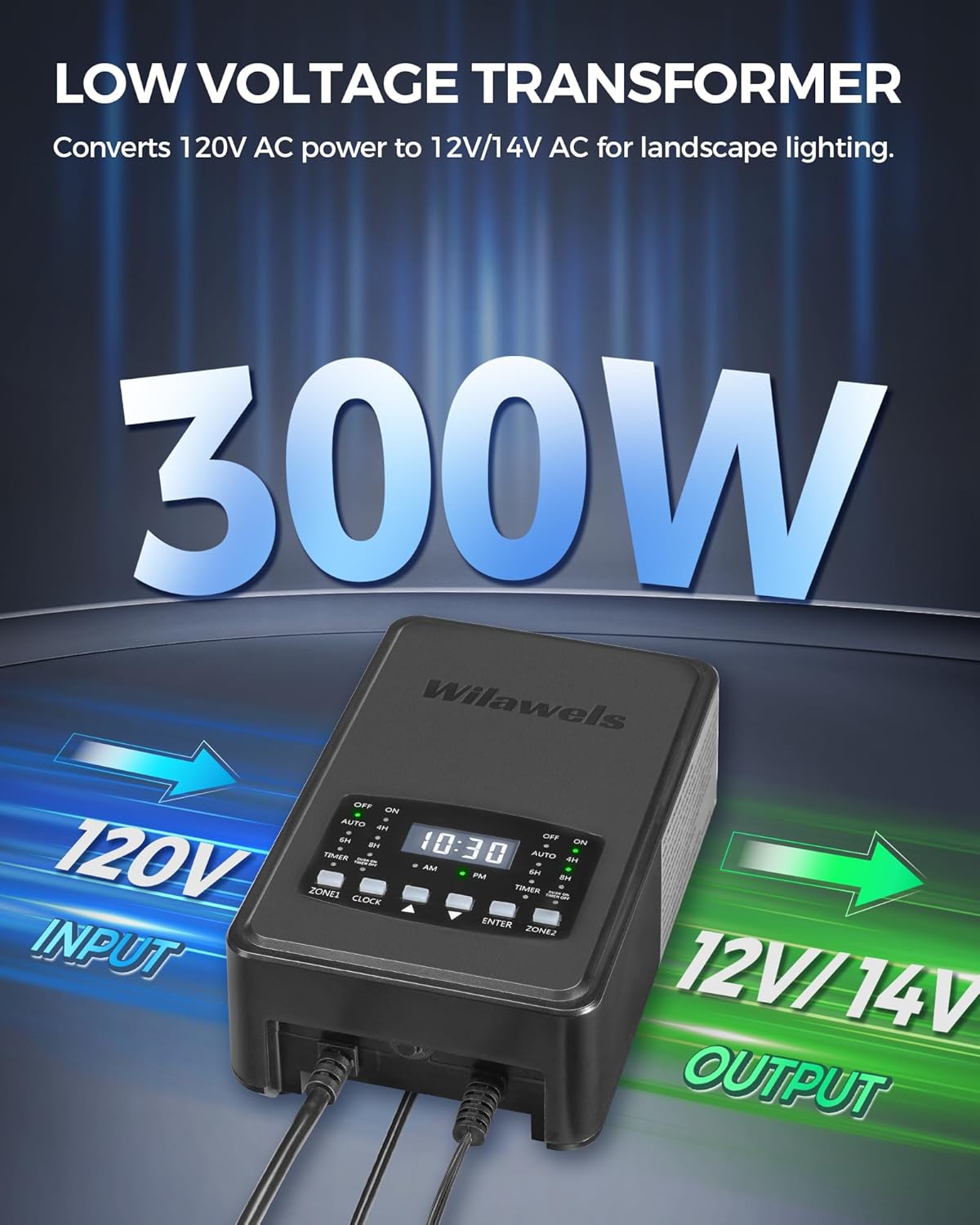
Image: Diagram illustrating the WILAWELS 300W Low Voltage Transformer converting 120V AC input to 12V/14V AC output for landscape lighting. This visual emphasizes the voltage transformation process.

Image: Diagram illustrating the WILAWELS 200W Low Voltage Transformer converting 120V AC input to 12V/14V AC output for lawn lights and landscape lighting. This visual highlights the voltage conversion for the 200W model.
Operating Instructions
After installation, plug the transformer into a GFCI-protected 120V AC outlet. The display will illuminate.
Setting the Clock
- Press the CLOCK button. The hour digits will flash.
- Use the UP (▲) and DOWN (▼) buttons to adjust the hour. Pay attention to AM/PM indicator.
- Press CLOCK again. The minute digits will flash.
- Use the UP (▲) and DOWN (▼) buttons to adjust the minutes.
- Press CLOCK one more time to save the time.
Operating Modes for 300W Model (D22LT06)
The 300W model features two independent zones. You can set different modes for Zone 1 and Zone 2.
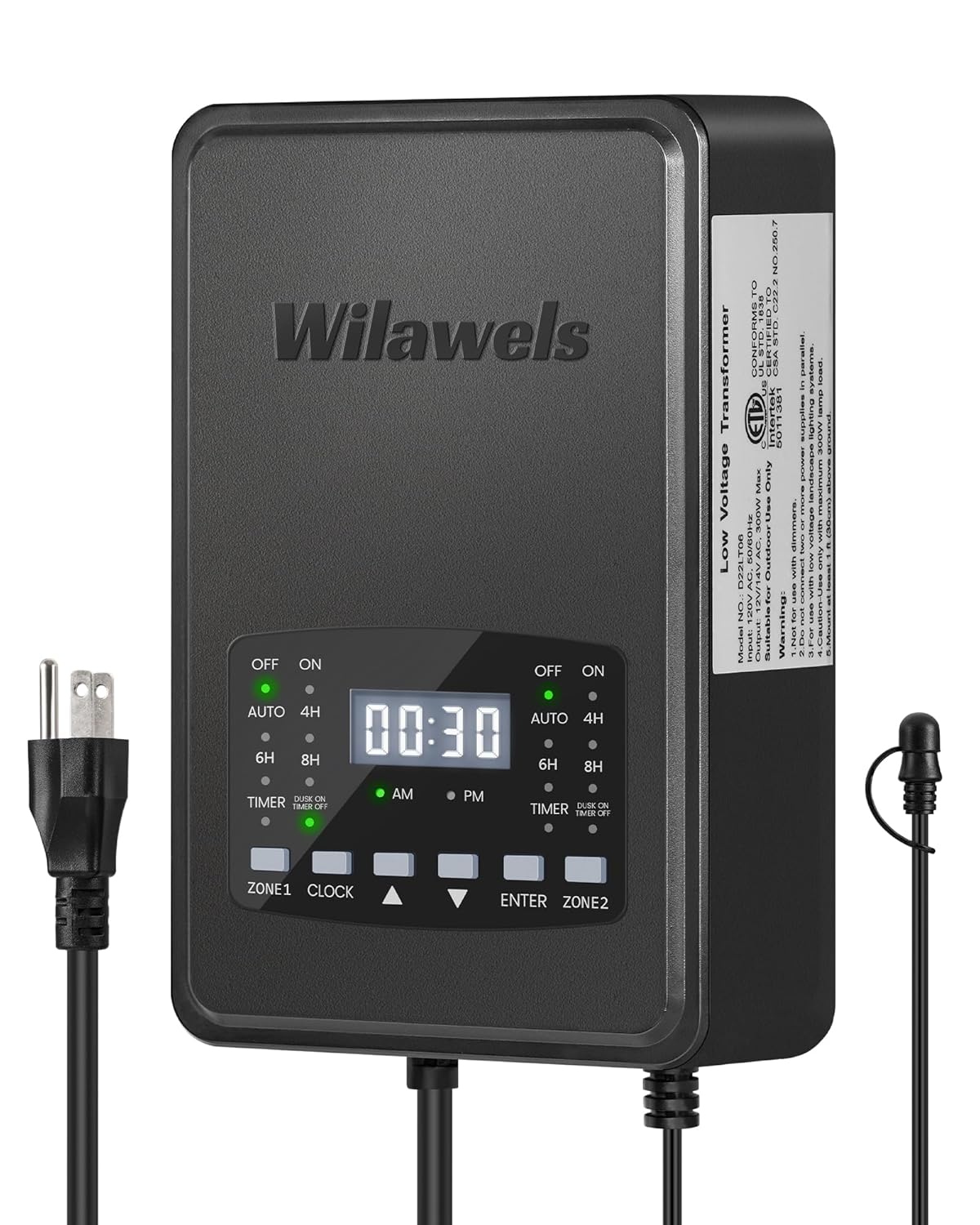
Image: Close-up of the WILAWELS 300W Low Voltage Transformer's control panel, showing the digital display, mode indicators (OFF, ON, AUTO, 4H, 6H, 8H, TIMER, DUSK ON TIMER OFF), and buttons for Zone 1, Clock, Up, Down, Enter, and Zone 2. This image helps users identify controls for setting modes and time.

Image: Illustration of the WILAWELS 300W Transformer's dual-zone independent control feature. It shows Zone 1 set to "Auto On/Off Mode" (Dusk to Dawn) and Zone 2 set to "Timer Mode" (On at 8:00 PM, Off at 11:30 PM), demonstrating how each zone can have a different schedule.

Image: A visual representation of the five operating modes available on the WILAWELS 300W Low Voltage Transformer. The modes include Manual On/Off, Auto On/Off, Timer, Countdown, and Dusk On Timer Off, each depicted with an icon.
- Press the ZONE 1 or ZONE 2 button to select the zone you wish to configure. The selected zone's indicator will flash.
- Use the UP (▲) and DOWN (▼) buttons to cycle through the available modes:
- OFF: Lights remain off.
- ON: Lights remain on continuously.
- AUTO (Dusk to Dawn): Lights turn on automatically at dusk and off at dawn via the photocell sensor.
- COUNTDOWN (2H/4H/6H/8H): Lights turn on at dusk and stay on for the selected duration (2, 4, 6, or 8 hours).
- TIMER: Allows setting specific ON and OFF times. (See "Setting Timer Mode" below).
- DUSK ON TIMER OFF: Lights turn on at dusk and turn off at a set time.
- Press ENTER to confirm the mode selection for the chosen zone.
Setting Timer Mode (300W Model D22LT06)
If you select TIMER mode for a zone:
- After selecting TIMER, the ON time hour digits will flash. Use UP (▲) and DOWN (▼) to set the hour, then press ENTER.
- The ON time minute digits will flash. Use UP (▲) and DOWN (▼) to set the minutes, then press ENTER.
- Repeat the process for the OFF time hour and minute settings.
- Press ENTER to save the timer settings for that zone.
Operating Modes for 200W Model (D11LT06)
The 200W model has a single control interface for all modes.

Image: Close-up of the WILAWELS 200W Low Voltage Transformer's control panel, displaying the digital time, mode indicators (OFF, ON, AUTO, TIMER, DUSK ON TIMER OFF, TEST, 2H, 4H, 6H, 8H), and buttons for Menu, Clock, Up, Down, and Enter. This image assists users in navigating the controls for setting modes and time.
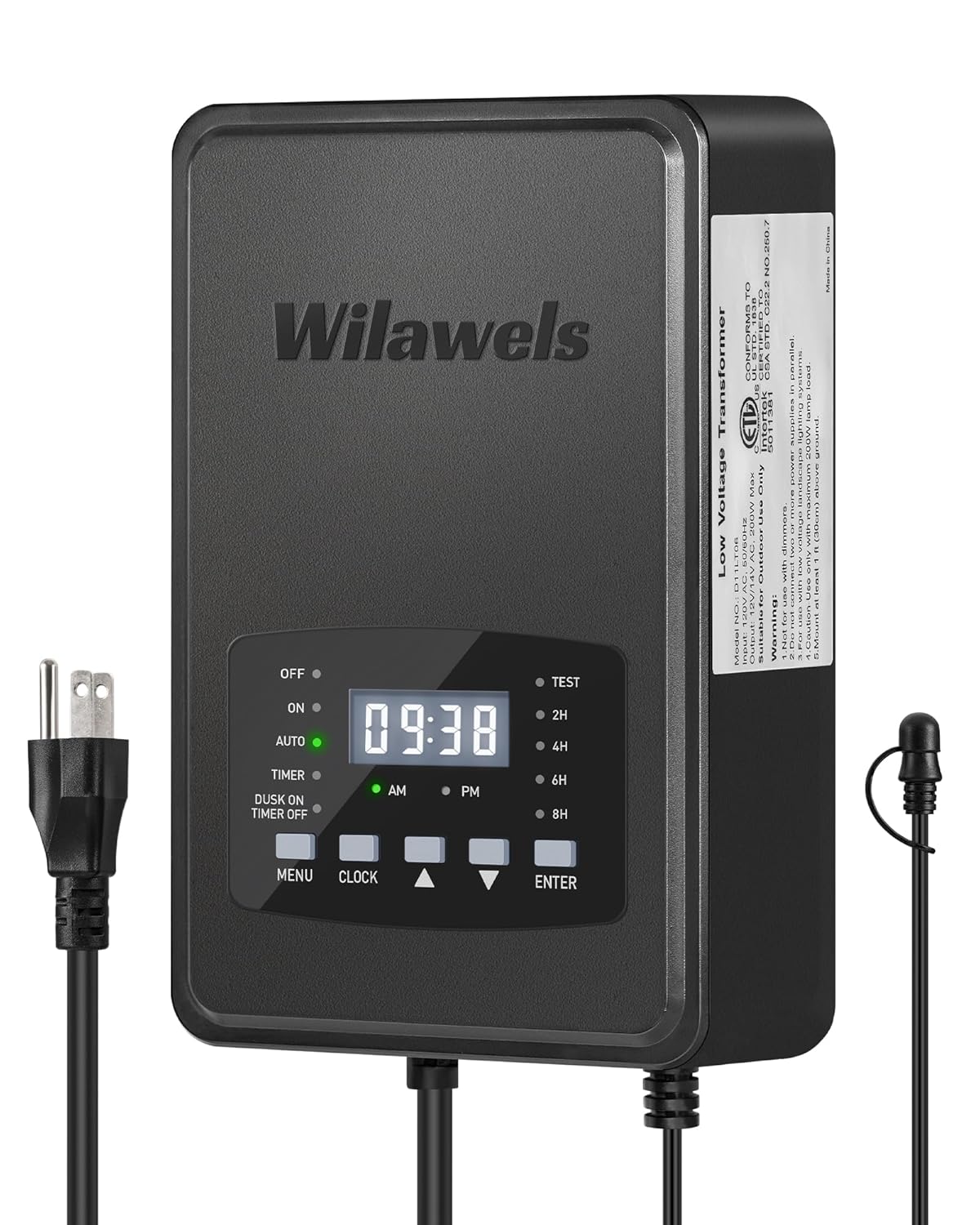
Image: A visual representation of the six operating modes available on the WILAWELS 200W Low Voltage Transformer. The modes include Manual On/Off, Auto On/Off, Timer, Countdown, Dusk On Timer Off, and Test Mode, each depicted with an icon.
- Press the MENU button to cycle through the available modes:
- OFF: Lights remain off.
- ON: Lights remain on continuously.
- AUTO (Dusk to Dawn): Lights turn on automatically at dusk and off at dawn via the photocell sensor.
- COUNTDOWN (2H/4H/6H/8H): Lights turn on at dusk and stay on for the selected duration (2, 4, 6, or 8 hours).
- TIMER: Allows setting specific ON and OFF times. (See "Setting Timer Mode" below).
- DUSK ON TIMER OFF: Lights turn on at dusk and turn off at a set time.
- TEST: For testing connections.
- Press ENTER to confirm the mode selection.
Setting Timer Mode (200W Model D11LT06)
If you select TIMER mode:
- After selecting TIMER, the ON time hour digits will flash. Use UP (▲) and DOWN (▼) to set the hour, then press ENTER.
- The ON time minute digits will flash. Use UP (▲) and DOWN (▼) to set the minutes, then press ENTER.
- Repeat the process for the OFF time hour and minute settings.
- Press ENTER to save the timer settings.
Maintenance
- Cleaning: Periodically wipe the transformer's exterior with a soft, damp cloth. Do not use abrasive cleaners or solvents. Ensure the unit is unplugged before cleaning.
- Photocell Sensor: Keep the photocell sensor clean and free from obstructions (e.g., dirt, leaves, snow) to ensure accurate dusk-to-dawn operation.
- Wiring Inspection: Annually inspect all low-voltage wiring for damage, fraying, or loose connections. Repair or replace any damaged wiring immediately.
- Load Management: Regularly check the total wattage of your connected lights to ensure it does not exceed 80% of the transformer's rated capacity.
Troubleshooting
| Problem | Possible Cause | Solution |
|---|---|---|
| Lights do not turn on. |
|
|
| Lights stay on continuously or turn on/off at wrong times. |
|
|
| Display is blank or flickering. |
|
|
Specifications
WILAWELS 300W Low Voltage Landscape Transformer (Model D22LT06)
- Input Voltage: 120V AC, 60Hz
- Output Voltage: 12V AC / 14V AC
- Max Power Output: 300W
- Control Zones: 2 Independent Zones
- Photocell Sensor Cord Length: 6.8 ft
- Power Cord Length: 3.3 ft
- Certifications: ETL Certified
WILAWELS 200W Low Voltage Landscape Transformer (Model D11LT06)
- Input Voltage: 120V AC, 60Hz
- Output Voltage: 12V AC / 14V AC
- Max Power Output: 200W
- Control Zones: 1 Zone
- Photocell Sensor Cord Length: 6.8 ft
- Power Cord Length: 3.3 ft
- Certifications: ETL Certified
Warranty and Support
For warranty information or technical support, please contact WILAWELS customer service. Refer to your purchase documentation for specific warranty terms and contact details. You can also visit the official WILAWELS store on Amazon for more information: WILAWELS Store.
no relevant documents
Ask a question about this manual
Ask about setup, troubleshooting, compatibility, parts, safety, or missing instructions. Manuals+ will review the question and use this page’s manual context to help answer it.