
Audizio 102.195
Audizio Boston All-in-One Retro Style Music Centre
User Manual - Model: 102.195
Introduction
Thank you for purchasing the Audizio Boston All-in-One Retro Style Music Centre. This versatile system combines a turntable, CD player, DAB+/FM radio, USB playback, and Bluetooth connectivity, all with integrated stereo speakers. This manual provides essential information for safe and optimal use of your device. Please read it thoroughly before operation and retain it for future reference.
Safety Instructions
- Power Source: Ensure the power supply matches the voltage specified on the unit.
- Ventilation: Do not block any ventilation openings. Maintain adequate space around the unit for proper airflow.
- Water and Moisture: Do not expose the unit to rain, moisture, or dripping/splashing liquids. Do not place objects filled with liquids on the unit.
- Heat Sources: Keep the unit away from heat sources such as radiators, heat registers, stoves, or other apparatus (including amplifiers) that produce heat.
- Cleaning: Clean only with a dry cloth. Do not use liquid or aerosol cleaners.
- Servicing: Do not attempt to service this product yourself. Refer all servicing to qualified service personnel.
- Placement: Place the unit on a stable, flat surface. Avoid placing it in direct sunlight or near strong magnetic fields.
Package Contents
Upon opening the package, ensure all items are present and in good condition:
- Audizio Boston Music Centre Unit
- External Stereo Speakers (2 units)
- Remote Control
- User Manual (this document)
- Power Adapter
Setup
Unpacking and Placement
Carefully remove the unit and its components from the packaging. Place the main unit and the two external speakers on a stable, flat surface. Ensure there is enough space for ventilation around the unit.

Image: The Audizio Boston Music Centre with its main unit and two detached stereo speakers, ready for setup.
Connecting the Speakers
Connect the included stereo speakers to the "SPEAKERS" output terminals on the rear of the main unit. Ensure the left speaker is connected to the "L" terminal and the right speaker to the "R" terminal.

Image: Detailed view of the rear panel of the Audizio Boston, highlighting the AUX IN and speaker output connections (RCA type) for connecting the external speakers.
Power Connection
Connect the power adapter to the DC 12V 2.5A input on the rear of the unit, then plug the adapter into a suitable wall outlet.
Operating Instructions
Front Panel Overview

Image: Close-up of the Audizio Boston's front panel, showing the LCD display, illuminated VU meters, control buttons, and volume knob.
The front panel features an LCD display, illuminated VU meters, control buttons for various functions (Play/Pause, Skip, Mode, Scan/Select, Menu), and a large volume knob.
Remote Control Functions

Image: The remote control for the Audizio Boston Music Centre, displaying buttons for power, mode, scan, mute, playback controls, volume, EQ, and repeat/preset functions.
The included remote control provides convenient access to all major functions, including power, mode selection, playback controls, volume adjustment, and EQ settings.
Turntable Operation
The turntable supports 3 speeds: 33 1/3, 45, and 78 RPM. Ensure the correct speed is selected for your vinyl record. Place the record on the platter, lift the tone arm using the cueing lever, position it over the record, and gently lower it. The auto-stop feature will stop the platter when the record finishes.

Image: The Audizio Boston Music Centre with a vinyl record playing on its turntable, demonstrating its primary function.
CD Player Operation
Insert a CD into the disc tray located on the front panel. The unit will automatically detect the CD and begin playback. Use the playback controls on the unit or remote to play, pause, skip tracks, or stop.

Image: The Audizio Boston Music Centre with its CD tray extended, showing a CD being inserted or removed.
USB Playback
Insert a USB flash drive into the USB port on the front panel. The unit supports MP3 playback. Use the controls to navigate through folders and tracks.
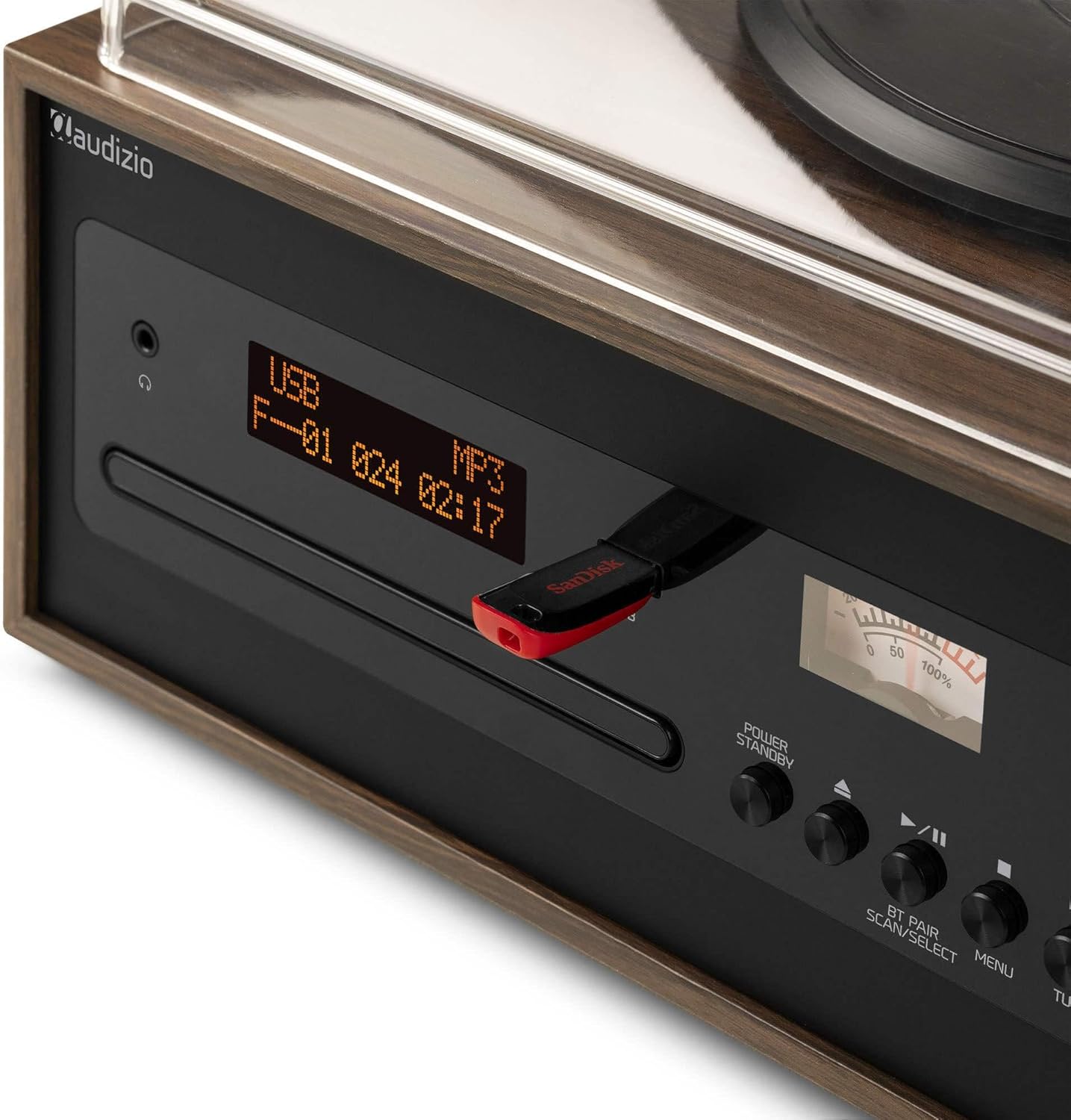
Image: A close-up of the Audizio Boston's front panel, showing a USB flash drive inserted into the USB port, with the display indicating USB playback mode.
Bluetooth Connectivity
Switch the unit to Bluetooth mode. On your mobile device, search for "Audizio Boston" in the Bluetooth settings and pair. Once connected, you can stream audio wirelessly to the music centre.

Image: A person holding a smartphone, wirelessly streaming music to the Audizio Boston Music Centre, demonstrating Bluetooth connectivity.
DAB+/FM Radio
Switch to DAB+ or FM radio mode. Use the scan function to automatically search for available stations. You can save your favorite stations as presets for quick access.
AUX Input
Connect external audio devices (e.g., smartphone, MP3 player) to the AUX IN port on the rear of the unit using a 3.5mm audio cable. Select AUX mode on the unit to play audio from the connected device.
Maintenance
Cleaning the Unit
Wipe the exterior of the unit with a soft, dry cloth. Do not use abrasive cleaners, waxes, or solvents as they may damage the finish. For the turntable stylus, use a specialized stylus cleaning brush.
Record Care
Keep your vinyl records clean and free of dust. Store them vertically in their sleeves to prevent warping. Avoid touching the record grooves directly.
CD Care
Handle CDs by their edges. Clean them with a soft, lint-free cloth, wiping from the center outwards. Avoid scratching the disc surface.
Troubleshooting
| Problem | Possible Cause | Solution |
|---|---|---|
| No power | Power cable not connected; Power outlet faulty | Ensure power cable is securely plugged in; Try a different power outlet. |
| No sound from speakers | Speakers not connected; Volume too low; Incorrect input mode selected | Check speaker connections; Increase volume; Select the correct input mode (e.g., Phono, CD, Bluetooth). |
| Turntable not spinning or playing | Speed setting incorrect; Tone arm not lowered; Auto-stop engaged prematurely | Select correct speed (33/45/78 RPM); Ensure tone arm is fully lowered onto the record. |
| Bluetooth pairing issues | Device too far; Bluetooth not enabled on source device; Unit not in pairing mode | Move device closer; Enable Bluetooth on your device; Ensure the unit is in Bluetooth pairing mode. |
| CD skipping or not playing | CD is dirty or scratched; CD inserted incorrectly | Clean the CD with a soft cloth; Ensure the CD is inserted correctly with the label side up. |
Specifications
| Feature | Detail |
|---|---|
| Model Name | 102.195 |
| Product Dimensions | 57.5 x 29.6 x 43.2 cm |
| Weight | 8 kg |
| Power Source | Electric with cable (220 Volts) |
| Turntable Speeds | 33 1/3, 45, 78 RPM |
| Connectivity | Bluetooth, USB, AUX In, RCA Out (for speakers) |
| Radio | DAB+, FM |
| Signal-to-Noise Ratio | 60 dB |
| Material | Wood |
| Included Components | Main unit, external speakers, remote control, user manual |
Warranty and Support
Warranty Information
This product comes with a standard manufacturer's warranty. Please refer to the warranty card included in your package or contact your retailer for specific warranty terms and conditions. Keep your proof of purchase for warranty claims.
Customer Support
For technical assistance, troubleshooting beyond this manual, or service inquiries, please contact Audizio customer support. Contact details can typically be found on the manufacturer's website or on the product packaging.
Note: Specifications are subject to change without notice.
Related documents102.195

Ask a question about this manual
Ask about setup, troubleshooting, compatibility, parts, safety, or missing instructions. Manuals+ will review the question and use this page’s manual context to help answer it.