
1. Introduction
The UltrA CatcheR Pocket Hunter is an innovative auto catch device designed to enhance your mobile gaming experience, particularly for augmented reality (AR) games. This device automates the tracking and catching of in-game elements, allowing for a more relaxed and efficient gameplay. Its plug-and-play design, passthrough charging capability, and portable form factor make it an ideal companion for extended gaming sessions on the go.
Key features include USB-C plug-and-play functionality, no external charging required for the device itself, passthrough charging for your phone, and smart LED indicators for pairing status.
2. What's in the Box
- Pocket Hunter x 1
- USB Type C to Type C Cable x 1
- Manual x 1
3. Setup
3.1. Initial Connection
The Pocket Hunter is a plug-and-play device. Simply insert the Pocket Hunter into your USB-C compatible phone or a USB-C power bank. No separate charging is required for the device itself.
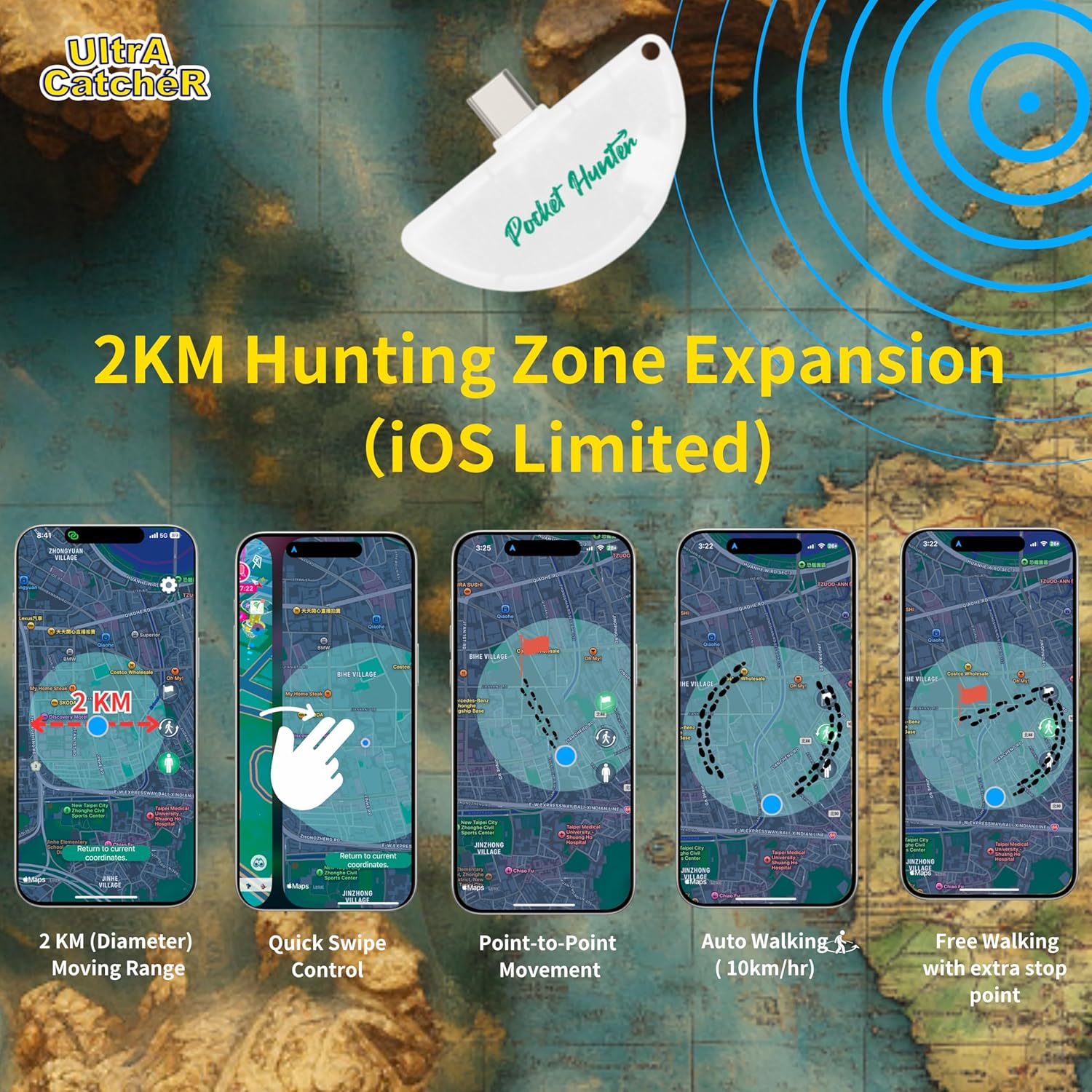
Image: Pocket Hunter device plugged into a smartphone's USB-C port.
3.2. LED Indicators for Pairing
The device features an LED indicator to show its pairing status:
- Green blink: Unpaired
- Purple blink: Paired
The power-saving LED dims after 3 minutes of inactivity.
3.3. Ultra Catcher App (iOS Only)
For advanced features like Hunting Zone Expansion and Auto Egg Incubation, download the Ultra Catcher app from the App Store. This app is compatible with iOS devices (iPhone & iPad).

Image: Pocket Hunter product packaging with a QR code for the Ultra Catcher app.
Scan the QR code on the product packaging or visit the App Store to download the app. Ensure your phone's Bluetooth is enabled for pairing.
Video: Tutorial demonstrating how to power on, pair via Bluetooth, save coordinates, switch modes, and adjust speed using a similar device. This video is provided by Brook Gaming US.
4. Operating Instructions
4.1. Automatic Catching and Spinning
The Pocket Hunter is designed to automate the catching of in-game creatures and spinning of PokeStops in compatible AR games, such as Pokémon Go. This allows you to collect items and creatures without constant interaction with your phone.

Image: Illustration showing the device automatically catching Pokémon and spinning PokeStops.
4.2. Passthrough Charging
The device includes a passthrough USB-C port, allowing you to charge your phone (5V/1A) simultaneously while the Pocket Hunter is in use. This prevents battery drain during extended gameplay.

Image: A smartphone connected to the Pocket Hunter, which is then connected to a charging cable, demonstrating passthrough charging.
4.3. Hunting Zone Expansion (iOS Limited)
For iOS users, the exclusive Hunting Zone Expansion feature, accessible via the Ultra Catcher app, allows your phone's location to move freely within a 1km diameter. This significantly increases capture opportunities without physical movement.

Image: A map interface showing a circular hunting zone with a 2KM diameter, indicating expanded movement range for iOS devices.
4.4. Auto Egg Incubation (iOS Limited)
The Pocket Hunter offers an automatic movement feature for iOS devices (iPhone & iPad). When connected via Bluetooth with Pokémon Go, it allows for egg hatching at speeds of 500 or 1000 m/hr in either front-end or background mode.

Image: A smartphone displaying the Pokémon Go egg incubation screen, with the Pocket Hunter device connected, illustrating the auto egg incubation feature.
4.5. Automatic Reconnection
The device is designed to automatically reconnect to your mobile game if the connection is lost, ensuring continuous gameplay without manual intervention.
Video: A tutorial demonstrating the automatic connection setting for a similar device, highlighting how it reconnects to the game after a disconnection.
Video: A quick user guide for a similar device, showing the setup process for auto-catching and automatic reconnection.
5. Maintenance
- Storage Temperature: -5°C to 30°C
- Environmental Temperature: 0°C – 35°C (32°F – 95°F)
- This product is not waterproof or dustproof. Avoid exposure to water or excessive dust.
- Clean the device with a soft, dry cloth. Do not use harsh chemicals or abrasive materials.
6. Troubleshooting
- Device not connecting: Ensure Bluetooth is enabled on your phone. Check the LED indicator on the Pocket Hunter for its pairing status (green blink for unpaired, purple blink for paired). Try restarting your phone and the game application.
- Frequent disconnections: Ensure the Pocket Hunter is securely plugged into your phone or power bank. Verify that the game application is running in the foreground or background as required by the game. The device is designed to automatically reconnect.
- Issues with advanced features (iOS): Ensure the Ultra Catcher app is installed and updated to the latest version. Check app permissions related to location services and Bluetooth.
- No auto-catch/spin: Confirm that the device is successfully paired (purple LED blink). Check in-game settings to ensure that the auto-catch/spin feature is enabled for external devices.
7. Specifications
- Item Weight: 1.06 ounces (0.03 Kilograms)
- Product Dimensions: 2.1 x 1.3 x 0.4 inches
- Material: Plastic
- Display Type: Digital
- Form Factor: Mini
- Manufacturer: Brook
- Language: English
- Recommended Age: 24 months and up
8. Warranty and Support
This product is covered by a 30-day refund/replacement policy. For any technical assistance or support inquiries, please contact our customer service team.
Customer Service Email: ultracatcher.service@gmail.com
Please provide your Amazon order details when contacting support for faster service.