
1. Introduction
This manual provides detailed instructions for the setup and operation of your Griscen Universal TV Remote Control. This remote is designed to control a wide range of television brands and other media devices.
1.1. Compatibility
The Griscen Universal TV Remote Control is compatible with numerous brands including Samsung, LG, Vizio, Sony, Hisense, TCL, Insignia, Toshiba, Philips, Sharp, and more. It can control TVs, DVD/Blu-ray players, and Media Streaming Players.
Important Note: This remote is NOT compatible with Roku Streaming Sticks, Roku Sound Bars, or TV Sticks. It does not support Bluetooth or RF streaming devices; connection and pairing are exclusively via infrared (IR).

Figure 1: Remote compatibility overview, highlighting supported and unsupported devices.
2. Setup
2.1. Battery Installation
The remote control requires 2 AAA batteries (not included). Ensure correct polarity when inserting batteries. Do not mix old and new batteries, or different types of batteries.
If the remote control becomes unresponsive, first try reinstalling the batteries. If the issue persists or the remote is not sensitive, replace the batteries.
2.2. Code Setting Method (Direct Code Entry)
To program your remote control using direct code entry, follow these steps:
- Step 1: Press and hold the SETUP button for 3 seconds until the red indicator light on the remote turns on.
- Step 2: Press and release the device button you wish to control (e.g., TV, STR, or AUD). The red light will blink once and then remain on.
- Step 3: Enter the 4-digit code for your device from the provided code list. The red light will turn off if the code is entered correctly. If the code is incorrect, the light will flash twice and remain on, indicating you should try another code.

Figure 2: Direct Code Entry Pairing Steps.
2.3. Alternative Programming Methods
If direct code entry is unsuccessful, or for advanced programming, refer to the following methods:
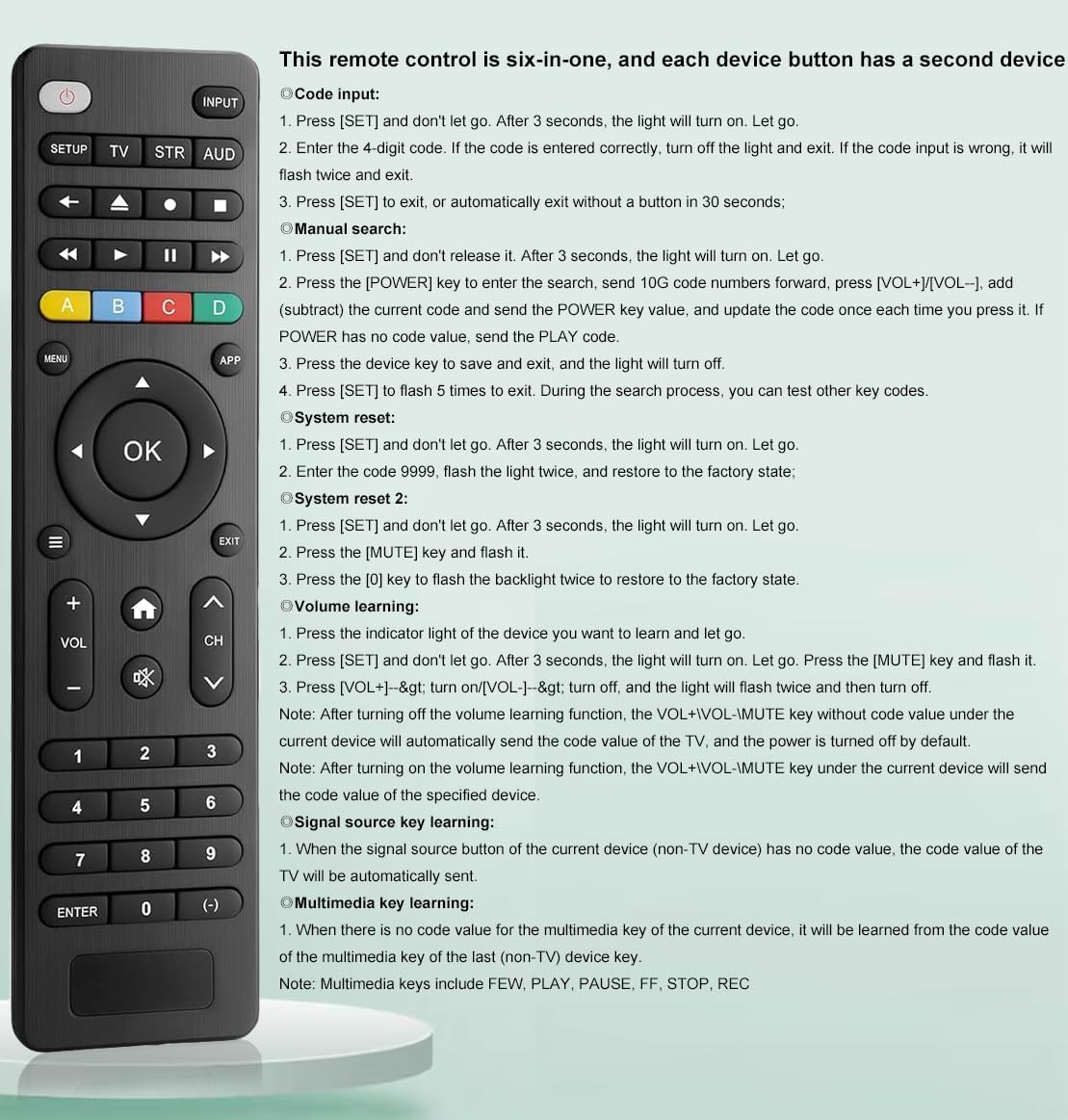
Figure 3: Advanced Programming Methods.
- Manual Search:
- Press and hold SETUP for 3 seconds until the light turns on. Release.
- Press the POWER key to enter the search. Send 100 code numbers forward.
- Press [SET] to flash 5 times to exit. During the search process, you can test other key codes.
- System Reset:
- Press [SET] and don't let go. After 3 seconds, the light will turn on. Release.
- Enter the code 9999. The light will flash twice and restore to factory state.
- Volume Learning: This feature allows the remote to learn volume commands from another remote. Follow the instructions in Figure 3 for detailed steps.
3. Operating Instructions
Familiarize yourself with the buttons and their functions on your Griscen Universal TV Remote Control.

Figure 4: Remote Control Button Functions.
- Power: Turns devices ON/OFF.
- SETUP: Used to program the remote.
- INPUT: Selects video input sources.
- TV/STR/AUD: Selects video inputs for TV, Streamer, or Audio devices.
- Playback Controls (Rewind, Play, Fast Forward, Stop, Pause, Record): Controls media playback.
- ABCD Buttons: Additional functions for DVRs, cable, and satellite receivers.
- MENU: Displays the on-screen menu.
- APP Hotkey: Accesses top apps like Netflix, Amazon Prime, etc.
- OK: Confirms selections.
- Navigation (Up/Down/Left/Right): Navigates menus.
- EXIT: Exits on-screen menus.
- VOL (+/-): Adjusts volume up or down.
- MUTE: Mutes sound.
- Home/Guide: Easily accesses features on today's streaming devices or cable/satellite receivers.
- CH (+/-): Changes channels up or down.
- Numbers (0-9): Enters numbers for direct channel selection.
- ENTER: Some devices require Enter to be pressed after channel selection.
- (-): Used to select digital channels, e.g., 4.1.
The remote offers stable transmission, responding quickly within 0.25 seconds, with sensitive and comfortable buttons. It has a transmission distance of up to 10 meters (approximately 33 feet).

Figure 5: Stable Transmission Feature.
4. Maintenance
To ensure the longevity and optimal performance of your remote control, follow these maintenance guidelines:
- Battery Care: Always use fresh batteries of the same type. Do not mix old and new batteries, or different brands/types of batteries. Remove batteries if the remote will not be used for an extended period to prevent leakage.
- Cleaning: Wipe the remote with a soft, dry cloth. Avoid using liquid cleaners or abrasive materials, as these can damage the surface or internal components.
- Storage: Store the remote in a cool, dry place away from direct sunlight and extreme temperatures.
- Handling: Avoid dropping the remote or subjecting it to strong impacts, which can cause internal damage.
5. Troubleshooting
If you encounter issues with your Griscen Universal TV Remote Control, refer to the following troubleshooting tips:
| Problem | Possible Cause | Solution |
|---|---|---|
| Remote not working at all. | Dead or incorrectly installed batteries. | Check battery polarity. Replace with fresh AAA batteries. |
| Remote not controlling your device. | Incorrect device code entered. Remote not programmed. | Re-enter the 4-digit code using the "Code Setting Method" (Section 2.2). Try alternative codes from the code list. Ensure the remote is pointed directly at the device's IR receiver. |
| Some buttons work, others don't. | Partial code match or specific functions not supported by the device. | Try another code for your device. Some advanced functions may not be universally compatible. |
| Remote is unresponsive or slow. | Low batteries. Obstruction between remote and device. | Replace batteries. Ensure a clear line of sight to the device. |
| Remote is not compatible with Roku Streaming Sticks/Sound Bars or TV Sticks. | This remote operates via infrared (IR) and does not support Bluetooth/RF devices. | This is expected behavior. The remote is not designed for these types of devices. |
6. Specifications
- Model Number: 3-WNRemote
- Dimensions: 7.13 x 1.93 x 1.02 inches (18.11 x 4.90 x 2.59 cm)
- Item Weight: 3.03 ounces (85.9 grams)
- Color: Black
- Power Source: 2 x AAA Batteries (not included)
- Max Number of Supported Devices: 1 (at a time, programmable for multiple types)
- Compatible Devices: Television, DVD/Blu-ray players, Media Streaming Players (IR-based)
- Transmission Type: Infrared (IR)
- Transmission Distance: Up to 10 meters (approx. 33 feet)

Figure 6: Remote Control Dimensions.
7. Product Video Overview
Watch this official video for a visual guide on the Griscen Universal TV Remote Control, including its features and basic operation.
Video 1: Universal TV Remote Control Replacement Overview. This video demonstrates the remote's design and highlights its compatibility and ease of use.
8. Warranty and Support
For warranty information or technical support, please contact Griscen customer service. Refer to the product packaging or the retailer's website for specific contact details and warranty terms.
Manufacturer: Griscen


