Introduction
Thank you for choosing the HapGIFT Ergonomic Office Chair. This manual provides essential information for the safe assembly, operation, and maintenance of your new chair. Please read these instructions thoroughly before assembly and retain them for future reference.
Safety Information
- Avoid exposing the chair to liquids or excessive moisture.
- Always follow the assembly instructions carefully to ensure safe use and prevent injury.
- Do not stand on the chair.
- Ensure all bolts and screws are tightened securely before use and periodically check for looseness.
- Do not use the chair if any parts are damaged or missing. Contact customer support for replacement parts.
- This chair is designed for adult use and supports a maximum weight of 350 lbs (158 kg).
Package Contents
Before beginning assembly, verify that all components are present and undamaged. If any parts are missing or damaged, please contact HapGIFT customer support.
- Backrest with mesh
- Seat cushion with footrest mechanism
- Headrest
- Armrests (pre-attached or separate)
- Gas lift cylinder
- Star base
- Casters (wheels)
- Mechanism plate
- Hardware kit (screws, washers, Allen wrench)
Assembly Instructions
Assembly typically takes approximately 30 minutes. It is recommended to assemble the chair on a soft, clean surface to prevent scratches.
- Attach Casters to Base: Insert the five casters into the holes at the end of each leg of the star base. Push firmly until they click into place.
- Insert Gas Lift: Place the gas lift cylinder into the center hole of the star base.
- Attach Mechanism Plate to Seat: Align the mechanism plate with the screw holes on the underside of the seat cushion. Ensure the front of the mechanism faces the front of the seat. Secure with screws provided in the hardware kit.
- Attach Backrest to Seat: Connect the backrest to the seat cushion using the designated screws. Ensure a secure fit.
- Attach Headrest: Slide the headrest into the slots at the top of the backrest. Adjust to your preferred height and angle.
- Connect Seat Assembly to Gas Lift: Carefully place the assembled seat and backrest onto the gas lift cylinder, ensuring it is centered and stable.
- Adjust Lumbar Support (if applicable): If your chair has a separate lumbar support adjustment, follow the specific instructions for its installation or initial adjustment.

Operating Adjustments
Your HapGIFT office chair offers multiple adjustments to customize your seating experience for optimal comfort and ergonomic support.
1. Seat Height Adjustment
To adjust the seat height, pull the lever located under the right side of the seat upwards. While holding the lever, stand up to raise the seat or remain seated to lower it. Release the lever at the desired height to lock it in place.
2. Recline Function and Tilt Lock
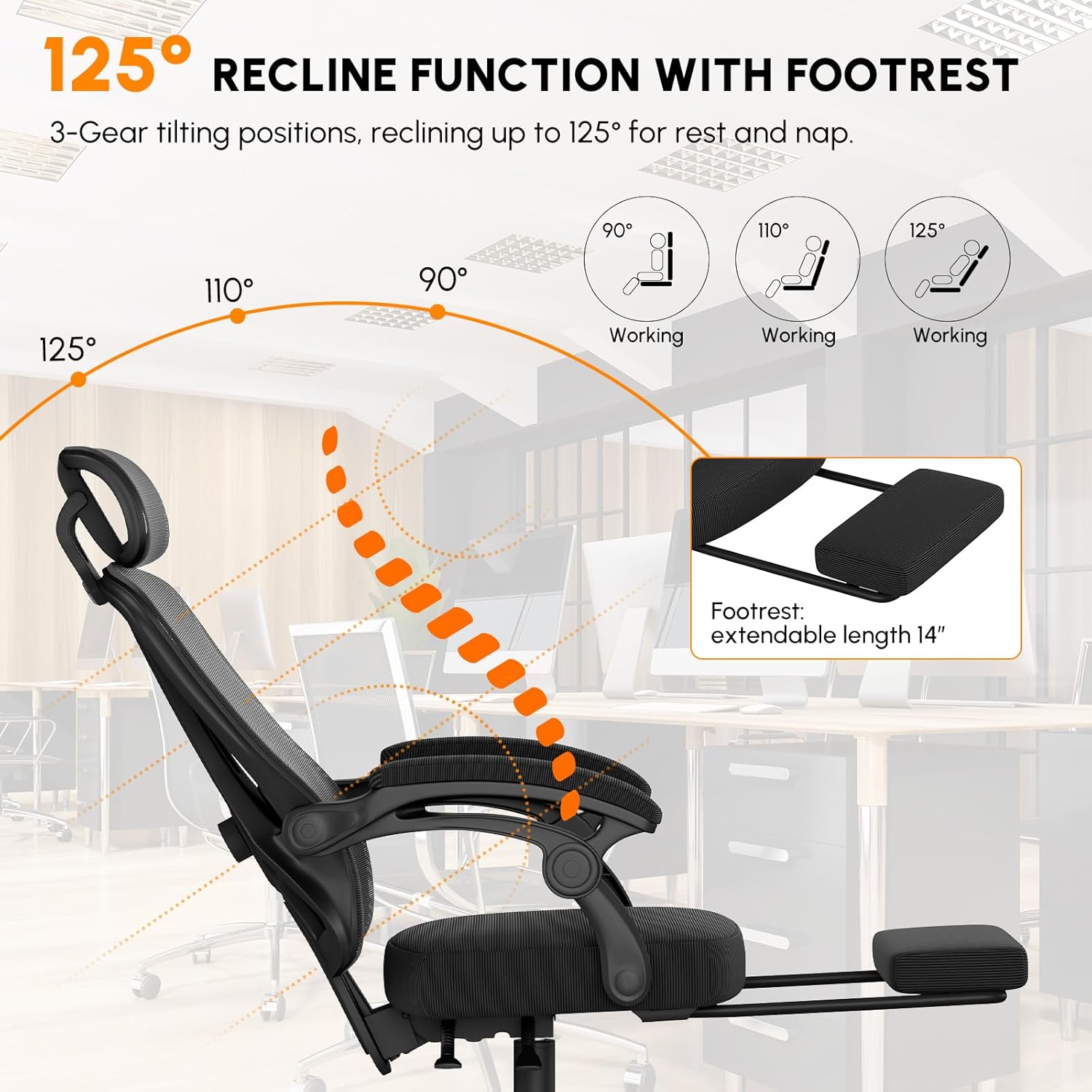
The chair features a 3-gear tilting position, allowing recline up to 125 degrees for rest. Use the lever on the left side of the seat to adjust the recline angle. Push the lever down to lock the backrest in an upright position (90 degrees for working), or pull it up to allow reclining. The chair can be set to 90°, 110°, or 125°.
3. Footrest Operation
To deploy the footrest, pull it out from under the seat. Extend it to the desired length. To retract, push it back under the seat until it is fully stored. The footrest extends up to 14 inches.
4. Adjustable Headrest
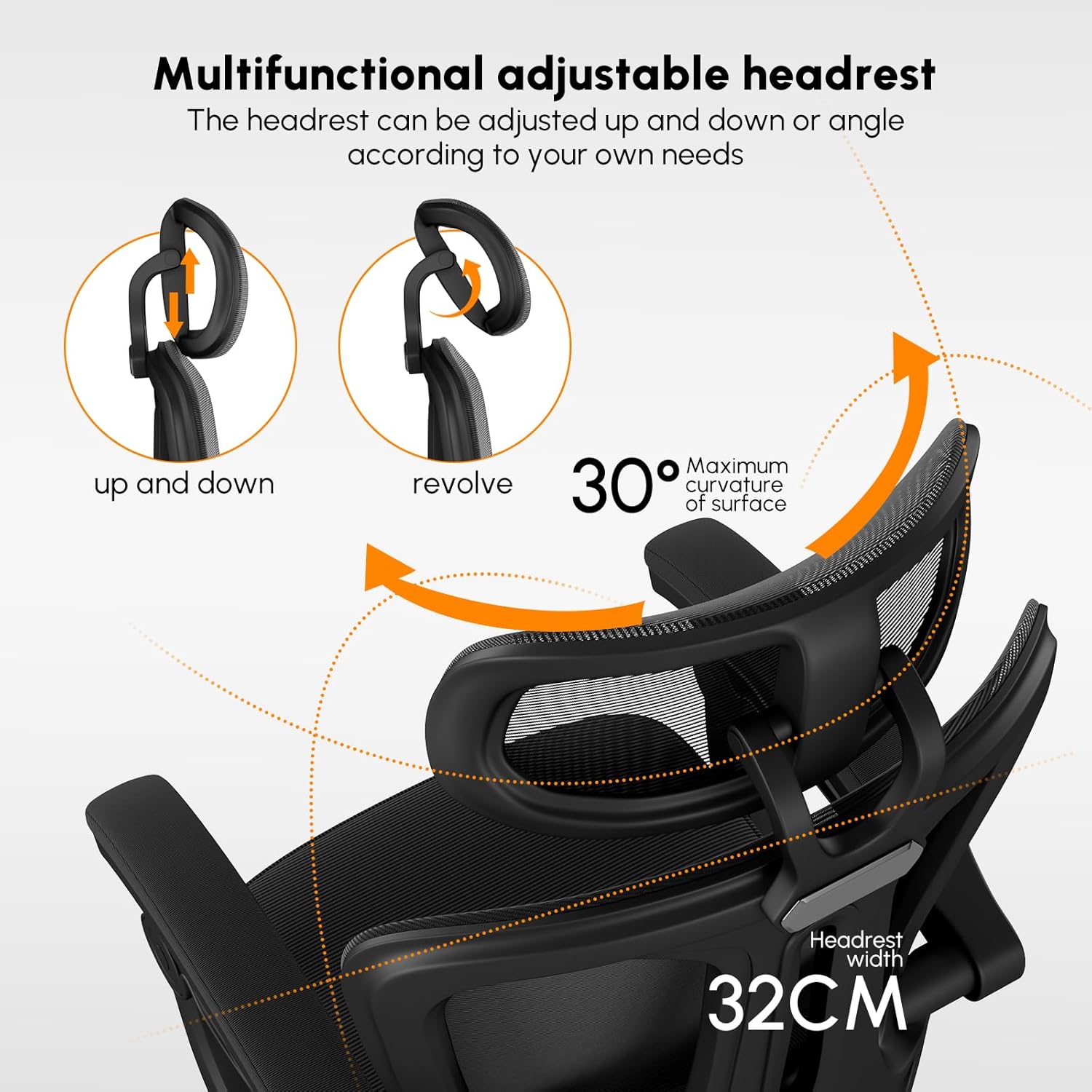
The headrest can be adjusted both vertically (up and down) and for angle (revolve). Gently push or pull the headrest to move it up or down. To adjust the angle, rotate it forward or backward. This allows for a maximum curvature of surface adjustment of 30 degrees.
5. Adjustable Lumbar Support
The chair features an airbag-type adjustable lumbar support. This support can be moved up and down (approximately 4cm / 1.57in) and forward or backward (approximately 3.5cm / 1.38in) to provide tailored support to your lower back. Use the knob on the side of the backrest to adjust the depth, and slide the lumbar support mechanism vertically to adjust its height.

6. Link Armrests
The armrests are designed to link with the recline of the backrest, maintaining a comfortable angle relative to your body. They can also be flipped up and out of the way if needed, providing more space or allowing the chair to be pushed closer to a desk.
Maintenance
- Cleaning: Wipe the mesh and fabric surfaces with a damp cloth and mild soap. Avoid harsh chemicals or abrasive cleaners. For the metal and plastic parts, use a soft, dry cloth.
- Inspection: Periodically check all screws and bolts to ensure they are tight. Re-tighten if necessary to maintain stability and safety.
- Caster Care: Keep the casters clean from hair and debris to ensure smooth rolling. You may occasionally lubricate the caster stems with a silicone-based spray if they become stiff.
- Gas Lift: The gas lift is a sealed unit and requires no maintenance. If it fails to adjust height, contact customer support.


Troubleshooting
| Problem | Possible Cause | Solution |
|---|---|---|
| Chair does not adjust height. | Gas lift cylinder malfunction or lever not engaged. | Ensure the height adjustment lever is fully pulled. If the issue persists, the gas lift may need replacement. Contact customer support. |
| Chair wobbles or feels unstable. | Loose screws or improper assembly. | Check all assembly screws and bolts, especially those connecting the mechanism plate to the seat and the backrest. Re-tighten as necessary. Ensure the gas lift is fully seated in the base. |
| Casters do not roll smoothly. | Debris (hair, dust) caught in casters. | Turn the chair over and remove any debris from the caster wheels. Clean with a damp cloth. |
| Squeaking noises. | Loose connections or friction between parts. | Tighten all screws. Apply a small amount of silicone lubricant to moving parts or connection points if the squeaking continues. |
| Footrest does not extend/retract easily. | Obstruction or mechanism issue. | Check for any obstructions under the seat. Ensure the mechanism is clean. If it remains stiff, contact customer support. |
Specifications
- Brand: HapGIFT
- Model Number: HAP003-BLACK-1-CA
- Color: Black
- Material: Iron frame, Mesh back, High-density sponge with memory latex cushion
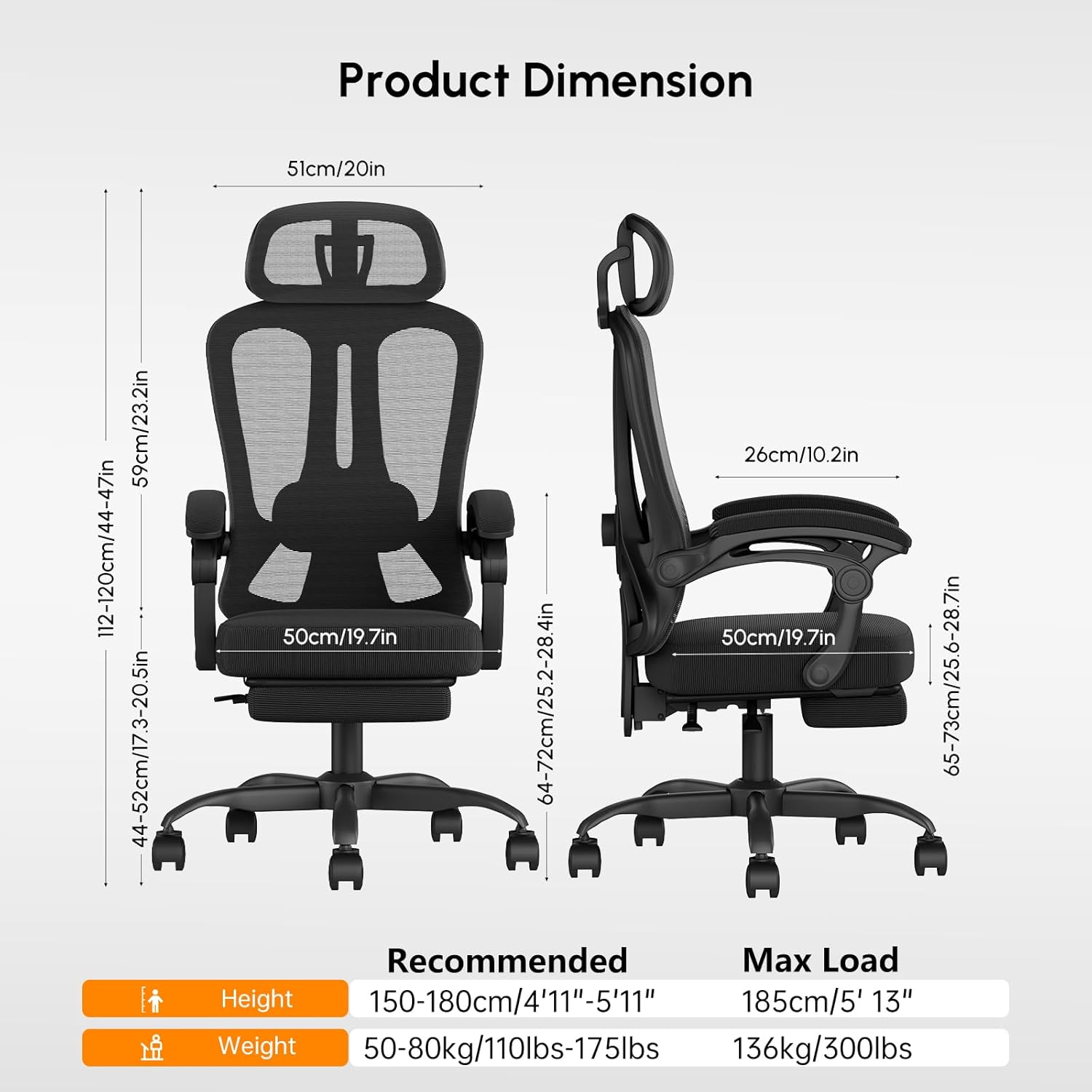
- Product Dimensions: 64 x 61 x 112-120 cm (25.2 x 24 x 44-47 inches) (L x W x H)
- Item Weight: 17 kg (37.4 lbs)
- Maximum Load Capacity: 350 lbs (158 kg)
- Special Features: Adjustable Headrest, Adjustable Lumbar Support, Recline Function (90°-125°), Extendable Footrest (14 inches), Link Armrests, Silent Casters
- Back Style: Mesh back
- Age Range (Description): Adult

Warranty and Support
HapGIFT chairs are designed and certified by professional institutions to ensure safety and durability. This product comes with a 1-year warranty from the date of purchase, covering manufacturing defects and material flaws under normal use.
For technical support, warranty claims, or replacement parts, please contact HapGIFT customer service. Provide your model number (HAP003-BLACK-1-CA) and proof of purchase when contacting support.
Contact information can typically be found on the HapGIFT official website or through your retailer's customer service portal.
