
KeenPlus C4
KeenPlus 144GB MP3 Player User Manual
Model: C4 | Brand: KeenPlus
Introduction
Thank you for choosing the KeenPlus 144GB MP3 Player. This device combines a premium zinc alloy body with a vibrant 4.3-inch Full HD anti-scratch touchscreen, offering a superior audio and visual experience. Designed for convenience, it features tactile physical buttons for easy control, even without waking the screen. With 144GB of storage, Bluetooth, and Wi-Fi connectivity, it provides access to a vast music universe, online streaming services, and versatile multimedia playback. This manual will guide you through the setup, operation, and maintenance of your new MP3 player.
What's in the Box

Image: All components included in the KeenPlus MP3 Player package.
- KeenPlus 144GB MP3 Player (Model C4)
- Headphones
- Data Cable (Type-C)
- Protective Case
- Instruction Manual
Product Overview
Familiarize yourself with the physical features and controls of your KeenPlus MP3 Player.
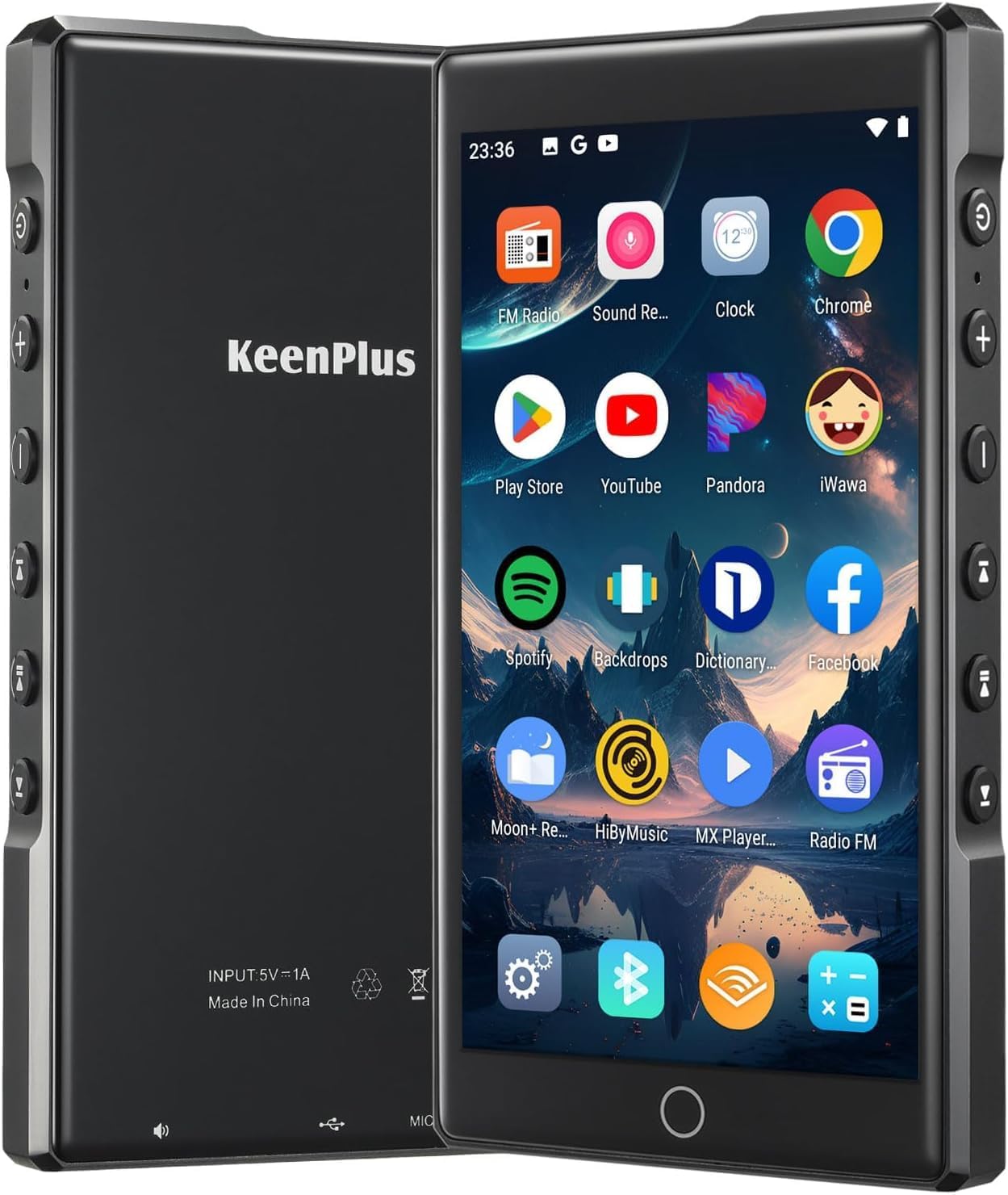
Image: Front and back view of the KeenPlus MP3 Player.

Image: Side view of the MP3 player showing the physical control buttons.
Physical Buttons and Ports
- Power Button: Turns the device on/off and locks/unlocks the screen.
- Volume +/-: Adjusts the audio volume.
- Previous/Next Track: Navigates between songs or media files.
- Play/Pause: Controls media playback.
- Reset Hole: For device reset (use a thin pin).
- 3.5mm Headphone Jack: Connect wired headphones.
- Charge Port (Type-C): For charging the device and data transfer.
- Loudspeaker/Recording Slot: Integrated speaker and microphone for recording.
- Micro SD Card Slot: For expanding storage capacity.

Image: Bottom view of the MP3 player showing ports and slots.
Product Overview Video
Video: A detailed overview of the KeenPlus MP3 Player, showcasing its physical features, buttons, and user interface. This video demonstrates the device's design and basic functionality.
Setup
Charging the Device
Before first use, fully charge your MP3 player. Connect the provided Type-C data cable to the device's charge port and the other end to a 5V1A charging head (not included). Avoid using fast charging cables of Type C-Type C to prevent potential damage.
Power On/Off
Press and hold the Power button on the side of the device to turn it on or off.
Adjusting Auto-Shutdown Duration
For environmental protection and energy efficiency, the device is preset to automatically shut down after 5 minutes of inactivity. You can adjust this setting:
- From the home screen, tap the Settings icon.
- Scroll down and select Auto Shutdown.
- Choose your desired auto-shutdown duration (e.g., Never, 5min, 10min, 15min, 20min, 30min).

Image: Steps to configure the auto-shutdown setting.
Operating Instructions
Basic Navigation
The device features a responsive touchscreen for intuitive navigation. Swipe to browse apps and content, and tap to select. The physical buttons on the side allow for quick control of playback and volume without needing to interact with the screen, ideal for use while on the go or in your pocket.
Connecting to Wi-Fi
To access online features, streaming services, and browse the internet, connect your device to a Wi-Fi network:
- Go to Settings.
- Tap on Wi-Fi.
- Toggle Wi-Fi On.
- Select your desired network from the list and enter the password if prompted.
Connecting via Bluetooth
The MP3 player supports Bluetooth for connecting to wireless headphones, speakers, or for transferring data with other Bluetooth-enabled devices:
- Go to Settings.
- Tap on Bluetooth.
- Toggle Bluetooth On.
- Select Pair new device and choose your Bluetooth device from the available list to connect.
Playing Music and Videos
The device supports various audio formats including FLAC, APE, WAV, and MP3, and is compatible with most video and picture formats without the need for conversion. Use the pre-installed music and video players, or download your preferred apps from the Play Store.
File Management
Transfer music, videos, and other files to your device by connecting it to a personal computer using the provided data cable. The device also supports cloud sync and auto-playlist sorting for convenient organization of your media library.
FM Radio
Tune into your favorite radio stations using the built-in FM radio feature. Ensure headphones are connected as they often act as the antenna.
Voice Recorder
Utilize the integrated voice recorder with noise reduction for clear audio recordings.
Maintenance
To ensure the longevity and optimal performance of your KeenPlus MP3 Player, follow these maintenance guidelines:
- Cleaning: Use a soft, dry, lint-free cloth to clean the screen and body. Avoid abrasive cleaners or solvents.
- Storage: Store the device in a cool, dry place away from direct sunlight and extreme temperatures.
- Protection: Always use the provided protective case to guard against scratches and minor impacts.
- Charging: Use only the recommended 5V1A charging head and the provided Type-C cable.
Troubleshooting
If you encounter issues with your MP3 player, refer to the common problems and solutions below:
| Problem | Solution |
|---|---|
| Device does not power on or respond. | Ensure the device is fully charged. If unresponsive, use a thin pin to press the Reset Hole. |
| Battery indicator shows incorrect percentage (e.g., 100% or 1%). | This may be a software display issue. Try restarting the device. If persistent, ensure proper charging with a 5V1A adapter. |
| Device shuts down randomly. | Check the 'Auto Shutdown' setting in the device's settings. Set it to 'Never' if you prefer it not to shut down automatically due to inactivity. |
| Bluetooth connection is unstable or fails. | Ensure both devices are in pairing mode and within range. Forget the device on both ends and try re-pairing. Restarting the MP3 player may also help. |
| Volume changes randomly or tracks skip/restart. | Ensure no physical obstruction or pressure is applied to the side buttons. If using a protective case, ensure it is not pressing any buttons. A factory reset might be necessary if software glitches persist (back up data first). |
Specifications
| Feature | Detail |
|---|---|
| Brand | KeenPlus |
| Model Name | C4 |
| Screen Size | 4.3 Inches |
| Memory Storage Capacity | 144 GB |
| Connectivity Technology | Bluetooth, Wi-Fi |
| Special Feature | Touch Screen |
| Compatible Devices | Personal Computer |
| Item Weight | 10.2 ounces |
| Package Dimensions | 6.65 x 5.55 x 0.98 inches |
| Batteries | 1 Lithium Polymer batteries required (included) |
| Manufacturer | KEENPLUS |
| Country of Origin | China |
| Date First Available | April 7, 2025 |
Warranty and Support
KeenPlus offers a 2-year warranty for this product, ensuring reliability and peace of mind. Our professional support team is available for 24-hour service to address any questions or concerns you may have. If you encounter any issues or require assistance, please contact KeenPlus customer support for a quick solution.