
1. Product Overview
This document provides instructions for the installation and replacement of the Generic circuit board motherboard, model OCBBBOADN, designed for various Delonghi ESAM series coffee machines. This component serves as the main control unit for your coffee maker, managing its various functions. It is intended as a direct replacement for a damaged or malfunctioning original board.

Image 1.1: Overall view of the Generic Delonghi Coffee Machine Circuit Board Motherboard.
2. Compatibility
This circuit board is compatible with the following Delonghi coffee machine models:
- ESAM4200
- ESAM4000
- ESAM3200
- ESAM3000
- ESAM2200
- ESAM2600
- ESAM2800
- ESAM2900
- ESAM04.120
- ESAM04.110
- ESAM03.120
- ESAM03.126
- ESAM03.110
- ESAM03.105
- ESAM02.110
Please verify the consistency of your damaged product with the images and model numbers provided before proceeding with installation.
3. Setup and Installation
3.1 Safety Precautions
- Always disconnect the coffee machine from the power outlet before beginning any disassembly or installation work. Failure to do so can result in electric shock or serious injury.
- Exercise caution when handling electronic components. Static electricity can damage sensitive parts. Consider using an anti-static wrist strap.
- Keep small parts and tools away from children.
- If you are unsure about any step, consult a qualified technician.
3.2 Tools Required
- Phillips head screwdriver
- Flathead screwdriver (optional, for prying)
- Anti-static wrist strap (recommended)
- Small container for screws
3.3 Installation Steps
The following steps outline the general procedure for replacing the circuit board. Specific disassembly instructions for your Delonghi coffee machine model may vary. Refer to your coffee machine's service manual for detailed disassembly guides.
- Prepare the Coffee Machine: Ensure the coffee machine is unplugged and completely cooled down. Remove any water tanks, bean hoppers, or drip trays.
- Access the Circuit Board: Carefully disassemble the coffee machine's casing to gain access to the existing circuit board. This typically involves removing screws and clips. Document the location of all screws and components.
- Disconnect Cables: Before removing the old board, take clear photos of all cable connections. This will serve as a reference for reconnecting the new board. Carefully disconnect all ribbon cables, power connectors, and sensor wires from the old circuit board. Note the orientation of each connector.
- Remove the Old Board: Unscrew any mounting screws holding the old circuit board in place. Carefully lift and remove the old board.
- Install the New Board: Position the new Generic circuit board (Model OCBBBOADN) into the coffee machine's housing, ensuring it aligns with the mounting points. Secure it with the screws removed earlier.
- Reconnect Cables: Using your reference photos, carefully reconnect all cables to the new circuit board. Ensure each connector is firmly seated and in the correct orientation. Double-check all connections before proceeding.
- Reassemble the Coffee Machine: Carefully reassemble the coffee machine's casing, ensuring all screws and clips are securely fastened. Do not force any parts.
- Test Functionality: Once fully reassembled, plug the coffee machine back into the power outlet. Perform a test run to ensure all functions are operating correctly.

Image 3.1: View of the circuit board highlighting various connection points for cables and sensors.

Image 3.2: Top-down perspective of the circuit board, showing component layout and mounting holes.
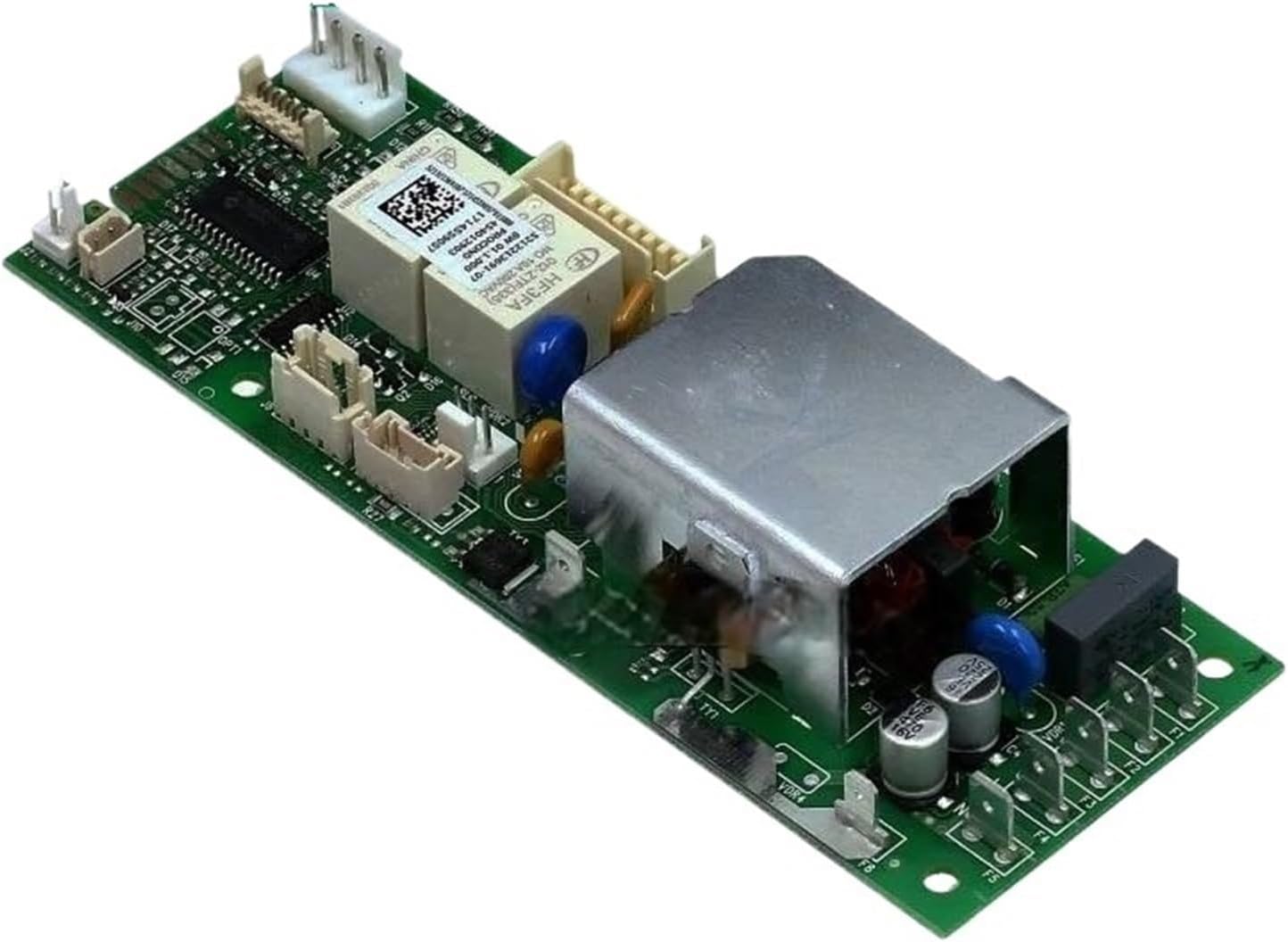
Image 3.3: Another angled view, providing a different perspective on the board's connectors and components.
4. Operating Instructions
This circuit board is a component of your Delonghi coffee machine. For operating instructions, please refer to the original user manual provided with your specific Delonghi coffee machine model.
5. Maintenance
The circuit board itself requires no routine user maintenance. For general maintenance of your Delonghi coffee machine, such as cleaning and descaling, please refer to the original user manual provided with your specific Delonghi coffee machine model.
6. Troubleshooting
If your coffee machine does not function correctly after replacing the circuit board, consider the following troubleshooting steps:
- No Power: Ensure the coffee machine is securely plugged into a working power outlet. Check the circuit breaker. Verify all power cables to the circuit board are correctly connected.
- Partial Functionality: Review all cable connections to the new circuit board. A loose or incorrectly connected ribbon cable or sensor wire can cause specific functions to fail. Refer to your installation photos.
- Error Codes: If the coffee machine displays an error code, consult your Delonghi coffee machine's user manual or service manual for the meaning of the code and recommended solutions.
- Incorrect Board: Double-check that the installed circuit board is indeed compatible with your specific Delonghi coffee machine model.
- Professional Assistance: If issues persist after performing basic troubleshooting, it is recommended to seek assistance from a qualified appliance repair technician.
7. Specifications
| Attribute | Value |
|---|---|
| Product Name | Coffee Machine Circuit Board Motherboard |
| Brand | Generic |
| Model Number | OCBBBOADN |
| Material | Plastic, Electronic Components |
| Application | Coffee Machine Spare Part |
| Package Dimensions | 7.87 x 7.87 x 3.94 inches |
| Item Weight | 1.76 pounds |
| Manufacturer | Generic |
| Date First Available | April 6, 2025 |
8. Warranty and Support
As this product is listed under a 'Generic' brand, specific warranty information may vary. Please refer to the seller or retailer from whom you purchased this circuit board for details regarding warranty coverage, return policies, and technical support. Keep your proof of purchase for any warranty claims.