Introduction
This manual provides detailed instructions for the installation, operation, and maintenance of your new Generic laptop keyboard, designed for various CLEVO NH50 series models. Please read this guide thoroughly before proceeding with installation to ensure proper function and longevity of your product. This keyboard features a Russian (RU) layout with a large carriage return key and a black frame.
Setup and Installation
Replacing a laptop keyboard requires careful handling of internal components. If you are unsure about any step, it is recommended to seek professional assistance.
- Preparation: Before beginning, ensure your laptop is powered off and disconnected from all power sources. Remove the battery if it is external.
- Accessing the Old Keyboard: Depending on your specific CLEVO NH50 model, you may need to remove screws from the bottom of the laptop, or carefully pry off the keyboard bezel from the top. Consult your laptop's service manual for precise disassembly instructions.
- Disconnecting the Old Keyboard: Once the old keyboard is accessible, carefully disconnect the ribbon cable(s) from the motherboard. These cables usually have a small latch that needs to be gently flipped up before the cable can be pulled out.
- Removing the Old Keyboard: Remove any screws or clips securing the old keyboard in place. Carefully lift it out.
- Installing the New Keyboard: Position the new keyboard into the laptop's frame. Ensure it sits flush.
- Connecting the Ribbon Cable: Carefully insert the new keyboard's ribbon cable(s) into the corresponding connectors on the motherboard. Ensure the cable is fully seated and then gently close the latch(es) to secure it. Refer to the image below for the typical appearance of the keyboard's ribbon cable connection point.
- Securing the New Keyboard: Re-install any screws or clips that secure the keyboard.
- Reassembly: Reattach the keyboard bezel (if applicable) and reassemble the laptop's casing. Reinsert the battery and connect the power adapter.
- Initial Test: Power on your laptop and test all keys to ensure they are functioning correctly.
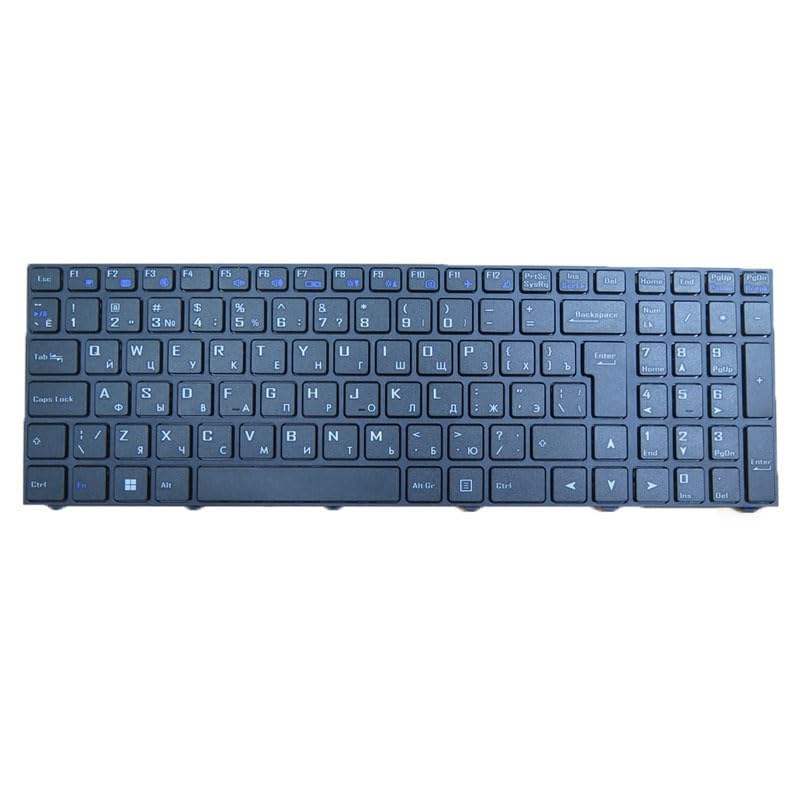
Image 1: Rear view of the keyboard, highlighting the flexible ribbon cable for connection to the laptop's motherboard and the various mounting points. This view is critical for proper installation and cable routing.
Operating Instructions
This keyboard functions as a standard input device for your laptop. It features a Russian (RU) layout, which may require specific language settings in your operating system for full functionality.
- Typing: Press keys firmly but gently for input.
- Function Keys (Fn): Many laptops utilize a Function (Fn) key in combination with the F1-F12 keys for special actions such as adjusting screen brightness, volume, or enabling/disabling Wi-Fi. Refer to your laptop's user manual for specific Fn key combinations.
- Language Settings: To utilize the Russian layout, ensure your operating system's language and keyboard input settings are configured for Russian.
Maintenance
Proper maintenance can extend the life of your keyboard.
- Cleaning: Use a soft, lint-free cloth slightly dampened with water or a mild cleaning solution to wipe the keycaps. Avoid excessive moisture. For debris between keys, use compressed air.
- Spills: In case of liquid spills, immediately power off your laptop, disconnect it from power, and remove the battery. Turn the laptop upside down to drain liquid and allow it to dry completely before attempting to power it on again. Professional inspection is recommended after a significant spill.
- Avoid Force: Do not apply excessive force to the keys or attempt to remove keycaps unless you are familiar with the process, as this can damage the key mechanisms.
Troubleshooting
If you encounter issues with your keyboard, try the following steps:
- Keys Not Responding:
- Ensure the ribbon cable is securely connected. Re-seat the cable if necessary.
- Restart your laptop.
- Check your operating system's device manager for any keyboard driver issues. Reinstall or update drivers if needed.
- Incorrect Characters:
- Verify that your operating system's language and keyboard layout settings match the physical Russian (RU) layout of the keyboard.
- Keyboard Not Detected:
- Ensure the ribbon cable is correctly and fully inserted into its connector.
- Try restarting your laptop.
- Check the BIOS/UEFI settings to ensure the keyboard is enabled.
Specifications
| Product Dimensions | 16.93 x 7.09 x 2.76 inches |
| Item Weight | 10.6 ounces |
| Manufacturer | Generic |
| ASIN | B0F3VHPVXN |
| Date First Available | April 6, 2025 |
| Compatibility | CLEVO NH50HJ, NH50HK, NH50HP, NH50JNN, NH50JNPS, NH50JNR, NH50RA, NH50RC, NH50RH, NH50VP series laptops |
| Layout | Russian (RU) with Big Carriage Return |
| Backlight | No Backlight |
Warranty
This product comes with a 90-day warranty from the date of purchase. This warranty covers manufacturing defects. It does not cover damage caused by improper installation, misuse, accidents, or unauthorized modifications. Please retain your proof of purchase for warranty claims.
Support
For technical assistance or inquiries regarding product compatibility, please contact the seller. It is highly recommended to verify your laptop model or product part number before purchasing. If you have disassembly pictures of your original keyboard, providing them to the seller can help ensure you receive the correct replacement part.
For further support, please refer to the contact information provided by your retailer or the manufacturer.