
Introduction
This manual provides essential instructions for the safe and efficient use of your LuxZilvia Original Matrice 4 Series 99Wh High-Capacity 6741 mAh Battery, designed for DJI Matrice 4T/4E Drones. Please read this manual thoroughly before first use to ensure proper operation and longevity of your battery.
Safety Information
WARNING: Failure to follow these safety instructions may result in fire, injury, or damage to the battery or drone.
- Do not disassemble, puncture, impact, or short-circuit the battery.
- Keep the battery away from heat sources, direct sunlight, and flammable materials.
- Do not immerse the battery in water or other liquids.
- Store the battery in a cool, dry place, away from children and pets.
- If the battery shows signs of swelling, leakage, or damage, discontinue use immediately and dispose of it properly.
- Only use the specified charging equipment (DJI Matrice 4 Series Charging Hub) to charge the battery.
- Do not charge the battery unattended.
Setup
1. Initial Inspection
Upon receiving your battery, carefully inspect it for any signs of physical damage. If any damage is observed, do not use the battery and contact customer support.
2. First Charge
Before first use, fully charge the battery using the DJI Matrice 4 Series Charging Hub. Refer to the charging hub's manual for detailed charging instructions.
3. Battery Installation
Ensure the drone is powered off before installing or removing the battery. Align the battery with the battery compartment on your DJI Matrice 4T/4E drone and gently push until it clicks securely into place. Refer to your drone's user manual for specific installation procedures.
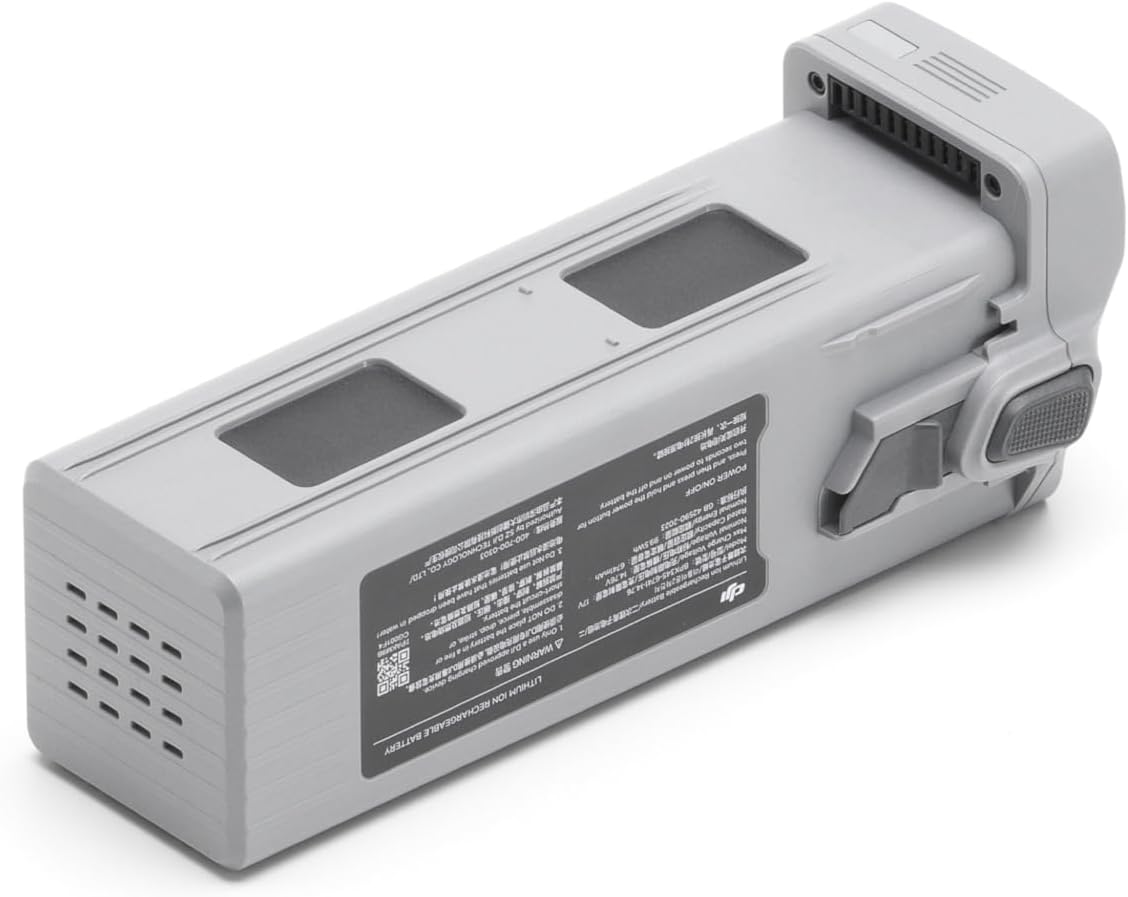
Figure 1: Top view of the LuxZilvia Matrice 4 Series Battery. Note the connection points and release mechanism.
Operating Instructions
1. Charging the Battery
Always use the official DJI Matrice 4 Series Charging Hub to charge this battery. Connect the battery to the charging hub and plug the hub into a power source. The charging hub will indicate the charging status. The recommended charging temperature is 5° to 40° C (41° to 104° F).

Figure 2: Side view of the battery showing various labels and warnings. Ensure proper handling and charging.
2. Powering On/Off
To power on the drone with the battery installed, press the power button once, then press and hold it for two seconds. To power off, repeat the same procedure.
3. Flight Performance
The 99Wh high-capacity battery provides up to 49 minutes of flight time or 42 minutes of hover time for the DJI Matrice 4 series drones. Actual flight time may vary based on environmental conditions, flight mode, payload, and drone settings. Always monitor the battery level via the drone's application during operation.
Note: Battery life test conditions were conducted in a windless environment with obstacle avoidance, RTK, GNSS enhancement, visual positioning, AI recognition, auxiliary imaging, and laser ranging functions turned off. The camera was set to 3× transmission mode with video recording, Night Scene Mode, infrared super-resolution, and Electronic Dehazing functions turned off. The maximum flight time was measured at sea level while flying forward at 9 m/s until the battery reached 0%. This value is for reference only. Always pay attention to app reminders during actual operation.
Maintenance
1. Storage
For long-term storage, it is recommended to discharge the battery to approximately 50-60% capacity. Store the battery in a cool, dry place (ideally between 20°C to 25°C or 68°F to 77°F) away from direct sunlight and extreme temperatures. Avoid storing fully charged or fully discharged batteries for extended periods.
2. Cleaning
Wipe the battery surface with a clean, dry, soft cloth. Do not use liquid cleaners or solvents. Ensure the battery terminals are clean and free of debris to maintain good electrical contact.
3. Battery Care
- Avoid exposing the battery to temperatures below 5°C (41°F) or above 40°C (104°F) during charging or operation.
- Do not drop or subject the battery to severe impacts.
- If the battery is not used for an extended period, charge and discharge it once every three months to maintain its health.

Figure 3: Angled view of the battery, highlighting its robust construction and connection interface.
Troubleshooting
| Problem | Possible Cause | Solution |
|---|---|---|
| Battery not charging | Incorrect charger, poor connection, charger malfunction, battery fault. | Ensure using DJI Matrice 4 Series Charging Hub. Check connections. Try a different power outlet. If issue persists, contact support. |
| Drone not powering on with battery | Battery not fully charged, battery not properly installed, battery fault, drone fault. | Fully charge the battery. Reinstall the battery securely. Test with another compatible battery if available. Refer to drone manual. |
| Reduced flight time | Extreme temperatures, aggressive flying, heavy payload, battery aging. | Operate within recommended temperature ranges. Fly conservatively. Reduce payload. Consider battery replacement if significantly degraded. |
| Battery swelling or leakage | Overcharging, physical damage, manufacturing defect. | Immediately discontinue use and dispose of the battery safely according to local regulations. Do NOT attempt to charge or use. |
Specifications
- Model: BPX345-6741-14.76
- Capacity: 6741 mAh
- Battery Type: Li-ion 4S
- Chemical System: LiNiMnCoO2
- Charging Temperature: 5° to 40° C (41° to 104° F)
- Max Charging Power: 207 W
- Nominal Voltage: 14.76V (inferred from 4S Li-ion, 3.69V/cell nominal)
- Energy: 99 Wh
- Compatibility: DJI Matrice 4 Series Drones (4T/4E)
Warranty and Support
For warranty information and technical support, please refer to the official LuxZilvia website or contact your authorized dealer. Keep your purchase receipt as proof of purchase.
Manufacturer: LuxZilvia
ASIN: B0F3TFSB4Z


